
so initialization failed again

my MEGAR3 with sd shield
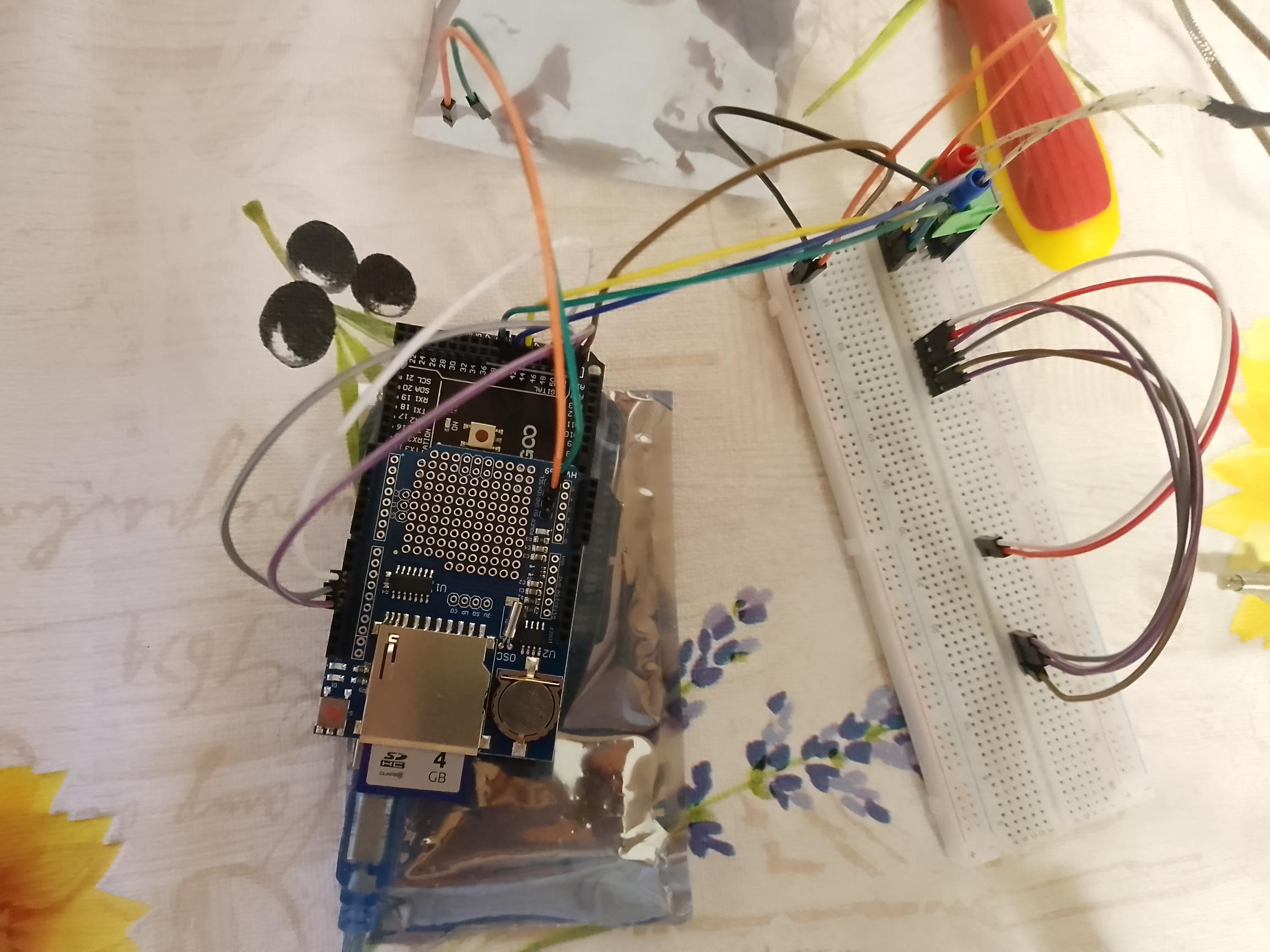
my MEGAR3 with datalogger shield
DatenLogger_Englisch.pdf (436,8 KB)


Arduino GIGA using SPI1 header and CS 52
on amazon i found this one it has level shifter ANGEEK 5 Stück SD Karten Modul SD Card Reader Module für Arduino und andere Microcontroller: Amazon.de: Computer & Zubehör
I found this from adafruit on amazon however I am not sure if its for Arduino: Adafruit 4682 3V Micro SD SPI oder SDIO Bypass-Karte: Amazon.de: Computer & Zubehör
This comes close to it, but unfortunately not available right now:
DAOKAI SPI Reader,Micro-SD-Kartenmodul TF Karte Memory Card Shield Modul SD-Schreiber mit Pins und Dupont-Kabel,Kompatibel mit Arduino Raspberry Pi(5 STÜCKE) : Amazon.de: Computer & Zubehör
this for normal sd cards however I`m not sure if it works with the mega or giga:
SUNFOUNDER 3 X SD Card Slot Modul Sockel Reader Compatible with Arduino UNO R3 Mega: Amazon.de: Computer & Zubehör
just saw this product, it might come closest since it doesn`t have level shifter: pzsmocn Steckplatzmodule Für Micro-SD/TF-Speicherkartenleser (2 Stück) Sind Mit Raspberry Pi und Arduino-Karten Kompatibel. Geeignet Für Smart Home, Roboter, Bürounterricht, 3D-Drucker Usw. : Amazon.de: Computer & Zubehör
would it be possible to connect up to 8 thermocouples (type K thermoelements + max6675 ADCs) to one arduino uno even it doesn`t have that many IO-pins and still be able to read 8 temperature values? or would it be possible to use a teensy 4.1 MCU and connect it with the arduino Mega to use the many IO-Pins of the arduino Mega or arduino Giga?
would it be possible to do the whole project on a raspberry pi using the a bus?
Sorry don't have time to go through all of this, but:
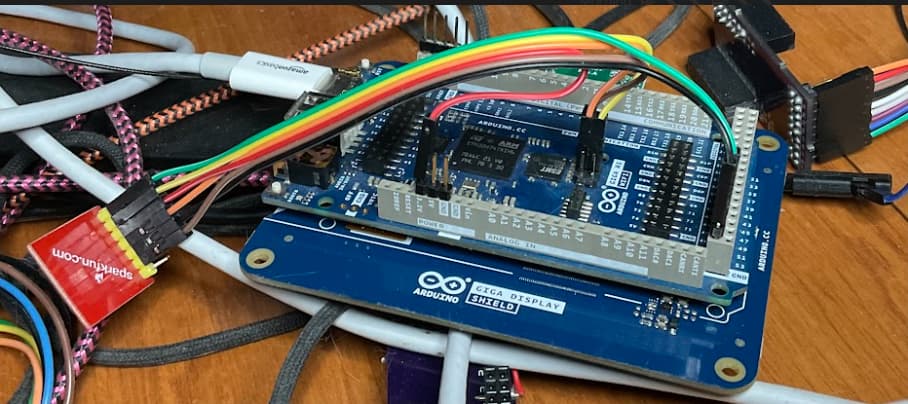
Here is my GIGA... Now has the giga display on it.
With Sparkfun adapter without level shifters
It is connected up to the SPI port (which uses the SPI port which underlying hardware is spi1), BUT software wise it is SPI.... Pins 11-13 are software wise SPI1 (hardware spi 5)... Sorry I know sort of confussing.
Note in my wiring I use a 3.3v power pin, not the +5v pin on the SPI connector area.
I believe my CS pin is: pin 23
#define CS_SD 23
...
// configuration information
// SD_FAT_TYPE = 0 for SdFat/File as defined in SdFatConfig.h,
// 1 for FAT16/FAT32, 2 for exFAT, 3 for FAT16/FAT32 and exFAT.
#define SD_FAT_TYPE 3
// SDCARD_SS_PIN is defined for the built-in SD on some boards.
//#ifndef SDCARD_SS_PIN
//const uint8_t CS_SD_PIN = SS;
//#else   // SDCARD_SS_PIN
// Assume built-in SD is used.
//const uint8_t CS_SD_PIN = SDCARD_SS_PIN;
//#endif  // SDCARD_SS_PIN

// Try max SPI clock for an SD. Reduce SPI_CLOCK if errors occur.
#define SPI_CLOCK SD_SCK_MHZ(30)

// Try to select the best SD card configuration.
//#if HAS_SDIO_CLASS
//#define SD_CONFIG SdioConfig(FIFO_SDIO)
//#elif ENABLE_DEDICATED_SPI
//#define SD_CONFIG SdSpiConfig(CS_SD, DEDICATED_SPI, SPI_CLOCK)
//#else  // HAS_SDIO_CLASS
#define SD_CONFIG SdSpiConfig(CS_SD, SHARED_SPI, SPI_CLOCK)
//#endif  // HAS_SDIO_CLASS
I might at the start set chip select pins high, if they are not done so by their hardware, like:
#ifdef CS_SD
  Serial.print(">>> CS_SD: ");
  Serial.println(CS_SD, DEC);
  pinMode(CS_SD, OUTPUT);
  digitalWrite(CS_SD, HIGH);
#endif
In my sketch I have a couple of different devices I look for image from. So check to see if any of them are there... The part for SD is:
#ifdef CS_SD
    if (!(g_devices_started & SD_DRIVE)) {
      Serial.println("calling SDBEGIN");
      if (SD.begin(SD_CONFIG)) {
        g_devices_started |= SD_DRIVE;
        tft.setCursor(1, 40);
        tft.setTextColor(RED, WHITE);
        tft.println("SD Started");
        if (!root_SD.open("/")) {
          tft.print("Failed to open root_SD directory");
        }
        Serial.print("SD Started");
        em = 0;
      }
    }
#endif
Note ignore the tft stuff, I simply output state of which devices are found on the screen...
DEDICATED versus SHARED - If the SD device is the only device on the SD bus, use the DEDICATED, else use the shared. I usually initially assume something is else is on the board and start of with shared. If that works, I might try dedicated... Might look at schematic to see if the board has anything else connected up using those pins...
As for available SD adapters, without level shifters. The adafruit one from your amazon is the same one I linked to from the US Amazon.
You can hook this one up with either SPI or SDIO... I don't think the GIGA has SDIO pins setup on it, so it can be hooked up using the SPI ones...
Pinouts | Adafruit MicroSD SPI or SDIO Card Breakout Board | Adafruit Learning System
I have a couple of them here, which I have not hooked up. Purchased them to try with different board (custom Teensy board...)
I believe there are more than 8 possible analog pins on GIGA, have not played with standard UNO in a very long time, so idea...
1 Like
Thank you Kurt for your Reply.
I had a little breakthrough today. As I said I ordered different shields that were available in my country and try some without level shifters and 3.3 input. Today some arrived. I realized I maybe ordered wrong because it says they are for D1 and ESP something. However since I received them and running out of time I tried them out. First soldering the headers, the connecting them I need to browse their ebook:
MicroSD-Shield-D1mini_DE.pdf (2,3 MB)
of course I used the header in the middle of the board,
and pin 53 for chip select that is said to be the pin for mega, not sure if giga, but anyway initialization worked. I have been there with the arduino Mega but couldn`t create a file. So I was curious if I can create a file with this sd card shield and I jumped when my serial monitor said temperature logged sucessfully.
there was no line to close the file though but I disconnected giga from my notebook power supply and was opening the card on my notebook. indeed there was a file with temperature data.
I write this in case someone has the same problem. Try different shields.
Here is my code:
#include <SPI.h>
  #include <SdFat.h>
  #include "max6675.h"

SdFat SD;
File ZahlenZeigen;

// Definieren Sie die Pins für den SPI-Header
#define SD_FAT_TYPE 3
#define SPI_CLOCK SD_SCK_MHZ(30)
#define MISO_PIN 89  // CIPO
#define MOSI_PIN 90  // COPI
#define SCK_PIN 91   // SCK
#define CS_SD 53     // CS
#define SD_CONFIG SdSpiConfig(CS_SD, DEDICATED_SPI, SPI_CLOCK)
//#define SD_CONFIG SdSpiConfig(CS_SD, SHARED_SPI, SPI_CLOCK, &SPI1)

const int thermoDO2 = 40;
const int thermoCS2 = 42;
const int thermoCLK2 = 44;
MAX6675 thermocouple(thermoCLK2, thermoCS2, thermoDO2);

void setup() {
  Serial.begin(9600);
  while (!Serial) { ; };

  // Setzen Sie die Pins für den SPI-Header
  pinMode(MISO_PIN, INPUT);
  pinMode(MOSI_PIN, OUTPUT);
  pinMode(SCK_PIN, OUTPUT);
  pinMode(CS_SD, OUTPUT);

  Serial.print("Initialisiere SD-Karte...");

  if (!SD.begin(SD_CONFIG)) {
    Serial.println("Initialisierung fehlgeschlagen!/failed");
    return;
  }

  Serial.println("Initialisierung abgeschlossen/finished.");

 Serial.println(" ");
}


  void loop() {
  // Read temperature from MAX6675
  double temperatureC = thermocouple.readCelsius();
  if (isnan(temperatureC)) {
    Serial.println("Error reading temperature!");
    return;
  }

  // Open the SD card file for appending
  File dataFile = SD.open("temperature_log.txt", FILE_WRITE);
  if (dataFile) {
    dataFile.print(temperatureC);
    dataFile.println(" °C");
    dataFile.close();
    Serial.println("Temperature logged successfully.");
  } else {
    Serial.println("Error opening file for writing!");
  }

  delay(1000); // Log temperature every second
}
so this is just a tiny breakthrough since I have to include a data logging with time so next step is the rtc shield, but first have to organize how the temperature data will be logged. if just in one file and when the file will be closed or for each data an own file. do I have to close the file before pulling the sd card? my company might keep the arduino running and just pull the card to see the logged data. does it might damage the data or should there be an mechanism to close the file before pulling the card?
additionally the live data should be displayed on 20x4 lcd display, hope everything goes well
1 Like
I have a problem with the rtc. Im using the rtc Ds3231
DS3231 RTC Real Time Clock_DE.pdf (1,9 MB)
DS3231_Real_Time_Clock_Datenblatt_AZ-Delivery_Vertriebs_GmbH_e99489a5-e10c-4ae7-8bc4-75ac830fd280.pdf (958,6 KB)
its connected with my arduino giga r1 wifi over i2c bus pins 20 and 21. it takes 3.3V input. on the i2c bus pins 20 and 21 is also the i2c adapter of my 20x4 lcd display connected. this however needs 5V. i asked the AI and they said its dangerous since the 5V can enter my rtc clock other the data and clock signal if the rtc has no level shifters(which I don`t know). therefore i was measuring and on my SDA and SCL wires is a voltage of 3.42 against ground(I used USB jack to measure GND). Then other problems could it be the battery is empty even if its a new part? would the battery charge over time or has to be replaced.
#include <Wire.h>
#include <LiquidCrystal_I2C.h>
#include <SPI.h>
#include <SdFat.h>
#include "RTClib.h"
#include "max6675.h"

/*void initializeRTC();
void checkAndLogTemperatures();
void displayTemperatures(double temperatures[]);
void logToSDCard(double temperatures[], bool error);
File openOrCreateFile();
void logDate(File& dataFile, const DateTime& now);
void logTime(File& dataFile, const DateTime& now);
void logRTCError(File& dataFile);
void checkFileSize(const char* filename);
void infoLCDSerialnewFile();
void handleError(int sensorIndex);
int getCsPinBySensorIndex(int index);
void resetMAX6675(int csPin);
void initializeSD();
void resetSPI(); */

RTC_DS3231 rtc;
DateTime now;
int lastDay = -1;
bool rtcRunning = false;
SdFat SD;
bool dateDisplayed = false; // Zum Überprüfen, ob das Datum bereits angezeigt wurde

#define SD_FAT_TYPE 3
#define SPI_CLOCK SD_SCK_MHZ(30)
#define MISO_PIN 89
#define MOSI_PIN 90
#define SCK_PIN 91
#define CS_SD 53
#define SD_CONFIG SdSpiConfig(CS_SD, DEDICATED_SPI, SPI_CLOCK)

LiquidCrystal_I2C lcd(0x27, 20, 4);
MAX6675 thermocouples[4] = {
    MAX6675(48, 46, 44),
    MAX6675(42, 40, 38),
    MAX6675(36, 34, 32),
    MAX6675(30, 28, 26)
};

int fileNumber = 1;
int bytesWritten = 0;
int maxIterations = 0;

void setup() {
    lcd.init();
    lcd.backlight();
    Serial.begin(9600);
    while (!Serial) { ; }
    Wire.begin();
    initializeRTC();
    pinMode(MISO_PIN, INPUT);
    pinMode(MOSI_PIN, OUTPUT);
    pinMode(SCK_PIN, OUTPUT);
    pinMode(CS_SD, OUTPUT);
    initializeSD();
}

void initializeRTC() {
    if (!rtc.begin()) {
        Serial.println("Couldn't find RTC");
        lcd.print("RTC Error!");
        rtcRunning = false;
    } else {
        rtcRunning = rtc.lostPower();
        if (!rtcRunning) {
            Serial.println("RTC is NOT running!");
            lcd.print("RTC not running!");
            rtc.adjust(DateTime(F(__DATE__), F(__TIME__)));
        }
        if (rtcRunning) {
        rtcRunning = true;
        Serial.println("RTC ist bereit");
        }
    }
}

void loop() {
    checkAndLogTemperatures();
    delay(1000);
}

void checkAndLogTemperatures() {
    double temperatures[4];
    bool anyError = false;
    for (int i = 0; i < 4; i++) {
        temperatures[i] = thermocouples[i].readCelsius();
        if (isnan(temperatures[i])) {
            handleError(i);
            temperatures[i] = thermocouples[i].readCelsius();
            if (isnan(temperatures[i])) {
                Serial.print("Continued error with sensor ");
                Serial.println(i+1);
                anyError = true;
            }
        }
    }

    displayTemperatures(temperatures);
    logToSDCard(temperatures, anyError);
}

void displayTemperatures(double temperatures[]) {
    lcd.clear();
    DateTime current = rtc.now();
    if (rtcRunning && (!dateDisplayed || (current.hour() == 9 && current.minute() == 0))) {
        lcd.setCursor(0, 0);
        lcd.print(current.toString("YYYY-MM-DD"));
        dateDisplayed = true;
        delay(1000); // Display date for a second
        lcd.clear();
    }
    if (!rtcRunning) {
        lcd.setCursor(0, 0);
        lcd.print("RTC not runningA!");
        delay(1000); // Display date for a second
        lcd.clear();
    }
    for (int i = 0; i < 4; i++) {
        lcd.setCursor(0, i + (rtcRunning ? 1 : 2)); // Adjust cursor if date is displayed
        lcd.print("S");
        lcd.print(i+1);
        lcd.print(": ");
        lcd.print(temperatures[i], 2);
        lcd.print(" C");
    }
      for (int i = 0; i < 4; i++) {
        Serial.print("Sensor");
        Serial.print(i+1);
        Serial.print(": ");
        Serial.print(temperatures[i], 2);
        Serial.print(" °C\t");
        }
        Serial.println();
}

void logToSDCard(double temperatures[], bool error) {
    char filename[48];  // Buffer für den Dateinamen
    snprintf(filename, sizeof(filename), "temperature_log_%d.txt", fileNumber);  // Generieren des Dateinamens

    if (!SD.begin(SD_CONFIG)) {
    Serial.println("SD-Karte nicht verfügbar!");
    return;
  }
  if (SD.begin(SD_CONFIG)) {
    File dataFile = openOrCreateFile(filename);
    if (!dataFile) {
        Serial.println("Error opening file for writing!");
        return;
    }
    if (!rtcRunning) {
        logRTCError(dataFile);
    } else {
        if (error) {
            dataFile.println("Sensor error!");
        } else {
            DateTime now = rtc.now();
            if (dataFile.size() == 0 || lastDay != now.day()) {
                logDate(dataFile, now);
                lastDay = now.day();
                Serial.println(now.toString("YYYY-MM-DD"));
            }
            logTime(dataFile, now);  // Log time before first temperature
            Serial.println();
        }
    }
    if (dataFile) {
      if (bytesWritten == 0 && maxIterations == 0) {
      int preWriteSize = dataFile.size();
        logTime(dataFile, now);
        Serial.print("\t");
        for (int i = 0; i < 4; i++) {
        dataFile.print("sensor");
        dataFile.print(i+1);
        dataFile.print(": ");
        dataFile.print(temperatures[i], 2);
        dataFile.print(" °C\t");
        }
        dataFile.println();
      int postWriteSize = dataFile.size();
      bytesWritten = postWriteSize - preWriteSize;
      maxIterations = 2000 / bytesWritten;

      Serial.print("Bytes written per iteration: ");
      Serial.println(bytesWritten);
      Serial.print("Maximum number of iterations: ");
      Serial.println(maxIterations);

    } else {
    logTime(dataFile, now);
    Serial.print("\t");
    for (int i = 0; i < 4; i++) {
        dataFile.print("sensor");
        dataFile.print(i+1);
        dataFile.print(": ");
        dataFile.print(temperatures[i], 2);
        dataFile.print(" °C\t");
    }
    dataFile.println();
    }
    dataFile.close();
    checkFileSize(filename);
    infoLCDSerialnewFile();
  } else {
    Serial.println("Error opening file for writing!");
  }
}
}

File openOrCreateFile(const char* filename) {
    //String filename = "temperature_log_" + String(fileNumber) + ".txt";
    //char filename[48]; // Stellen Sie sicher, dass der Buffer groß genug ist
    //snprintf(filename, sizeof(filename), "temperature_log_%d.txt", fileNumber);

    File dataFile = SD.open(filename, FILE_WRITE);
    if (!dataFile) {
        dataFile = SD.open(filename, FILE_WRITE);
    }
    return dataFile;
}

void logDate(File& dataFile, const DateTime& now) {
    if (rtcRunning) {
        dataFile.println(now.toString("YYYY-MM-DD"));
    } else {
        Serial.println("Date unknown");
    }
}

void logTime(File& dataFile, const DateTime& now) {
    if (rtcRunning) {
        dataFile.print(now.toString("HH:MM:SS"));
    } else {
        Serial.print("Time unknown");
    }
}

void logRTCError(File& dataFile) {
    dataFile.println("RTC not running!");
    Serial.println("RTC not running!");
}

void checkFileSize(const char* filename) {
    File dataFile = SD.open(filename, FILE_READ);
    if (dataFile.size() >= 2000) {
        fileNumber++;
        dataFile.close();
        Serial.println("File size limit reached. Creating new file.");
    } else {
        dataFile.close();
    }
}

void infoLCDSerialnewFile () {
      lcd.clear();
      lcd.setCursor(0, 0);
      lcd.print("new file ");
      delay(500);
      lcd.setCursor(0, 0);
      lcd.print("bytesWritten: ");
      lcd.setCursor(0, 1);
      lcd.print(bytesWritten);
      Serial.print("Bytes pro Speichersatz: ");
      Serial.println(bytesWritten); Serial.println();
      lcd.setCursor(0, 2);
      lcd.print("max iteration/file: ");
      lcd.setCursor(0, 3);
      lcd.print(maxIterations);
      Serial.println("Speichersätze pro Datei: ");
      Serial.println(maxIterations); Serial.println();
      delay(500);
}

void handleError(int sensorIndex) {
    int csPin = getCsPinBySensorIndex(sensorIndex);
    Serial.print("Fehler bei der Temperaturmessung an Sensor ");
    Serial.print(sensorIndex + 1);
    Serial.println(", versuche zurückzusetzen...");
    resetSPI();
    initializeSD();
    lcd.init();
    resetMAX6675(csPin);
    delay(500);
    }

int getCsPinBySensorIndex(int index) {
    // Hier sind die CS-Pins für jeden Sensor definiert, wie in Ihrem Setup angegeben
    const int csPins[4] = {46, 40, 34, 28};
    return csPins[index];
}

void resetMAX6675(int csPin) {
    digitalWrite(csPin, HIGH);
    delay(10);
    digitalWrite(csPin, LOW);
}

void initializeSD() {
    if (!SD.begin(SD_CONFIG)) {
        Serial.println("SD-Karteninitialisierung fehlgeschlagen!");
    } else {
        Serial.println("SD-Karte initialisiert.");
    }
}

void resetSPI() {
    SPI.end();
    delay(100);
    SPI.begin();
}
the lcd prints "RTC not runningA!" and then "new file" and then "bytes Written: 78 max interations 25"