For a strange reason it is working 
The rules:
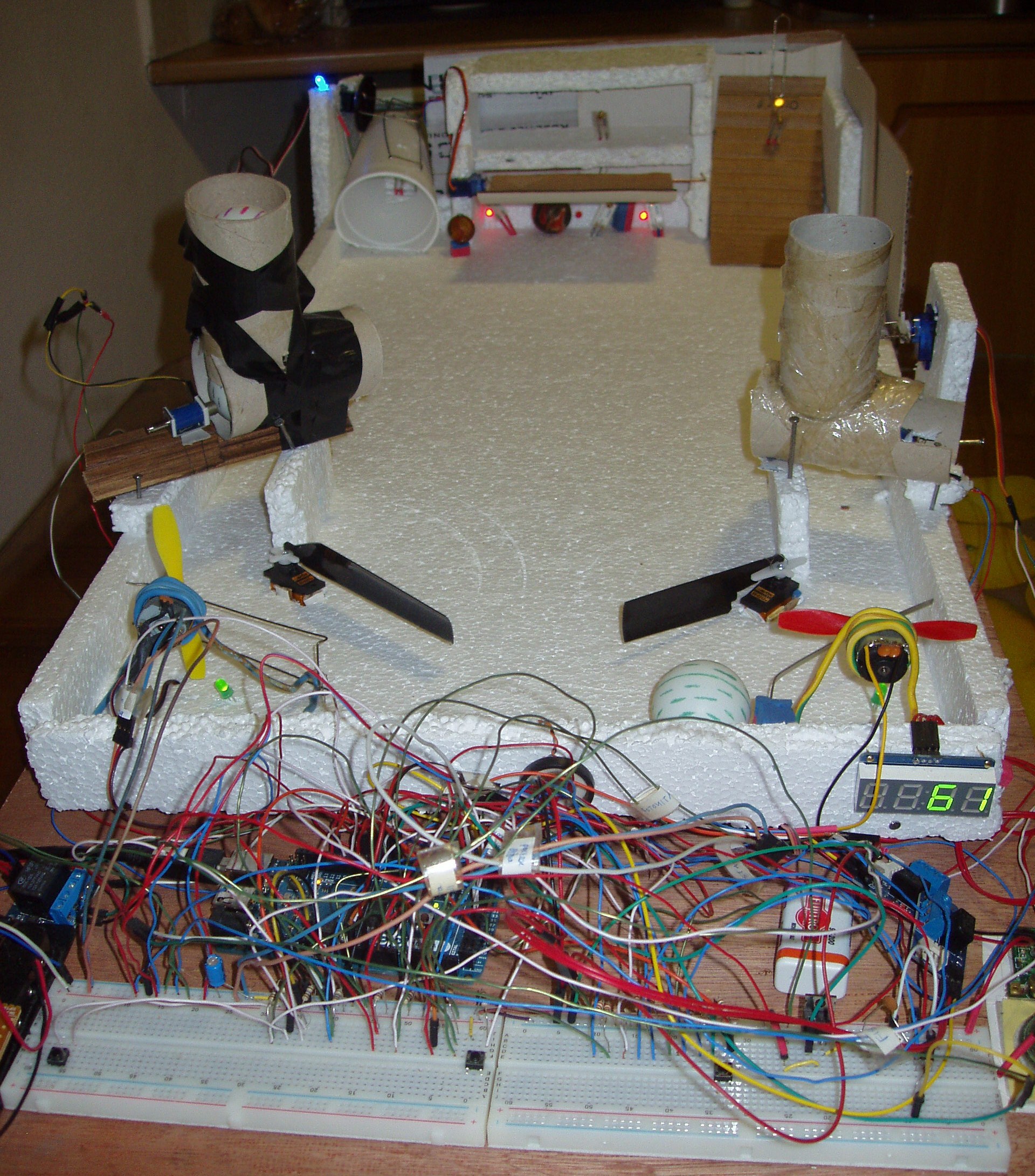
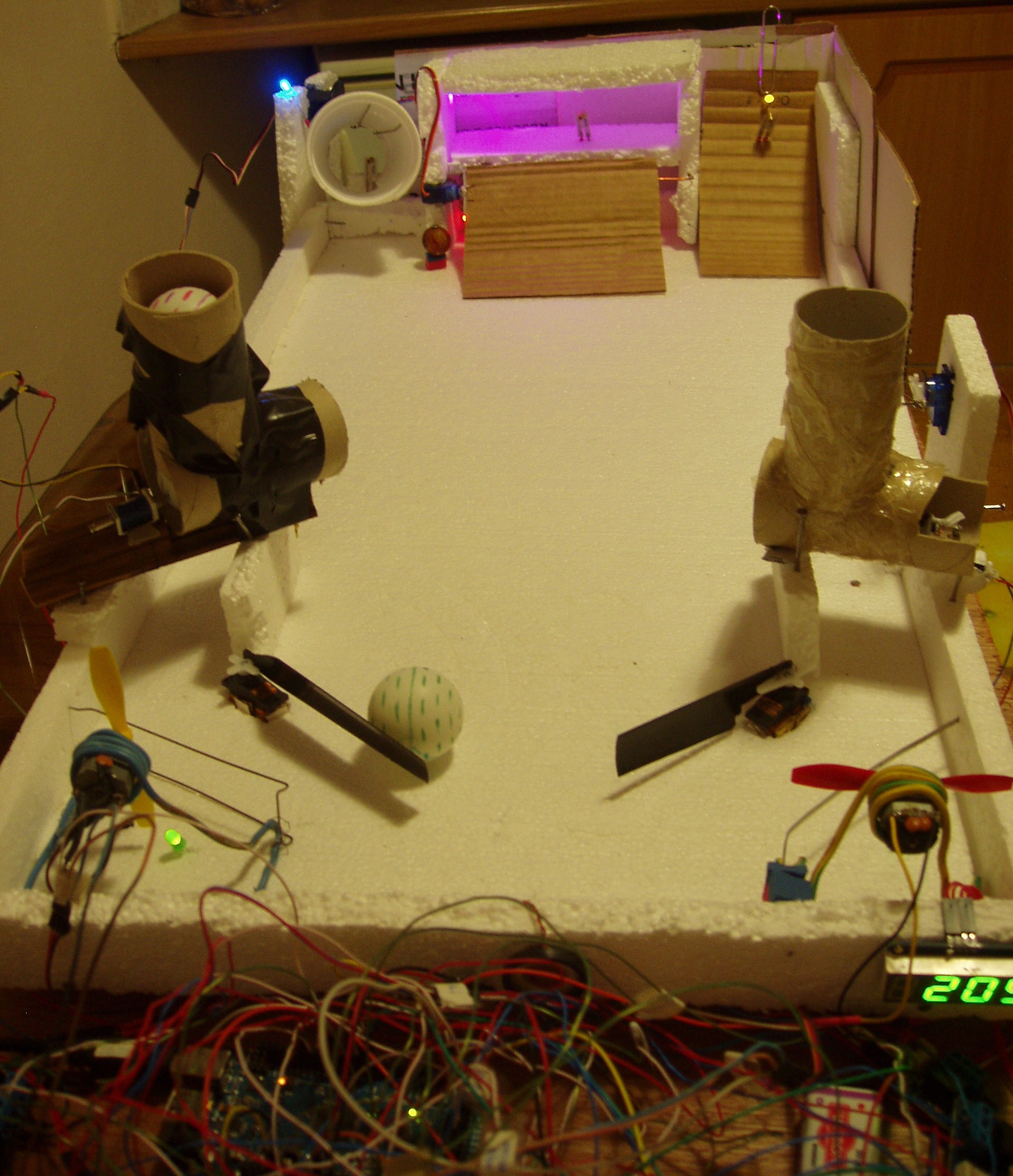
each red target is 1p.,yellow 2p.,when all these are hitten it is given one right save which activates
the right fan when the ball passes over a fotocell (the black dot under the right bridge)
at 60,80,...,200p. and for 5p. it is getting down the white cup where at its end there is the blue
target which when it is hitten it is given one left save which activates the left fan when both
racket bottons are pressed.
at 30p.,100p. it is falling a ball from the left bridge.
at 205p. it is getting down the ramp and when the target it is hitten it is playing the song
"celebration" and the servo throws the pistache
I am a begginer and thanks of Arduino i had a very nice time making it and now playing
Nice, never thought of such a solution
I think that the "ball launcher" is clever.
How do you start the game? Where are the controls?
Please make a video, if you can.
The controls are 2 push-buttons on the breadboard and a 3rd for the start.
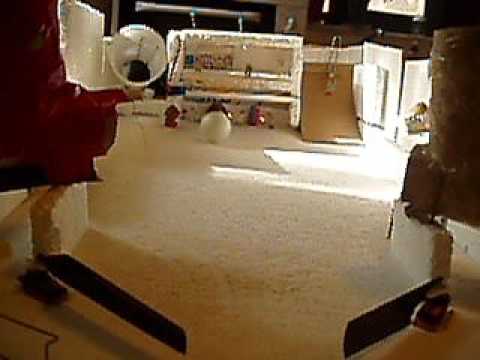
I am sorry for the quality of the video...
So cool, mate

antonis14:
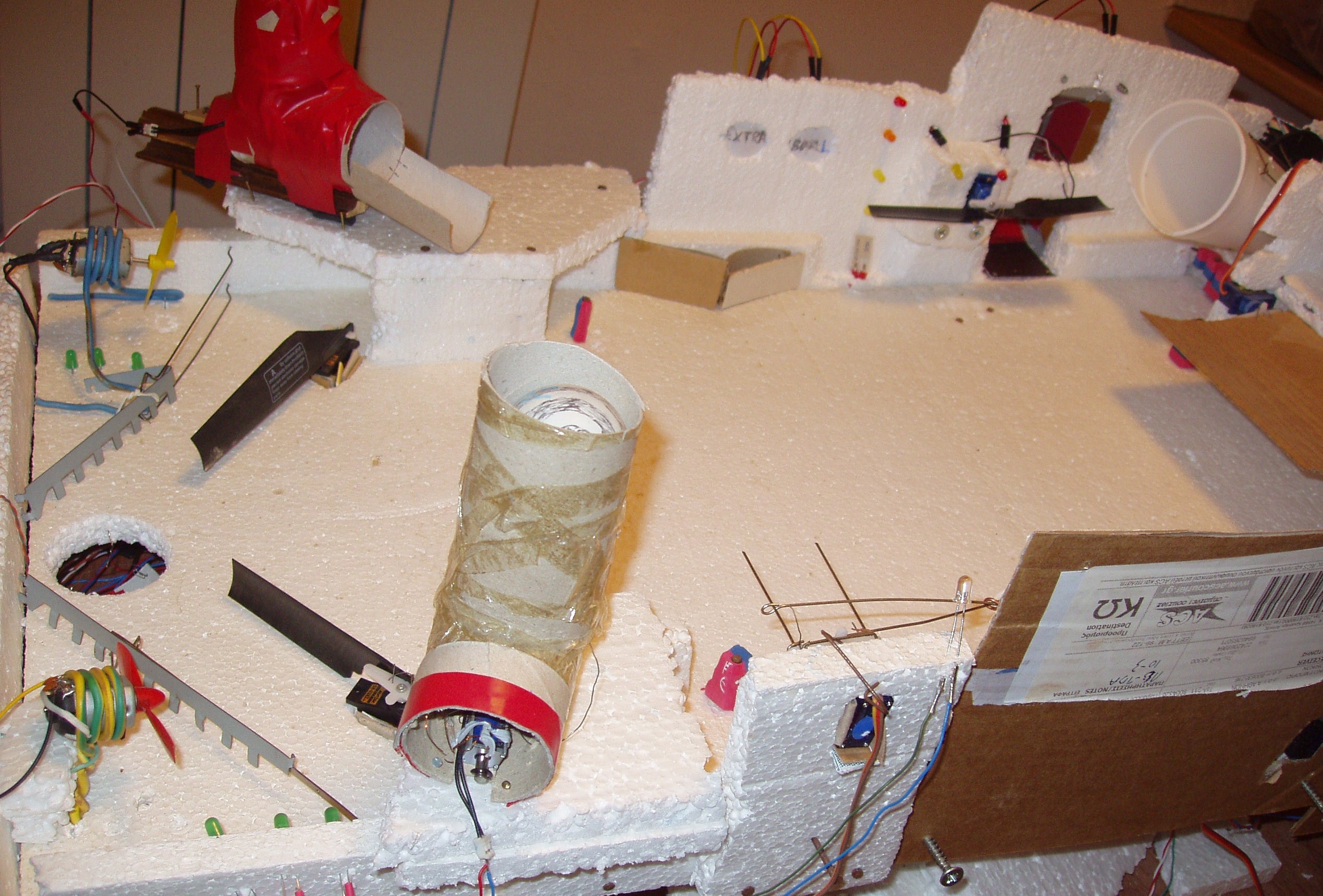
New edition
The video is very low resolution. It's hard to see what's happening.
Pretty nice approach to construction, like from the scrap heap.
+1
awesome project XD.
making low budget pinballs like this should become a thing XD
These are made in my local maker space. More info here.

Final edition
Arduino mega is now full:
30 leds
11 vibration sensors
6 servos
2 motors
1 vibration motor
4 photocells
2 solenoids
3 relays
speaker
screen
4 push buttons
The funniest moment with this game is when sometimes the upper left racket hits the ball back
so fast that is impossible to react,the ball passes the hole, the border (i will make a special ramp
for this..) and hits right into the face

I took some inspiration from these projects, and tried to make a pinball at the arduino jam in belgium last weekend: Arduino jam pinball
racemaniac;
I'm trying to make something similar to the targets I see you have in the cardboard pinball machine. Do you share how you have made this somewhere? I didn't find details on the Arduino Jam webpage. The arduino code would be greatly appreciated!
functionaldesign:
racemaniac;
I'm trying to make something similar to the targets I see you have in the cardboard pinball machine. Do you share how you have made this somewhere? I didn't find details on the Arduino Jam webpage. The arduino code would be greatly appreciated!
For detecting the ball hitting them, i use some piezo discs Piezo discs. The link i gave here are with wires presoldered, you can get them a lot cheaper without the wires, and it's not that hard to solder :).
The electronics of the target are very simple:
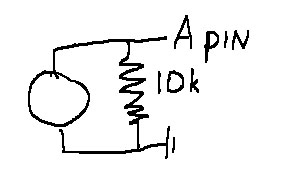
The negative side is connected to the ground, the positive side to an analog pin of the arduino, and a 10k resistor across it as pull down resistor.
For the led matching the target, you just connect it as you would connect any led to the arduino :). choose a pin, put an appropriate resistor between the led & the arduino, and that's it :). (so the led and the target are on seperate pins)
And the code i have for reading the targets & setting the leds (small note: my leds were wired such that putting the pin LOW lights them them, putting it HIGH dims them):
/*
 * pinball v0.1
 */

#define numBalls 3

#define targetCount 4
#define targetLed1 8
#define targetLed2 9
#define targetLed3 10
#define targetLed4 11

#define targetPin1 A0
#define targetPin2 A1
#define targetPin3 A2
#define targetPin4 A3

typedef struct target
{
  byte detectPin;
  byte ledPin;
  byte hit;
};

uint16_t score;

target targets[targetCount] = {{targetPin1,targetLed1, 0}
                    ,{targetPin2,targetLed2, 0}
                    ,{targetPin3,targetLed3, 0}
                    ,{targetPin4,targetLed4, 0}
};


// the setup function runs once when you press reset or power the board
void setup() {
  pinMode(targetLed1, OUTPUT);
  pinMode(targetLed2, OUTPUT);
  pinMode(targetLed3, OUTPUT);
  pinMode(targetLed4, OUTPUT);
  pinMode(targetPin1, INPUT);
  pinMode(targetPin2, INPUT);
  pinMode(targetPin3, INPUT);
  pinMode(targetPin4, INPUT);
}

// the loop function runs over and over again forever
void loop()
{
  detectCollision();
  redrawTargets();
  checkAllTargets();
}

void detectCollision()
{
  int a = analogRead(targets[0].detectPin);
  int b = analogRead(targets[1].detectPin);
  int c = analogRead(targets[2].detectPin);
  int d = analogRead(targets[3].detectPin);

  if(a>100 || b>100 || c>100 || d>100)
  {
    if(a >b && a>c && a>d)
      targets[0].hit = 1;
    else if(b>c && b>d)
      targets[1].hit = 1;
    else if(c>d)
      targets[2].hit = 1;
    else
      targets[3].hit = 1;
    score += 50;
    delay(100);
  }
}

void redrawTargets()
{
  for(int i = 0; i < targetCount; i++)
    digitalWrite(targets[i].ledPin, 1-targets[i].hit);

}

void dimTargets()
{
  for(int i = 0; i < targetCount; i++)
    digitalWrite(targets[i].ledPin, HIGH);

}

void checkAllTargets()
{
  for(int i = 0; i < targetCount; i++)
    if(targets[i].hit == 0)
      return;
  score += 200;
  for(int i = 0; i < targetCount; i++)
    targets[i].hit = 0;
  blinkTargets();
}

void blinkTargets()
{
    for(int i = 0; i < 5; i++)
  {
    redrawTargets();
    delay(200);
    dimTargets();
    delay(200);
  }
  redrawTargets();
}
Thank you so much! I had made a code for targets like this, but looking at your code I realised what a newbie I am. I have spent some days now working on your code to understand it, and also made a prototype with led lights and buttons. And now it works great, lights go out when hit and blinks when the bonus it reached! Because of studying your code I'm now on a completely different level and hopefully I can continue to build on it to add more functionality to a final pinball mock-up game.
A piece of code I haven't found answer to what means:
typedef struct target
{
byte detectPin;
byte ledPin;
byte hit;
};
I have changed the code to be able to use regular buttons and used the "State change detection" tutorial for this. I don't know if this is the correct way, so I'm adding my detectCollision() function below if anyone have comments for improvments. For some reason the first hit gives 0 score, and the second hit adds 50 as it should. The original detectCollision() is much more compact so I'm guessing there is a similar way of doing this with regular buttons like I'm trying to do. I'm going to make targets with microswitches behind them, thats why I have made it this way.
  int last_a = 0;
  int last_b = 0;
  int last_c = 0;
  int last_d = 0;

void detectCollision()
{
  int a = digitalRead(targets[0].detectPin);
  int b = digitalRead(targets[1].detectPin);
  int c = digitalRead(targets[2].detectPin);
  int d = digitalRead(targets[3].detectPin);

//Check if target1 is hit

       if(a != last_a){
          if (a == HIGH) {    // Switch is pressed
        }
        else {                // Switch is released and score added
          targets[0].hit = 1;
          Serial.print("Traff A!"); Serial.print("New score: ");
          Serial.print(score); Serial.print("!");Serial.println();
          score += 50;
        }
        delay(50);
        last_a = a;
        }

 //Check if target2 is hit

       if(b != last_b){
          if (b == HIGH) {    // Switch is pressed
        }
        else {                // Switch is released and score added
          targets[1].hit = 1;
          Serial.print("Traff B!"); Serial.print("New score: ");
          Serial.print(score); Serial.print("!");Serial.println();
          score += 50;
        }
        delay(50);
        last_b = b;
        }

//Check if target3 is hit

       if(c != last_c){
          if (c == HIGH) {   // Switch is pressed
        }
        else {               // Switch is released and score added
          targets[2].hit = 1;
          Serial.print("Traff C!"); Serial.print("New score: ");
          Serial.print(score); Serial.print("!");Serial.println();
          score += 50;
        }
        delay(50);
        last_c = c;
        }

//Check if target4 is hit

       if(d != last_d){
          if (d == HIGH) {   // Switch is pressed
        }
        else {               // Switch is released and score added
          targets[3].hit = 1;
          Serial.print("Traff D!"); Serial.print("New score: ");
          Serial.print(score); Serial.print("!");Serial.println();
          score += 50;
        }
        delay(50);
        last_d = d;
        }

}
functionaldesign:
Thank you so much! I had made a code for targets like this, but looking at your code I realised what a newbie I am. I have spent some days now working on your code to understand it, and also made a prototype with led lights and buttons. And now it works great, lights go out when hit and blinks when the bonus it reached! Because of studying your code I'm now on a completely different level and hopefully I can continue to build on it to add more functionality to a final pinball mock-up game.A piece of code I haven't found answer to what means:
typedef struct target
{
byte detectPin;
byte ledPin;
byte hit;
};
A struct is like defining your own datatypes, that are composed of other datatypes. In this case i group everything i need to know about a target together, so the code becomes easier to read. Otherwise i'd have target1detectpin, target2detectpin, target1ledpin, target1hit, ... that gets really annoying really soon.
And as you can see in the code, you can initialize it like this:
target someTarget = {, , };
And then do
someTarget.hit = ;
or
if(someTarget.hit){
functionaldesign:
I have changed the code to be able to use regular buttons and used the "State change detection" tutorial for this. I don't know if this is the correct way, so I'm adding my detectCollision() function below if anyone have comments for improvments. For some reason the first hit gives 0 score, and the second hit adds 50 as it should. The original detectCollision() is much more compact so I'm guessing there is a similar way of doing this with regular buttons like I'm trying to do. I'm going to make targets with microswitches behind them, thats why I have made it this way.int last_a = 0;
int last_b = 0;
int last_c = 0;
int last_d = 0;
void detectCollision()
{
int a = digitalRead(targets[0].detectPin);
int b = digitalRead(targets[1].detectPin);
int c = digitalRead(targets[2].detectPin);
int d = digitalRead(targets[3].detectPin);
//Check if target1 is hit
if(a != last_a){
if (a == HIGH) { // Switch is pressed
}
else { // Switch is released and score added
targets[0].hit = 1;
Serial.print("Traff A!"); Serial.print("New score: ");
Serial.print(score); Serial.print("!");Serial.println();
score += 50;
}
delay(50);
last_a = a;
}
//Check if target2 is hit
if(b != last_b){
if (b == HIGH) { // Switch is pressed
}
else { // Switch is released and score added
targets[1].hit = 1;
Serial.print("Traff B!"); Serial.print("New score: ");
Serial.print(score); Serial.print("!");Serial.println();
score += 50;
}
delay(50);
last_b = b;
}
//Check if target3 is hit
if(c != last_c){
if (c == HIGH) { // Switch is pressed
}
else { // Switch is released and score added
targets[2].hit = 1;
Serial.print("Traff C!"); Serial.print("New score: ");
Serial.print(score); Serial.print("!");Serial.println();
score += 50;
}
delay(50);
last_c = c;
}
//Check if target4 is hit
if(d != last_d){
if (d == HIGH) { // Switch is pressed
}
else { // Switch is released and score added
targets[3].hit = 1;
Serial.print("Traff D!"); Serial.print("New score: ");
Serial.print(score); Serial.print("!");Serial.println();
score += 50;
}
delay(50);
last_d = d;
}
}
And your score problem: you're printing the score before you're adding to it. that's why you don't see the score increase the first time ;).
And of course you can write it shorter, but first focus on splitting it up like i did, that will help you far more in development than writing it as short as possible (also because short code is often less readable. That nice short collision detection function is probably the hardest to understand how it works ).