Select View > Devices by type from the Device Manager menus.
Open the "View" menu.
If there is a ✓ to the left of the "Show hidden devices" menu item, click on "Show hidden devices" to disable it.
Open the "Ports (COM & LPT)" section of the Device Manager tree.
You should see a port identified as "USB-SERIAL CH340 (COMn)" under the "Ports (COM & LPT)" section (where "COMn" is some serial port e.g., COM4). Double click on that item.
The "USB-SERIAL CH340 (COMn) Properties" dialog will open.
Select the "Driver" tab of the "USB-SERIAL CH340 (COMn) Properties" dialog.
You will see a "Roll Back Driver" button in the dialog. If it is not clickable, perform the following instructions:
Click the "Update driver" button.
An "Update Drivers Device - USB-SERIAL CH340 (COMn)" dialog will open.
Click on "Search automatically for drivers" in the "Update Drivers Device - USB-SERIAL CH340 (COMn)" dialog.
You should now see the driver installation wizard update the driver. Wait for the update to finish, as indicated by the message "Windows has successfully updated your drivers" in the dialog. It is possible you will instead see the message "The best drivers are already installed". If so, please stop following the instructions here and reply on the forum thread to let me know. I'll provide alternative instructions you can follow.
Click the "Close" button in the "Update Drivers Device - USB-SERIAL CH340 (COMn)" dialog.
The dialog will close.
Click the "Roll Back Driver" button in the "USB-SERIAL CH340 (COMn) Properties" dialog.
The "Driver Package rollback" dialog will open.
Click the radio button next to "My apps don't work with this driver" in the "Driver Package rollback" dialog .
Click the "Yes" button.
The "Driver Package rollback" dialog will close.
Click the "Close" button in the "USB-SERIAL CH340 (COMn) Properties" dialog.
Now start Arduino IDE again and repeat whatever you were doing before when you encountered that error before. Hopefully this time you will not encounter that "can't set com-state" error during the sketch upload.
Hi @ruudmr ! I have a Nano that doesn't have a number at the back of the chip. After many attempts and failures, I found that the 2019 driver (30/01/2019 -> v. 3.5.2019.1 from wch.cn) works fine on Windows 11. I also discovered that there are some versions that compile and upload to the Nano but have significant problems with serial communications. I have a zip file containing the correct driver, but unfortunately, I can't upload it because I'm a "new user". Sorry about that.
Did you try the 3.7.2022.01 version that is installed when you follow the instructions I provided in post #21? If yes, what was the problem you experienced while using it?
I haven't received any reports of people experiencing problems when using that version. 3.7.2022.01 is the last version before the incompatibility was introduced in the 3.8.2023.2 version of the driver. I think it is best to use the newest possible version of the driver so I would recommend people use 3.7.2022.01 unless there is a specific reason to use 3.5.2019.1 instead.
Sorry to say, but the old ch340 drivers and win11 are really working on this module.
Try it again. But better don’t buy this type of modules again. I look always very good that the nano is the good type with ch340 on the chip.
What do you mean by "last one"? If you are referring to version 3.8.2023.2, then yes we know that. That is why the instructions roll the driver version back to "the one before the last one": version 3.7.2022.01
I apologize for the little misunderstanding. I didn't mean to imply that your instructions hadn't worked for me (in fact, I haven't tested them yet!), but rather that I found the 2019 version to be working great for me.
Additionally, @cdr60 mentioned that he could only make the 2014 version work, which is strange to me because when I tested it, it didn't work on my computer. (I assume it was a different version from the same year.)
Lastly, regarding @ruudmr 's comment: Yes, I discovered on my own, after hours of complete incomprehension, why it was working on one computer and not the other. Mistakes were made, but I've learned my lesson and will be more careful next time when purchasing cheap Aliexpress clones.
Thanks for the clarification. I don't happen to own a board with one of these problematic "CH340" chips (I have several boards with legitimate WCH CH340, but none with the chips that don't work with driver version 3.8.2023.2) so I am dependent on the reports from the users who do own those boards for my understanding of the problem and how to solve it.
Yeah. Purely from the perspective of fixing the "can't set com-state" upload failure, any driver version prior to 3.8.2023.2 should do the trick. But, from a general operating system maintenance perspective, it is best to keep drivers updated so I think it is best practices to use the newest possible version of the driver.
Some time ago I was suggesting the use of the 2014 version when supporting users affected by this problem and I didn't receive any reports of problems with that version so it is unexpected. I installed and tested that version of the driver on my Windows 11 machine with the good CH340 board I have and it worked as expected.
The only reason I was using the 2014 version in my support work was because that was the only version I had found a trustworthy and accessible source of. I later learned how to get any version of the driver directly from the manufacturer's website (they maintain two separate official websites for English and Chinese, wch.cn and wch-ic.com). So even though it is unexpected that this version doesn't work, I also don't recommend using such an old version of the driver when the more modern version is now readily available.
Hi all,
since I encountered simillar problems (no "connectability" win11 + CH340) I checked some values of the driver via the device manager.
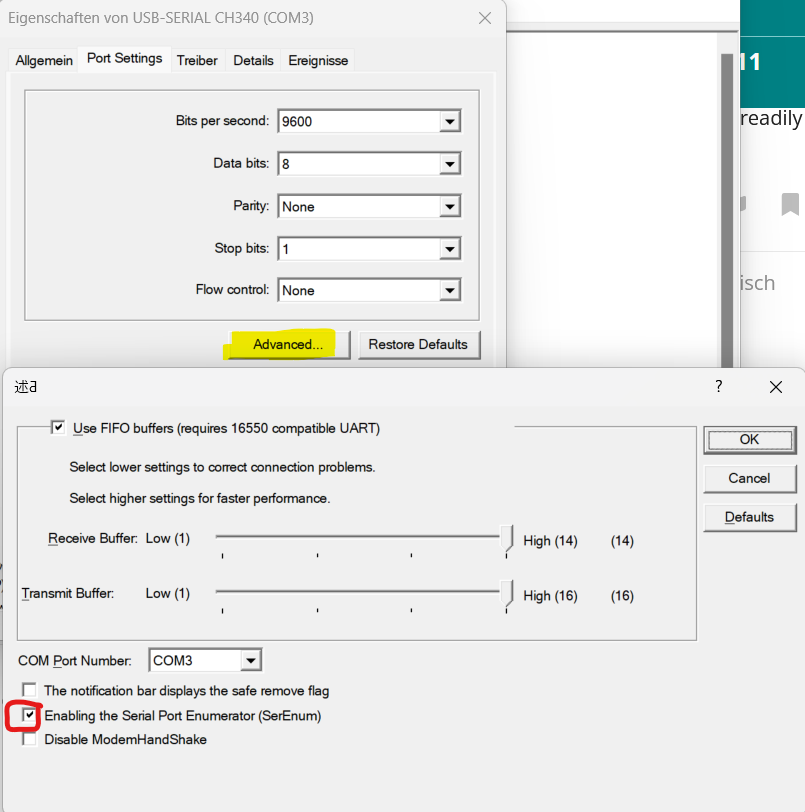
In advance settings "SerEnum" had been unabled. After checking the box both of my devices worked with the current driver Version (3.8.2023.2).
Maybe one of you can check?
HI @smirlin. Thanks for sharing this interesting information. The driver rollback workaround we found does work, but is fairly complex and using outdated drivers is not ideal. It would be wonderful to find a better solution to offer the users who are unfortunate enough to have bought the cheap boards with the sketchy "CH340" chips that don't work with the latest driver.
I saw a previous mention of this solution:
However, I discarded it as a solution because they reported it wasn't persistent:
Do you find that the problem is solved persistently after you enable that setting, or do you have to repeat the procedure again later? Unfortunately I don't own one of the boards with the bad CH340 chip so I can't perform any experiments personally.
Even if it doesn't serve as a solution, it is still interesting in that it might give a bit more insight into what the actual problem is.
Hi @ptillisch .
Unfortunately I have to conclude, that it's not a presistent solution yet
I encountered disconnectivity problems a day later and haven't had the chance of dig deeper in to it.
Your solution with the older driver worked for the boards afterwards. When checking it out I saw, that the "SerEnum" option isn't available in the old driver.
I wanted to double check next weekend, maybe with the help of an oscilloscope.
I'm sorry for my late reply. I changed my plan with the oscilloscope. Instead I ordered some different Nanos... what I thought were originals... but silly me trusted amazon too much. Anyways the other boards have nicely marked chips, hence I am relativly sure they are originals. Today I wanted to test them.
Here are some observations:
Windows surprised me with automatic updates of the driver, without giving me the chance of downgrading via the device manager. Win 11changed the driver from 2019 to 2023 version several times in a row ... approximatly 20s after attaching the Nanos (any of the 3rd party devices).
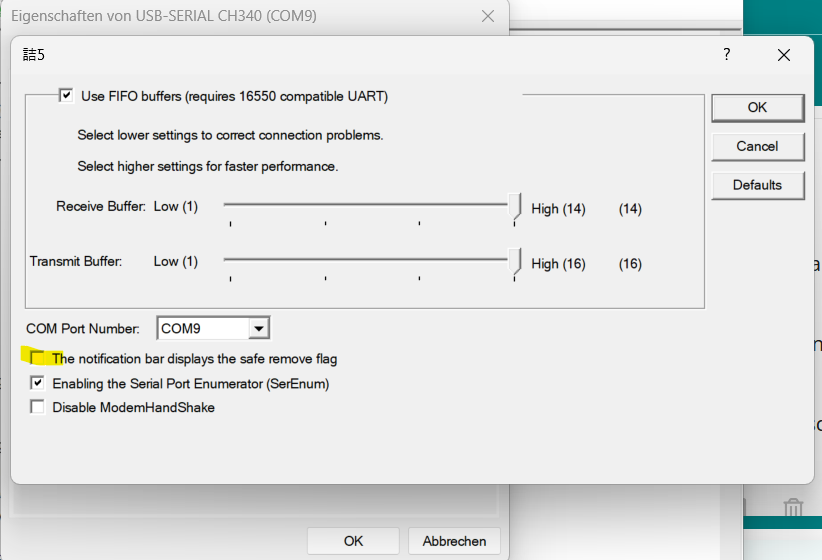
Driver settings changed from time to time until I ticked highlighted option. after that windows asked for reboot. I unticked the option later again but kept SerEnum ticked. Ever since it stayed.
I had a similar experience. I have been hampered in my efforts to support the users affected by this "can't set com-state" problem because, although I have many CH340-based boards, none of them produce the fault (I bought them all years ago and they all have the expected labeling on the CH340 chip). So I'm in the odd position where I actually wish I did own one of these problematic boards simply for the sake of experimentation.
I did a shopping spree on Amazon, buying one of each of the cheap products from sketchy sellers I could find where the "CH340" chip was unlabeled in the product photo. To my dismay, when the order arrived all the chips were labeled and the boards work perfectly with the latest WCH driver version. So I'm still in the same position of not being able to personally reproduce the fault.
I guess Aliexpress would be a better source for sketchy boards, but I swore off on ever using that site again because I got ripped off too many times and the site is set up so the buyer is at a disadvantage in this situation (whereas Amazon and eBay greatly favor the buyer over the seller in disputes).
 It is possible you will instead see the message "The best drivers are already installed". If so, please stop following the instructions here and reply on the forum thread to let me know. I'll provide alternative instructions you can follow.