@horace
I tried your Altsoft serial code available on post#6 and it WORKED with my new RS232 to TTL module.
Now what are the next steps

@jim-p
I attempted your code on post#43 and circuit diagram on post#57 first it didnot responded but when I swapped the rx,tx pins of new rs232 to ttl module with 4,5 pin of arduino , it started working atleast showing 15 '0' bytes.
Ouput:
TX: 68 4 0 4 8
RX: 0 0 0 0 0 0 0 0 0 0 0 0 0 0 0
TX: 68 4 0 4 8
RX: 0 0 0 0 0 0 0 0 0 0 0 0 0 0 0
TX: 68 4 0 4 8
RX: 0 0 0 0 0 0 0 0 0 0 0 0 0 0 0
TX: 68 4 0 4 8
RX: 0 0 0 0 0 0 0 0 0 0 0 0 0 0 0
TX: 68 4 0 4 8
RX: 0 0 0 0 0 0 0 0 0 0 0 0 0 0 0
TX: 68 4 0 4 8
RX: 0 0 0 0 0 0 0 0 0 0 0 0 0 0 0
TX: 68 4 0 4 8
RX: 0 0 0 0 0 0 0 0 0 0 0 0 0 0 0
TX: 68 4 0 4 8
RX: 0 0 0 0 0 0 0 0 0 0 0 0 0 0 0
sounds like you had a faulty RS232 module
I assume you connected 2 pins 2 and 3 of the new RS232-TTL module and the loopback test worked
it is always a good idea to check that modules are working before connecting to external equipment
1 Like
@horace
Yes , I checked exactly what you have mentioned.
good news - hopefully you can now get the compass operational
1 Like
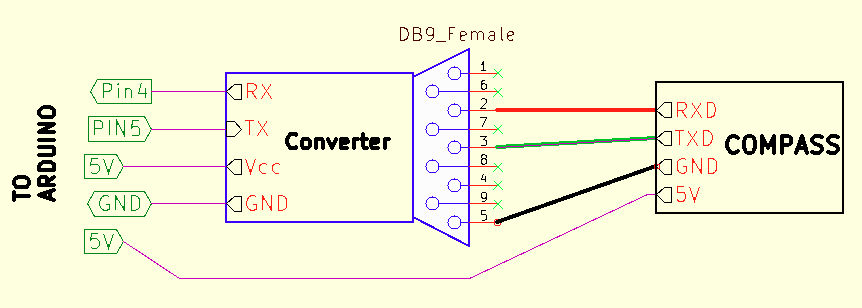
The diagram shown below should be the correct way to connect everything.
If it does not work then something else is wrong.
The only connection in question is the one between the compass and the converter.
When you connect the compass to your computer and run the rion software, which DB9 pins do you connect to the compass TXD and RXD?
@jim-p
I also mentioned previously that when connecting with rion software I dont use rs232 to ttl instead I use DB9 male connector to usb (post#67) and connect it with my USB connection present in cpu.
The connections are same as they mentioned in the YouTube link in my first post.
I don't see anything in the video or post #67 that says which DB9 pin numbers were connected to RXD TXD.
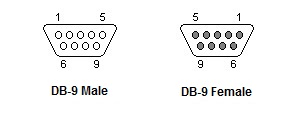
Which pin number on the DB9 connector did you connect the compass TXD wire to, was it pin 2 or pin3
@jim-p
Did you see the youtube video mentioned in first post ?
I did the exact connections as they have shown in the beginning.
DB9 pin 2(rx)-blue(tx) compass
DB9 pin 3(tx)-Pink(rx) compass
DB9 pin 5-Gnd
Then insert male DB9 to usb in cpu
And I used 5v from arduino , I didn't used rs232 for rion software.
Then the diagram I show in post #91 is correct.
1 Like
Ok I will try my best and then update you
This code sends a Set Installation command then a Read Roll, Pitch, Heading command.
If the Compass does not respond it will timeout and try again.
#include <SoftwareSerial.h>

#define rxPin 4
#define txPin 5

byte cmd_number;
byte response[20];
unsigned long timeout = 5000;

// Compass commands
// [0x68, length, address, command_code, data, checksum] (response length)

byte commands[4] [8] =
{
  {0x68,0x05,0x00,0x2A,0x01,0x30, 6},  // Set Installation Mode
  {0x68,0x04,0x00,0x04,0x08, 15},      // Read Pitch,Roll,Heading
  {0x68,0x00,0x00,0x00,0x00, 0},
  {0x68,0x00,0x00,0x00,0x00, 0}
};

SoftwareSerial SSerial (rxPin, txPin);

void setup()
{
  pinMode(rxPin, INPUT);
  pinMode(txPin, OUTPUT);
  SSerial.begin(9600);

  Serial.begin(9600);
  Serial.println("Running  ");
  cmd_number = 0;
}

void loop()

{
  int i;
  int rsp_len; // Response length
  int cmd_len; //Commend length
  unsigned long start_time, elapsed_time;

  cmd_len = commands[cmd_number] [1] + 1;
  rsp_len = commands[cmd_number] [cmd_len];

  Serial.print("TX:  ");

  for (i=0;i<cmd_len;i++)
  {
    SSerial.write (commands[cmd_number] [i]);
    Serial.print (commands[cmd_number] [i],HEX);
    Serial.print ("  ");
  }

  Serial.println (" ");
  delay(100);

  i=0;
  start_time = millis();
  elapsed_time = 0L;

  while ((i < rsp_len) && ( elapsed_time < timeout))
  {
    if(SSerial.available())
    {
      response[i] = SSerial.read();
      i++;
    }
    elapsed_time = millis() - start_time;
  }


  Serial.print("RX:  ");

  if(elapsed_time < timeout)
  {
    for (int i=0; i<rsp_len; i++)
    {
      Serial.print (response[i], HEX);
      Serial.print ("  ");
    }
  }
  else
  {
    Serial.println (">>>> TIMEOUT <<<<<");
  }

  Serial.println(" ");

  ++cmd_number;

  if (cmd_number == 2) cmd_number = 0;
  delay (1000);

}
1 Like
@jim-p
Thankyou for all your help , I will attempt it and hopefully give you a goodnews
any progress? my TTL-RS232 modules have arrived at last - delayed by floods!
@horace
Unfortunately when I was near on achieving the task ,6 days prior I attempted on doing post#97 I thought of operating the compass on rion software before then coming to main task but it did'nt operate. So since then I am burned-out in trying to run it. 
does the compass still work when connected to a PC?
Inorder to operate the compass it can only work with it's own rion software , which is not happening.
if the compass is not working with it own software sounds like it is damaged
Let's hope
if you power the compass what are the voltages on the Tx and Rx lines (not connected to anything)
1 Like