Controling servo speed by slider

No. I do not have your hardware, your bluetooth whatever, or understanding of what your bluetooth thingy sends. I made an edit to cover reading two bytes at a time, given what you showed, but if the unknown communications protocol is any more difficult than that, I haven't a clue what it needs.

Those serial tutorials lay out how to design protocols so they can be parsed, and provide guidance on how to parse things. If you have a good protocol for sending your two integers, it should be straightforward to parse.

arduino receives data correctly. These are integers in serial monitor:


When I press (touch down) forward button, number 2 is displayed in serial monitor and the servos work. And when I touch up forward button number 3 is displayed in serial monitor and the servos are stopped. But when I press backward or left or right buttons the numbers are displayed in serial monitor but the servos don't work.

    if (BT.available() >1) {

I used your idea in my code but result is the same.

take a look at this lines:

now with their values:

for (int Pos = 130 ; Pos >= 50 ; Pos--) {

Since 130 is already bigger than 50 the condition is fulfilled instantaneously and the function does nothing.

You know what you're sending (or maybe rather, receiving), we don't. Maybe start with a code that shows what you are receiving.

#include <SoftwareSerial.h>

SoftwareSerial BT(13, 12);  //RX , TX pins

void setup()
{
  Serial.begin(9600);
  BT.begin(9600);
}

void loop()
{
  static uint8_t cnt;

  if (BT.available())
  {
    uint8_t b = BT.read();
    if (b < 0x10)
    {
      Serial.print("0");
    }
    Serial.print(b, HEX);
    Serial.print(" ");
  }
  
  cnt++;
  if (cnt == 16)
  {
    Serial.println();
    cnt = 0;
  }
}

Send one command; dot repeat.

Note:
You are aware of the following?

  1. '2' is not the same as 2.
  2. read() returns a single byte, not an integer.

Based on your screenshot in post #7 and the code in the opening post, I think that note 1 is valid.

Sorry I can't undestand your code. could you plz edit my code and do the changes in it to know what you mean exactly?

That sounds like you send only one character at time. If you touch down a button marked "forward" and your code receives 2 and 10 seconds later you "touch up" the "forward" button, what is your code supposed to do in the intervening 10 seconds? If it was 1 sec between the signals? If it was 0.001 sec?

Also, the forward and stop only care about the "state2" variable, while the other motions only care about "state". Try printing out the pair:

Serial.print(state2); Serial.print("&") Serial.println(state);

From what you describe I think reading single bytes should be enough and separating them by pairs into state2 and state seems unnecessary. Maybe you might want to keep a memory of the prior byte and do something interesting based on the pair, but your code doesn't show that use case.

I control the time of signals by clock in blocks. If I hold the button 10 seconds the servo movement will reapete until I touch down the button.

Wait -- is this related to this?

If you are mixing bytes, characters, numbers, and strings, you need to be very careful about the protocols so the arduino can decode what it happening.

yes I changed using integer and character to just integer to simplify my code So that the code might work. But the result didn't changed

Well, you might change to another protocol. An Arduino can handle both:

I tried this:

    Serial.print(state2); 
    Serial.print("&");
    Serial.println(state);

This is serial monitor:

But there are no changes in the result.

I think pcRead is suitable for my problem. But I don't know how to use it in my code. Could you edit my code by using it?

But it is working correctly in void setup.

Of course not. That change is just reporting what is getting parsed so you can tell the difference between "state2" and "state".

Now, look carefully at the lines where the second number on the line (state) matches the actions you have programmed in #1:

Do you mean there are differences? I think There are no differences actually. The results are same.

here is just one variable that is received from bluetooth:

uint8_t b = BT.read();

But I need two variables. Like this:

uint8_t b = BT.read();
uint8_t b2 = BT.read();

I mean that you have shown there is no two integers where state==4 in order to make this clause activate:

Sorry I don't understand what you say. How can I use two integers there? Can you show me how can I use two integers in sketch?

I do not understand the need to use them as two integers.

From the sketch you've shown, it looks like it would be better to use the integers one at a time. Send "Forward", and it goes forward, send "Stop Going Forward" and it stops.

It doesn't appear to be a problem with reading two bytes from a bluetooth module, it looks like more of a problem with what do you want to do with your two bytes.

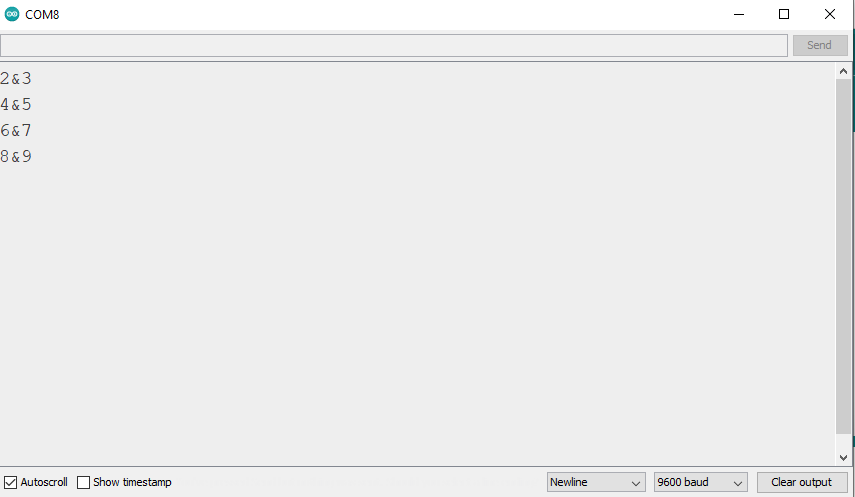
Note also that the forward move wasn't stopped by this clause since state2 was never a 3.