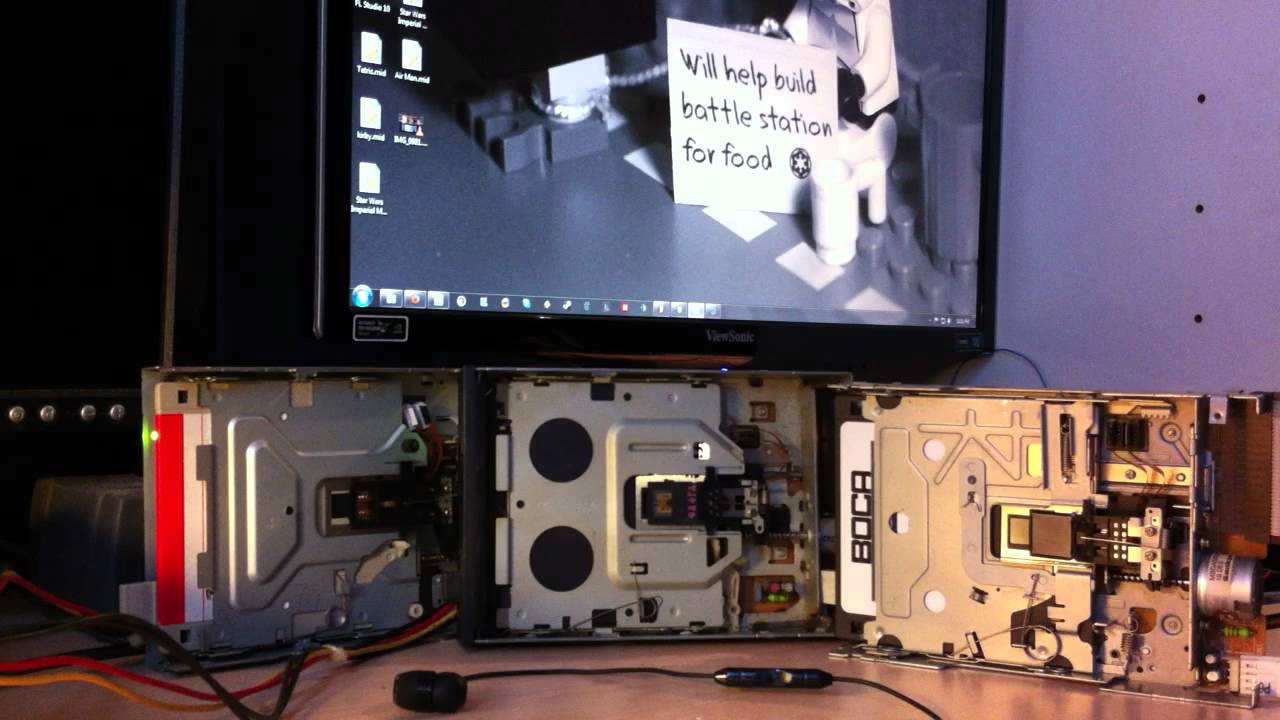
interface with floppy and play melody

in the java ide, goto open then browse to the downlaoded folder, when you click on the MoppyDesk folder inside the Java folder which is in the downloaded folder, it should detect it as a project and open it.

for RXTX, you need to downlaod this: http://rxtx.qbang.org/pub/rxtx/rxtx-2.2pre2-bins.zip
and go to the win64 or win32 folder depending on your OS(64 bit or 32bit windows, your on windows right?) then inside the correct fodler for you, copy the DLL to:

  1. go to program files/Java
  2. should be a whole bunch of folders like: jre1.6.0_02 and jre6
  3. open each folder and goto the bin folder in each and copy the DLL in each bin folder.
  4. restart JAVA IDE
    :slight_smile:

Still no joy :

J

ava.lang.UnsatisfiedLinkError: no rxtxSerial in java.library.path thrown while loading gnu.io.RXTXCommDriver
Exception in thread "AWT-EventQueue-0" java.lang.UnsatisfiedLinkError: no rxtxSerial in java.library.path
	at java.lang.ClassLoader.loadLibrary(ClassLoader.java:1860)
	at java.lang.Runtime.loadLibrary0(Runtime.java:845)
	at java.lang.System.loadLibrary(System.java:1084)
	at gnu.io.CommPortIdentifier.<clinit>(CommPortIdentifier.java:123)

Think I may need to try my vista laptop. The above is on my XP PRO PC.

Texy

in the downladed rxtx zip go to windows, and then use the 32bit i386 dll. mine worked fine on windows xp pro

realized the 6 floppy support arduino code was messed up so here it is(also with songs): http://dl.dropbox.com/u/28052258/code%2Bsongs.zip

you dont have make any modifications to the JAVA app, but make sure the midi you are playing has 6 tracks in it. here is the programi like to use for editing MIDIs: Free and open source MIDI sequencer / editor software "Sekaiju"
it is Japanese but ALT+s then ALT+L lets you select language to english. i like it since all i need to do is move arouind tracks and notes in a MIDI and it works great for that---FREE!

Spent a lot of time on this, but no joy on my XP Pro Px or my vista laptop.

Texy

Well I finally got his to work, although most of the midi files I have downloaded do not work.
Any idea's why?

Texy

oops sorry didnt realize you replied...
there are 4 floppies, so the MIDI you play must have four tracks.

all my examples: http://dl.dropbox.com/u/28052258/songs%2Bmidieditor.zip have six tracks (so theyre ready for more floppies)

So as I have only 1 floppy, I need to make sure that the midi file uses the track that it's connected to ? I can only assume that the files that do not work don't use the first track. I can see that the arduino is active as I can see the rx/tx LEDs working in time to the music.
Texy

from my experiments i believe if the first track is completely blank (or the second track) the JAVA program will automatically go to the first track with data. look at the program i have included in the ZIP files i have linked to in my previous posts, there is a easy free midi editro to use. if you open midi with it and it only has one track, then copy the first track a few times to another few tracks. that program always has a first track in any midi that is empty and you cant write music to, but it doesnt mess up the floppies(look at the second track as the first track).

also the JAVA code limits the notes played so the floppy doesnt attempt to play notes that are to high or low for it, and cause crappy grinding sounds. so if its really high or low constantly, then the floppy wont play anything.

I have used the midi editor suggested to view the tracking details of various midi files. It seems that there are indeed many files that do not use track 1, however the arduino nor the java app automatically use the first track it finds with data, otherwise I wouldn't get any 'silent' midi files. You can use the midi editor to change the track numbers easily enough, but I cannot, for example, get a suitable midi file that I can replicate the imperial march as shown in the OP's first post.
Texy

yeah, i have been unable to find a good imperial march either.

I too could not find a decent version to be played with floppy drives so I edited one to my needs. Links below:

http://dl.dropbox.com/u/12354903/Star%20Wars%20Imperial%20March.mid
http://dl.dropbox.com/u/12354903/Star%20Wars%20Imperial%20March%202.mid

The difference between the two is what track is played on two channels. Since I only had three drives, I only put three tracks in this. I'm using the second one here:

Hope this helps. Enjoy!

wow i have the same exact setup, and it sounds nothing like that...

You mean after using my MIDI files? I had to edit them to get the proper tracks to play. All the other files I came across had like 10 tracks or double notes playing at the same time for one drive, which does not work.

yeah, but that was after i tried sammyiam's new code that used interrupts instead. (its on his github along with a new java program with GUI)
so i think if i try the old code it will probably work better. on any song i played after using the new code, the headers would barely move and wasnt very loud...

Hello, I can not build MoppyDesk.jar when I try it fails. Can you send someone MoppyDesk.jar file?

im guessing you didnt put the TX /RX drivers in the right place?

copy the error here.

I have succeeded with this project (playing buzzing sounds / music via a floppy drive pins)

but not on Arduino I am just making the transition to Arduino now, and hope to progress towards loads of cool and interesting projects...(note the following is just an explanation of the project using a different interface - a RPi...my way has limits but Arduino's can expand this project massively so I read - to control a heck of a lot of hardware and play orchestrated songs)

Anyway It took me about 2 days of messing about - with the FDD wiring and ground requirements but it DOES WORK

On my device I made use of GPIO pins. And software allows specific frequencies to be sent to certain pins on the floppy drive....making the little motor vibrate back and forth quickly- creating a dirty Buzzing noise....the frequency can be altered to change he tone of the output signal and Buzzing.

Firstly you configure the Pins with the floppy Pins using simple commands to turn the GPIO pins between High and Low

Some-body cleverly wrote a StarWars theme in C (the song a million floppies have been resurrected to play against their will - on youtube - I am one of these guilty persons!)

Anyway after learning to compile and execute C programs for the first time...I got the song to run...

If you remove the floppy or don't have one...it will play on a small speaker exactly the same - like more of an oscillating vibrating tone...a little tube over the speaker amplifies it a bit

I used speakers to test or configure the Pins and the signals being sent...and I am in the process of a 6 floppy dirve version...but until I get the floppy drives I set up and configure everything on very small speakers...

I am using software allowing MIDI to CODE conversion...then splits a signal into 6 channels somehow - so you can have multiple hardware devices simulating different octaves and instruments etc. For now my speakers will have to do to get the code running - then I will "simply" wire the floppies up when I get them eventually

The reply above mentioned Midi to Code and that is correct if you want to use a different song to the prepared example in the guides...and allows you to basically take any song or tune and convert it to floppy frequencies

NOTE I fried 2 of my GPIO pins and nearly lost my device alltogether by overloading the pins. I have a full on step-by-step guide for this project, and explain the floppies wiring requirements....it is a simple case of just hooking them up....but...theres a lot of little things that can cause problems - I overcome these and noted them all down from installation and download of the software, to compiling the song in C, configuring the right Pin to Pin access and SAFE testing using simple diodes and a handful of tiny 8 ohm, 2 W, speakers

here was my finished result

Anyway I hope this helps - please don't rush into this as you can do damage to your equipment

I am sorry if the nature of this appears out of context.... I just contributed my experience with the subject of playing music via a vibrating floppy drive - I know the 2 platforms are undoubtedly worlds apart with these sort of projects.....I am a complete newbie to Arduino so unfortunately my only experience has been on a different platform - I have now progressed from this platform now it feels, so Arduino will hopefully open new doors for me electronically