Yes please
Try this - hacked together quickly so there is limited parsing smartness
create a new sketch, in the main tab copy & paste that code:
#include <assert.h>
#include <ESP8266WiFi.h>
#include <ESPAsyncTCP.h>
#include <ESPAsyncWebServer.h>
#include "html.h"

AsyncWebServer server(80);

const char* ssid = "JohnM";          // Your WiFi SSID
const char* password = "Greenlantern@123";  // Your WiFi Password

const byte blueLedPin  = 12;
const byte whiteLedPin = 13;
const byte redLedPin   = 16;

const char* validCommands[] = { "dog", "goat", "cat" };
size_t maxCommandLength; // size of the longest command, here it will be 4 for goat
const byte commandCount = sizeof validCommands / sizeof validCommands[0];
const char* separators = " ,.;:/+-&\t";
void dogCommand();
void goatCommand();
void catCommand();
void (*funcPtrs[])() = { &dogCommand, &goatCommand, &catCommand };

static_assert((commandCount == sizeof funcPtrs / sizeof funcPtrs[0]), "Error: command list and functoin list not matching");

void dogCommand() {
  Serial.println("dog function");
  digitalWrite(whiteLedPin, HIGH);
  delay (500);
  digitalWrite(whiteLedPin, LOW);
}
void goatCommand() {
  Serial.println("goat function");
  digitalWrite(blueLedPin, HIGH);
  delay (500);
  digitalWrite(blueLedPin, LOW);
}
void catCommand() {
  Serial.println("cat function");
  digitalWrite(redLedPin, HIGH);
  delay (500);
  digitalWrite(redLedPin, LOW);
}

void notFound(AsyncWebServerRequest *request) {
  request->send(404, "text/plain", "Not found");
}

void processCommand(const char* aCommand) {
  size_t commandIndex;
  if (strlen(aCommand) > 0) {
    for (commandIndex = 0; commandIndex < commandCount; commandIndex++) {
      if (strcmp(validCommands[commandIndex], aCommand) == 0) {
        funcPtrs[commandIndex]();
        break;
      }
    }
    if (commandIndex >= commandCount) {
      Serial.print("Command not recognized : "); Serial.println(aCommand);
    }
  }
}

void parseCommands(const char* aCommandList) {
  bool error = false;
  char commandBuffer[maxCommandLength + 1];
  commandBuffer[maxCommandLength] = '\0';

  const char * startPtr = aCommandList;
  const char * endPtr;
  if (strlen(aCommandList) > 0)
    do {
      endPtr = strpbrk(startPtr, separators);
      if (endPtr == nullptr) {
        if (strlen(startPtr) > maxCommandLength) error = true;
        else strncpy(commandBuffer, startPtr, maxCommandLength);
      } else {
        size_t nbChars = endPtr - startPtr;
        if (nbChars > maxCommandLength) error = true;
        else {
          strncpy(commandBuffer, startPtr, nbChars);
          commandBuffer[nbChars] = '\0';
        }
      }
      if (error) {
        Serial.print("Error parsing "); Serial.print(startPtr); Serial.println(". Continue.");
      } else processCommand(commandBuffer);
      error = false;
      startPtr = endPtr + 1;
    } while (endPtr != nullptr);
}

void getCommand(AsyncWebServerRequest *request) {

  // GET request for "/process?command=<message>"
  if (request->hasParam("command")) {
    parseCommands(request->getParam("command")->value().c_str());
    request->send(200, "text/html", webPage);
  }
}

void setup() {
  pinMode(blueLedPin,  OUTPUT);
  pinMode(whiteLedPin, OUTPUT);
  pinMode(redLedPin,   OUTPUT);

  Serial.begin(115200);
  while (!Serial);
  Serial.println("\n\nWeb Form Demo");
  WiFi.mode(WIFI_STA);
  WiFi.begin(ssid, password);
  if (WiFi.waitForConnectResult() != WL_CONNECTED) {
    Serial.println("WiFi Access FaiLedPin!");
    while (true) yield();
  }

  Serial.print("IP Address: ");  Serial.println(WiFi.localIP());

  server.on("/", HTTP_GET, [](AsyncWebServerRequest * request) {
    request->send(200, "text/html", webPage);
  });
  server.on("/process", HTTP_GET, getCommand);
  server.onNotFound(notFound);
  server.begin();

  Serial.println("recognized commands: ");
  for (auto && s : validCommands) {
    maxCommandLength = max(maxCommandLength, strlen(s));
    Serial.print("  - "); Serial.println(s);
  }
  Serial.println("Web site ready.");
}

void loop() {}
click on the down pointing arrow in the top right of the IDE

and create a new tab called html.h
paste this code into that new tab
#ifndef _HTML_
#define _HTML_

const char webPage[] PROGMEM = R"--(<!DOCTYPE HTML><html>
<head>
  <meta charset="utf-8" />
  <title>I'M IN COMMAND !</title>
</head>
<body>
  <form method="GET" action="/process">
  Enter your command : <input type="text" name="command"><br>
  <input type="submit" value="Submit">
 </form>
</body>
</html>
)--";

#endif
compile and run the code, with the Serial monitor set at 115200 bauds
connect your web browser to the IP address that you see printed in the Serial Monitor, you should see something like this

type cat or dog or goat in the text field and submit
you should see some feedback in the Serial monitor and the LED should do their stuff
you can type keywords separated by ONE of the registered separators ,.;:/+-&\t
so it's OK to enter dog,cat&goat, parsing should work but I did not bother removing multiple separators so you might get some unrecognised commands if you do so
This should give you a base to work from.
PS: if those are your real credentials
const char* ssid = "JohnM";          // Your WiFi SSID
const char* password = "Greenlantern@123";  // Your WiFi Password
consider them compromised after posting them on a public forum.. suggest you change them quickly.
thanks for the your quick solution. I did not have any problem compiling it.
When I enter the commands in the webpage it prints in the serial monitor but does not light up the LEDs. I tried several times.
Thanks
Samuel
this is the function that is supposed to be called if you enter "dog"
void dogCommand() {
  Serial.println("dog function");
  digitalWrite(whiteLedPin, HIGH);
  delay (500);
  digitalWrite(whiteLedPin, LOW);
}
➜ do you see dog function written in the Serial Monitor?
if so the digitalWrite() are also sent. so something is happening on pins
const byte blueLedPin  = 12;
const byte whiteLedPin = 13;
const byte redLedPin   = 16;
if you don't see anything, either those pins are not the ones you use on your arduino or your LEDs are not connected in the right way.
try this code:
const byte blueLedPin  = 12;
const byte whiteLedPin = 13;
const byte redLedPin   = 16;

void setup() {
  Serial.begin(115200); Serial.println();
  pinMode(blueLedPin,  OUTPUT);  digitalWrite(blueLedPin, HIGH);
  pinMode(whiteLedPin, OUTPUT);  digitalWrite(whiteLedPin, HIGH);
  pinMode(redLedPin,   OUTPUT);  digitalWrite(redLedPin, HIGH);
}

void loop() {}
do you see the 3 LEDs on ?
thanks I will chk and get back tomorrow. Its night and strain on my eyes. sorry, appreciate your effort Thanks
samuel
Hi
On the webpage I get' Not found'
On the serial monitor
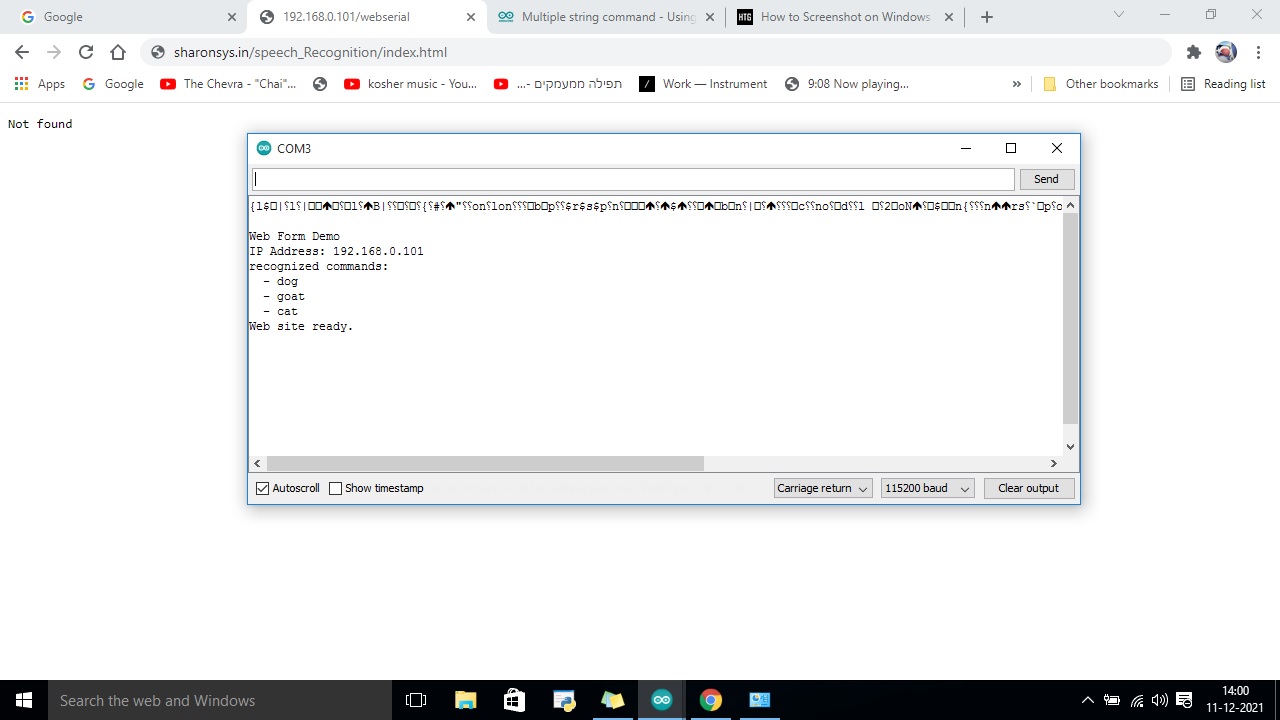
I get response only for entering 'dog' command in the serial monitor.
then the LED dos not work
Regards
Samuel
All three LEDs are on
get response only for entering 'dog' command in the serial monitor
The code does not listen to the serial monitor. I don’t understand what you are saying…
You need to enter the command on the web view and hit submit
I did that nothing happened.
only when I type in the serial monitor it printed dog and without LED
Now the webpage shows not found
but the monitor says website ready
I dont understand because I did not make any changes
The only change I made was the password for ssid
regards
Samuel
again, the code posted above does not listen to the Serial monitor, so typing anything in the Serial monitor (if this is the one of the IDE) won't do anything.
Your "not found" seems to be for http://192.168.0.101/webserial

this is not what you should type. The web page to use is just http://192.168.0.101
Use the IP you see in the Serial monitor

I loaded the codes again and compiles. i used the ip that was in the serial monitor and the webpage showed not found. but the serial monitor shows webpage ready and the recognized commands as dog,cat and goat.Now If I type the commands separetely,or together no result is shown in the monitor and there is not LED lighted up
FYI
Regards
Samuel
i used the ip that was in the serial monitor and the webpage showed not found.
what's your PC's IP address and net mask? is your PC on the same network as the ESP?
what did you type exactly?
if you don't have the web interface, how can you type anything?? I just don't get it.... AGAIN, the code does NOTHING through the serial monitor. So don't expect any input in the Serial monitor to be dealt with. stop doing that, stop bringing that up, there is no point there...
You need to get the web page working. It works on my network. If you can't reach your ESP, you need to explore what's going on from a network routing perspective.
Right there was no web page so I could not type there
I just tried typing in the serial monitor just to see if it worked like before
Checking
I am using the same network
Rgds
Samuel
can you share IP and net mask ? is the PC using also the WiFi or ethernet? what URL are you typing (exactly)?
seems you can't get to your ESP so that's an issue.
serialmonitrt shows :
IP Address: 192.168.0.101
recognized commands:
- dog
- goat
- cat
Web site ready.
IP Address: 192.168.0.101
recognized commands: - dog
- goat
- cat
Web site ready.
This is irrelevant. we know the Arduino boots, joins the network and prints what's expected. All good there. (did you boot twice ?)
the issue is why your PC can't find it.
Could you answer the questions ?
can you share IP and net mask ? is the PC using also the WiFi or ethernet? what URL are you typing (exactly)?
I am using the same wifi as the esp
i am typing 192.168.0.101/webserial
i booted twice
what did I write about this in post #70 ??
do you read the answers? why should I bother...
to be clear:

Connection-specific DNS Suffix:
Description: Intel(R) Dual Band Wireless-N 7260
Physical Address: 80-86-F2-C1-43-B4
DHCP Enabled: Yes
IPv4 Address: 192.168.0.111
IPv4 Subnet Mask: 255.255.255.0
Lease Obtained: 11 December 2021 13:45:44
Lease Expires: 11 December 2021 18:03:41
IPv4 Default Gateway: 192.168.0.1
IPv4 DHCP Server: 192.168.0.1
IPv4 DNS Servers: 8.8.8.8, 1.1.1.1
IPv4 WINS Server:
NetBIOS over Tcpip Enabled: Yes
Link-local IPv6 Address: fe80::502b:c8f1:4eec:febd%12
IPv6 Default Gateway:
IPv6 DNS Server:
sorry. I did and got the web page. I entered commands
and this is the output
Web Form Demo
IP Address: 192.168.0.101
recognized commands:
- dog
- goat
- cat
Web site ready.
dog function
goat function
cat function
dog function
But the LEDs were not activated