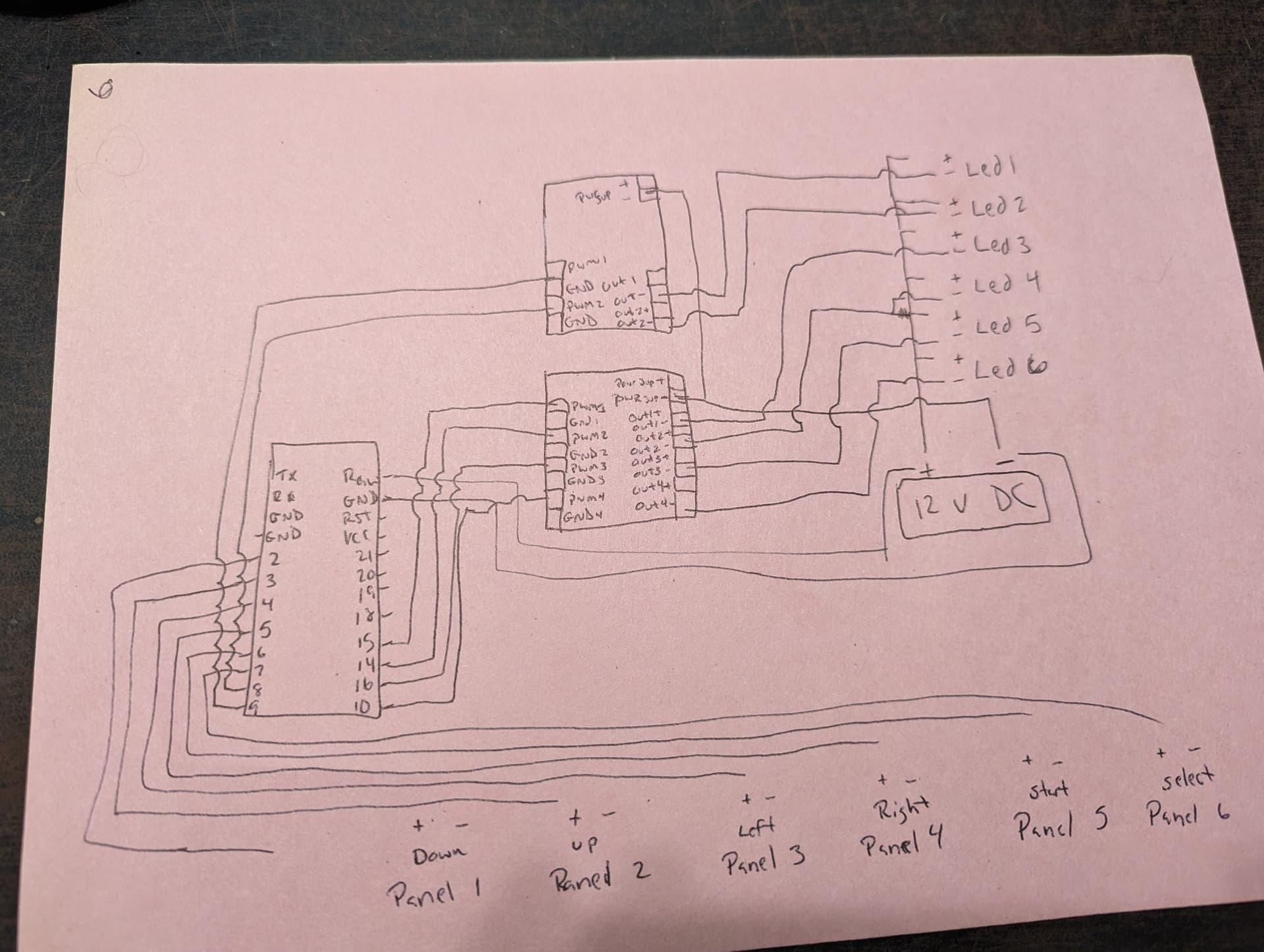
I am trying to follow the directions on this post to wire up a dance pad and I am struggling with the directions that he provided. The issue that I am having is for the LED Version 2 controller he just says to wire them together but that doesn't help me. The pictures that are posted are all of the V1 setup not the V2. I have a few questions on the LED controller, 1, I don't know how to power the system properly. I have a DC power source of 12V, 3A which I can run but dont know the right way to, secondly I would hope that I can power the arduino with the same power source that I am using for the Isolators. I have attached a diagram which I think is how it is supposed to be wired according to what the guy was saying in the instructions but I feel like I am missing something. I feel like I am grounding out something wrong because nothing seems to be working and my power just disappears somewhere in the circuit.
Hi and welcome .
Unfortunately a lot of stuff on instructables is not well designed , complete , and in a lot of cases doesn’t even work .
However a few more details might help - what are the leds for example , put the code up here ( use the code tabs ) . It might also be worth asking questions to the author .
Also useful to know your experience with Arduino .
Sorry not a very positive reply , but this is a difficult one . Hopefully some other comments will turn up
Well done posting a circuit diagram !
The link on the web site doesn’t open .
I will try to explain what I have going on and some pictures, I will also add the code too. So the dance pad is like what you would find in an arcade with the addition of the top left and right panels for start and select. I have built the thing from scratch and 3d printed the parts that I needed, the intent is that when you step on the pad the controller sends a signal to the computer it is plugged into to show the pad was pressed. I also want the pad to light up when it detects a press. I have color coded the wires to correspond with each pad. After thinking about it I believe that I have the ground not set up properly because I tied in the sensor ground and the light ground to the same ground line. I was also mistaken at the mosfet, ignore all the black wires coming out of them because I was just getting frustrated at that point. I know the electricity from the DC 12v power source is reaching the Arduino and if i take the + and - from the DC straight to the Arduino it turns on but when I try to run the ground it will not turn on, for the Arduino micro pro that is shown in the picture, I have the 12v running to RAW, a ground line ran to the ground pin. then the down panel to 2, up to 3, left to 4, right to 5, start to 6, and select to 7. I have tied the sensor lines to these (might be a mistake) Then I have pins 8, 9, 10, 16, 14, and 15 all going to the Mosfet PWM ports (I think I need to run the ground pins back to the Arduino here instead of back to the DC power source but at the moment they are tied into the common ground) The sensor pad lines are not connected to the other Arduino micro pro yet because I hadn't gotten to that step because I was struggling with this at the moment.
#include <inttypes.h>
#include "HID-Project.h"

#undef DDR_CONTROL_12DIGITAL_PANEL
#define DDR_CONTROL_LED_6DIGITAL_PANEL

//
// Define to enable 12 bit analog resolution
// #define ANALOG_RESOLUTION_12BIT     1

#define GAMEPAD 1

#if !defined(__AVR_ATmega32U4__) && !defined(__AVR_ATmega328P__) && \
    !defined(__AVR_ATmega1280__) && !defined(__AVR_ATmega2560__)
  #define CAN_AVERAGE
#endif

#if defined(_SFR_BYTE) && defined(_BV) && defined(ADCSRA)
  #define CLEAR_BIT(sfr, bit) (_SFR_BYTE(sfr) &= ~_BV(bit))
  #define SET_BIT(sfr, bit) (_SFR_BYTE(sfr) |= _BV(bit))
#endif

#ifndef ANALOG_RESOLUTION_12BIT
  #define ANALOG_RESOLUTION     1023
#else
  #define ANALOG_RESOLUTION     4095
#endif

#ifdef GAMEPAD
  // Use the Joystick library
  void ButtonStart() {
      Gamepad.begin();
  }
  void ButtonPress(uint8_t button_num) {
    Gamepad.press(button_num);
  }
  void ButtonRelease(uint8_t button_num) {
    Gamepad.release(button_num);
  }
  void ButtonSendNow(void) {
    Gamepad.write();
  }
#else
  #include <Keyboard.h>
  // And the Keyboard library for Arduino
  void ButtonStart() {
    Keyboard.begin();
  }
  void ButtonPress(uint8_t button_num) {
    Keyboard.press('a' + button_num - 1);
  }
  void ButtonRelease(uint8_t button_num) {
    Keyboard.release('a' + button_num - 1);
  }
  void ButtonSendNow(void) {
  }
#endif

// Default threshold value for each of the sensors.
#ifdef ANALOG_RESOLUTION_12BIT
const int16_t kDefaultThreshold = 1024 * 2;
#else
const int16_t kDefaultThreshold = ANALOG_RESOLUTION / 2;
#endif
// Max window size for both of the moving averages classes.
// Original default: 50
// Use 20 as each loop for 6 sensor takes 89us
const size_t kWindowSize = 5;
// Baud rate used for Serial communication. Technically ignored by Teensys.
const long kBaudRate = 115200;
// Max number of sensors per panel.
// NOTE(teejusb): This is arbitrary, if you need to support more sensors
// per panel then just change the following number.
const size_t kMaxSharedSensors = 2;
// Button numbers should start with 1 (Button0 is not a valid Joystick input).
// Automatically incremented when creating a new SensorState.
uint8_t curButtonNum = 2;

// Timestamps are always "unsigned long" regardless of board type So don't need
// to explicitly worry about the widths.
unsigned long lastSend = 0;
// loopTime is used to estimate how long it takes to run one iteration of
// loop().
long loopTime = -1;

//
// Define to enable 12V
// This is used to drive the enable 12V to the LED controller.
// Make sure not to conflict with Light pin.
#ifdef DDR_CONTROL_12DIGITAL_PANEL
  #define pin_12v_enable    18
#else
  #define pin_12v_enable    0
#endif

/*===========================================================================*/

// EXPERIMENTAL. Used to turn on the lights feature. Note, this might conflict
// some existing sensor pins so if you see some weird behavior it might be
// because of this. Uncomment the following line to enable the feature.

#ifdef DDR_CONTROL_LED_6DIGITAL_PANEL
#define ENABLE_LIGHTS
#else
#undef ENABLE_LIGHTS
#endif

// We don't want to use digital pins 0 and 1 as they're needed for Serial
// communication so we start curLightPin from 2.
// Automatically incremented when creating a new SensorState.
//
// A0/D0 - Down
// A1/D1 - Up
// A2/D2 - Left
// A3/D3 - Right
// A4 - Start
// A5 - Select
//
// As such, start at 6.
//
#if defined(ENABLE_LIGHTS)
  #ifdef DDR_CONTROL_12DIGITAL_PANEL
    uint8_t curLightPin = 8;
  #else
    uint8_t curLightPin = 8;
  #endif
#endif

int GetNextLightPin(void)
{
#ifdef DDR_CONTROL_LED_6DIGITAL_PANEL
  switch (curLightPin) {
  case 8:
    curLightPin++;
    return 8;
  case 9:
    curLightPin++;
    return 9;
  case 10:
    curLightPin = 16;
    return 10;
  case 16:
    curLightPin = 14;
    return 16;
  case 14:
    curLightPin = 15;
    return 14;
  case 15:
    curLightPin = 0;
    return 15;
  }
#else
  return ++curLightPin;
#endif
}

/*===========================================================================*/

// Calculates the Weighted Moving Average for a given period size.
// Values provided to this class should fall in [−32,768, 32,767] otherwise it
// may overflow. We use a 32-bit integer for the intermediate sums which we
// then restrict back down to 16-bits.
class WeightedMovingAverage {
 public:
  WeightedMovingAverage(size_t size) :
      size_(min(size, kWindowSize)), cur_sum_(0), cur_weighted_sum_(0),
      values_{}, cur_count_(0) {}

  int16_t GetAverage(int16_t value) {
    // Add current value and remove oldest value.
    // e.g. with value = 5 and cur_count_ = 0
    // [4, 3, 2, 1] -> 10 becomes 10 + 5 - 4 = 11 -> [5, 3, 2, 1]
    int32_t next_sum = cur_sum_ + value - values_[cur_count_];
    // Update weighted sum giving most weight to the newest value.
    // [1*4, 2*3, 3*2, 4*1] -> 20 becomes 20 + 4*5 - 10 = 30
    //     -> [4*5, 1*3, 2*2, 3*1]
    // Subtracting by cur_sum_ is the same as removing 1 from each of the weight
    // coefficients.
    int32_t next_weighted_sum = cur_weighted_sum_ + size_ * value - cur_sum_;
    cur_sum_ = next_sum;
    cur_weighted_sum_ = next_weighted_sum;
    values_[cur_count_] = value;
    cur_count_ = (cur_count_ + 1) % size_;
    // Integer division is fine here since both the numerator and denominator
    // are integers and we need to return an int anyways. Off by one isn't
    // substantial here.
    // Sum of weights = sum of all integers from [1, size_]
    int16_t sum_weights = ((size_ * (size_ + 1)) / 2);
    return next_weighted_sum/sum_weights;
  }

  // Delete default constructor. Size MUST be explicitly specified.
  WeightedMovingAverage() = delete;

 private:
  size_t size_;
  int32_t cur_sum_;
  int32_t cur_weighted_sum_;
  // Keep track of all values we have in a circular array.
  int16_t values_[kWindowSize];
  size_t cur_count_;
};

// Calculates the Hull Moving Average. This is one of the better smoothing
// algorithms that will smooth the input values without wildly distorting the
// input values while still being responsive to input changes.
//
// The algorithm is essentially:
//   1. Calculate WMA of input values with a period of n/2 and double it.
//   2. Calculate WMA of input values with a period of n and subtract it from
//      step 1.
//   3. Calculate WMA of the values from step 2 with a period of sqrt(2).
//
// HMA = WMA( 2 * WMA(input, n/2) - WMA(input, n), sqrt(n) )
class HullMovingAverage {
 public:
  HullMovingAverage(size_t size) :
      wma1_(size/2), wma2_(size), hull_(sqrt(size)) {}

  int16_t GetAverage(int16_t value) {
    int16_t wma1_value = wma1_.GetAverage(value);
    int16_t wma2_value = wma2_.GetAverage(value);
    int16_t hull_value = hull_.GetAverage(2 * wma1_value - wma2_value);

    return hull_value;
  }

  // Delete default constructor. Size MUST be explicitly specified.
  HullMovingAverage() = delete;

 private:
  WeightedMovingAverage wma1_;
  WeightedMovingAverage wma2_;
  WeightedMovingAverage hull_;
};

/*===========================================================================*/

// The class that actually evaluates a sensor and actually triggers the button
// press or release event. If there are multiple sensors added to a
// SensorState, they will all be evaluated first before triggering the event.
class SensorState {
 public:
  SensorState()
      : num_sensors_(0),
        #if defined(ENABLE_LIGHTS)
        kLightsPin(GetNextLightPin()),
        #endif
        buttonNum(curButtonNum++) {
    for (size_t i = 0; i < kMaxSharedSensors; ++i) {
      sensor_ids_[i] = 0;
      individual_states_[i] = SensorState::OFF;
    }
    #if defined(ENABLE_LIGHTS)
      pinMode(kLightsPin, OUTPUT);
    #endif
    initialized_ = true;
  }

  void Init() {
    if (initialized_) {
      return;
    }
    buttonNum = curButtonNum++;
    initialized_ = true;
  }

  // Adds a new sensor to share this state with. If we try adding a sensor that
  // we don't have space for, it's essentially dropped.
  void AddSensor(uint8_t sensor_id) {
    if (num_sensors_ < kMaxSharedSensors) {
      sensor_ids_[num_sensors_++] = sensor_id;
    }
  }

  // Evaluates a single sensor as part of the shared state.
  void EvaluateSensor(uint8_t sensor_id,
                      int16_t cur_value,
                      int16_t user_threshold) {
    if (!initialized_) {
      return;
    }
    size_t sensor_index = GetIndexForSensor(sensor_id);

    // The sensor we're evaluating is not part of this shared state.
    // This should not happen.
    if (sensor_index == SIZE_MAX) {
      return;
    }

    // If we're above the threshold, turn the individual sensor on.
    if (cur_value >= user_threshold + kPaddingWidth) {
      individual_states_[sensor_index] = SensorState::ON;
    }

    // If we're below the threshold, turn the individual sensor off.
    if (cur_value < user_threshold - kPaddingWidth) {
      individual_states_[sensor_index] = SensorState::OFF;
    }

    // If we evaluated all the sensors this state applies to, only then
    // should we determine if we want to send a press/release event.
    bool all_evaluated = (sensor_index == num_sensors_ - 1);

    if (all_evaluated) {
      switch (combined_state_) {
        case SensorState::OFF:
          {
            // If ANY of the sensors triggered, then we trigger a button press.
            bool turn_on = false;
            for (size_t i = 0; i < num_sensors_; ++i) {
              if (individual_states_[i] == SensorState::ON) {
                turn_on = true;
                break;
              }
            }
            if (turn_on) {
              ButtonPress(buttonNum);
              combined_state_ = SensorState::ON;
              #if defined(ENABLE_LIGHTS)
                digitalWrite(kLightsPin, HIGH);
              #endif
            }
          }
          break;
        case SensorState::ON:
          {
            // ALL of the sensors must be off to trigger a release.
            // i.e. If any of them are ON we do not release.
            bool turn_off = true;
            for (size_t i = 0; i < num_sensors_; ++i) {
              if (individual_states_[i] == SensorState::ON) {
                turn_off = false;
              }
            }
            if (turn_off) {
              ButtonRelease(buttonNum);
              combined_state_ = SensorState::OFF;
              #if defined(ENABLE_LIGHTS)
                digitalWrite(kLightsPin, LOW);
              #endif
            }
          }
          break;
      }
    }
  }

  // Given a sensor_id, returns the index in the sensor_ids_ array.
  // Returns SIZE_MAX if not found.
  size_t GetIndexForSensor(uint8_t sensor_id) {
    for (size_t i = 0; i < num_sensors_; ++i) {
      if (sensor_ids_[i] == sensor_id) {
        return i;
      }
    }
    return SIZE_MAX;
  }

 private:
  // Ensures that Init() has been called at exactly once on this SensorState.
  bool initialized_;

  // The collection of sensors shared with this state.
  uint8_t sensor_ids_[kMaxSharedSensors];
  // The number of sensors this state combines with.
  size_t num_sensors_;

  // Used to determine the state of each individual sensor, as well as
  // the aggregated state.
  enum State { OFF, ON };
  // The evaluated state for each individual sensor.
  State individual_states_[kMaxSharedSensors];
  // The aggregated state.
  State combined_state_ = SensorState::OFF;

  // One-tailed width size to create a window around user_threshold to
  // mitigate fluctuations by noise.
  // TODO(teejusb): Make this a user controllable variable.
  const int16_t kPaddingWidth = 1;

  // The light pin this state corresponds to.
  #if defined(ENABLE_LIGHTS)
    const uint8_t kLightsPin;
  #endif

  // The button number this state corresponds to.
  // Set once in Init().
  uint8_t buttonNum;
};

/*===========================================================================*/

// Class containing all relevant information per sensor.
class Sensor {
 public:
  Sensor(uint8_t pin_value, SensorState* sensor_state = nullptr, uint8_t pin_Digital = false)
      : initialized_(false), pin_value_(pin_value), analog_(pin_Digital ? false : true),
        user_threshold_(kDefaultThreshold),
        #if defined(CAN_AVERAGE)
          moving_average_(kWindowSize),
        #endif
        offset_(0), sensor_state_(sensor_state),
        should_delete_state_(false) {
          if (!analog_) {
            pinMode(pin_value_, INPUT_PULLUP);
          }
        }

  ~Sensor() {
    if (should_delete_state_) {
      delete sensor_state_;
    }
  }

  void Init(uint8_t sensor_id) {
    // Sensor should only be initialized once.
    if (initialized_) {
      return;
    }
    // Sensor IDs should be 1-indexed thus they must be non-zero.
    if (sensor_id == 0) {
      return;
    }

    // There is no state for this sensor, create one.
    if (sensor_state_ == nullptr) {
      sensor_state_ = new SensorState();
      // If this sensor created the state, then it's in charge of deleting it.
      should_delete_state_ = true;
    }

    // Initialize the sensor state.
    // This sets the button number corresponding to the sensor state.
    // Trying to re-initialize a sensor_state_ is a no-op, so no harm in
    sensor_state_->Init();

    // If this sensor hasn't been added to the state, then try adding it.
    if (sensor_state_->GetIndexForSensor(sensor_id) == SIZE_MAX) {
      sensor_state_->AddSensor(sensor_id);
    }
    sensor_id_ = sensor_id;
    initialized_ = true;
  }

  // Fetches the sensor value and maybe triggers the button press/release.
  void EvaluateSensor(bool willSend) {
    if (!initialized_) {
      return;
    }
    // If this sensor was never added to the state, then return early.
    if (sensor_state_->GetIndexForSensor(sensor_id_) == SIZE_MAX) {
      return;
    }

    int16_t sensor_value;

    if (analog_)
      sensor_value = analogRead(pin_value_);
    else
      sensor_value = digitalRead(pin_value_) ? 0 : ANALOG_RESOLUTION;

    #if defined(CAN_AVERAGE)
      // Fetch the updated Weighted Moving Average.
      cur_value_ = moving_average_.GetAverage(sensor_value) - offset_;
      cur_value_ = constrain(cur_value_, 0, ANALOG_RESOLUTION);
    #else
      // Don't use averaging for Arduino Leonardo, Uno, Mega1280, and Mega2560
      // since averaging seems to be broken with it. This should also include
      // the Teensy 2.0 as it's the same board as the Leonardo.
      // TODO(teejusb): Figure out why and fix. Maybe due to different integer
      // widths?
      cur_value_ = sensor_value - offset_;
    #endif

    if (willSend) {
      sensor_state_->EvaluateSensor(
        sensor_id_, cur_value_, user_threshold_);
    }
  }

  void UpdateThreshold(int16_t new_threshold) {
    user_threshold_ = new_threshold;
  }

  int16_t UpdateOffset() {
    // Update the offset with the last read value. UpdateOffset should be
    // called with no applied pressure on the panels so that it will be
    // calibrated correctly.
    offset_ = cur_value_;
    return offset_;
  }

  int16_t GetCurValue() {
    return cur_value_;
  }

  int16_t GetThreshold() {
    return user_threshold_;
  }

  uint8_t IsDigital() {
    return analog_ == false ? 1 : 0;
  }

  // Delete default constructor. Pin number MUST be explicitly specified.
  Sensor() = delete;

 private:
  // Ensures that Init() has been called at exactly once on this Sensor.
  bool initialized_;
  // The pin on the Teensy/Arduino corresponding to this sensor.
  uint8_t pin_value_;

  // The user defined threshold value to activate/deactivate this sensor at.
  int16_t user_threshold_;

  #if defined(CAN_AVERAGE)
  // The smoothed moving average calculated to reduce some of the noise.
  HullMovingAverage moving_average_;
  #endif

  // The latest value obtained for this sensor.
  int16_t cur_value_;
  // How much to shift the value read by during each read.
  int16_t offset_;

  // Since many sensors may refer to the same input this may be shared among
  // other sensors.
  SensorState* sensor_state_;
  // Used to indicate if the state is owned by this instance, or if it was
  // passed in from outside
  bool should_delete_state_;

  // A unique number corresponding to this sensor. Set during Init().
  uint8_t sensor_id_;
  uint8_t analog_;
};

/*===========================================================================*/

// Defines the sensor collections and sets the pins for them appropriately.
//
// If you want to use multiple sensors in one panel, you will want to share
// state across them. In the following example, the first and second sensors
// share state. The maximum number of sensors that can be shared for one panel
// is controlled by the kMaxSharedSensors constant at the top of this file, but
// can be modified as needed.
//
// SensorState state1;
// Sensor kSensors[] = {
//   Sensor(A0, &state1),
//   Sensor(A1, &state1),
//   Sensor(A2),
//   Sensor(A3),
//   Sensor(A4),
// };

#ifdef DDR_CONTROL_LED_6DIGITAL_PANEL
  Sensor kSensors[] = {
    Sensor(2, NULL, true), /* Pad - Down */
    Sensor(3, NULL, true), /* Pad - Up */
    Sensor(4, NULL, true), /* Pad - Left */
    Sensor(5, NULL, true), /* Pad - Right */
    Sensor(6, NULL, true), /* Pad - Start */
    Sensor(7, NULL, true), /* Pad - Select */
  };
#endif
#ifdef DDR_CONTROL_12DIGITAL_PANEL
  Sensor kSensors[] = {
    Sensor(2, NULL, true), /* Pad - Down */
    Sensor(3, NULL, true), /* Pad - Up */
    Sensor(4, NULL, true), /* Pad - Left */
    Sensor(5, NULL, true), /* Pad - Right */
    Sensor(6, NULL, true), /* Pad - Start */
    Sensor(7, NULL, true), /* Pad - Select */
    Sensor(8, NULL, true), /* Pad - Down */
    Sensor(9, NULL, true), /* Pad - Up */
    Sensor(10, NULL, true), /* Pad - Left */
    Sensor(16, NULL, true), /* Pad - Right */
    Sensor(14, NULL, true), /* Pad - Start */
    Sensor(15, NULL, true), /* Pad - Select */
  };
#endif

#ifdef DDR_CONTROL_4DIGITAL_2ANALG_PANEL
  Sensor kSensors[] = {
    Sensor(A0, NULL, true), /* Pad - Down */
    Sensor(A1, NULL, true), /* Pad - Up */
    Sensor(A2, NULL, true), /* Pad - Left */
    Sensor(A3, NULL, true), /* Pad - Right */
    Sensor(A4, NULL, false), /* Pad - Start - analog */
    Sensor(A5, NULL, false), /* Pad - Select - analog */
  };
#endif

#ifdef DDR_CONTROL_4LED_PANEL
  Sensor kSensors[] = {
    Sensor(A0, NULL, true), /* Pad - Down */
    Sensor(A1, NULL, true), /* Pad - Up */
    Sensor(A2, NULL, true), /* Pad - Left */
    Sensor(A3, NULL, true), /* Pad - Right */
  };
#endif

const size_t kNumSensors = sizeof(kSensors)/sizeof(Sensor);

/*===========================================================================*/

class SerialProcessor {
 public:
   void Init(long baud_rate) {
    SerialUSB.begin(baud_rate);
  }

  void CheckAndMaybeProcessData() {
    while (SerialUSB.available() > 0) {
      size_t bytes_read = SerialUSB.readBytesUntil(
          '\n', buffer_, kBufferSize - 1);
      buffer_[bytes_read] = '\0';

      if (bytes_read == 0) { return; }

      switch(buffer_[0]) {
        case 'o':
        case 'O':
          UpdateOffsets();
          break;
        case 'v':
        case 'V':
          PrintValues();
          break;
        case 't':
        case 'T':
          PrintThresholds();
          break;
        case '0' ... '9': // Case ranges are non-standard but work in gcc
          UpdateAndPrintThreshold(bytes_read);
        default:
          break;
      }
    }
  }

  void UpdateAndPrintThreshold(size_t bytes_read) {
    // Need to specify:
    // Sensor number + Threshold value, separated by a space.
    // {0, 1, 2, 3,...} + "0"-"1023"
    // e.g. 3 180 (fourth FSR, change threshold to 180)

    if (bytes_read < 3 || bytes_read > 7) { return; }

    char* next = nullptr;
    size_t sensor_index = strtoul(buffer_, &next, 10);
    if (sensor_index >= kNumSensors) { return; }

    int16_t sensor_threshold = strtol(next, nullptr, 10);
    if (sensor_threshold < 0 || sensor_threshold > ANALOG_RESOLUTION) { return; }

    kSensors[sensor_index].UpdateThreshold(sensor_threshold);
    PrintThresholds();
  }

  void UpdateOffsets() {
    for (size_t i = 0; i < kNumSensors; ++i) {
      kSensors[i].UpdateOffset();
    }
  }

  void PrintValues() {
    SerialUSB.print("v");
    for (size_t i = 0; i < kNumSensors; ++i) {
      SerialUSB.print(" ");
      SerialUSB.print(kSensors[i].GetCurValue());
    }
    SerialUSB.print("\n");
  }

  void PrintThresholds() {
    SerialUSB.print("t");
    for (size_t i = 0; i < kNumSensors; ++i) {
      SerialUSB.print(" ");
      if (kSensors[i].IsDigital())
        SerialUSB.print("D ");
      else
        SerialUSB.print("A ");
      SerialUSB.print(kSensors[i].GetThreshold());
    }
    SerialUSB.print("\n");
    SerialUSB.print("Loop Time (us):");
    SerialUSB.print(loopTime);
    SerialUSB.print("\n");
  }

 private:
   static const size_t kBufferSize = 64;
   char buffer_[kBufferSize];
};

/*===========================================================================*/

SerialProcessor serialProcessor;

#ifdef ANALOG_RESOLUTION_12BIT
void analogReadCorrection (int offset, uint16_t gain)
{
  // Set correction values
  ADC->OFFSETCORR.reg = ADC_OFFSETCORR_OFFSETCORR(offset);
  ADC->GAINCORR.reg = ADC_GAINCORR_GAINCORR(gain);

  // Enable digital correction logic
  ADC->CTRLB.bit.CORREN = 1;
  while(ADC->STATUS.bit.SYNCBUSY);
}
#endif

void setup() {
  serialProcessor.Init(kBaudRate);
#ifdef ANALOG_RESOLUTION_12BIT
   analogReadResolution(12);
   analogReadCorrection(15, 2056);
#endif
  ButtonStart();
  for (size_t i = 0; i < kNumSensors; ++i) {
    // Button numbers should start with 1.
    kSensors[i].Init(i + 1);
  }

  #if defined(CLEAR_BIT) && defined(SET_BIT)
	  // Set the ADC prescaler to 16 for boards that support it,
	  // which is a good balance between speed and accuracy.
	  // More information can be found here: http://www.gammon.com.au/adc
	  SET_BIT(ADCSRA, ADPS2);
	  CLEAR_BIT(ADCSRA, ADPS1);
	  CLEAR_BIT(ADCSRA, ADPS0);
  #endif

  //
  // Enable 12V
  if (pin_12v_enable != 0) {
    pinMode(pin_12v_enable, OUTPUT);
    digitalWrite(pin_12v_enable, HIGH);
  }
}

void loop() {
  unsigned long startMicros = micros();
  // We only want to send over USB every millisecond, but we still want to
  // read the analog values as fast as we can to have the most up to date
  // values for the average.
  static bool willSend;
  // Separate out the initialization and the update steps for willSend.
  // Since willSend is static, we want to make sure we update the variable
  // every time we loop.
  willSend = (loopTime == -1 || startMicros - lastSend + loopTime >= 1000);

  serialProcessor.CheckAndMaybeProcessData();

  for (size_t i = 0; i < kNumSensors; ++i) {
    kSensors[i].EvaluateSensor(willSend);
  }

  if (willSend) {
    lastSend = startMicros;
    ButtonSendNow();
  }

  if (loopTime == -1) {
    loopTime = micros() - startMicros;
  }
}


