Every time i try to putty my Leonardo i get a blank screen and i cant do anything to it, ive attached a screenshot of what it looks like, yes i installed the drivers, yes im using micro-usb, yes it's powered on, baud rate is 9600, ultimately i just want to look at my leonardos directory or send it commands

Does it work withe the Arduino IDE terminal?
Weedpharma
Post the sketch that you have uploaded to the Leonardo.
Directory? The Leonardo isn't a storage device.
Unless you have uploaded a sketch which uses Serial output, you will get nothing.
The Leonardo and other related boards don't reset when USB connects. If it sends something at the top of the sketch then you won't see it. The Serial object is set up to detect this, but it only works once per sketch.
void setup() {
  Serial.begin(9600); //actual baud rate is not important
  while(!Serial && millis() < 5000) {
    //Wait up to 5 sec for USB to connect
  }
  Serial.println("Hello!");
}
void loop() {
}
I believe i did not make myself clear, i can upload my sketch into Leonardo, but i want to run that sketch using a serial terminal, the problem lies when i connect serially, nothing shows up and i cant enter anything.
WHAT I WANT: RUN SKETCHES STORED IN LEONARDO USING SERIAL MONITOR!
Let me make myself perfectly clear!......RTFM!
We're trying to help you but you need to actually bother to provide the requested information. Instead you're being rude, see how far that gets you here. You're getting confused because your Leonardo is much different than your Galileo. There is no operating system. The only thing running on the Leonardo is the bootloader and whatever code you upload.
how do i tell the bootloader to run the stored sketch? im asking for the simplest things here....
AdanChristo:
im asking for the simplest things here....
No, we're asking for the simplest things:
weedpharma:
Does it work withe the Arduino IDE terminal?
pert:
Post the sketch that you have uploaded to the Leonardo.
Since you're unwilling to provide this information, spend the time to comprehend the answers that MorganS and I have already provided, or do any research on your own I can't help you. Good luck with your Arduino!
Reply and Attach the sketch you uploaded.
Also, click File:Preferences, enable Verbose outputs.
Copy/Paste what shows up there.
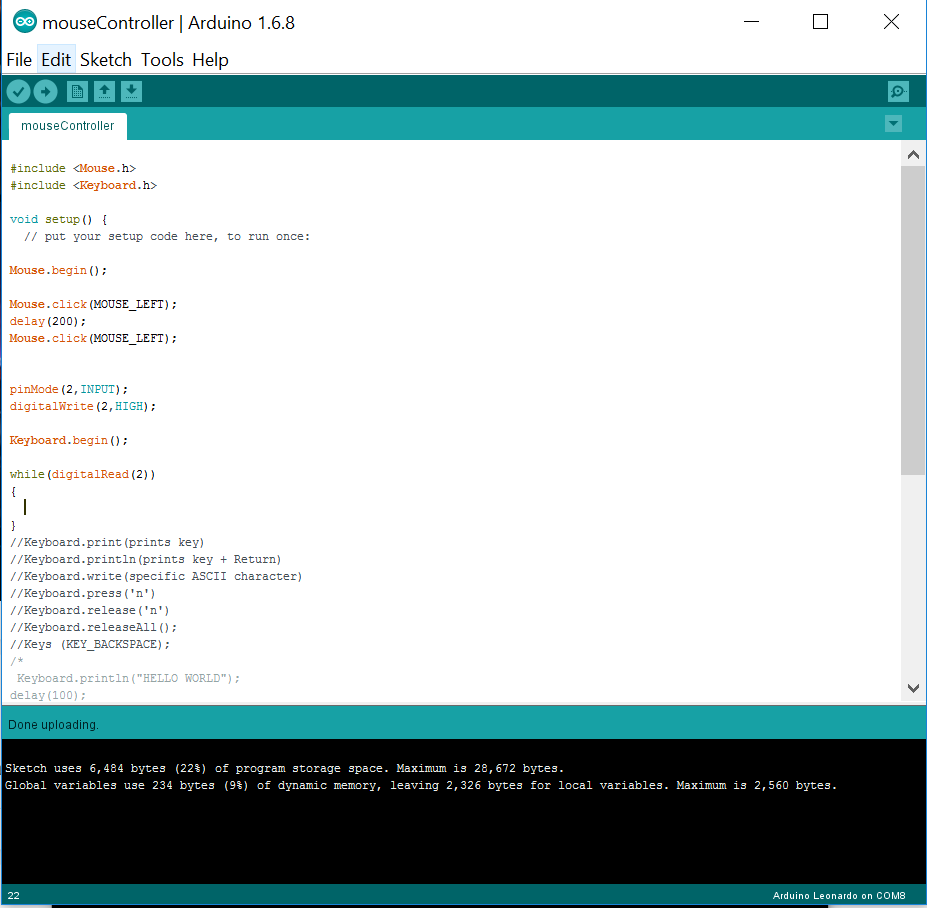
but i did... i attached the screenshot of the serial console and the code i uploaded, here's the same code in text:
#include <Mouse.h>
#include <Keyboard.h>

void setup() {
  // put your setup code here, to run once:

Mouse.begin();

Mouse.click(MOUSE_LEFT);
delay(200);
Mouse.click(MOUSE_LEFT);


pinMode(2,INPUT);
digitalWrite(2,HIGH);

Keyboard.begin();

while(digitalRead(2))
{

}
//Keyboard.print(prints key)
//Keyboard.println(prints key + Return)
//Keyboard.write(specific ASCII character)
//Keyboard.press('n')
//Keyboard.release('n')
//Keyboard.releaseAll();
//Keys (KEY_BACKSPACE);
/*
 Keyboard.println("HELLO WORLD");
delay(100);
Keyboard.press(KEY_RETURN);
delay(100);
Keyboard.println("I AM ALIVE");
delay(100);
Keyboard.press(KEY_RETURN);
delay(100);
Keyboard.write(48);
delay(200);
Keyboard.press(KEY_BACKSPACE);
delay(2000);
Keyboard.releaseAll();
 */


}

void loop() {
  // put your main code here, to run repeatedly:

}
so make myself clear again: i can upload sketches successfuly! but i want to activate or run the sketch uploaded at a later time using the serial monitor, once that sketch is successfuly uploaded i want to run it as many times as i can using my PC and not a physical connection on the breadboard, thank you.
mouseController.ino (828 Bytes)
output.txt (40.8 KB)
AdanChristo:
I believe i did not make myself clear, i can upload my sketch into Leonardo, but i want to run that sketch using a serial terminal, the problem lies when i connect serially, nothing shows up and i cant enter anything.WHAT I WANT: RUN SKETCHES STORED IN LEONARDO USING SERIAL MONITOR!
A leonardo is not a computer with an OS, a file system, and a bunch of binaries that you can run. As soon as you upload a sketch, that sketch is running and that sketch "owns" all the pins and the serial port. You may as well try to putty into your pho - ok, bad example. Your kitchen blender. Your washing machine. Yes, they have microprocessors. This doesn't mean that they are running linux.
If your sketch outputs stuff to the serial, then puTTY should be able to see it. You won't get a unix prompt. You'll get whatever your sketch spits out.
void setup() {
  Serial.begin(9600);
}

void loop() {
  Serial.println("Hello, world!");
  delay(500);
}
Explain to putty that there's 9600 baud coming in on the USB (not sure how that all works, to be frank) and you'll see a string of "Hello World!"s.
If you want a arduino with binaries and stuff on it, you want a Yun.
Ok ill take your answer, it makes sense. Now.. what work-around do you recommend? what if i can use a Yun to control Leonardo, is that possible? instead of using Leonardo as an OS, why not use a more advanced Arduino to do it, but how?
AdanChristo:
so make myself clear again: i can upload sketches successfuly! but i want to activate or run the sketch uploaded at a later time using the serial monitor, once that sketch is successfuly uploaded i want to run it as many times as i can using my PC and not a physical connection on the breadboard, thank you.
It doesn't work that way. A sketch runs and stays running continuously. You can't (easily) re-run the sketch. What you can do is write a sketch that does a thing whenever another thing happens. Whenever a button is pressed. Whenever a sensor goes 'ping!'. Whenever it gets a specific string coming in on the serial port.
So strip your setup() of everything except initialization (pinmode, mouse/keyboard begin), put the stuff you want to happen in a function called "stuff I want to happen", and write another function called "should I do the thing?".
void setup() {
  one-time setup;
}

void loop() {
  if(I_should_do_the_thing()) // does the thing when 'YES\n' from puTTY
    do_the_thing();
}

boolean I_should_do_the_thing() {
  if there's stuff coming in on serial, add it to my serial buffer.

  boolean match = strcmp(serial buffer, "YES\n"); // YES and line break

  if the character at the end of the serial buffer is a line break
    clear the buffer

  return match;
}

void do_the_thing() {
  the thing goes here.
}
omg you are a live saver! however, i got just 1 error:
'serial' was not declared in this scope
therefore, i cant compile,
codeToRun.txt (627 Bytes)
AdanChristo:
omg you are a live saver! however, i got just 1 error:'serial' was not declared in this scope
therefore, i cant compile,
Cause what PaulMurrayCbr wrote was pseudocode.
You should probably take some steps backward, and learn a few of the basic example sketches.
ChrisTenone:
Cause what PaulMurrayCbr wrote was pseudocode.
You should probably take some steps backward, and learn a few of the basic example sketches.
Yup.
The arduino will do what you want it for, by the sounds of it. But now you need to learn to program. You don't need a black-belt, but you'll need an orange or yellow.
Look through the example sketches. Play with them - put in different numbers, see what happens.
This C++ tutorial contains a fair bit of stuff that doesn't apply on the Arduno, but as Chris points out, if you entered my code into the IDE and expected it to work, then you need to learn the basics of the language.
@AdanChristo, if you are a complete beginner to Arduinos you will probably find things easier with an Uno [or Mega or Mini or Nano] which don't use the Atmega 32U4 MCU and behave more simply in conjunction with a PC.
...R
C/C++ symbolic names cannot contain spaces:
strcmp(serial buffer, "YES\n");