Oh not to mention, that I did the test on the same core, and with RTOS you can fully use the second core as well.
I tried it, did not get 12million on both counters, but like 10-11 on both.
I would say in a realistic scenario RTOS would be like 50+ x times faster.
No the tasks have all their own watchdog task.(If you want, and you should)
You see that in the tasks, I use add_watchdog_task or something.
I removed them in the working version, I posted last, and left onlx the main wdt task, so your program runs smoothly.
and of course, you can improve the performanceCounter by a lot, by making the printout every 1000ms a task by itself, and other stuff. you can get to 40million a sec.(chatgpt found that one)
But that is not the point, since the point is to:
"count the work that can be done, after all other tasks have done their thing"
Also next I think I implement the perfcounter into my printAllignedArray, and let the score calculate for the past second, when it is called.
So meaning, when I add performance counter print manually into the code,(not every 1000ms automatically) the score will work the same. And by using it 1/x and inverted mapping into 0-100, I can get a CPU counter from 0-100. 100 = full performance left, 0 = no performance left.
Not so. The performance_lastResetTime += performance_period; type of statements ensures each "task" repeats with the given period (there may be some jitter—taking longer one period and shorter the next—if an iteration of the loop takes more than a millisecond to complete). Then again, the same thing can happen with separate tasks in an RTOS if you use cooperative multitasking and a task takes more than a millisecond to yield. But at least the average rate will be what you ask for.
I tested the code in Wokwi (RTOS vs Superloop performance - Wokwi ESP32, STM32, Arduino Simulator) (this has my suggested changes of using ticks rather than milliseconds and accumulating ticks rather than losing ticks). I found that the small task overruns its 1 ms time slot by a lot. It executes a lot more times in the superloop version than in the RTOS task version (about 3 times as many times). That definitely can account for the large difference in "performance" between the two. It might be instructive to check how many times the small task runs in a second and then either scale down the number of iterations from 1000 to something smaller like 100 or increase the period of the small task.
The performance of the RTOS also changed (increased) if I included a vTaskDelay(1) at the beginning of task_biggerTask's loop (otherwise it's busy-waiting which sort of defeats the purpose of using tasks).
Once I got the small task under control and added vTaskDelay(1) to task_biggerTask, the superloop and RTOS task versions both had very similar "performance" figures.
Note: at least in Wokwi, portTICK_PERIOD_MS is 1, meaning 1 tick == 1 millisecond, so there's no penalty for multiplying anyway. But it still makes sense to use ticks in case they're not equal so that wraparound of the tick counter is properly handled.
In the first bit of code, the "meat" of your "minor task" (printing "." periodically) is executed once each time the task is run (since things are simple, this is probably every "scheduler tick" - 1 or 10ms or whatever.)
In the second bit (super-loop), you're doing the same check every time through the "while (1)" loop. For each of three timers. So essentially your super-loop does 3x the computation each time through its loop, compared to the loop in task_performance()
3x less computation means = 3x faster.
Once again, you have a "performance metric" that doesn't really mean anything.
Hello westfw.
I have never forgotten this thread and everybody in it, especially you with that trippy hair 
I have not made one more programming thread after that one here. I did not needed it.
It probably was even one of the firsts here.
So I come back of nostalgia, and I bring gifts...lol. Or the promise of gifts 

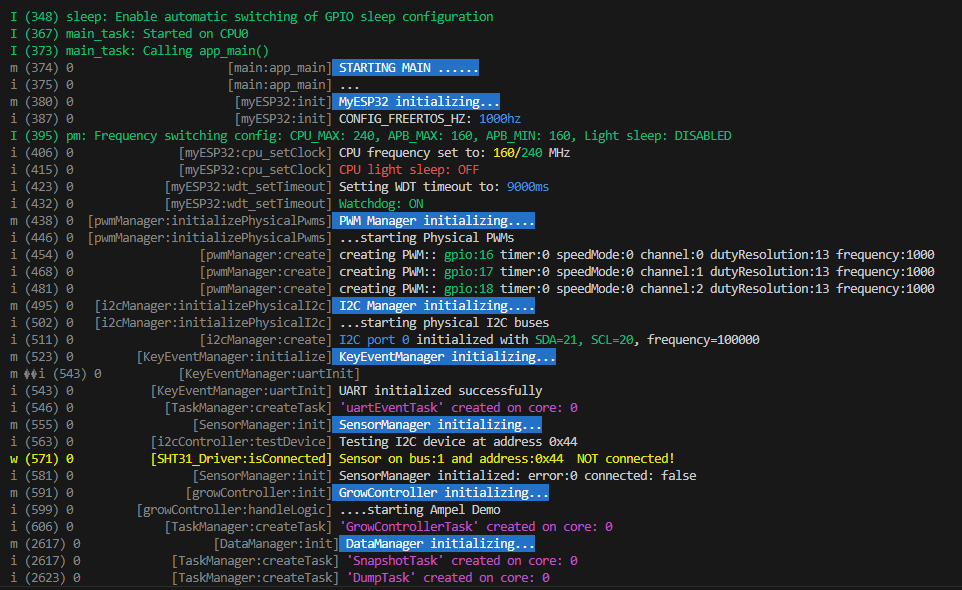
I wanted to make a toolkit for me, to use in all projects.
There is a performance test if you scroll down, that shows what's possible with good design.
And yet VERY simple.
Well it's kinda really good, and I thought I offer it here for you, or to have a first impression, if that is something that people would use.
No globals, only instances. All hidden away. You only need the board.json of your esp32 and the physical GPIOS pins for your hardware.
All hardware stuff is ready to use behind myEsp32. No restricting functionality like arduino, yet even simpler. Because the whole project guides you with excellent step by step. The good thing, you can use it, but don't have too.
If you don't wanna use/see, you don't see. Will take no resources except memory.
It's pretty big already.
But has i2c, gpios, pwm, keyEventManager, TaskManager,.....ah see yourself:
(don't even fit all)
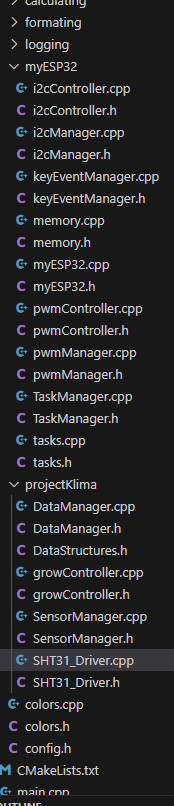
But I should stop talking, just made a topic, if you wanna have a look.
I went to school hard with AI, and switched to esp-idf the first week I learned arduino,
and I wanted to learn to meta-structure bigger stuff.
And yes, RTOS is really easy. And a comparison with timechecks is not even fair.
I have not used one timecheck in 5k lines.
Most stuff follows SRP(Single responsibility principle), is isolated and has extensive dokumentation.
All basic functionality accessible with two commands for a pwm for example.
pwm.get
pwm.DoyourStuff
And probably faster than what 90% are using here(not sure though, feedback is welcome)
A noob would be able to make his first bigger programm, only board.json needed.
Or course if sensors are used that I have not written a driver for, then he must look for a lib.
That's all. The rest is "Malen nach Zahlen" ("Drawings with numbers") Very easy.
First before I send you to sleep with the wall of text, here a performance test.

----------------------------------------------------------------------------------------------
quick performance test(was done in 5 minutes)
----------------------------------------------------------------------------------------------
-read all 4 sensors.
-DataManager makes systemsnapshot (pulls from the different modules (4 sensor readings from SensorManager, systemerrors(There are no so far), controlData, statuses from other modules, etc).
-DataManager gives the snapshot to Growcontroller, who controls climate via hardware components of myEsp32.(Growcontroller is NOT part of the package, this is user level of course, cause not everybody programs Growcontroller)(But I leave it in, as example)
Growcontroller gives the snapshot back with the control data of the pwm in the snapshot.
Snapshot in, snapshot out. DataManger has way too many Buffers(no seriously needed lol) and saves and lazy loads history data from flash/sdCard.)*
This is done in binary and aligned in memory. Fslittle.(Oh shit, that is maybe one external tool I used, not sure the definition)
Power outage during writing to flash or sd card is no problem. All is handled and safe.
All while serial monitor is buzzing, the user also spams a key on the usb keyboard and sends it to the program and prints. While every few seconds, main and other components prints all tasks and stats.
-This loop is ALL done 1000 times per second, and the cpu 0 is over 90% idle!, and cpu 1 100% idle
----------------------------------------------------------------------------------------------
quick performance test End
----------------------------------------------------------------------------------------------
No optimization done yet. For example I know I will kill mutex and go atomic.
But mutex is first for practice, so I understand Pros and cons better.
Oh and yes: Definitive a case of premature optimization. 
But I refuse to write slow code, it's not even slower or more complicated, at least not with this toolset.
Now a few words to the old things discussed(For completeness)
I still use it, and perfected it even further. Now the log shows in every line how busy the cpu was from last log line, to this. For the ones who love times instead: The log lines also show the systemtime delta proportional in color*(either static color ranges, or dynamically predicted by an integrated transformer neural network per gradient descent)*
The last one was obviously a jo -ke, it's just a stupid algorithm not yet implemented.
...the systemtime delta proportional in color,
so that you can see easily see how much time passed.
This performanceCounter is even more usefull then I thought.(Without writing a single line, constant measurement totally in the background)(Not in screenshot, switched to seconds ticker for stresstest.)
Of course nothing beats real measurement tools, but that's the point, you need to actively do it. With the above, you spot things you did not even know you wanna spot.
And the true power comes the more complicated things get. Especially with RTOS and multithreaded. But this is not the point, some has to see to believe.
(To be honest this is really not important at all)
And the "." thing you mentioned....
Come on... I am aware how long prints take, this was for debugging and counting it visually.
I have always many versions, and I stitched it together with C&P, you know how it is.
My goal was not to make a program, but learn.
I know you are more of a critic. But maybe that's what's needed 
Maybe you say, that I should just program for me, because people won't even look at it. Not sure, have never made anything public.
But in making it as easy as possible for others, I make it also easy for me.
Hi christoph. You are a curious one I like it.
Superloops can be made without the expensive time checks.
...
well see the performance test section above.
This is integrated in a 5k lines project so far.
I will make public, maybe something for you.