The RS-232 level Rx and Tx lines could still be swapped around, depending on how the cable is wired.
That module does not have Rout and Tin markings, so exactly how do you have it connected?
to do a basic RS232 test I use the following code on a Mega
// Arduino Mega serial1 test

// mega Serial1 pin 18 is Tx
//      Serial1 pin 19 is Rx
// for loopback test connect pin 18 to pin 19

// for RS232 shield connect
// Mega pin 18 TXD to TTL/RD232 Tx
// Mega pin 19 RXD to TTL/RS232 Rx
// for loopback test connect 9-pin D_type connector pins 2 Tx to 3 Rx (pin 5 is GND)
// connect GND pins together and VCC to 5V

void setup() {
  Serial.begin(115200);  // initialise serial monitor port
  Serial1.begin(9600);  //115200);  // initialise Serial1
  Serial.write("Arduino Mega Serial1 test -  for loopback test connect pin 18 to pin 19\n");
  Serial.write("RS232: Mega pin 18 TXD to TTL/RD232 Tx and pin 19 RXD to TTL/RS232 Rx\n");
  Serial.write("RS232 - loopback connect 9-pin D-type pin 2 Tx to pin 3 Rx\n");
}

void loop() {
  if (Serial1.available()) {  // read from Serial1 output to Serial
    Serial.write(Serial1.read());
  }
  if (Serial.available()) {  // read from Serial outut to Serial1
    char inByte = Serial.read();
    //Serial.write(inByte);     // local echo if required
    Serial1.write(inByte);
  }
}
initially connect Mega pins 18 and 19 to form a loopback test - characters entered on serial monitor are echoed back to be displayed
if that work connect to Mega to the TTL/RS232 module
// Mega pin 18 TXD to TTL/RD232 Tx
// Mega pin 19 RXD to TTL/RS232 Rx
// connect GND pins together and VCC to 5V
to test the TTL/RS232 module connect 9-pin D_type connector pin 2 Tx to pin 3 Rx to form a loopback test - characters entered on serial monitor are echoed back to be displayed, e.g. a run gave
Arduino Mega Serial1 test -  for loopback test connect pin 18 to pin 19
RS232: Mega pin 18 TXD to TTL/RD232 Tx and pin 19 RXD to TTL/RS232 Rx
RS232 - loopback connect 9-pin D-type pin 2 Tx to pin 3 Rx
test1 of Mega Serial1 to RS232 loopback
test2 01234567890
test3 abcdefghijklmnopqrst
if that works connect the TTL/RS232 module to the target RS232 device
9pin D-type female connector pin 2 Tx, pin 3 Rx and pin 5 is GND (the pins are usually numbered but difficult to read)
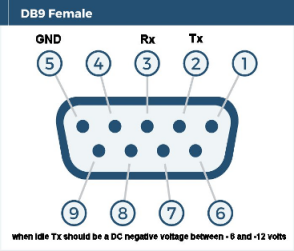
if you have a multimeter pin2 Tx should be between -6 and -12 Volts (logic 1 level when idle)
if the target RS232 has a male 9-pin D-type connector (using a multimeter pin 3 should be between -6 to - 12 volts) you can usually plug it directly into the TTL/RS232 module
if the target has a female 9-pin D-type connector (using a multimeter target pin 2 should be between -6 to - 12 volts) you usually cross connect pins 2 and 3 to pin 3 and 2 of the TTL/RS232 module, e.g. Mega connected to a Quectel EC21 modem communication at 9600baud

a run gave
at
OK
at+cgmi
Quectel
OK
at+cgmm
EC21
OK
at+csq
+CSQ: 20,99
OKOK
at+cimi
+CME ERROR: 3

at_cimi fails because a SIM is not fitted
if you have other connectors or trailing leads check the voltages - the target Tx signal should be between -6 and -12volts - connect to pin 3 of the TTL/RS232 connector and the target Rx to pin 2 of the TTL/RS232 connector
1. Chech that the connection among RS232 Port of Radar, RS232-TTL Module, and MEGA aggrees with Fig-1.

Figure-1:
2. Uplaod the following skecth in MEGA and post the message that you are seeing on the Serial Monitor ar Bd = 115200.
void setup()
{
     Serial.begin(115200);
     Serial1.begin(115200);
}

void loop()
{
    byte n = Serial1.available();
    if(n != 0)
    {
           char y = Serial1.read();
           Serial.print(y);
    }
}
Thank you so much to all of you it has been worked.
Glad you got it working
Have a nice day!