Stuck with NRF24 modules

Hi, I need your help! I have 2 NRF24L01 modules: 1st is connected to the Arduino Nano Every board and works as a transmitter. Here is the wiring:
GND -> GND
3.3V -> VCC
D9 -> CE
D10 -> CSN
D13 -> SCK
D11 -> MOSI
D12 -> MISO
100 uF capacitor -> VCC and GND pins on NRF24 module

Here is the code for the transmitter:

#include "SPI.h" 
#include "RF24.h" 
#include "nRF24L01.h" 

#define CE_PIN 9 
#define CSN_PIN 10 
#define INTERVAL_MS_TRANSMISSION 250 

RF24 radio(CE_PIN, CSN_PIN); 

const uint64_t my_radio_pipe = 0xE8E8F0F0E1LL;

//NRF24L01 buffer limit is 32 bytes (max struct size) 
struct Data_to_be_sent { 
	 byte xVal; 
}; 

Data_to_be_sent sent_data; 

void setup() 
{ 
	 Serial.begin(115200); 
	 radio.begin(); 
	 //Append ACK packet from the receiving radio back to the transmitting radio 
	 radio.setAutoAck(false); //(true|false) 
	 //Set the transmission datarate 
	 radio.setDataRate(RF24_250KBPS); //(RF24_250KBPS|RF24_1MBPS|RF24_2MBPS) 
	 sent_data.xVal = 0101;
	 radio.openWritingPipe(my_radio_pipe); 
} 

void loop() 
{ 
	radio.write(&sent_data, sizeof(Data_to_be_sent)); 
	delay(INTERVAL_MS_TRANSMISSION); 
} 

2nd module is connected to the Arduino UNO R3 and works as a receiver. Wiring is identical to the 1st module. 100uF capacitor is also present. Here is the code:

#include "SPI.h" 
#include "RF24.h" 
#include "nRF24L01.h" 

#define CE_PIN 9 
#define CSN_PIN 10 

RF24 radio(CE_PIN, CSN_PIN); 

const uint64_t pipeIn = 0xE8E8F0F0E1LL;

//NRF24L01 buffer limit is 32 bytes (max struct size) 
struct Received_data { 
	byte xVal;
}; 

Received_data received_data; 

void setup() 
{ 
	 Serial.begin(115200); 
	 radio.begin(); 
	 //Append ACK packet from the receiving radio back to the transmitting radio 
	 radio.setAutoAck(false); //(true|false) 
	 //Set the transmission datarate 
	 radio.setDataRate(RF24_250KBPS); //(RF24_250KBPS|RF24_1MBPS|RF24_2MBPS) 

	 radio.openReadingPipe(1, pipeIn); 
	 radio.startListening(); 
} 

void loop() 
{ 
	if(radio.available()){
		radio.read(&received_data, sizeof(Received_data));
		Serial.println(received_data.xVal);
	}
	else{
		Serial.println("no");
	}
} 

I assume both modules are working, because I ran this code on both of them:

#include <SPI.h>
#include <RF24.h>
#include <printf.h>

RF24 radio(9, 10);

byte addresses[][6] = {"1Node", "2Node"};

void setup(){
  radio.begin();
  radio.setPALevel(RF24_PA_LOW);

  radio.openWritingPipe(addresses[0]);
  radio.openReadingPipe(1, addresses[1]);
  radio.startListening();

  Serial.begin(9600);
  printf_begin();

  radio.printDetails();
}

void loop(){

}

And got this output:

EN_AA		= 0x3f
EN_RXADDR	= 0x02
RF_CH		= 0x4c
RF_SETUP	= 0x03
CONFIG		= 0x0f

Also the isChipConnected() function returns 1 on both of the modules.

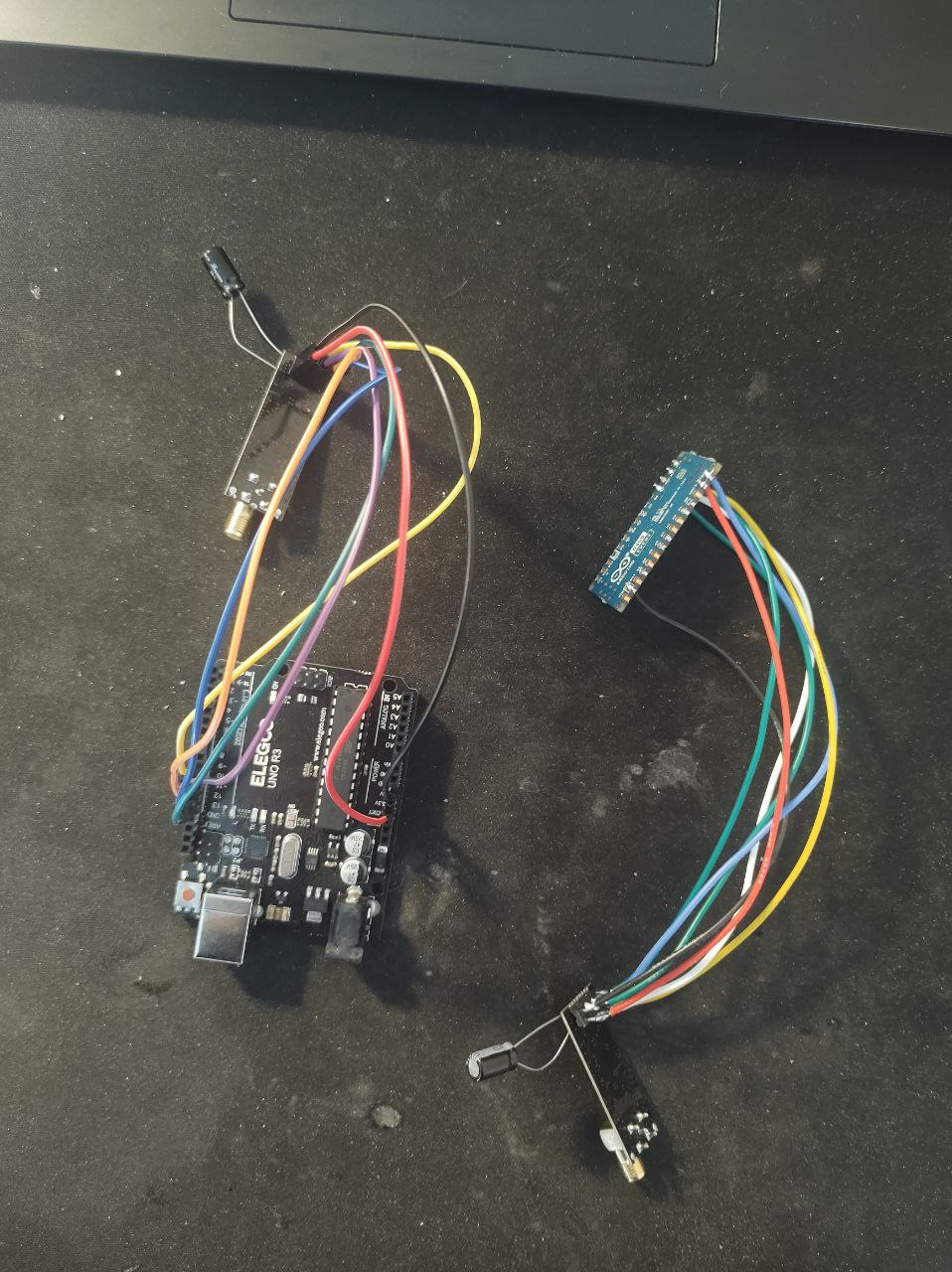
The problem is that when I upload my sketches and trying to receive some data, the if(radio.available()) method returns false and I don't see needed data in the Serial monitor. I don't really know what's the problem, I tried different NRF24 modules and checked my wiring several times. Here is the picture of wiring:

I moved your topic to an appropriate forum category @pastt0r.

In the future, when creating a topic please take some time to pick the forum category that best suits the subject of your topic. There is an "About the _____ category" topic at the top of each category that explains its purpose.

This is an important part of responsible forum usage, as explained in the "How to get the best out of this forum" guide. The guide contains a lot of other useful information. Please read it.

This is the second time this week I've had to ask you to do this. Please pay attention to what I am writing and be careful to be more responsible in your use of Arduino Forum in the future. If you won't respond to polite requests then I will be forced to give you account suspension to get your attention. I don't want to do that, and I'm sure you don't want that either.

Thanks in advance for your cooperation.

Hi @pastt0r. Are you still using the same NRF24L01 module you were using when your other Nano Every board burned?:

It is possible the conditions that damaged the Nano Every also damaged the NRF24L01 module that was connected to the board at the time.

Hi @ptillisch. No I'm not, I took a different one

1 Like

It looks like you are trying to power the radios right from the Arduinos, that typically doesn't work well.

Typically if you are getting good output from printDetails() it means you have good SPI communication.

If you can't transmit while that is OK, double check your CE pin is correct.

If that is OK, try calling radio.setPALevel(RF24_PA_MIN,0); on both devices. This disables the LNA & sets the PA to minimum power.

2 Likes

hi @TMRh20 . I added radio.setPALevel(RF24_PA_MIN,0); to my sketches but it didn't help. radio.begin() returns true in both sketches. printf_begin() & radio.printDetails() are show this output: SPI Speedz = 10 Mhz STATUS = 0x0e RX_DR=0 TX_DS=0 MAX_RT=0 RX_P_NO=7 TX_FULL=0

I can't remember what state the radios are in by default.

Have you tried calling radio.stopListening() after opening the writing pipe?

Yes, I just tried it, but it didn't help

everytime radio.available() returns false. Is there any way to check if I actually send any data?

On some of the NRF modules with a PA, the setPALevel() setting makes little difference to the transmit power output and thus current consumption.

Some of the PA NRF modules use el-cheapo components where you dont actually have control of the power output.

You need a known working receiver ...........

Or a spectrum analyzer or an SDR which might suggest at least an RF output............

Even if the internals of the NRF think on a digital basis if data has been sent, that does not mean there has been any actual RF output.

hi @srnet, is there any way to check if my receiver is working?

Of course, you need a known working NRF transmitter.

ok, what could possibly be wrong then? I mean, sketches look good, so maybe problem in arduino boards? or I need a different capacitor(currently I have 100uF)?

Faulty modules.

Some time back I checked some NRF24 modules I had, 16 maybe, It took me a while to get a working TX and RX pair.

Once I did that I could work out that around 50% of the NRF24 modules I had did not work, such are the many benefits of low cost modules from the far East, maybe.

okay, thank all of you very much

This topic was automatically closed 180 days after the last reply. New replies are no longer allowed.