i couldnt find the code here
can you please copy paste the code here
Could you answer my question from post #16 please
What values does it give you?
Then maybe I can help
No, if you want to learn something, you have to try it yourself, there are code examples on the link I've sent you. Cheers.
Yes you were right but when i used your code that you provided me it is showing me out of range in my output .
OK, this is the bare minimum code to see if it works. You should see a number that increments by 1 and the duration.
If you get 0 or some big number for duration, or the number stops incrementing, then something is wrong with your sensor. Recheck the wiring
const int TRIG_PIN = 3;
const int ECHO_PIN = 2;
long i=0;

void setup() {
  pinMode(TRIG_PIN, OUTPUT);
  pinMode(ECHO_PIN, INPUT);
  digitalWrite(TRIG_PIN, LOW);
  Serial.begin(9600);
}

void loop() {
  unsigned long duration;

  digitalWrite(TRIG_PIN, HIGH);       // Set trigger pin HIGH
  delayMicroseconds(20);              // Hold pin HIGH for 20 uSec
  digitalWrite(TRIG_PIN, LOW);        // Return trigger pin back to LOW again.
  duration = pulseIn(ECHO_PIN, HIGH); // Measure time in uSec for echo to come

  Serial.print(i);
  Serial.print("      ");
  Serial.print(duration);
  Serial.print(" uSec");
  Serial.println();
  delay(500);  // Delay between readings
}ok let me check sir if its working or not
No hurry

Were you moving your hand in front of he sensor to see if it would change?
It will give you around 39000 if nothing is in front of the sensor
I forgot to increment "i"
Add i++; after the delay statement.
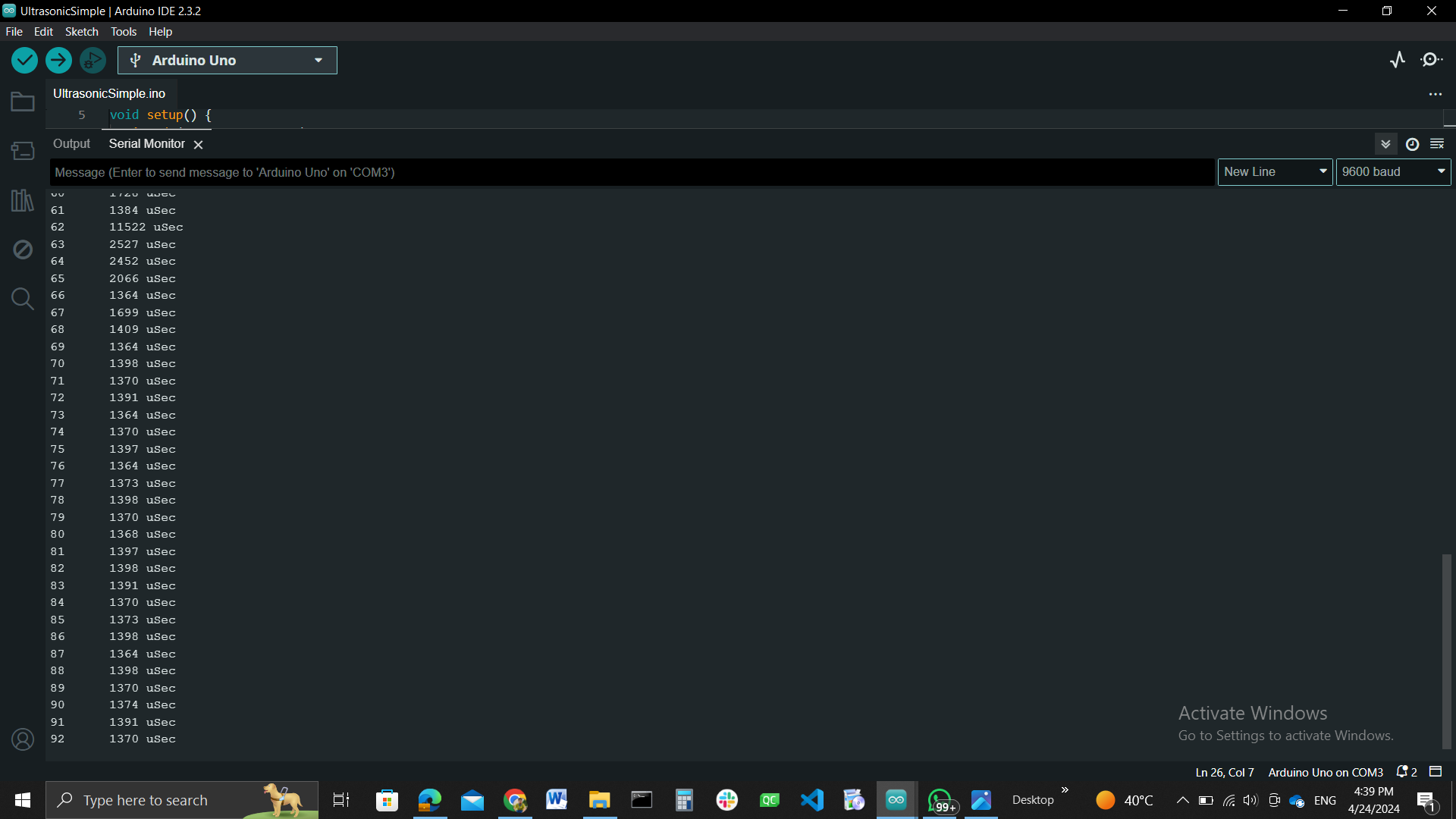
So it looks like it is working OK.
So now I'm not sure why the other code that computes distance is not working
Let me check
yes sir its working , please have a look , i am also re-verifying the code
Look at what?
There is nothing wrong with the other code that computes distance
Is it working or do you still need help?
i am providing you a code please have a look and understand what the requirement is and please check whether this could be used or not
#include <NewPing.h>
#include <MedianFilter.h>
#include <Wire.h>
#include <LiquidCrystal_I2C.h>

#define TRIGGER_PIN  2  // Arduino pin tied to trigger pin on the ultrasonic sensor.
#define ECHO_PIN     3  // Arduino pin tied to echo pin on the ultrasonic sensor.
#define RELAY_PIN    13 // Arduino pin tied to the relay.

#define MAX_DISTANCE 50 // Maximum distance we want to ping for (in centimeters).
                         // Maximum sensor distance is rated at 400-500cm.

NewPing sonar(TRIGGER_PIN, ECHO_PIN, MAX_DISTANCE); // NewPing setup of pins and maximum distance.
MedianFilter filter(31, 0);
LiquidCrystal_I2C lcd(0x27, 16, 2); // I2C address 0x27, 16 columns, 2 rows

void setup() {
  Serial.begin(115200); // Open serial monitor at 115200 baud to see ping results.
  lcd.init(); // Initialize the LCD
  lcd.backlight(); // Turn on backlight
  pinMode(RELAY_PIN, OUTPUT); // Set relay pin as output
}

void loop() {
  delay(50); // Wait 50ms between pings (about 20 pings/sec). 29ms should be the shortest delay between pings.
  unsigned int uS = sonar.ping(); // Send ping, get ping time in microseconds (uS).

  filter.in(uS);
  int o = filter.out();

  int distance_cm = o / US_ROUNDTRIP_CM; // Convert ping time to distance in cm
  int percentage = map(distance_cm, 0, MAX_DISTANCE, 100, 0); // Map distance to percentage

  lcd.clear(); // Clear the LCD screen
  lcd.setCursor(0, 0); // Set cursor to the first column of the first row
  lcd.print("Distance: ");
  lcd.print(distance_cm);
  lcd.print("cm");

  lcd.setCursor(0, 1); // Set cursor to the first column of the second row
  lcd.print("Percent: ");
  lcd.print(percentage);
  lcd.print("%");

  Serial.print("Distance: ");
  Serial.print(distance_cm);
  Serial.println("cm");

  Serial.print("Percent: ");
  Serial.print(percentage);
  Serial.println("%");

  // Check if the water level is below 10%
  if (percentage < 10) {
    digitalWrite(RELAY_PIN, HIGH); // Turn on the motor
    lcd.setCursor(0, 3); // Set cursor to the first column of the fourth row
    lcd.print("Water level low"); // Display message
  } else if (percentage > 90) { // Check if the water level is above 90%
    digitalWrite(RELAY_PIN, LOW); // Turn off the motor
    lcd.setCursor(0, 3); // Set cursor to the first column of the fourth row
    lcd.print("Water level full"); // Display message
  }
}
It did not work with NewPing before.
Are you saying it now works with NewPing?
Look, this way you won't learn anything, focus on one version and add thing step by step, dont jump from one code to another, this is confusing for you and anybody who wants to help...
The main question is : do you want to learn how all this works?
NewPing library already have median filter you don't need external library for this.
Have you tried simple example first and is it working good?
https://bitbucket.org/teckel12/arduino-new-ping/wiki/Home#!simple-newping-sketch
Yes sir it is working but the only problem i am facing is that the minimum distance it could measure is 24 cm of the total height not below that, the distance become constant and when the sensor is touching the water then it is showing 0 cm distance and 100% full , so idk what is the reason behind it but this code works as of now, can you please check and provide me any suggestions
I don't think that sensor can measure less than 21cm
Did you read the data sheet?
No i was unaware of that
thanks for the information
Sir I will provide you a code that I wrote but i want you to check once
The code is working fine with new ping library and the measurements are also there
So the problem is like i am using a relay to control the motor by NO/NC Function so please have a look into it
Thanks