Why does nrf24l01 types only work with the +PA +LNA version?

Hello everyone, hope you are having a good day/night.
Whenever I use this type of nrf24l01 (the one with the antennas) it works:
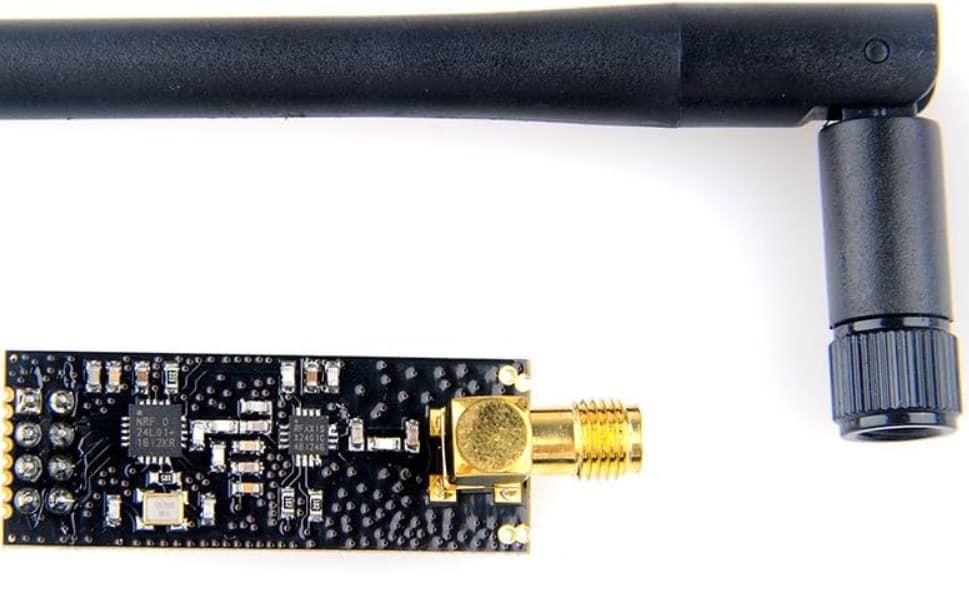

But when I use this type it doesn't work, meaning it does not function, if it is a receiver it just prints out " " (even when the transmitter is off) or if it is a transmitter it does not transmit.

I tried them as receiver and transmitter but they never worked (they don't transmit or receive, because when I switch the nrf24l01 module to the nrf24l01+ PA + LNA it starts working again immediately.
This is my code (transmitter):

//Include Libraries
#include <SPI.h>
#include <nRF24L01.h>
#include <RF24.h>

//create an RF24 object
RF24 radio(9, 8);  // CE, CSN

//address through which two modules communicate.
const byte address[6] = "00001";

void setup() {
  radio.begin();

  //set the address
  radio.openWritingPipe(address);

  //Set module as transmitter
  radio.stopListening();
}
void loop() {
  unsigned int randNumber = random(1, 9999);
  Serial.println(randNumber);
  radio.write(&randNumber, sizeof(randNumber));

  delay(20);
}

This is just the code that receives it. It has nothing to do with what I'm asking I'm just providing it to understand the transmitter code more (the code below is working fine.

#include <SPI.h>
#include <nRF24L01.h>
#include <RF24.h>
#include <Wire.h>
#include <Adafruit_GFX.h>
#include <Adafruit_SSD1306.h>

// Create an RF24 object
RF24 radio(9, 8);  // CE, CSN

#define SCREEN_WIDTH 128  // OLED display width, in pixels
#define SCREEN_HEIGHT 64  // OLED display height, in pixels

// Declaration for an SSD1306 display connected to I2C (SDA, SCL pins)
Adafruit_SSD1306 display(SCREEN_WIDTH, SCREEN_HEIGHT, &Wire);

// Address through which two modules communicate
const byte address[6] = "00001";

void setup() {
  Serial.begin(9600);

  // Initialize RF24 module
  radio.begin();

  // Set the address
  radio.openReadingPipe(0, address);

  // Set module as receiver
  radio.startListening();

  // Initialize OLED display
  if (!display.begin(SSD1306_SWITCHCAPVCC, 0x3C)) {
    Serial.println("OLED initialization failed!");
    while (true)
      ;  // Stop execution if OLED fails
  }
  display.clearDisplay();
  display.display();
}

void updateDisplay(unsigned int data) {
  display.clearDisplay();
  display.setTextSize(2);
  display.setCursor(0, 16);
  display.setTextColor(WHITE, BLACK);  // Avoid full screen clearing to reduce flicker
  display.print("data: ");
  display.println(data);
  display.display();
}

void loop() {
  // Check if RF24 has received data
  if (radio.available()) {
    unsigned int data = 0;
    radio.read(&data, sizeof(data));  // Read as unsigned int
    updateDisplay(data);
  }
}

I even tried using the nrf24l01 adapter that looks something like this:
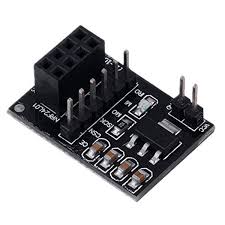

No matter what distance I tried it never worked, and by didn't work I mean it does not transmit or receive anything. I am using room temperature to power the device which is about 28°C or 82°F, I'm using an Arduino nano to control the nrf24l01 modules.

Can You describe the environment for the tests? Distance, clear sight or obstacles between etc?

1 Like

It may be more accurate to say those instances of that type don't work.

There are quite a few places to buy the modules, and paying more one place than another is sadly no guarantee that they will function well, or at all.

I have used the NRF24L01 in a number of projects. The most reliable modules have come frm disused toys…

Never more true is the concept of YMMV.

a7

1 Like

@alto777 and @Railroader please check my edited post.

I tried purchasing the nrf24l01 from about 4 different stores, each costing different prices, yet they all remain the same and don't function at all.

I will, but in geberal it is a better idea not to edit a post beyond fixing typos and such.

It can make trash of the subsequent posts and make ppl look like idiots, though idiots they may well be.

More important as the edited post is further back.

a7

OK, so you use an adapter. Is that all you added? Too much work to see what your edits were all about.

The adapter can make a difference, here it has not.

So maybe don't play the lottery just now. :expressionless:

Srsly, you may just be unlucky. Solve your own problem by spending big on the modules that work for you.

Did you say anything in repsonse to @Railroader very important questions?

Separate the modules by at least two meters. Five would be even better.

a7

Can You describe the environment for the tests?

I am using room temperature to power the device which is about 28°C or 82°F

Distance

No matter what distance I tried it never worked, ranging from almost touching the nrf24l01 to about 5 meters far.

clear sight or obstacles between etc?

I don't find any obstacles in my opinion.

Separate the modules by at least two meters. Five would be even better.

I tried but it still didn't function.

Solve your own problem by spending big on the modules that work for you.

The problem is that I need the small nrf24l01 modules, not the big one. Price is not an issue for me, I spent too much money trying to find one that works.

1 Like

Good luck. Unfortunately, I don't have the time to trace back through posts when they are edited. Edits often change the nature of the problem, which can render previous answers invalid for the revised question.

Have you seen this troubleshooting guide?

I am curious as to whether your small RF24 radios are responsive to SPI commands etc, Are you able to run the included gettingStarted sketch and print out the debugging info per the link I provided on the non-working RF24s?

It tells me:

radio hardware is not responding!!

I even tried adding wrap foil.

That tells me that either you have a wiring problem or the modules are faulty. The radios cannot talk to the Arduino so you will never receive or transmit until that works.
Are you connecting them exactly the same as the working modules? If so I suspect bad hardware.

I switch the small nrf24l01 modules that don't work with the big nrf24l01 + lna + pa at the same time and then it works. So it is not a wiring problem.
If it is a hardware problem, where can I buy good nrf24l01 that function properly. (if it can be from aliexpress that's better)

The best I can recommend is from experience I’ve purchased from Amazon and had good luck. You will have to check out product reviews of people that have had success

Hello everyone, I have found the issue, When purchasing NRF24L01 modules, I have realized that there are mostly 2 types of nrf24l01 modules in Aliexpress even tho the listing says the same thing.
Let me show you the 2 types:
Type 1:


Type 2:
image

Both of them cost the same thing ($1.87$ per piece) even the name for both of them says "NRF24L01 2.4GHz wireless module".
You can see type 1 has white PCB lines while type 2 doesn't.

I have purchased both of them at the same time. And guess what? Type 1 works while type 2 doesn't, the same circuit the same everything but only type 1 worked for me. So I think maybe the problem is that type 2 (the one that wasn't working for me) has different software code or different wiring I don't know.

This topic was automatically closed 180 days after the last reply. New replies are no longer allowed.