I'm using ESP32 Wifi camera (More known as ESP32 CAM) With arduino Uno and Mega boards, I tried every tutorial to make it possible to control this cam with an arduino board but they are all out dated and the error message keeps popping up everytime I try, Note that Im not plugging the ground to the port next to it (port no 100) but instead I plugged it to the arduino Ground port.

I'm sorry, but I don't have access to the specific parts you're using. Could you please provide links to the hardware devices, along with an annotated schematic showing all connections, including power, ground, and power sources? This information will help me assist you more effectively.
1 Like
how are you programming the ESP-CAM, e.g. using a FTDI serial interface esp32-cam-intro, upload-code-esp32-cam-mb-usb module?
1 Like
2 posts were split to a new topic: Compilation fails: "ctags: cannot open temporary file : Permission denied"
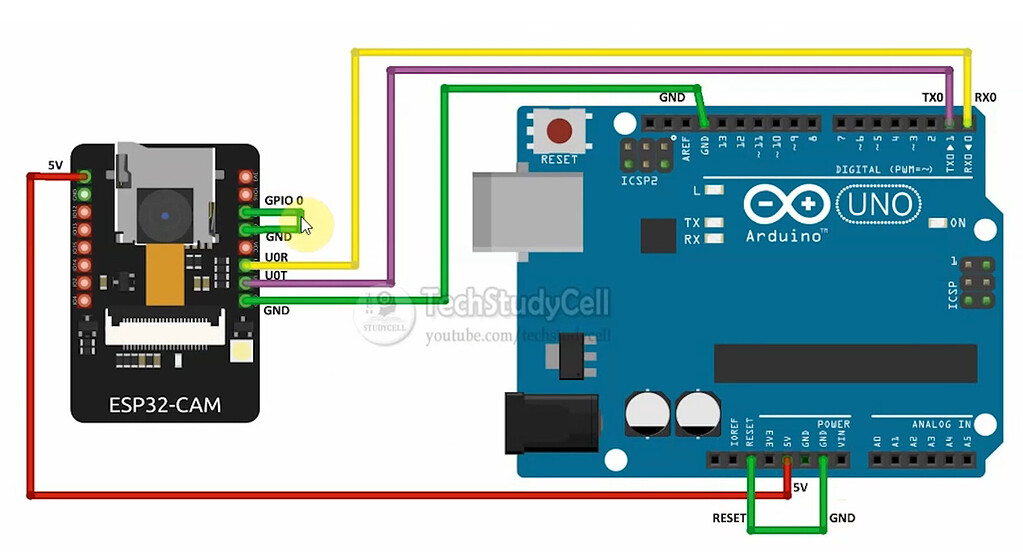
I'm using the arduino Uno/Mega pins RX and TX to connect to the RX & TX pins of the ESP32 Cam, and I'm coding it on the Arduino IDE
Hi @ryderly. The pin marked "GND" on that diagram is not actually the ground pin of the ESP32-CAM. On the silkscreen of some ESP32-CAM boards, this pin is ambiguously marked "GND/R". On other boards it is incorrectly marked "GND".
Move the connection to the "GND" pin next to the "5V" pin and then try uploading again. Hopefully this time it will be successful.
You must use the following procedure to upload to the ESP32-CAM:
- Connect the IO0 pin on the ESP32-CAM to GND.
- Press and release the "RST" button on the ESP32-CAM board.
- Select Sketch > Upload from the Arduino IDE menus.
- Wait for the upload to finish successfully.
- Disconnect the IO0 pin from GND.
- Press and release the "RST" button on the ESP32-CAM board.
This topic was automatically closed 180 days after the last reply. New replies are no longer allowed.