Originally, this thread title was: "(double) read multiple digital pins" but I change it.
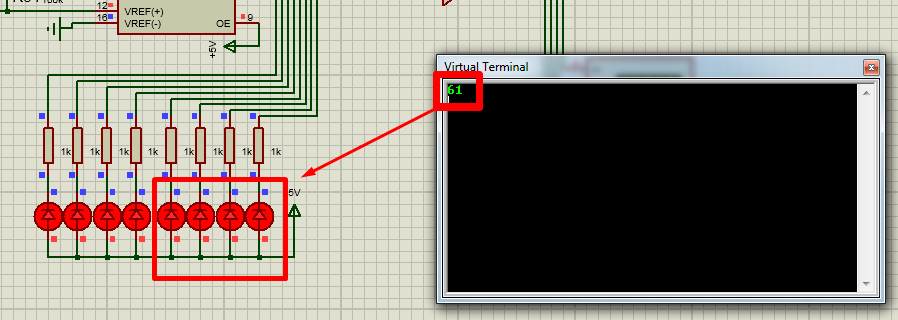
Hello o/ In sumary; I run a program to read some parallel pins in Proteus simulator. When I cycle through the pins, this program reads them, and output to a virtual terminal a response. But sometimes, it is outputting 2 times for the same reading. I put an osciloscope on the sending data pins and NO bouncing or double signal is sent to the arduino inputs. But I can see on the terminal the double results (randomly). So the double output is definitely from the arduino program.
It can be anything, a second pair of eyes is always good. Thank you !
#include "Arduino.h"

void setup() {
Serial.begin(9600);

pinMode(13, INPUT);
pinMode(12, INPUT);
pinMode(11, INPUT);
pinMode(10, INPUT);

}

int pin13State = 0;
int pin12State = 0;
int pin11State = 0;
int pin10State = 0;
int lastpin13State = 0;
int lastpin12State = 0;
int lastpin11State = 0;
int lastpin10State = 0;

bool isNotaccessedAlready=true;

void loop() {

pin13State = digitalRead(13);
pin12State = digitalRead(12);
pin11State = digitalRead(11);
pin10State = digitalRead(10);

isNotaccessedAlready=true;
if (pin13State != lastpin13State || pin12State != lastpin12State || pin11State != lastpin11State || pin10State != lastpin10State)
{
  if(isNotaccessedAlready)
  {
    isNotaccessedAlready=false; // used for possible double readings from the || operators inside this if
    Serial.print(Binaryread());
    Serial.println();

    lastpin13State=pin13State;
    lastpin12State=pin12State;
    lastpin11State=pin11State;
    lastpin10State=pin10State;
    return;
  }
}

}


int sum = 0;
int Binaryread()
{
  sum=0;
  if (digitalRead(13) == HIGH)  sum += 1;
  if (digitalRead(12) == HIGH)  sum += 1;
  if (digitalRead(11) == HIGH)  sum += 1;
  if (digitalRead(10) == HIGH)  sum += 1;
  return(sum);
}


bool IsChanged()//this function is not used in the code anymore
{
  if (digitalRead(13)==LOW || digitalRead(12)==LOW || digitalRead(11)==LOW || digitalRead(10)==LOW)
  return(true);
}
I really don't understand your answer.
Please check the code and see if you spot any possible error from my part. OR come with some tweak of the code I don't know. Thank you.
I think the problem is that you are using return in the loop().
It breaks the whole logic of your program. Remove the return, it is not needed in your code
Probably is harder to see the problem code in this relatively big code. Is not that big though. But here is the problem location:
I believe those OR operators || are read one after another and if let's say [pin12State != lastpin12State], it will perform an entire if statement code execution, then return to the NEXT || operator in line , this time will be [pin11State != lastpin11State], and again, if found !=, it will perform an entire if statement code execution (again).
This is my explanation that I can think of.
isNotaccessedAlready=true;
if (pin13State != lastpin13State || pin12State != lastpin12State || pin11State != lastpin11State || pin10State != lastpin10State)
{
  if(isNotaccessedAlready)
  {
    isNotaccessedAlready=false; // used for possible double readings from the || operators inside this if
....
  }
....
    return;
  }
}
Heh, it works --the same-- with or without it ! Very strange, it is having no impact on the code.
I specifically search for a code break and all I found was the return keyword for -if- statements.
Originally, I didnt include this return and it was doing the same exact thing as now.
After including the return, it is still doing the same thing as before, no change.
Very strange.... right?
that is not a flag.
That is a boolean variable I created. In the hope it will split the potential double code execution inside the if statement from multiple OR || operators.
It is a wild guess, but it didnt work either. It didnt helped. So yes, in a sense, it is useless NOW after I tested it.
int Binaryread()
{
  sum=0;
  if (pin13State== HIGH)  sum += 1;
  if (pin12State== HIGH)  sum += 1;
  if (pin11State== HIGH)  sum += 1;
  if (pin10State == HIGH)  sum += 1;
  return(sum);
}