So i finished a project yestersday and it didnt work because of a mistake in code, Today morning i pluged in my arduino uno to my mac mini and the L led blinked 3 times and then switched off and when i was trying to upload the code the port was not recongnised I connected my arduino nano and it worked perfectly, I am very new to the arduino world and it has not even being 3 weeks since i bought my 2nd brand new arduino uno and I would really appreciate any sort of help.
First step, make sure nothing is connected to the Arduino, just the USB to the PC; then, download the 'blink' example code to see if the Arduino lives. If it doesn't work then, at least you know you don't have to diagnose your external hardware.
1 Like
Your Uno has code previously uploaded... the three blink L LED was the code running.
The last board that you used with "this" computer was your Nano, so it was recognized, and the Uno was not. Sometimes boards are automatically recognized... I rarely have that happen, so I must identify my port and board every time... so...
With your Uno plugged into "this" computer, and the IDE running, select Tools >> Port >> (your Uno port) and Tools >> Board >> (your Uno)... then upload a sketch (I like to use blink.ino, but change the blink rate to recognize that my code uploaded).
Describe your project on detail.
That would be the bootloader
What switched off? The LED or the complete Uno?
What happened with the first one? Did it also no longer work? Or did it go in a project that you did not want to break down.
Yes i have tried ai generated code in that board, and I tried other computer and it didn't work, I tried a different cable same thing happened, i tried it with zero wiring and i tried turning off anti virus did not work, i tried selecting the com port yet there was no port recongnized, i restarted my pc still got nothing, i did download CH340 but did not work , I did try create editor install locations yet when i when to content/Macos/there was no config.ini but just arduino ide excetuble. Thank you for the help.
So I tried to upload the blink code(i have done before this promblem) today but i cant upload it cause it is not recongized by my pc.
So this is the code i uploaded before
#define echoPin 12
#define trigPin 13
#define MotorR1 7
#define MotorR2 6
#define MotorRenable 9
#define MotorL1 5
#define MotorL2 4
#define MotorLenable 3
long duration, distance;
void setup() {
pinMode(echoPin, INPUT);
pinMode(trigPin, OUTPUT);
pinMode(MotorL1, OUTPUT);
pinMode(MotorL2, OUTPUT);
pinMode(MotorLenable, OUTPUT);
pinMode(MotorR1, OUTPUT);
pinMode(MotorR2, OUTPUT);
pinMode(MotorRenable, OUTPUT);
Serial.begin(9600);
}
void loop() {
digitalWrite(trigPin, LOW);
delayMicroseconds(5);
digitalWrite(trigPin, HIGH);
delayMicroseconds(10);
digitalWrite(trigPin, LOW);
duration = pulseIn(echoPin, HIGH);
distance = duration / 29.1 / 2;
Serial.println(distance);
if (distance < 15) {
backward();
delay(150);
rightTurn();
delay(250);
} else {
forward();
}
}
void forward() {
digitalWrite(MotorR1, HIGH);
digitalWrite(MotorR2, LOW);
analogWrite(MotorRenable, 250);
digitalWrite(MotorL1, HIGH);
digitalWrite(MotorL2, LOW);
analogWrite(MotorLenable, 250);
}
void rightTurn() {
digitalWrite(MotorR1, HIGH);
digitalWrite(MotorR2, LOW);
analogWrite(MotorRenable, 0);
digitalWrite(MotorL1, HIGH);
digitalWrite(MotorL2, LOW);
analogWrite(MotorLenable, 250);
}
void backward() {
digitalWrite(MotorR1, LOW);
digitalWrite(MotorR2, HIGH);
analogWrite(MotorRenable, 150);
digitalWrite(MotorL1, LOW);
digitalWrite(MotorL2, HIGH);
analogWrite(MotorLenable, 150);
}
My project is a obstacle avoiding car without a servo motor I am using the L298N motor driver with 2 gear motors and a ultra sonic sensor. I have seperate batter supply i for each the motor driver has a 9v battery and the arduino is connected to a 12v battery, i have connected the 5v in the motor driver to the vin, iwas making it following a tutorial.
The Led switched only switched off the power led in the arduino was working.
My first arduino worked perfectly and I did not wont to remove from the project so i kept it.\
Thank you for the reply!
Please edit your post with the code, select all code, click the <CODE> button to apply so-called code tags and next save your post. It makes it easier to read, easier to copy and the forum software will display it correctly.
Thanks for the description.
Seeing that the IDE no longer recognises the board, I'm afraid that a mistake that you made has damaged the TTL-to-USB converter; I do not know which mistake that is. I'm not a Mac user but you should be able to find out if the Mac itself still recognises the board.
If the Mac does not recognise the board, you have a few options.
- If the TTL-to-USB converter is the 16U2 (square chip closest to the USB connector), you can try to reburn the firmware using a programmer or Atmel Flip. You might be able to revive it.
- Use your Nano as a TTL-to-USB converter. Keep the Nano in reset, connect it to the Uno with GND to GND, TX to TX and RX to RX and upload using the port provided by the Nano (select Uno as the target board, Nano's port as port). Note that there is a risk that you can damage your Nano as well so disconnect everything before performing the operation.
- Use your Nano as a programmer (or buy a programmer like Pololu USB AVR Programmer v2.1) to program the 328P on the Uno directly. Instructions are similar to "burning bootloader" but you use "upload using programmer" to upload your sketch. You will loose the bootloader and the serial functionality. Again, be careful and disconnect everything.
- Throw the board away. Making mistakes while working with anything higher than 5V always gives the risk of damaging your 5V based electronics.
Even if you manage to revive your board, there is a chance that it will be unreliable for the rest of its life.
Would you point me to this tutorial?
I can provide instructions for @navinduwithcars to follow to check this:
 NOTE: These instructions will not solve the problem. They are only intended to gather more information which might provide a clue that eventually leads to a solution.
- Unplug the USB cable of your Arduino board from your computer if it is currently connected.
- Click the Apple logo on the left side of the menu bar at the top of the screen ("Apple menu").
- Select "System Settings..." from the menu.
- A "System Settings" window will open. Click "General" in the menu on the left side of the window.
ⓘ You may need to scroll the menu down to see "General". - Click "About" on the panel at the right side of the "System Settings" window.
- The "About" panel will open. Click the "System Report..." button at the bottom of the panel.
- The "System Information" window will now open. Select Hardware > USB from the tree on the left side of the window.
- Take note of the contents of the "USB Device Tree" panel of the "System Information" window.
- Plug the USB cable of your Arduino board into your computer.
- Select File > Refresh Information from the menu bar.
Do you see any new device appear in the "USB Device Tree" panel of the "System Information" window after doing the last step?
1 Like
so after the wiring should i connect the nano and upload the code as it is a uno?
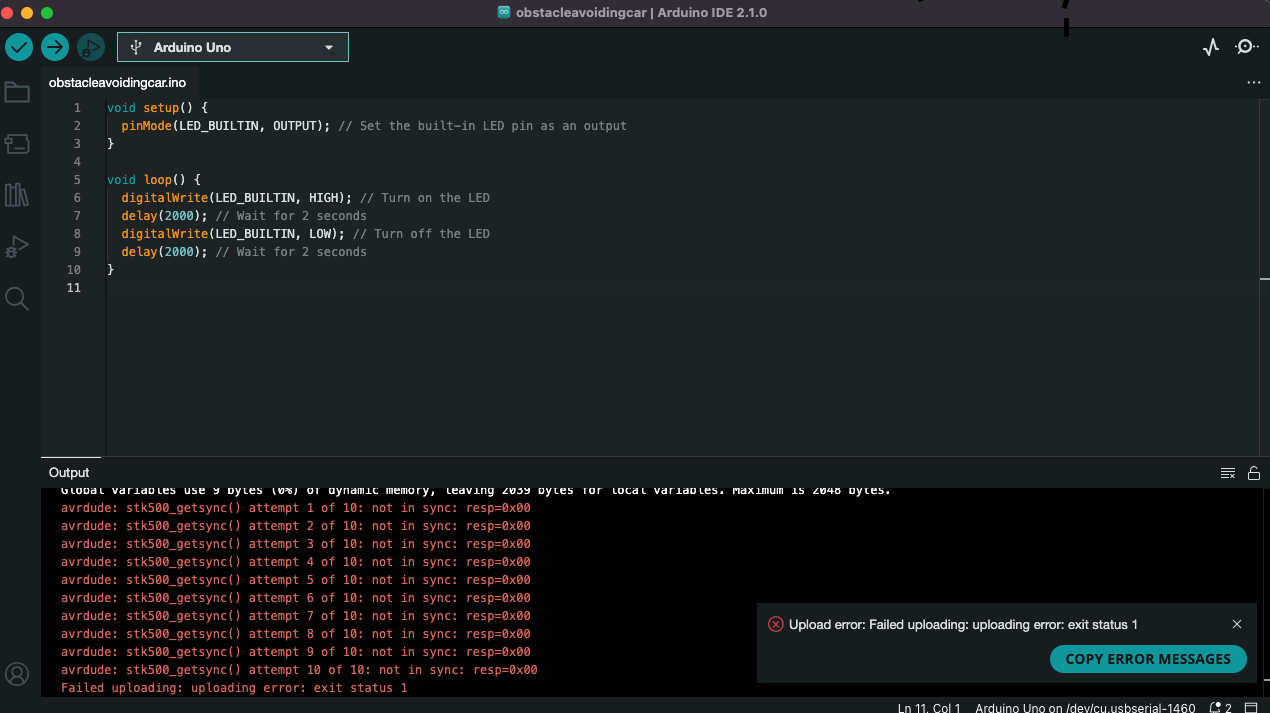
Yes
Note:
1)
I realise a possible pitfall  You need a reset signal from the Nano to the Uno as well. First make sure that you load a blank sketch to the Nano. After that you can connect reset to reset as well.
2)
This will not solve the problem, it's works around the issue that you're experiencing.
thank you so much for the help unfortunatly i am thought of giving up and another question is it possible to make a obstacle avoiding car with a arduino nano without a servo motor cause i am trying it making code i shall make a diiferent blog on that
An Uno and a Nano use the same processor so whatever can be done with an Uno can be done with a Nano.