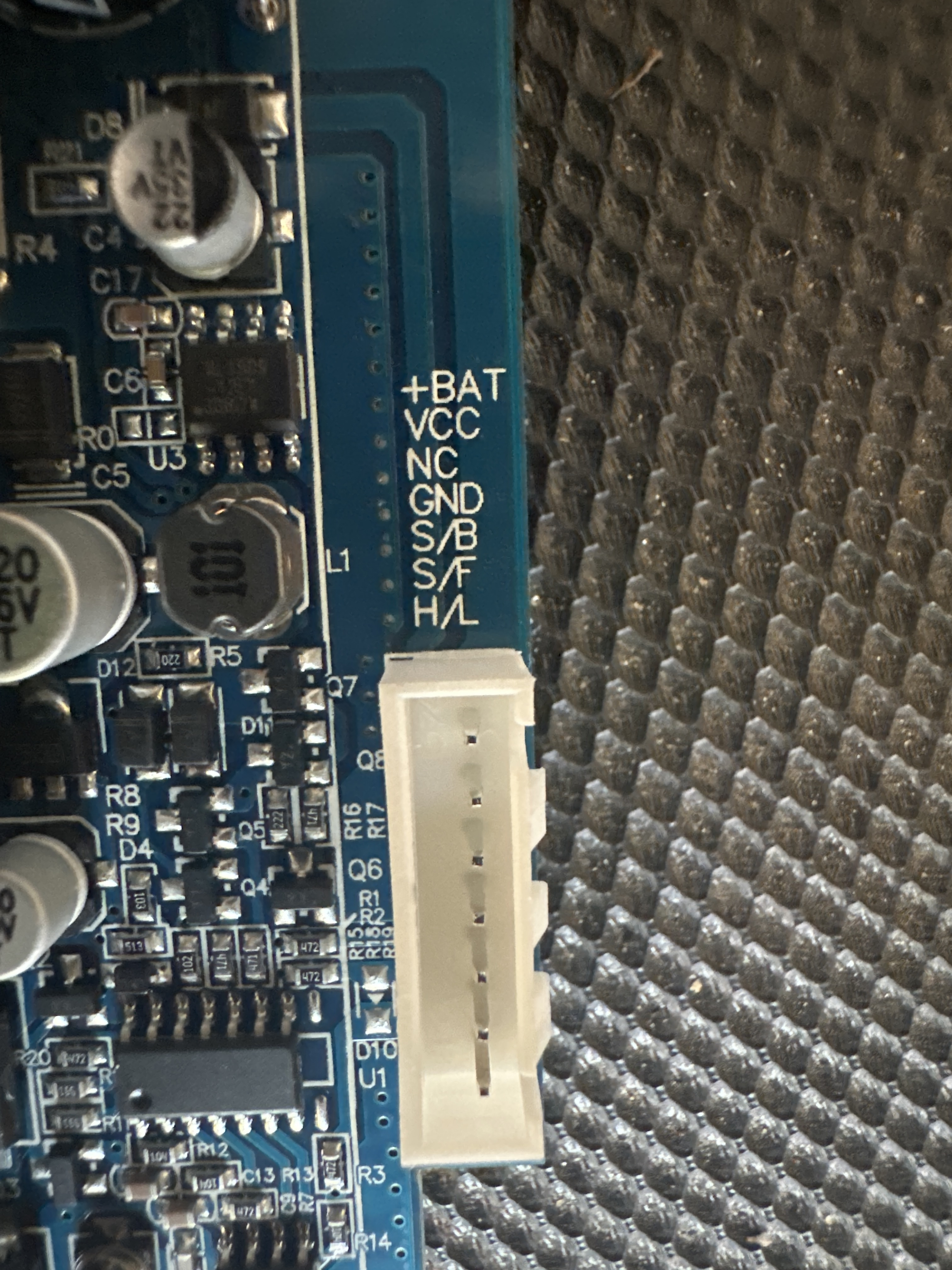
Arduino mega with sabertooth 2x60 coding power wheel motors

Update: To really stack on the confusion. I just put power to everything. With my current wiring and the original code that I brought in from the other topic. As soon as plugged battery in the motors went full speed in reverse. Pedal not pressed, shift selector in all 3 positions. Power button pressed/depressed. Full speed reverse no matter what

Edit: I had DIP switch 2 up. I put it down and motors stopped


High/low switch and power output from 7 pin are not hooked up

heh, so turns out I read the datasheet wrong last night. Nothing will be damaged, no worries, but the DIP switches I think should be
Sabertooth DIP switch settings for this Simplified Serial Mode:

  • 1: U
  • 2: D
  • 3: D for LiPo, U for all other chemistries (battery cutoff switch)
  • 4: D for 9600 baud, reverse this for 19200 baud: baud select pin 1
  • 5: U for 9600 baud, reverse this for 19200 baud: baud select pin 2
  • 6: U for Standard Simplified Serial
    About to test my own 2x25 rig to 2x Razor scooter motors using only switches at 12V

EDIT: ^ there is wrong. I had to use packetized serial (which is probably better anyway) so now, the switches are

  • 1: D (packetized serial at address 128)
  • 2: D
  • 3: D for LiPo, U for all other chemistries (battery cutoff switch)
  • 4: U
  • 5: U
  • 6: U

Orange wire is VCC

Edit to this. I told you a lot of conflicting info by mistake. Sorry about that. If you want that sort of response, it may need to be coded in. the exponential response is for RC mode, which is the only mode I have experience with. Well, until ten minutes ago.
Try the code as I just posted it in post #27.
It works for me, tested as far as two scooter motors doing what they should.
Note that the DIP switches have changed (last time, I swear!).
Have a good read through to see what's going on with it.

Going to attempt to make it work with Serial1 for the Mega. So far it hasn't for me. In the meantime, use pins 0 and 1, it works. In fact, there's maybe no reason to port over to Serial 1 other than that I must defeat the argumentative Arduino Mega!

Tested and working on Arduino Mega over Serial1. The key was opening the library .h file and discovering that the Sabertooth class allowed for a second argument, namely what Serial port, when we instantiate...an instance using Packetized Serial (mode 4) (help me out, gurus, did I say that right? Instantiate an instance? Seems awkward... but you know what I mean).
Anyway, here's the code, same as last but works with Mega on TX1/RX1 now. Booyah.

/*********** Powerwheels Sabertooth *********************

    !!!!!!!!!!!!!!!  IMPORTANT  !!!!!!!!!!!!!!!
    !!!!!!!!!!!!!!!  IMPORTANT  !!!!!!!!!!!!!!!
    !!!!!!!!!!!!!!!  IMPORTANT  !!!!!!!!!!!!!!!

  THIS CODE WILL ALLOW OVERRIDING OF KID'S RIDE ON TOYS
  SUCH AS THOSE MADE BY POWERWHEELS AND PEG PEREGO

  IT IS UNTESTED CODE IN ACTUAL RIDE ON WITH RIDER.
      USE AT YOUR OWN RISK!
  DO NOT, I MEAN DO NOT USE ON RIDE ON TOY WITH ANY
  RIDER UNTIL IT HAS BEEN CALIBRATED AND THOROUGHLY
  TESTED TO THE SATISFACTION OF A COMPETENT ADULT
  CARE PROVIDER FOR THE RIDER IF THE RIDER IS NOT AN
  ADULT.

  THIS CODE CONTAINS NO EMERGENCY OVERRIDE AND THE TOY
  SHOULD ONLY BE OPERATED WITHIN THE REACH OF A
  COMPETENT ADULT CARE PROVIDER WHERE A MECHANICALLY
  OPERATED EMERGENCY STOP OVERRIDE DEVICE HAS BEEN INSTALLED,
  EFFECTIVELY REMOVING ALL BATTERY POWER TO THE MOTORS.

  END OF IMPORTANT NOTE

   ---------  INSTRUCTIONS TO BUILDER  ------------
        Requires changes to code depending on your hardware
        if using two position button type pedal, activate
        the line
        pinMode(sensorPin, INPUT_PULLUP);
        by uncommenting it.
        if using typical potentiometer, leave that line
        commented out.

        Also, in function void checkSpeedPot(){}
        have a read through and there's some stuff to set there
        Defaults to testing (printing data to PC over Serial)
        and assumes pushbutton type "all-or-nothing"
        throttle input. These can be adjusted according to
        the notes above and the comments found throughout
        this sketch.

        Also, select the instance of Sabertooth class that suits you
        (default is for Arduino Mega or other with Serial1 UART)

  The circuit:
  - potentiomenter to analog input 0
  OR if you use a switch type pedal
  - switch pin A0 to GND
  - forward switch to D3
  - reverse switch to D4
  - LED on digital pin 13 to ground
  - view values in Serial monitor, 9600 baud
  - Arduino TX to Sabertooth S1 (Uno) if selected
  - Arduino RX to Sabertooth S2 (Uno) if selected
    DEFAULT:
  - Arduino TX1 to Sabertooth S1 (Mega)
  - Arduino RX1 to Sabertooth S2 (Mega)

  Tested with 2 x Razor scooter brushed motors and seems
  to be working as expected.

  Sabertooth DIP switch settings for this Packetized Serial Mode:
   - 1: D for Packetized Serial address 128
   - 2: D
   - 3: D for LiPo, U for all other chemistries (battery cutoff switch)
   - 4: U for 9600 baud, reverse this for 19200 baud: baud select pin 1 U for autobaud
   - 5: U for 9600 baud, reverse this for 19200 baud: baud select pin 2
   - 6: U for Standard Simplified Serial

  by Hallowed31
  2024-07-27

  Library copyright Dimension Engineering, 2012
    "Copyright (c) 2012 Dimension Engineering LLC
    See license.txt for license details."
*/


#include <Sabertooth.h>

/* choose your version, normal or Mega. Use one only.
  (or roll your own changing 2nd argument in the Sabertooth instance) */

// use line below for Uno Serial on pins 0 and 1
//Sabertooth ST = Sabertooth(128); // address 128

// use line below for Mega, Leonardo, any with a Serial1
Sabertooth ST = Sabertooth(128, Serial1); // address 128, port Serial1

#define PUSHED LOW
#define RELEASED HIGH

const int maximum = 1017;
const int minimum = 13;
const byte speedPot = A0;
const byte heartbeatLED = 13;
//Hardware Serial connected to 1;
const byte backwardSwitch = 3;
const byte forwardSwitch = 4;

//10 * 50ms = 500ms (1/2 second) before a change is validated
const byte debounceAmount = 10;

//when counters reach 10 (i.e. 10 read cycles) we assumed a valid switch change
byte forwardCounter = 0;
byte backwardCounter = 0;

byte lastForwardSwitch = RELEASED;
byte lastBackwardSwitch = RELEASED;

enum { REVERSE = -1,
       NEUTRAL = 0,
       FORWARD = 1
     };

int directionFlag = NEUTRAL;
int speed = 0;
int m1 = 0; // signal to motor 1
int m2 = 0; // signal to motor 2

unsigned long heartbeatTime;
unsigned long checkSwitchesTime;
unsigned long checkSSpeedPotTime;

void setup() {
  Serial.begin(9600);
  Serial1.begin(9600); // if you got a compile error here, you don't have one of these
  SabertoothTXPinSerial.begin(9600);
  Sabertooth::autobaud(SabertoothTXPinSerial);
  // the line below is for a button type pedal
  // comment this out if using potentiometer
  pinMode(speedPot, INPUT_PULLUP);
  pinMode(forwardSwitch, INPUT_PULLUP);
  pinMode(backwardSwitch, INPUT_PULLUP);
  pinMode(heartbeatLED, OUTPUT);
}

void loop() {
  if (millis() - heartbeatTime >= 500ul) { //500ms
    heartbeatTime = millis();
    digitalWrite(heartbeatLED, !digitalRead(heartbeatLED));
  }

  if (millis() - checkSwitchesTime >= 50ul) { //50ms
    checkSwitchesTime = millis();
    checkSwitches();
  }

  if (millis() - checkSSpeedPotTime >= 100ul) { //100ms
    checkSSpeedPotTime = millis();
    checkSpeedPot();
  }

  /************************************************
    Other non blocking code goes here.
    That means no while(), no delay();
  *************************************************/

}

void checkSwitches() {
  // forward switch
  byte state;
  state = digitalRead(forwardSwitch);
  if (lastForwardSwitch != state) {
    forwardCounter++;
    if (forwardCounter >= debounceAmount) {
      //get ready for the next cycle
      forwardCounter = 0;
      lastForwardSwitch = state;
      if (state == PUSHED) {
        directionFlag = FORWARD;
      }
      else {
        directionFlag = NEUTRAL;
        // ST.drive(0);
      }
    }
  }
  else {
    forwardCounter = 0;
  }

  // backward switch
  state = digitalRead(backwardSwitch);
  if (lastBackwardSwitch != state) {
    backwardCounter++;
    if (backwardCounter >= debounceAmount) {
      backwardCounter = 0;
      lastBackwardSwitch = state;
      if (state == PUSHED) {
        directionFlag = REVERSE;
      }
      else {
        directionFlag = NEUTRAL;
        //ST.drive(0);
      }
    }
  }
  else {
    backwardCounter = 0;
  }
}

void checkSpeedPot() {
  speed = analogRead(speedPot);

  // uncomment for testing, comment out for final install
  // printRawData();

  /* IMPORTANT - use only ONE of these speed = map(etc) functions at at time */
  // for potentiometer type throttle
  // speed = (map(speed, minimum, maximum, 0, 1023)) / 8;  //for speed 0 to ±127

  // for pushbutton type throttle, map is reversed because INPUT_PULLUP
  speed = (map(speed, minimum, maximum, 1023, 0)) / 8;  //for speed 0 to ±127

  // uncomment for testing, comment out for final install
  //  printMappedData();
  speed = constrain(speed, 0, 127);  //for speed 0 to ±127
  speed = directionFlag * speed;
  m1 = speed;
  m2 = speed;

  // uncomment for testing, comment out for final install
  // printFinalDriveSignal();

  ST.motor(1, m1); // motor 1, speed cast to m1
  ST.motor(2, m2); // notor 2, speed cast to m2
}

void printRawData() {
  Serial.print("Throttle Input: ");
  Serial.print(speed);
  Serial.print(" ");
}
void printMappedData() {
  Serial.print("Throttle Mapped To: ");
  Serial.print(speed);
  Serial.print(" ");
}
void printFinalDriveSignal() {
  Serial.print("  Final Drive Signal M1: ");
  Serial.print(m1);
  Serial.print("  Final Drive Signal M2: ");
  Serial.println(m2);
  Serial.println();
}

More to come...maybe.
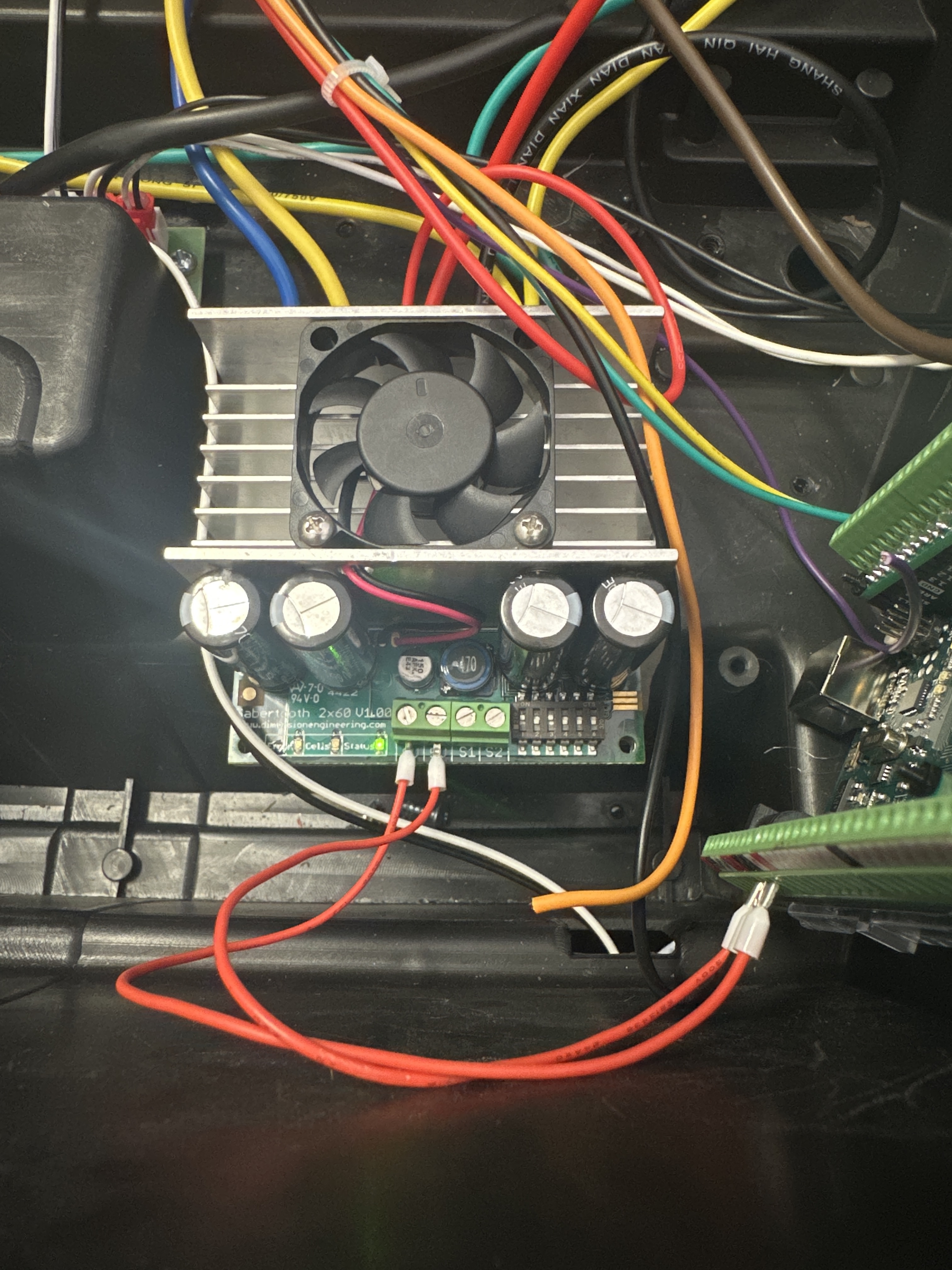
I need to move wires here?

Read the code. I defaulted it to Mega Serial1 on RX1 pin 19 to S2 ST, TX1 pin 18 to ST S1.
Leave 5V ST unconnected; connect 0V St to Arduino Gnd.

This line of code is a definition and instantiates an object of the Sabertooth class. ST is an identifier, the name of the object.

ST is an instance of a Sabertooth.

Sabertooth ST = Sabertooth(128, Serial1); // address 128, port Serial1

Meanwhile, I've used up all my time figuring out the switch handling. It obscures the logic of what the switches do. Normally I like to see ppl do the state change/denouncing and whatever, but ezButton does not suck and makes this code more readable:

// add a library
# include <ezButton.h>

// make some buttons
ezButton aFowardButton(forwardSwitch);
ezButton aBackwardButton(backwardSwitch);

// in setup, set the debounce time
  aFowardButton.setDebounceTime(25);
  aBackwardButton.setDebounceTime(25);
  
// and later in check switches, let ezButton take a look at them
  aFowardButton.loop();
  aBackwardButton.loop();

// and then use isPressed and isReleased on the ezButtons

Call checkSwitches all the time, not every 50 ms.

Here's checkSwitches() just using the library.

void checkSwitches() {
  aFowardButton.loop();
  aBackwardButton.loop();

  if (aFowardButton.isPressed())
    directionFlag = FORWARD;
  if (aFowardButton.isReleased()) {
    directionFlag = NEUTRAL;
    Serial.println("FWD -> ST.drive(0)");
    // ST.drive(0);
  }

  if (aBackwardButton.isPressed())
    directionFlag = REVERSE;
  if (aBackwardButton.isReleased()) {
    directionFlag = NEUTRAL;
    Serial.println("REV -> ST.drive(0)");
    // ST.drive(0);
  }
}

I don't have a Sabertooth toy of any kind, nor any proxy hardware. I am faking all that. The changes I have made seem to leave the functionality intact, and as I said, I am out of the time I was gouing to spend looking at the actual logic of driving the motors according to the input. Brief testing hasn't turned up anything.

a7

Ah, yes. I'll try to improve my verbiage.

Cheers, I like yours better. Modt of this Sabertooth sketch is taken directly from Dimension Engineering's example sketches. Some of their examples just don't seem to work. So I pieced together what i had to to get it to work the way I wanted.
Pure trial and error but after ten years I think (I haven't looked at this Sabertooth stuff in years), I finally got the Sabertooth to work for two motors using something other than mapped RC inputs.

Cheers for the code revisions.

Regarding Sabertooth: I have a 2x60 and a couple of 2x25s. The 2x60 has seen most hours use and it delivers every time. So if you're ever looking for a rock solid motor driver, I heartily recommend the Sabertooth, especially compared to some of the other options of similar price point out there (here's looking at you, Pololu T Rex and Wild Thumper)

Well obviously, I do. Your version tested on same exact hardware and working as expected.

/*********** Powerwheels Sabertooth (Altonate) Version777  *********************

  NOTE: Fun revision. Identical to Powerwheels Sabertooth
        but revised to use code suggestions of Arduino
        Forum guru, Alto777.
        Tested on equipment described below, working well
        as expected.

    !!!!!!!!!!!!!!!  IMPORTANT  !!!!!!!!!!!!!!!
    !!!!!!!!!!!!!!!  IMPORTANT  !!!!!!!!!!!!!!!
    !!!!!!!!!!!!!!!  IMPORTANT  !!!!!!!!!!!!!!!

  THIS CODE WILL ALLOW OVERRIDING OF KID'S RIDE ON TOYS
  SUCH AS THOSE MADE BY POWERWHEELS AND PEG PEREGO

  IT IS UNTESTED CODE IN ACTUAL RIDE ON WITH RIDER.
      USE AT YOUR OWN RISK!
  DO NOT, I MEAN DO NOT USE ON RIDE ON TOY WITH ANY
  RIDER UNTIL IT HAS BEEN CALIBRATED AND THOROUGHLY
  TESTED TO THE SATISFACTION OF A COMPETENT ADULT
  CARE PROVIDER FOR THE RIDER IF THE RIDER IS NOT AN
  ADULT.

  THIS CODE CONTAINS NO EMERGENCY OVERRIDE AND THE TOY
  SHOULD ONLY BE OPERATED WITHIN THE REACH OF A
  COMPETENT ADULT CARE PROVIDER WHERE A MECHANICALLY
  OPERATED EMERGENCY STOP OVERRIDE DEVICE HAS BEEN INSTALLED,
  EFFECTIVELY REMOVING ALL BATTERY POWER TO THE MOTORS.

  END OF IMPORTANT NOTE

   ---------  INSTRUCTIONS TO BUILDER  ------------
        Requires changes to code depending on your hardware
        if using two position button type pedal, activate
        the line
        pinMode(sensorPin, INPUT_PULLUP);
        by uncommenting it.
        if using typical potentiometer, leave that line
        commented out.

        Also, in function void checkSpeedPot(){}
        have a read through and there's some stuff to set there
        Defaults to testing (printing data to PC over Serial)
        and assumes pushbutton type "all-or-nothing"
        throttle input. These can be adjusted according to
        the notes above and the comments found throughout
        this sketch.

        Also, select the instance of Sabertooth class that suits you
        (default is for Arduino Mega or other with Serial1 UART)

  The circuit:
  - potentiomenter to analog input 0
  OR if you use a switch type pedal
  - switch pin A0 to GND
  - forward switch to D3 to GND
  - reverse switch to D4 to GND
  - LED on digital pin 13 to GND
  - view values in Serial monitor, 9600 baud
  - Arduino TX to Sabertooth S1 (Uno) if selected
  - Arduino RX to Sabertooth S2 (Uno) if selected
    DEFAULT:
  - Arduino TX1 to Sabertooth S1 (Mega)
  - Arduino RX1 to Sabertooth S2 (Mega)

  Tested with 2 x Razor E300 scooter brushed motors @12V, no load
  and seems to be working as expected.
  Test motor specs:
  MY1016-B 24V 350W 2750 RPM electric scooter motor

  Sabertooth DIP switch settings for this Packetized Serial Mode:
   - 1: D for Packetized Serial address 128
   - 2: D
   - 3: D for LiPo, U for all other chemistries (battery cutoff switch)
   - 4: U for 9600 baud, reverse this for 19200 baud: baud select pin 1 U for autobaud
   - 5: U for 9600 baud, reverse this for 19200 baud: baud select pin 2
   - 6: U for Standard Simplified Serial
     I mean, I'm pretty sure. Google "Sabertooth DIP switch wizard" to be sure.

  by Hallowed31
  2024-07-27
  most excellent code revisions
  by Alto777
  2024-07-28

  Library copyright Dimension Engineering, 2012
    "Copyright (c) 2012 Dimension Engineering LLC
    See license.txt for license details."
*/


#include <Sabertooth.h>
// add a library
#include <ezButton.h>

/* choose your version, normal or Mega. Use one only.
  (or roll your own changing 2nd argument in the Sabertooth instance) */

// use line below for Uno Serial on pins 0 and 1
//Sabertooth ST = Sabertooth(128); // address 128

// use line below for Mega, Leonardo, any with a Serial1
Sabertooth ST = Sabertooth(128, Serial1); // address 128, port Serial1

const int maximum = 1017; // throttle max as calibrated with analogRead();
const int minimum = 13;   // throttle min as calibrated with analogRead();

const byte speedPot = A0;
const byte heartbeatLED = 13;
const byte backwardSwitch = 3;
const byte forwardSwitch = 4;

// make some buttons
ezButton aForwardButton(forwardSwitch);
ezButton aBackwardButton(backwardSwitch);

enum { REVERSE = -1,
       NEUTRAL = 0,
       FORWARD = 1
     };

int directionFlag = NEUTRAL;
int speed = 0;
int m1 = 0; // signal to motor 1
int m2 = 0; // signal to motor 2

unsigned long heartbeatTime;
unsigned long checkSSpeedPotTime;

void setup() {
  Serial.begin(9600);
  Serial1.begin(9600); // if you got a compile error here, you don't have one of these
  SabertoothTXPinSerial.begin(9600);
  Sabertooth::autobaud(SabertoothTXPinSerial);
  // the line below is for a button type pedal
  // comment this out if using potentiometer
  pinMode(speedPot, INPUT_PULLUP);
  pinMode(forwardSwitch, INPUT_PULLUP);
  pinMode(backwardSwitch, INPUT_PULLUP);
  pinMode(heartbeatLED, OUTPUT);
  // set the debounce time
  aForwardButton.setDebounceTime(25);
  aBackwardButton.setDebounceTime(25);
  Serial.println("Powerwheels Sabertooth ver.777");
  delay(1000); // a second to read sketch name
}

void loop() {
  checkSwitches();
  if (millis() - heartbeatTime >= 500ul) { //500ms
    heartbeatTime = millis();
    digitalWrite(heartbeatLED, !digitalRead(heartbeatLED));
  }

  if (millis() - checkSSpeedPotTime >= 100ul) { //100ms
    checkSSpeedPotTime = millis();
    checkSpeedPot();
  }

  /************************************************
    Other non blocking code goes here.
    That means no while(), no delay();
  *************************************************/
}

void checkSwitches() {
  aForwardButton.loop();
  aBackwardButton.loop();
  // forward switch
  if (aForwardButton.isPressed()) directionFlag = FORWARD;
  if (aForwardButton.isReleased()) directionFlag = NEUTRAL;
  // backward switch
  if (aBackwardButton.isPressed()) directionFlag = REVERSE;
  if (aBackwardButton.isReleased()) directionFlag = NEUTRAL;
}

void checkSpeedPot() {
  speed = analogRead(speedPot);

  // uncomment for testing, comment out for final install
  // printRawData();

  /* IMPORTANT - use only ONE of these speed = map(etc) functions at at time */
  // for potentiometer type throttle
  // speed = (map(speed, minimum, maximum, 0, 1023)) / 8;  //for speed 0 to ±127

  // for pushbutton type throttle, map is reversed because INPUT_PULLUP
  speed = (map(speed, minimum, maximum, 1023, 0)) / 8;  //for speed 0 to ±127

  // uncomment for testing, comment out for final install
  //  printMappedData();
  speed = constrain(speed, 0, 127);  //for speed 0 to ±127
  speed = directionFlag * speed;
  m1 = speed;
  m2 = speed;
  // uncomment for testing, comment out for final install
  // printFinalDriveSignal();

  ST.motor(1, m1); // motor 1, speed cast to m1
  ST.motor(2, m2); // notor 2, speed cast to m2
}

void printRawData() {
  Serial.print("Throttle Input: ");
  Serial.print(speed);
  Serial.print(" ");
}
void printMappedData() {
  Serial.print("Throttle Mapped To: ");
  Serial.print(speed);
  Serial.print(" ");
}
void printFinalDriveSignal() {
  Serial.print("  Final Drive Signal M1: ");
  Serial.print(m1);
  Serial.print("  Final Drive Signal M2: ");
  Serial.println(m2);
  Serial.println();
}

Well done. I like the action one-liners in checkSwitches().

ezButton could drive this by the state of the two switches. I left it as edge so that there would be a place to do anything that might ever be first or last around being in gear.

I wish my Moms was alive, I am sure she would have enjoyed seeing your kind and generous comments.

a7

All the time and effort helping with this is appreciated. I hope to one day have a fraction of your coding knowledge. I did have a successful upload of the most recent sketch. Unfortunalely, my ST has an error code issue that I was unable to resolve. I have to send it back for evaluation/repair. Will update when it comes back and and installed.

Edit: I had the comment/uncomment backwards for the pinMode(speedpot, INPUT_PULLUP)

This sketch is working as it should on my car. The only issue I see currently is the start/stop is still very abrupt. When I let off the throttle it immediately locks up.

Edit #2: Was able to figure out the stop/start. I added ST.setRamping(14); using the value I found in the sabertooth user guide.

In addition, I can see this is going to be way too fast right now. Is there a simple way to reduce the speed?

Edit:

const int maximum = 217;  // throttle max as calibrated with analogRead();

Changing this value seemed to lower the speed, but I am not sure if this is the easiest/correct way.

Could you please post the code with the specified option added. For some reason, smooth start/stop doesn't work for me. Thank you.

Sure. I will post it when I get back home, I’m out of town for a few days.

/*********** Powerwheels Sabertooth (Altonate) Version777  *********************
331
  NOTE: Fun revision. Identical to Powerwheels Sabertooth
        but revised to use code suggestions of Arduino
        Forum guru, Alto777.
        Tested on equipment described below, working well
        as expected.

    !!!!!!!!!!!!!!!  IMPORTANT  !!!!!!!!!!!!!!!
    !!!!!!!!!!!!!!!  IMPORTANT  !!!!!!!!!!!!!!!
    !!!!!!!!!!!!!!!  IMPORTANT  !!!!!!!!!!!!!!!

  THIS CODE WILL ALLOW OVERRIDING OF KID'S RIDE ON TOYS
  SUCH AS THOSE MADE BY POWERWHEELS AND PEG PEREGO

  IT IS UNTESTED CODE IN ACTUAL RIDE ON WITH RIDER.
      USE AT YOUR OWN RISK!
  DO NOT, I MEAN DO NOT USE ON RIDE ON TOY WITH ANY
  RIDER UNTIL IT HAS BEEN CALIBRATED AND THOROUGHLY
  TESTED TO THE SATISFACTION OF A COMPETENT ADULT
  CARE PROVIDER FOR THE RIDER IF THE RIDER IS NOT AN
  ADULT.

  THIS CODE CONTAINS NO EMERGENCY OVERRIDE AND THE TOY
  SHOULD ONLY BE OPERATED WITHIN THE REACH OF A
  COMPETENT ADULT CARE PROVIDER WHERE A MECHANICALLY
  OPERATED EMERGENCY STOP OVERRIDE DEVICE HAS BEEN INSTALLED,
  EFFECTIVELY REMOVING ALL BATTERY POWER TO THE MOTORS.

  END OF IMPORTANT NOTE

   ---------  INSTRUCTIONS TO BUILDER  ------------
        Requires changes to code depending on your hardware
        if using two position button type pedal, activate
        the line

        
        pinMode(sensorPin, INPUT_PULLUP);
        by uncommenting it.
        if using typical potentiometer, leave that line
        commented out.

        Also, in function void checkSpeedPot(){}
        have a read through and there's some stuff to set there
        Defaults to testing (printing data to PC over Serial)
        and assumes pushbutton type "all-or-nothing"
        throttle input. These can be adjusted according to
        the notes above and the comments found throughout
        this sketch.

        Also, select the instance of Sabertooth class that suits you
        (default is for Arduino Mega or other with Serial1 UART)

  The circuit:
  - potentiomenter to analog input 0
  OR if you use a switch type pedal
  - switch pin A0 to GND
  - forward switch to D3 to GND
  - reverse switch to D4 to GND
  - LED on digital pin 13 to GND
  - view values in Serial monitor, 9600 baud
  - Arduino TX to Sabertooth S1 (Uno) if selected
  - Arduino RX to Sabertooth S2 (Uno) if selected
    DEFAULT:
  - Arduino TX1 to Sabertooth S1 (Mega)
  - Arduino RX1 to Sabertooth S2 (Mega)

  Tested with 2 x Razor E300 scooter brushed motors @12V, no load
  and seems to be working as expected.
  Test motor specs:
  MY1016-B 24V 350W 2750 RPM electric scooter motor

  Sabertooth DIP switch settings for this Packetized Serial Mode:
   - 1: D for Packetized Serial address 128
   - 2: D
   - 3: D for LiPo, U for all other chemistries (battery cutoff switch)
   - 4: U for 9600 baud, reverse this for 19200 baud: baud select pin 1 U for autobaud
   - 5: U for 9600 baud, reverse this for 19200 baud: baud select pin 2
   - 6: U for Standard Simplified Serial
     I mean, I'm pretty sure. Google "Sabertooth DIP switch wizard" to be sure.

  by Hallowed31
  2024-07-27
  most excellent code revisions
  by Alto777
  2024-07-28

  Library copyright Dimension Engineering, 2012
    "Copyright (c) 2012 Dimension Engineering LLC
    See license.txt for license details."
*/

#include <Sabertooth.h>
// add a library
#include <ezButton.h>

/* choose your version, normal or Mega. Use one only.
  (or roll your own changing 2nd argument in the Sabertooth instance) */

// use line below for Uno Serial on pins 0 and 1
//Sabertooth ST = Sabertooth(128); // address 128

// use line below for Mega, Leonardo, any with a Serial1
Sabertooth ST = Sabertooth(128, Serial1);  // address 128, port Serial1

const int maximum = 1023;  // throttle max as calibrated with analogRead();
const int minimum = 13;    // throttle min as calibrated with analogRead();

const byte speedPot = A0;
const byte heartbeatLED = 13;
const byte backwardSwitch = 3;
const byte forwardSwitch = 4;

// make some buttons
ezButton aForwardButton(forwardSwitch);
ezButton aBackwardButton(backwardSwitch);

enum { REVERSE = -1,
       NEUTRAL = 0,
       FORWARD = 1
};

int directionFlag = NEUTRAL;
int speed = 0;
int m1 = 0;  // signal to motor 1
int m2 = 0;  // signal to motor 2
unsigned long heartbeatTime;
unsigned long checkSSpeedPotTime;

void setup() {
  Serial.begin(9600);
  Serial1.begin(9600);  // if you got a compile error here, you don't have one of these
  SabertoothTXPinSerial.begin(9600);
  ST.setRamping(16);
  ST.setDeadband(0);
  Sabertooth::autobaud(SabertoothTXPinSerial);
  // the line below is for a button type pedal
  // comment this out if using potentiometer
  // pinMode(speedPot, INPUT_PULLUP);
  pinMode(forwardSwitch, INPUT_PULLUP);
  pinMode(backwardSwitch, INPUT_PULLUP);
  pinMode(heartbeatLED, OUTPUT);
  // set the debounce time
  aForwardButton.setDebounceTime(25);
  aBackwardButton.setDebounceTime(25);
  Serial.println("Powerwheels Sabertooth ver.777");
  delay(1000);  // a second to read sketch name
}

void loop() {
  checkSwitches();
  if (millis() - heartbeatTime >= 500ul) {  //500ms
    heartbeatTime = millis();
    digitalWrite(heartbeatLED, !digitalRead(heartbeatLED));
  }

  if (millis() - checkSSpeedPotTime >= 100ul) {  //100ms
    checkSSpeedPotTime = millis();
    checkSpeedPot();
  }

  /************************************************
    Other non blocking code goes here.
    That means no while(), no delay();
  *************************************************/
}

void checkSwitches() {
  aForwardButton.loop();
  aBackwardButton.loop();
  // forward switch
  if (aForwardButton.isPressed()) directionFlag = FORWARD;
  if (aForwardButton.isReleased()) directionFlag = NEUTRAL;
  // backward switch
  if (aBackwardButton.isPressed()) directionFlag = REVERSE;
  if (aBackwardButton.isReleased()) directionFlag = NEUTRAL;
}

void checkSpeedPot() {
  speed = analogRead(speedPot);

  // uncomment for testing, comment out for final install
  printRawData();

  /* IMPORTANT - use only ONE of these speed = map(etc) functions at at time */
  // for potentiometer type throttle
  // speed = (map(speed, minimum, maximum, 0, 1023)) / 8;  //for speed 0 to ±127

  // for pushbutton type throttle, map is reversed because INPUT_PULLUP
  speed = (map(speed, minimum, maximum, 1023, 0)) / 8;  //for speed 0 to ±127

  // uncomment for testing, comment out for final install
  printMappedData();
  speed = constrain(speed, 0, 60);  //for speed 0 to ±127
  speed = directionFlag * speed;
  m1 = speed;
  m2 = speed;
  // uncomment for testing, comment out for final install
  printFinalDriveSignal();

  ST.motor(1, m1);  // motor 1, speed cast to m1
  delay(100);
  ST.motor(2, m2);  // notor 2, speed cast to m2
  delay(100);
}

void printRawData() {
  Serial.print("Throttle Input: ");
  Serial.print(speed);
  Serial.print(" ");
}
void printMappedData() {
  Serial.print("Throttle Mapped To: ");
  Serial.print(speed);
  Serial.print(" ");
}
void printFinalDriveSignal() {
  Serial.print("  Final Drive Signal M1: ");
  Serial.print(m1);
  Serial.print("  Final Drive Signal M2: ");
  Serial.println(m2);
  Serial.println();
}

here you go.

i also changed this...... speed = constrain(speed, 0, 60); //for speed 0 to ±127 to lower the speed some, it was too fast at 127.