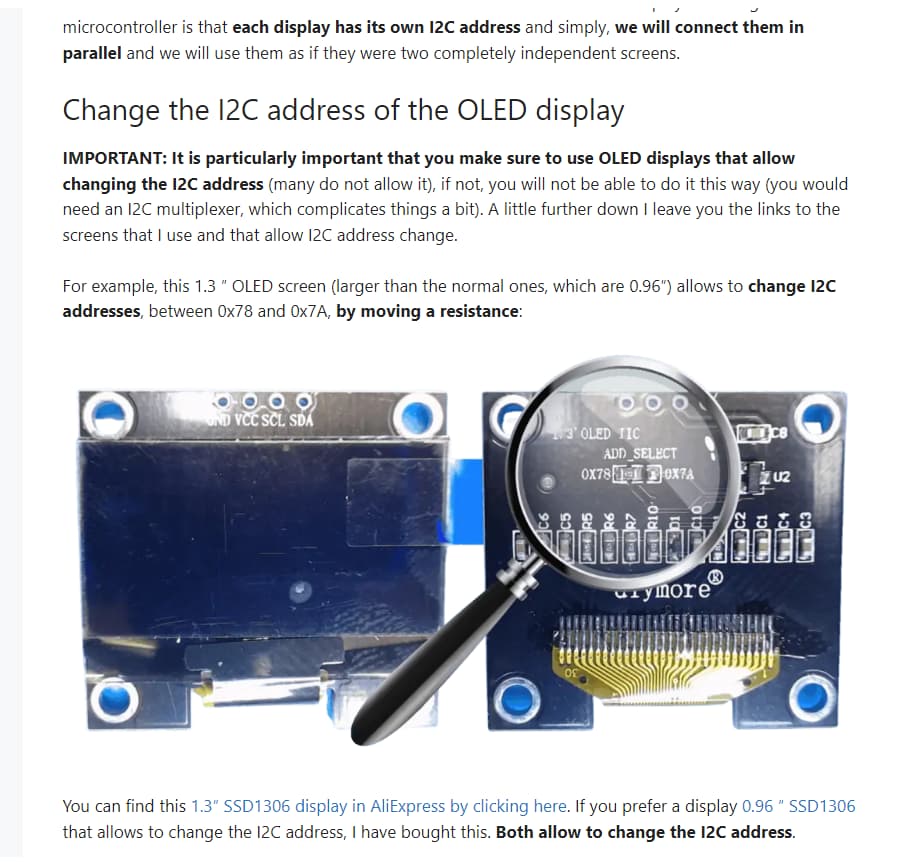
Hi. I'm trying to use two SSD1306 through a TCA9548A together with a rotary encoder. When turning the encoder CCW, display #1 should count downwards and by turning the other way, display #2 should count upwards.
I've tested the display with a separate code and it works.
I've tested the rotary encoder with a separate code and it works.
My problem is when I merge the two codes. Then both displays show "0". The rotary does not respond (no feedback on display or SerialMonitor). Only the push-function seems to work.
Any ideas?
Here's my code:
For the display:
#include <Wire.h>
#include <Adafruit_SSD1306.h>
#include <Adafruit_BMP280.h>
#include <Adafruit_ADXL345_U.h>

// SSD1306 def:
#define SCREEN_WIDTH 128
#define SCREEN_HEIGHT 64
Adafruit_SSD1306 display(SCREEN_WIDTH, SCREEN_HEIGHT, &Wire, -1);

int UPvalue = 0;
int DOWNvalue = 0;


void setup() {
  Serial.begin(9600);

  // Start I2C communication
  Wire.begin();

  // Initialize multiplexer on bus number 2
  TCA9548A(0);
  if(!display.begin(SSD1306_SWITCHCAPVCC, 0x3C)) {
    Serial.println(F("SSD1306 allocation failed"));
    for(;;);
  }
  display.clearDisplay();

  // Initialize multiplexer on bus number 3
  TCA9548A(1);
  if(!display.begin(SSD1306_SWITCHCAPVCC, 0x3C)) {
    Serial.println(F("SSD1306 allocation failed"));
    for(;;);
  }
  display.clearDisplay();
 }

void loop()
{

  DisplayValue(0,UPvalue);
  DisplayValue(1,DOWNvalue);

  UPvalue++;
  DOWNvalue--;

  delay(500);
}

void DisplayValue(int displayNumber, int outputValue)
{
  TCA9548A(displayNumber);

  // Display altitude on SSD1306 OLED display
  display.clearDisplay(); // Clear display buffer
  display.setTextSize(2);
  display.setTextColor(WHITE); // Set text color to white
  display.setCursor(0, 0);
  display.print(outputValue);
  display.display();

}

// Select I2C BUS
void TCA9548A(uint8_t bus)
{
  Wire.beginTransmission(0x70);  // TCA9548A address
  Wire.write(1 << bus);          // send byte to select bus
  Wire.endTransmission();
  //Serial.print("bus active:" );
  //Serial.println(bus);
}
For the rotary encoder:
#include <Arduino.h>

// Rotary encoder pins
#define PIN_A 2
#define PIN_B 3
#define PUSH_BTN 4

// A turn counter for the rotary encoder (negative = anti-clockwise)
int rotationCounter = 0;
int UPvalue = 0;
int DOWNvalue = 0;

// Flag from interrupt routine (moved=true)
volatile bool rotaryEncoder = false;


void setup()
{
    Serial.begin(115200);

    // The module already has pullup resistors on board
    pinMode(PIN_A, INPUT);
    pinMode(PIN_B, INPUT);

    // But not for the push switch
    pinMode(PUSH_BTN, INPUT_PULLUP);

    // We need to monitor both pins, rising and falling for all states
    attachInterrupt(digitalPinToInterrupt(PIN_A), rotary, CHANGE);
    attachInterrupt(digitalPinToInterrupt(PIN_B), rotary, CHANGE);
    Serial.println("Setup completed");
}

void loop()
{
    // Has rotary encoder moved?
    if (rotaryEncoder)
    {
        // Get the movement (if valid)
        int8_t rotationValue = checkRotaryEncoder();

        // If valid movement, do something
        if (rotationValue > 0)
        {
          UPvalue += rotationValue;
          Serial.print("UPvalue: ");
          Serial.println(UPvalue);
        }
        if (rotationValue < 0)
        {
          DOWNvalue += rotationValue;
          Serial.print("DOWNvalue: ");
          Serial.println(DOWNvalue);
        }
    }

    if (digitalRead(PUSH_BTN) == LOW)
    {
      UPvalue = 0;
      DOWNvalue = 0;
      Serial.print("UPvalue: ");
      Serial.println(UPvalue);
      Serial.print("DOWNvalue: ");
      Serial.println(DOWNvalue);

      // Wait until button released (demo only! Blocking call!)
      while (digitalRead(PUSH_BTN) == LOW)
      {
        delay(100);
      }
    }
}


//Interrupt/encoder-code copied from RalphBacon /226-Better-Rotary-Encoder---no-switch-bounce:

// Interrupt routine just sets a flag when rotation is detected
void rotary()
{
  rotaryEncoder = true;
}

// Rotary encoder has moved (interrupt tells us) but what happened?
// See https://www.pinteric.com/rotary.html
int8_t checkRotaryEncoder()
{
  // Reset the flag that brought us here (from ISR)
  rotaryEncoder = false;

  static uint8_t lrmem = 3;
  static int lrsum = 0;
  static int8_t TRANS[] = {0, -1, 1, 14, 1, 0, 14, -1, -1, 14, 0, 1, 14, 1, -1, 0};

  // Read BOTH pin states to deterimine validity of rotation (ie not just switch bounce)
  int8_t l = digitalRead(PIN_A);
  int8_t r = digitalRead(PIN_B);

  // Move previous value 2 bits to the left and add in our new values
  lrmem = ((lrmem & 0x03) << 2) + 2 * l + r;

  // Convert the bit pattern to a movement indicator (14 = impossible, ie switch bounce)
  lrsum += TRANS[lrmem];

  /* encoder not in the neutral (detent) state */
  if (lrsum % 4 != 0)
  {
    return 0;
  }

  /* encoder in the neutral state - clockwise rotation*/
  if (lrsum == 4)
  {
    lrsum = 0;
    return 1;
  }

  /* encoder in the neutral state - anti-clockwise rotation*/
  if (lrsum == -4)
  {
    lrsum = 0;
    return -1;
  }

  // An impossible rotation has been detected - ignore the movement
  lrsum = 0;
  return 0;
}
Merged code:
#include <Wire.h>
#include <Adafruit_SSD1306.h>
#include <Adafruit_BMP280.h>
#include <Adafruit_ADXL345_U.h>

// SSD1306 def:
#define SCREEN_WIDTH 128
#define SCREEN_HEIGHT 64
Adafruit_SSD1306 display(SCREEN_WIDTH, SCREEN_HEIGHT, &Wire, -1);

// Rotary encoder pins
#define PIN_A 2
#define PIN_B 3
#define PUSH_BTN 4

// A turn counter for the rotary encoder (negative = anti-clockwise)
int rotationCounter = 0;
int UPvalue = 0;
int DOWNvalue = 0;

// Flag from interrupt routine (moved=true)
volatile bool rotaryEncoder = false;

void setup() {
  Serial.begin(9600);

  // Start I2C communication
  Wire.begin();

  // Init screen 0
  TCA9548A(0);
  if(!display.begin(SSD1306_SWITCHCAPVCC, 0x3C)) {
    Serial.println(F("SSD1306 allocation failed"));
    for(;;);
  }
  display.clearDisplay();

  // Init screen 1
  TCA9548A(1);
  if(!display.begin(SSD1306_SWITCHCAPVCC, 0x3C)) {
    Serial.println(F("SSD1306 allocation failed"));
    for(;;);
  }
  display.clearDisplay();

  pinMode(PIN_A, INPUT);
  pinMode(PIN_B, INPUT);

  // But not for the push switch
  pinMode(PUSH_BTN, INPUT_PULLUP);

  // We need to monitor both pins, rising and falling for all states
  attachInterrupt(digitalPinToInterrupt(PIN_A), rotary, CHANGE);
  attachInterrupt(digitalPinToInterrupt(PIN_B), rotary, CHANGE);
  Serial.println("Setup completed");
 }

void loop()
{
  // Has rotary encoder moved?
  if (rotaryEncoder)
  {
    // Get the movement (if valid)
    int8_t rotationValue = checkRotaryEncoder();

    // If valid movement, do something
    if (rotationValue > 0)
    {
      UPvalue += rotationValue;
      Serial.print("UPvalue: ");
      Serial.println(UPvalue);
    }
    if (rotationValue < 0)
    {
      DOWNvalue += rotationValue;
      Serial.print("DOWNvalue: ");
      Serial.println(DOWNvalue);
    }
  }

  if (digitalRead(PUSH_BTN) == LOW)
  {
    UPvalue = 0;
    DOWNvalue = 0;
    Serial.print("UPvalue: ");
    Serial.println(UPvalue);
    Serial.print("DOWNvalue: ");
    Serial.println(DOWNvalue);

    // Wait until button released (demo only! Blocking call!)
    while (digitalRead(PUSH_BTN) == LOW)
    {
      delay(100);
    }
  }

  DisplayValue(0,UPvalue);
  DisplayValue(1,DOWNvalue);

  //UPvalue++;
  //DOWNvalue--;

  //delay(500);
}

void DisplayValue(int displayNumber, int outputValue)
{
  TCA9548A(displayNumber);

  // Display altitude on SSD1306 OLED display
  display.clearDisplay(); // Clear display buffer
  display.setTextSize(2);
  display.setTextColor(WHITE); // Set text color to white
  display.setCursor(0, 0);
  display.print(outputValue);
  display.display();

}

// Select I2C BUS
void TCA9548A(uint8_t bus)
{
  Wire.beginTransmission(0x70);  // TCA9548A address
  Wire.write(1 << bus);          // send byte to select bus
  Wire.endTransmission();
  //Serial.print("bus active:" );
  //Serial.println(bus);
}


//Interrupt/encoder-code copied from RalphBacon /226-Better-Rotary-Encoder---no-switch-bounce:

// Interrupt routine just sets a flag when rotation is detected
void rotary()
{
  rotaryEncoder = true;
}

// Rotary encoder has moved (interrupt tells us) but what happened?
// See https://www.pinteric.com/rotary.html
int8_t checkRotaryEncoder()
{
  // Reset the flag that brought us here (from ISR)
  rotaryEncoder = false;

  static uint8_t lrmem = 3;
  static int lrsum = 0;
  static int8_t TRANS[] = {0, -1, 1, 14, 1, 0, 14, -1, -1, 14, 0, 1, 14, 1, -1, 0};

  // Read BOTH pin states to deterimine validity of rotation (ie not just switch bounce)
  int8_t l = digitalRead(PIN_A);
  int8_t r = digitalRead(PIN_B);

  // Move previous value 2 bits to the left and add in our new values
  lrmem = ((lrmem & 0x03) << 2) + 2 * l + r;

  // Convert the bit pattern to a movement indicator (14 = impossible, ie switch bounce)
  lrsum += TRANS[lrmem];

  /* encoder not in the neutral (detent) state */
  if (lrsum % 4 != 0)
  {
    return 0;
  }

  /* encoder in the neutral state - clockwise rotation*/
  if (lrsum == 4)
  {
    lrsum = 0;
    return 1;
  }

  /* encoder in the neutral state - anti-clockwise rotation*/
  if (lrsum == -4)
  {
    lrsum = 0;
    return -1;
  }

  // An impossible rotation has been detected - ignore the movement
  lrsum = 0;
  return 0;
}