Hello all, I am fairly new to more complex arduino programming especially serial communication (beyond simple button, LED, relay, etc. circuits.)
I have recently picked up an Axisflying 640x512 thermal camera module for personal use as well as to help me learn/dive into the world of serial communication and programming.
It is 115200 baud rate, 1 start and 1 stop bit with 8 data bits, and no check bits. It needs to recieve the commands in hexadecimal format.
I am looking for help on setting up the UART communication to the module to be able to change its built in image processing and color mode settings.
Is an arduino uno or equivalent able to send and recieve serial commands to a module like this or do i need a different board to be able to handle this communication
Are there any good resources to read/watch to get a better understanding of the syntax surrounding serial communication
i have used serial.print and a few other basic commands in a college class but nothing to crazy
End goal - i would like to receive the CVBS image and overlay the parameters from the thermal camera i.e brightness, color mode, etc. this will likely be achieved with the use of a MaX7456 board that i have.
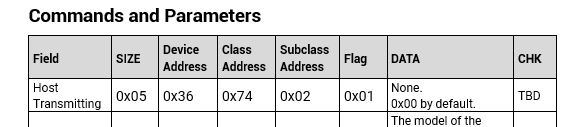
Attached is some of the datasheet from the camera module explaining the serial commands it wants to recieve and what will be returned.
This is a learning project for me so im not expecting to immediately figure it out, I would like to be able to learn and understand what i am coding vs. Just using code I dont understand.
Thanks for any help and guidance you can offer. Let me know if I left out any important info and i will try my best to answer.
For 115200 baud, forget trying to use an UNO. It has only 1 hardware serial port which is connected to the USB-Serial interface chip which you use to download your code. Software serial ports are useless at that baud rate too.
I would be looking at an Arduino Mega (MEGA2560 chip on it) or an Arduino Nano Every - they are 5V I/O boards. I don't have any knowledge of the newer MKR boards or the ESPxx boards - they are 3.3v I/O boards.
Your camera looks like is uses 3.3v so one of the many ESPxx boards might be a better fit.
Your MAX7456 requires an SPI port (either software or real hardware). The MEGA, Nano Every and ESP boards all have hardware SPI. Hopefully somebody else will provide ESP board details for you.
When experimenting with serial commands, I usually try and start by using a PC terminal program to send the messages to the device just to see what happens and get my head around the basic messages. Then I move on to Arduino code once I have a basic feel for the messages.
If your device requires binary data (it looks like it might), then you will be using Serial.read and Serial.write rather than Serial.print.
I would suggest starting with trying to implement a really simple command. Does the camera support toggling between black hot and white hot images?
FYI, the screen captures are pretty unreadable. There's an operating manual on the Axisflying website (scroll down near the bottom) that might hold the details but it's a .docx file which my version of MSWord doesn't seem to like opening.
The camera manual, which you download from the product page, describes this in detail. The serial communication appears to be camera control only. Image output is video, and not Arduino compatible.
Thank you for the response, the camera has i think 15 different color modes to chose from, sorry about the screen captures i was hoping i could input files into the thread but i couldnt find a way.
I like the idea of using the pc terminal to send commands, i have a usb to serial adapter on the way to try that.
The camera manual makes sense as for what i need to send in hexadecimal. i was more referring to the programming syntax in the arduino. As for the video its cvbs output and the MaX7456 allows you to overlay basic text and images onto the video before displaying on a monitor
I dont know all the ins and outs of it yet, that will come down the road a ways.
Possibly because you were a new user; now you're a basic user and you should be able to upload attachments. Easiest is to drag a file into the reply window of the forum.
I guess im not very familiar with the specifics of rs232 and ttl, all the manufacturer states is that the camera uses 3.3v UART serial communication. Not sure if that defines it as TTL or rs232
That makes a lot more sense, thank you for the explanation and brief code, i was confused in thinking that the Serial.Write() command was sending start and stop bits along with the included data you input.
Ill definitely be going over the tutorial at some point this week. Thanks again!