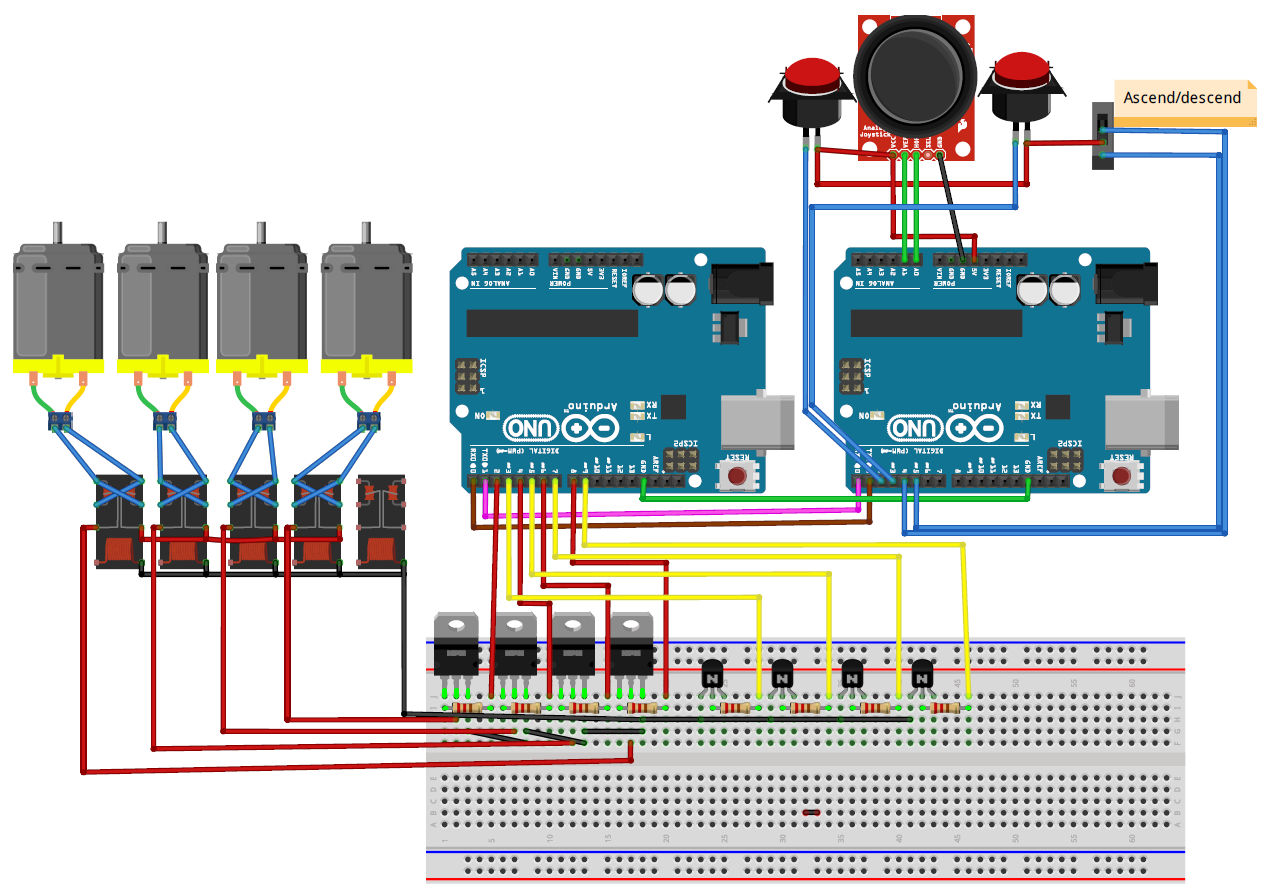
I just started to learn how to program the arduino (noob here), but I could really use your help with a problem i'm having.
Im currently making 2 arduinos communicate with each other, basically a robot om some sort. The TX arduino will send letters by buttonpresses to the other arduino via serial. And the RX arduino will then drive a couple of motors depending on which letter it recieves.
Basically I'll be sending numbers all the time to keep a motor running and always checking in the RX arduino for correct numbers. Now I need to keep the motor running while checking for a specific number and the problem i'm having now is constant "blinking" of the motor.
How can I get constant power to the output while checking the serial for different numbers?
Example:
RX arduino
const int led1 = 5;
const int led2 = 6;
const int led3 = 7;
const int led4 = 8;
const int led5 = 9;
Help us to help you. You have not been clear about what you want to have happen.
Your code is clear but labeled as an example. What is your REAL code? Please use code tags, the scroll-like symbol in the tool bar.
Interestingly, the code defines led1 through led5 but then initializes pins 5 through 9 as outputs.
Your code makes a pin go high for 5 milliseconds when the appropriate character is received. It is not clear what happens (or what should happen) if an inappropriate character is received.
What a high output represents and what a low output represents is unclear since no schematic has been provided.
I suspect that you need to see the Blink Without Delay example, because you should not be using delay(...) at all. This comes up so frequently that the documentation for delay(...) should be changed to say that it is deprecated, and it should refer you to alternatives. Think about it this way: When you make coffee, do you sit and twiddle your fingers for five minutes? Of course not! You check the time that you started, check the current time frequently, and get your coffee when the current time minus the time to make coffee exceeds the time that you started. Same with Arduino.
Thanks for the answer and I'm sorry for being so unclear.
I'll try explaining a little bit better what I'm after, and since I don't know so much about programming, my code there was patched together from other codes.
Im building an ROV, and I need to control it somehow. I want to use one TX arduino with button inputs and one RX arduino with motor outputs (relays - motor etc). Communication via Serial (TX/RX).
TX -----> sends a "1" for forward motion, "2" for backwards etc. ----> RX
I need the communication to work as if I had a straight 12V directly to the motors from the controller. A button that starts a motor on the other side without any major delays and output always on if RX constantly receives for example a "1".
Basically I just needed a push in the right direction on what to read up on. And thanks for taking your time with my stupid questions.
You wrote "...output always on if RX constantly receives for example a "1"."
but there is really no such thing as "constantly". Perhaps you mean that the motor should stay on for x milliseconds if a '1' is received?
It would be easier if '1' turned a motor on and, say, '6' turned the same motor off. However, this is not failsafe if the communications is lost. Turning the motor on for x milliseconds if a '1' is received, and turning it off after x milliseconds if nothing further is received, is more challenging but probably safer.
I get that a button on the transmitting Arduino is supposed to control a motor on the receiving Arduino. I am not sure that I get what you want too have happen to that motor... and the other motors. How often will the transmitting Arduino send? Will it send just a single character each time, or might it send 12345? Does a '2' shut off all motors except #2? We need more clarification.
I want to turn on an led on the RX arduino. If i press and hold the button on the TX arduino, the LED(RX) will be lit until i release the button. That's pretty much all the code i need. Since I know electronics, the rest isn't a problem, only programming.
Nevermind anything else I was planning, just need that part figured out somehow...
I don't know what capture.png has to do with this description. I don't know what the unlabeled components are in capture.png, but it looks like there are four motors and two switches.
In any case, your transmitting Arduino has to debounce the switches and do the following:
If switch 1 goes from released to pressed, send a '0'. (led1 on)
If switch 1 goes from pressed to released, send a '5'. (led1 off)
If switch 2 goes from released to pressed, send a '1' (led2 on)
If switch 2 goes from pressed to released, send a '6' (led2 off)
etc.
The receiving Arduino takes the appropriate action upon receiving a character. Receiving '0', '1', '2', '3', '4' means turn on LED 1, 2, 3, 4, 5. Receiving '5', '6', '7', '8', '9' means turn off LED 1, 2, 3, 4, 5.
No timing required! No constant sending. No constant receiving.
The challenges will be on the transmitting side: debouncing switches, and recognizing state changes.
samsve:
TX -----> sends a "1" for forward motion, "2" for backwards etc. ----> RX
I need the communication to work as if I had a straight 12V directly to the motors from the controller. A button that starts a motor on the other side without any major delays and output always on if RX constantly receives for example a "1".
You should not design your system to expect a constant stream of "1"s. Instead, program it so that a single "1" starts it doing something and it continues doing that something until it gets another command to do something else, or to stop.
For reassurance you might build the system to send a character every (say) 200 millisecs so that the ROV would know there was a problem if the characters stop coming. However there is no need for those "keep alive" characters to have anything to do with the control system.
The examples in serial input basics show how to receive data without interfering with other Arduino activities - such as motor control.
I want to turn on an led on the RX arduino. If i press and hold the button on the TX arduino, the LED(RX) will be lit until i release the button.
You need to work on your arduino "button" setup first. How are you going to connect a button to the arduino such that the arduino will send a character out the serial tx pin?
PaulS:
It is NOT a substitute for if(Serial.available() > 0) { // Read the data } in loop().
Actually I believe it IS a substitute. I believe it does exactly the same job as this
void loop() {
   // other stuff in loop
   if (Serial.available > 0) {
      mySerialEvent();
   }
}

void mySerialEvent() {
   // code to deal with data
}
However, like @PaulS I much prefer to have my own if (Serial.available() > 0) { where I want it and under my own control. That is the basis of the code in serial input basics which I linked to in Reply #7
One reason for not using serialEvent() is that there are many situations where you don't want to do anything until there are several characters in the serial input buffer.
Actually I believe it IS a substitute. I believe it does exactly the same job as this
Yeah, you are right. I was thinking one thing. My fingers were thinking something else.
The point I was trying to make was that that is exactly how and when the serialEvent() function is called. It is NOT called whenever there is serial data to read, regardless of what the code is doing.