I have used arduino on this pc before but randomly arduino stopped launching no matter which version I have tried it does not work I see the "loading screen" but then nothing happens when it is done
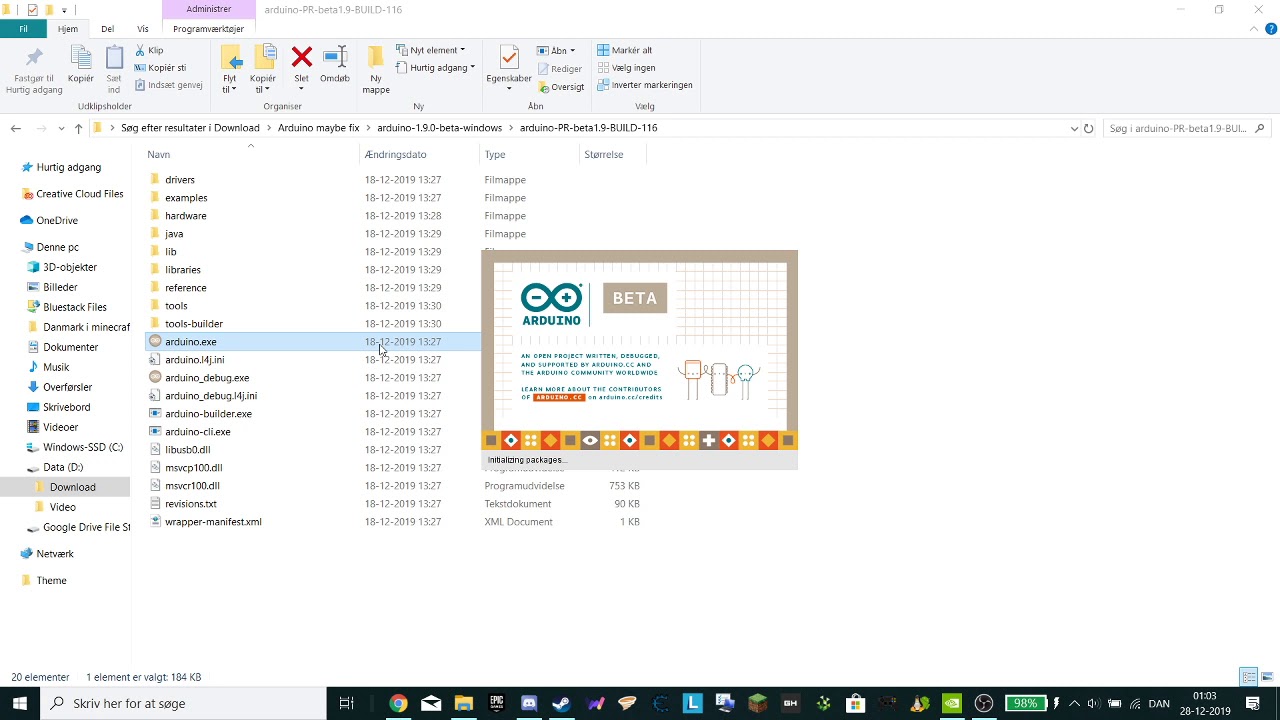
I have used arduino on this pc before but randomly arduino stopped launching no matter which version I have tried it does not work I see the "loading screen" but then nothing happens when it is done
A lot of people wont wander around the internet to watch a video for troubleshooting.
This is especially true to find out a video is PRIVATE and unviewable.
Could you take a few moments to Learn How To Use The Forum.
It will help you get the best out of the forum in the future.
Posting tips.
sorry i thought i set it to hidden so people could see it but it was not but i have fixed that now
and it wont work in any of the versions of IDE i have tried
First off I noticed you are using the beta and nightly versions.
These are generally not to be treated as a stable version.
I would suggest an install of 1.8.9 (avoid 1.8.10 for now) as a proper install.
Then work through the lists here unless you spot something that becomes obvious.
The sort of behaviour you see is also often related to additional security which is also covered in the link above.
Bob.
i tried both 1.8.9 and 1.8.10 and they do the same
Some additional clean up instructions attached.
Often useful to people who may have had a flurry of IDE changes.
With your type of issue the devil is often in the detail and a slow methodical approach is always my recommendation.
CLEAN UP BEFORE INSTALLING ANOTHER COPY OF THE IDE OR ARDUINO CREATE.pdf (347 KB)
it did not work i tried both things but it did not work then i even tried to uninstall arduino again and install it again but it still do work
Please run the file arduino_debug.exe that is located in the Arduino IDE installation folder from the Windows command line (cmd or PowerShell), copy the output that is shown on the command line after the IDE fails to load, then paste it in a reply here.
this is what i get
Loading configuration...
Initializing packages...
Preparing boards...
java.io.IOException: Cloudfiludbyderen kører ikke
at java.io.FileInputStream.readBytes(Native Method)
at java.io.FileInputStream.read(FileInputStream.java:255)
at sun.nio.cs.StreamDecoder.readBytes(StreamDecoder.java:284)
at sun.nio.cs.StreamDecoder.implRead(StreamDecoder.java:326)
at sun.nio.cs.StreamDecoder.read(StreamDecoder.java:178)
at java.io.InputStreamReader.read(InputStreamReader.java:184)
at java.io.BufferedReader.fill(BufferedReader.java:161)
at java.io.BufferedReader.readLine(BufferedReader.java:324)
at java.io.BufferedReader.readLine(BufferedReader.java:389)
at processing.app.legacy.PApplet.loadStrings(PApplet.java:270)
at processing.app.helpers.PreferencesMap.load(PreferencesMap.java:100)
at processing.app.helpers.PreferencesMap.load(PreferencesMap.java:74)
at processing.app.packages.UserLibrary.create(UserLibrary.java:77)
at cc.arduino.contributions.libraries.LibrariesIndexer.scanLibrary(LibrariesIndexer.java:224)
at cc.arduino.contributions.libraries.LibrariesIndexer.scanInstalledLibraries(LibrariesIndexer.java:201)
at cc.arduino.contributions.libraries.LibrariesIndexer.rescanLibraries(LibrariesIndexer.java:161)
at cc.arduino.contributions.libraries.LibrariesIndexer.setLibrariesFolders(LibrariesIndexer.java:120)
at processing.app.BaseNoGui.onBoardOrPortChange(BaseNoGui.java:678)
at processing.app.Base.onBoardOrPortChange(Base.java:1317)
at processing.app.Base$11.actionPerformed(Base.java:1518)
at processing.app.Base.rebuildBoardsMenu(Base.java:1494)
at processing.app.Base.(Base.java:275)
at processing.app.Base.main(Base.java:151)
java.lang.NullPointerException
at processing.app.helpers.PreferencesMap.load(PreferencesMap.java:101)
at processing.app.helpers.PreferencesMap.load(PreferencesMap.java:74)
at processing.app.packages.UserLibrary.create(UserLibrary.java:77)
at cc.arduino.contributions.libraries.LibrariesIndexer.scanLibrary(LibrariesIndexer.java:224)
at cc.arduino.contributions.libraries.LibrariesIndexer.scanInstalledLibraries(LibrariesIndexer.java:201)
at cc.arduino.contributions.libraries.LibrariesIndexer.rescanLibraries(LibrariesIndexer.java:161)
at cc.arduino.contributions.libraries.LibrariesIndexer.setLibrariesFolders(LibrariesIndexer.java:120)
at processing.app.BaseNoGui.onBoardOrPortChange(BaseNoGui.java:678)
at processing.app.Base.onBoardOrPortChange(Base.java:1317)
at processing.app.Base$11.actionPerformed(Base.java:1518)
at processing.app.Base.rebuildBoardsMenu(Base.java:1494)
at processing.app.Base.(Base.java:275)
at processing.app.Base.main(Base.java:151)
Did you do the "REMOVE or RENAME the “arduino15” folder" step of the instructions ballscrewbob provided?
i tried first with the rename did not work then i tried deleting it and it did still nok work