Today I was working on a project with my Arduino and I uploaded some sketches and after some testing I couldn't select the port in the Arduino software. After some research on the internet I went to device manager to see if the Arduino would be recognized there but I can't find it.
If I connect my Arduino to my laptop the only thing the arduino does is light up the green ON LED and light up the orange L and orange TX LED. Then I connected the Arduino from my brother to my laptop (exact same Arduino) and it worked fine. The difference that I saw was that the Arduino that was working fine had a blinking orange TX LED.
The Arduino that I am using is an Arduino UNO and I am connecting it with the cable that I got with the Arduino.
I hope that I wrote down enough information.
Thanks in advance!
Make sure the USB cable is completely plugged into both the Arduino board and the PC.
You may have a damaged USB cable. Try a different cable.
Either of the above can result in the power connections being made (and thus LED lights on the board), but no data connections (and thus no port for the board).
Thanks for your reaction!
I tried to use the cable I used on the working Arduino and it still didn't work. The cable is plugged all the way in on both my Arduino and laptop.
One thing I failed to mention in my post is that I was working with a transistor and a motor out of a drill. I powerd my Arduino with a 12 volt adapter and I did unplugg it from my laptop.
Reply #2 contains very relevant information. Mistakes with motors and 12V are usually deadly for Arduinos.
Sounds like the TTL-to-USB converter is gone and possibly more.
My advise is to buy another one. You can continue you project and you can use it as a programmer if you want to try see if the main processor (328P) is still working.
12 volts applied incorrectly can kill most Arduinos stone dead.
Start with JUST an Arduino connected to USB (preferably 2.0) after re-starting the computer and nothing else connected to the board.
A decent in focus picture of the Arduino may also be useful to ascertain it is a clone or an original. ( we don't care if it's a clone).
If the Arduino by itself shows up you may have been lucky.
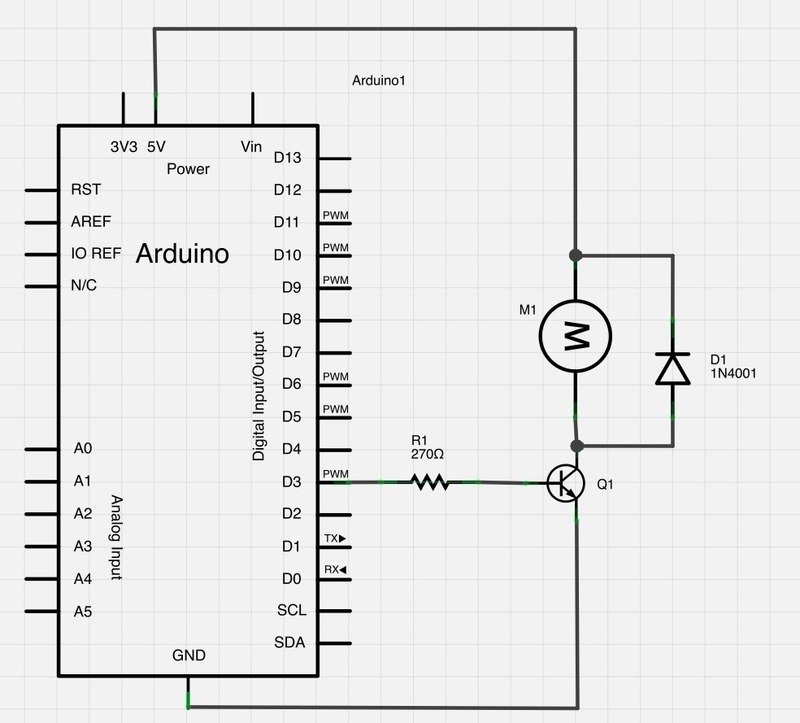
A schematic (even hand drawn) of how you had it wired up would also be useful at this point.
I applied the 12 volts using the power supply port on the Arduino itself so I don't think that was the problem.
I tried re-starting my computer with nothing connected to the Arduino board or to my laptop (except from the Arduino itself ofcourse) and it did nothing.
Here are the pictures of the Arduino and schematic.
Which transistor is that? You're missing a resistor between pin 2 and the base of the resistor. You're missing a flyback diode over the motor, which probably is the cause of the damaged Arduino.
Do I understand it right that I will not be able to fix the Arduino in any way?
The problem is that you don't know what is exactly wrong. Fixing one component without others that are possibly damaged might result in the new component again being blown.
You might be able to keep on using it; but you need to determine if the main processor (328P) is still working. To do determine that, you need a means to upload code which can be via ICSP (using another Arduino or a dedicated programmer) or you can try an external TTL-to-USB converter (needs to have DTR output as well as Rx and TX).
=== @ballscrewbob, looks like op used high-side switching.
sterretje: @ballscrewbob, looks like op used high-side switching.
Yes the arrangement looks highly suspect as it stands.
I think we have also seen this sort of arrangement on a real arduino also take out the usb chip used on NON clones too where both the barrel socket AND the USB have both been used in a power handling situation.
If the computer is also blown then hopefully it still has some warranty and the OP does not mention how he was using it to take advantage of that.
Apple products seem especially fickle with thier USB arrangements.
The transistor I used is a B1151 PNP transistor.
Using a flyback diode in my schematic wouldn't have been a bad idea and I did not think about the resistor between pin 2 and the base of the transistor.
I will try to upload a programm to the Arduino using another Arduino to see if the processor still works.
Btw nothing happened to my computer, I disconnected the usb cable when I plugged the 12 volt power supply in the Arduino.
ballscrewbob:
Transistors are not always the best choice for motor control and most of us prefer MOSFETS for medium power handling and the ease of PWM usage.
I should have done some more research before trying out. The reason I used the transistor was because I had some laying around but now I've ordered a motor shield for the arduino so that will do the job.
I've tried to upload a sketch to the "broken" Arduino using another Arduino and I got this error:
avrdude: Device signature = 0x000000
avrdude: Yikes! Invalid device signature.
Double check connections and try again, or use -F to override
this check.
avrdude done. Thank you.
Does this mean the processor is damaged?
I connected the 2 Arduino's with the connections shown on this page: https://www.arduino.cc/en/Tutorial/BuiltInExamples/ArduinoISP
I uploaded the Arduino ISP sketch to the programmer Arduino and selected Arduino as ISP and then clicked upload with programmer.