Automated Cat feeder project

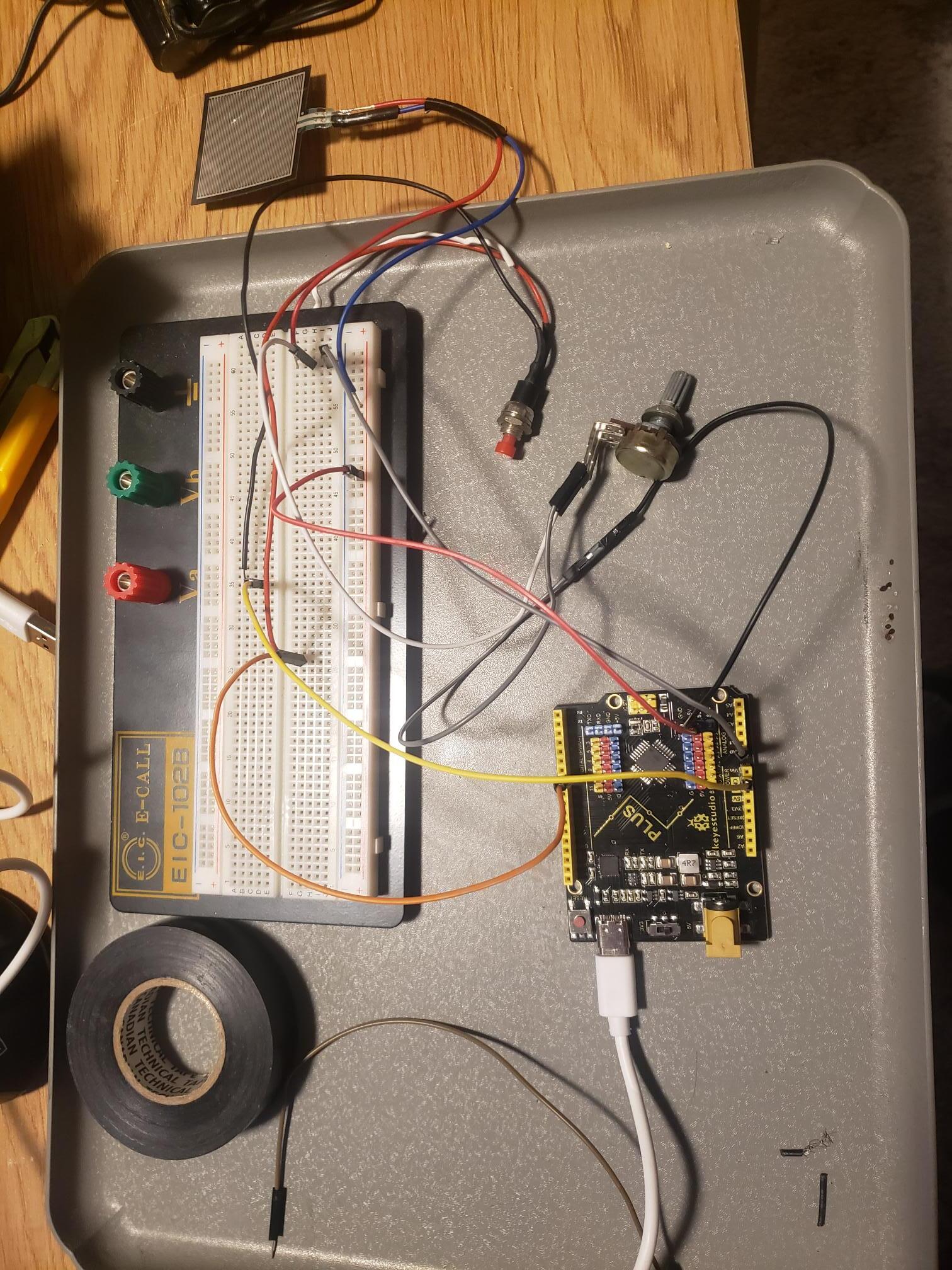
Good Evening friends. I am building an rfid feeder alternative after seeing someone online build something similar using a scale sensor to determine which cat could eat from the bowl. We have one cat that is 10 lbs and one that is 14 lbs. I'm sure you can guess who is overeating and needs to be restricted to diet food. I purchased an arduino uno and fsr sensor to control the futaba servo I already have. I have found code online and edited it to operate on the override switch for filling the dish but neither input functions when I combine the switch code with the fsr code. I was reading about using a switch case string and wonder if that would work better. I would also like to slow down the loop because it moves so fast i can't read the data from the fsr sensor. I'm trying to keep it as simple as possible, using the servo to open the lid when the smaller cat activates the fsr and close it when the other cat exceeds the settings for the fsr. I also want to include a low power library that will shut down after an elapsed time and reactivate when the microswitch powers the wake up circuit. Any assistance would be greatly appreciated. I did build one of these last year and used a cd rom drawer, relays, resistors and capacitors to make a unit that operated on a magnetic reed but the cat kept sticking to the fridge with that big magnet on her collar!

#include <Servo.h>
#include <ezButton.h>
#define fsrPin A0

constexpr uint8_t openPin = 7;    // open door
constexpr uint8_t closePin = 7;   // force close
constexpr uint8_t servoPin = 9;
const int BUTTON_PIN = 7;   
ezButton button(BUTTON_PIN);
int fsrReading;

// make your own servo class
class SlowServo {
  protected:
    uint16_t target = 110;       // target angle
    uint16_t current = 110;      // current angle
    uint8_t interval = 30;      // delay time
    uint32_t previousMillis = 0;
  public:
    Servo servo;

    void begin(byte pin)
    {
      servo.attach(pin);
    }

    void setSpeed(uint8_t newSpeed)
    {
      interval = newSpeed;
    }

    void set(uint16_t newTarget)
    {
      target = newTarget;
    }

    void update()
    {
      if (millis() - previousMillis > interval)
      {
        previousMillis = millis();
        if (target < current)
        {
          current--;
          servo.write(current);
        }
        else if (target > current)
        {
          current++;
          servo.write(current);
        }
      }
    }
};

SlowServo myservo;  // create a servo object

void setup() {
  Serial.begin(9600);
  myservo.begin(servoPin);          // start the servo object
  pinMode(openPin, INPUT_PULLUP);
  pinMode(closePin, INPUT_PULLUP);
  button.setDebounceTime(100);
  Serial.println("digital cat feeder");}

void doorOpen()
{
  Serial.println(F("open"));
  myservo.set(90);
}

void doorClose()
{
  Serial.println(F("close"));
  myservo.set(0);
}

void loop() {
  button.loop(); 
  fsrReading = analogRead(fsrPin);
  Serial.println ("Analog Reading = ");
  Serial.println  (fsrReading);
   
  if (digitalRead(openPin) == LOW){
  
    doorOpen();
  }
  if (fsrReading < 700 && fsrReading > 900) {
Serial.println("snowy - open cover");
{
    doorOpen ();
}
  if (digitalRead(closePin) == LOW)
  {
    doorOpen();
  }
  } else if (fsrReading < 1100) {
Serial.println("zelda - close cover");
  }
{  
doorClose();
}
  myservo.update();  // call the update method in loop
    
}

Hi,
open pin and close pin are the same pin?

And this condition will never be satisfied,
"if (fsrReading < 700 && fsrReading > 900)"

See if these changes I made to your code meet your needs.

During development, just throttle your loop().

Easy, but maybe problematic: drop a delay() in at the top (or bottom) of the loop function.

     delay(333); 

Adjust for circumstances, remove when no longer needed.

A more sophisticated method would allow some aspects of your loop() function to run at full speed, like your servo update code might prefer, yet throttle another section so it runs only, say, 5 times a second.

In a cat feeder, this might be left in place. While you may want to update the servos frequently, there's no need to weigh the cat 2000 times a second, or whatever. Even blinking lights and input/output stuff can be very happy at a significant reduced rate of execution.

void loop()
{
// place stuff that wants full speed loop here at the top,
// whatever needs full speed
// ... 


// then put this throttle code in

  static unsigned long lastTime;
  unsigned long now = millis();
  if (now - millis() < 100)
    return;

  lastTime = now;  

// and the rest of the loop will only execute every 100 milliseconds

// put stuff that wants to run "slower" here
// ... 


}

It's a common pattern using millis(), using what you might see and learn about in "blink without delay", the classic example from the IDE.

HTH

a7

I was just playing with @ruilviana's simulation posted in #2.

In it, this


  if (digitalRead(openPin) == LOW) {
    Serial.println(F("open"));
    doorOpen();
  }

  if (digitalRead(closePin) == LOW) {
    Serial.println(F("close"));
    doorClose();
  }

implements two buttons, one to force the bowl open, and one to forfe it closed, and either button means ignoring the FSR.

I would replace this with one toggle switch labeled "open / automatic".

Or, if you worry about leaving it open, one button that when pressed would open the door when pressed, and close it when the button is pressed again. Add a timer so that the door closes automatically after, say, the 60 seconds @chevette55 might need to replenish the food.

Unless you need the "force close" setting for when the cats don't get food. If that is part of the specifications, it would end up being another automatic function.

Has the FSR been providing good data for making the Snowy/Zelda choice? I have not used them, but I see ppl expecting too munch of them in terms of actual weight measurements and repeatability.

a7

Wow! I appreciate the suggestions! About the fsr sensitivity, I've made the weigh scale pivot point adjustable so I can fine tune the pressure on the sensor to differentiate between the two cats.

I was just realizing I can get rid of the close door function on the switch and just have it close after a 30 second delay. The toggle switch could work also. I added the debounce because the uno is so sensitive to input.

I tried putting in a delay but it slows the servo movement also. Throttling the code is exactly what I need to do. Thank you for the input.

Outlook for Android

that code seems unnecessarily complicated.
don't understand how override switches work without more logic to override the FSR

consider

#undef MyHW
#ifdef MyHW
#include "sim.hh"

constexpr uint8_t openPin  = A1;
constexpr uint8_t closePin = A2;
constexpr uint8_t servoPin = 10;
constexpr uint8_t fsrPin   = A0;
#else
#include <Servo.h>

constexpr uint8_t openPin  = 7;    // open door
constexpr uint8_t closePin = 8;   // force close
constexpr uint8_t servoPin = 9;
constexpr uint8_t fsrPin   = A0;
#endif

Servo myservo;

const int PosOpen  = 90;
const int PosClose = 0;

int posTarget = PosClose;
int posServo  = posTarget;
int posInc    = 10;

unsigned long msecPeriod = 250;
unsigned long msecLst;

char s [80];

// -----------------------------------------------------------------------------
void loop ()
{
    unsigned long msec = millis ();

    // slowly move servo when target != current position
    if (posServo != posTarget && msec - msecLst >= msecPeriod)  {
        msecLst = msec;

        int err = posTarget - posServo;
        if (0 < err)
            posServo += posInc;
        else if (0 > err)
            posServo -= posInc;

        myservo.write (posServo);
    }

    // read inputs
    int fsr       = analogRead (fsrPin);
    int doorClose = digitalRead (openPin);
    int doorOpen  = digitalRead (closePin);

    // update target based on input(s)
    if (fsr < 300)
        posTarget = PosOpen;
    else if ( 400 < fsr)
        posTarget = PosClose;

    // debug prints
    sprintf (s, " fsr %6d, door O/C %d %d, posTarget %6d, posServo %6d",
        fsr, doorOpen, doorClose, posTarget, posServo);
    Serial.println (s);
}

// -----------------------------------------------------------------------------
void setup () {
    Serial.begin (9600);
    Serial.println ("digital cat feeder");

    pinMode (openPin,  INPUT_PULLUP);
    pinMode (closePin, INPUT_PULLUP);

    myservo.attach (servoPin);          // start the servo object
    myservo.write  (posTarget);          // start the servo object
}

The code pattern I exhibited will work for that. Argh! The corrected pattern does work...

button.loop() and myservo.update() should both go in the free running non-throttled section. The rest of the code can then execute leisurely in the throttled section. but the servos will step along and no button activity will be missed.

Although now back from you know where, and in the lab, I find the code pattern I posted was incorrect.

Below is @ruilviana's sim with throttling and a few tweaks. As I play with it, I think there will be some problems with the logic and timing. Not because the code doesn't do what it says. It works fine, but I wonder in practice how Zelda and Snowy will react to the servo, whether they mightn't register and be identified perfectly and so forth.

You can always count on cats to be difficult, more so in proportion to the trouble you go to doing something nice for them. :expressionless:

I changed the rotary pot out for a slide fader, which I just find easier to operate and read.

First, the corrected throttle:

// then put this throttle code in

  static unsigned long lastTime;
  unsigned long now = millis();
  if (now - lastTime < 333)
    return;

  lastTime = now;  

Stuff above the throttle gets run very frequently, stuff below the throttle only every 333 ms in this example.

And the sim with the high-speed stuff moved above the inserted throttle.

// https://forum.arduino.cc/t/automated-cat-feeder-project/1086691
// https://wokwi.com/projects/355957711456430081

#include <Servo.h>
#include <ezButton.h>
#define fsrPin A0

constexpr uint8_t openPin = 7;    // open door
constexpr uint8_t closePin = 8;   // force close
constexpr uint8_t servoPin = 9;
const int BUTTON_PIN = 7;
ezButton button(BUTTON_PIN);
int fsrReading;

// make your own servo class
class SlowServo {
  protected:
    uint16_t target = 110;       // target angle
    uint16_t current = 110;      // current angle
    uint8_t interval = 30;      // delay time
    uint32_t previousMillis = 0;
  public:
    Servo servo;
    //-----------------------------------------------------------------------
    void begin(byte pin)
    {
      servo.attach(pin);
    }
    //-----------------------------------------------------------------------
    void setSpeed(uint8_t newSpeed)
    {
      interval = newSpeed;
    }
    //-----------------------------------------------------------------------
    void set(uint16_t newTarget)
    {
      target = newTarget;
    }
    //-----------------------------------------------------------------------
    void update()
    {
      if (millis() - previousMillis > interval)
      {
        previousMillis = millis();
        if (target < current)
        {
          current--;
          servo.write(current);
        }
        else if (target > current)
        {
          current++;
          servo.write(current);
        }
      }
    }
};
//-----------------------------------------------------------------------
SlowServo myservo;  // create a servo object
//-----------------------------------------------------------------------
void setup() {
  Serial.begin(9600);
  myservo.begin(servoPin);          // start the servo object
  pinMode(openPin, INPUT_PULLUP);
  pinMode(closePin, INPUT_PULLUP);
  button.setDebounceTime(100);
  Serial.println("digital cat feeder");
  doorClose();
}
//-----------------------------------------------------------------------
void doorOpen()
{
  myservo.set(90);
}
//-----------------------------------------------------------------------
void doorClose()
{
  myservo.set(0);
}
//-----------------------------------------------------------------------
void loop() {


  button.loop();
  myservo.update();  // call the update method in loop

// then put this throttle code in

  static unsigned long lastTime;
  unsigned long now = millis();
  if (now - lastTime < 333)
    return;

  lastTime = now;  

// below this runs only 3 times a second

  fsrReading = analogRead(fsrPin);
  Serial.print ("                     Analog Reading = ");
  Serial.println  (fsrReading);

  if (digitalRead(openPin) == LOW) {
    Serial.println(F("open"));
    doorOpen();
  }

  if (digitalRead(closePin) == LOW) {
    Serial.println(F("       close"));
    doorClose();
  }

  if (digitalRead(openPin) == HIGH && digitalRead(closePin) == HIGH )
  {
    if (fsrReading < 700) {
      Serial.println("NO CATS - close cover");
      doorClose();
    }
    if (fsrReading > 700 && fsrReading < 900) {
      Serial.println("snowy - open cover");
      doorOpen ();
    }
    if (fsrReading > 900) {
      Serial.println("zelda - close cover");
      doorClose();
    }
  }
}

Play with it here: throttled cat feeder simulation


Sry about the throttle code error, I try to test things but in this case I should not code when m,y brain is too hot.

a7

Well I loaded that code and tested it and it works great! I made a few small adjustments and it works consistently. Need to shorten the lid arm a bit as I'm not getting a full close on it. I'm sure fat cat will try and stick her nose underneath. I set up the servo saver(a relic from past r/c cars) so that its almost vertical in the close position to put less strain on the servo if she tries to pry at the lid. I don't think she will try very hard as she's pretty lazy, even when hungry. Thank you for your help with the code. I know in my head what I want the unit to do but am still figuring out how to translate it in code. I have lots of experience with electronics but this is my first foray into coding. I'll keep reading and learning and eventually I'll figure it out. Thanks again to everyone that offered advice and suggestions. Have a great evening!

And if your cats over there are anything like ours over here, you will see that they figure out how to get food they aren't supposed to be able to. You are at the beginning of a competition between engineering and animal instincts and talents.

I was actually surprised when my cat did not figure out that one knob controlled the serving size on the timed auger feeder dispenser we made for him.

I never did figure out how he knew about 20 seconds before the auger turned that it was about to, but he would perk up, run to the bowl and… soon food would come out.

a7

This is my second attempt at an automatic feeder. The first one was a thin board with automotive feeler gauges attached to a strip of tinfoil to act as a reed switch. it turned on timed relays that opened and closed a cd-rom drawer with a plastic dish filled with food. it worked for a bit but we ended up having to open it with the override switch because the magnet kept getting stuck on the fridge and pulling away from her collar. it worked great for months but a few pieces of food got jammed in the drawer and damaged the motor from not having any protection other than a 3a fuse. Both of them are pretty docile and so far the new feeder is working. You are right though, fat cat already tried getting under the lid but i need to adjust it so theres no gap. I also oriented the feeder in our closet so that it can only be accessed from the front, not the sides. Sorry for the delayed response.

Haven’t been following, but have you considered an RFID tag on the fat cat.

image

I considered an rfid setup but have read that they only work in close proximity and not always reliable. So far this setup is working good!

This topic was automatically closed 180 days after the last reply. New replies are no longer allowed.