I'm new to the software development with the Arduino IDE.
I currently have a project where I use an Arduino Nano ESP32 and the Arduino IDE 2.3.2.
What are some general best practices and code structuring for Arduino?
I'm doing PLC development since 10 years now.
And general question:
I like the code snippets (sketches) of the libaries I use, but my main program gets really "messy" I'd say with all the used snippets so I'd like to rather restructure my .ino file, or split the different functions up into seperate files which I then just call in my main .ino file. Is that possible? Can I call setup and loop in other files too?
What are your go-to things you do for medium projects?
Because I'd also like to implement some QoL features, like WiFi scan & whats printed to the serial port, I'd like to display on a web server, so it's possible to see, what is happening without needing to plug into the COM port.. etc, also some diagnosis prints etc.
Sure it is! The compiler is a C++ one, so you can either use "#include" to incorporate external file (located in the same .ino directory) or even create custom classes (.cpp) to be used in your code.
While you can have multiple .ino files and regular C++ source files in the root sketch directory, I'd recommend having just the one single .ino, which has the same name as the directory (that's what makes it a valid sketch); and then regular C++ source and headers under a tree in the src subdirectory. The compiler will recursively compile everything there and link them together. So
mysketch/
mysketch.ino
src/
some_stuff.cpp
some_stuff.h
one/
one.cpp
one.h
other_one.cpp
other_one.h
third_one.hpp
two/
two.cpp
two.h
Use relative directories to include, e.g. in mysketch.ino
normally i push often used piece of code in a function, or if this piece do something similar like LCD output, or time renew. so loop() contain only names of functions and it is mostly clear what sketch do. and when function ends, every not static variable will disappear and free memory.
extremely big chunk of code is better to place in external .ino file. good example is 3D printer or CNC firmware.
Scan wifi networks > connect to the network thats implemented into the project > connect to the mqtt broker thats implemented in the project
And after that sequence if everything is fine I just want to subscribe to a topic, deserialize json .. do some input/output stuff and also check if I lost connection to the wifi and then start the setup sequence again until everything is connected. A will message is also implemented.
But I'm currently already at 280 lines of code in the .ino file, which is a lot to scroll through.. thats why I wanted to just call those functions in my .ino file after another.
Also I want to setup a very simple web server which just prints the message i currently print to serial port.
I can't get what you're saying here, please provide an example.
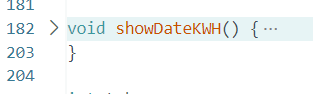
If you "fold" a function (Using Ctrl Shift ') it shows only the definition and collapses the content. E.g. the function:
Create additional ino files in the sketch directory and give them a proper name.
mysketch/
mysketch.ino
WiFi.ino
Webserver.ino
Add .h and .cpp files in the sketch directory
mysketch/
mysketch.ino
WiFi.h
WiFi.cpp
Webserver.h
Webserver.cpp
The approach given in post #4.
Pros and cons for each.
Multiple inos. All ino files will be preprocessed and concatenated to one big cpp file and that will be compiled.
Pros:
Easy for beginners.
Cons:
The creation of the big .cpp file might not always result in a correct .cpp file and the compiler will throw errors.
Making a mistake in e.g. WiFi.ino might result in an error reported for Webserver.ino.
.h/.cpp files in the sketch directory
Pros:
None of the cons of multiple inos.
Cons:
If you have a lot of files navigating might become a little tricky once all tab pages no longer fit horizontally. I haven't touched IDE 2.x for a while so can't say for sure if you can access them from the left "file explorer" pane (if open).
.h/.cpp in src subdirectories
Pros:
None of the cons of multiple inos.
Cons:
To my knowledge, you can not edit those files directly in the IDE; again, I haven't touched IDE 2.x for a while, maybe @kenb4 can advise.
You do not call setup() and loop(). As you might know, every C/C++ program has a function called main(); the Arduino environment hides it for you although you can find it in the core directory of the core that you're using. This main() function is responsible for calling setup() and loop() (and for configuring the hardware).
You can place loop() and setup() in their own ino files, e.g. loop.ino and setup.ino and leave the sketch's ino file itself empty. If you however break up your program in functions and place those functions in their own files (grouped by functionality as shown above), your setup() and loop() will stay relatively small so there is hardly a need for it.
Yes, you can access them in the sketchbook tree. This applies to files in the root of the sketch, and any other subdirectories, including src (the only subdirectory the compiler back-end will check). The IDE just has no (obvious?) option to create files, other than in the root.
In the meatball menu at the right end of the tabs, there is a menu option to create a New Tab, which is a file in the root. Those tabs are opened automatically for existing files when the sketch is opened and cannot be closed; there are menu options to Delete or Rename the file. Tabs for other files elsewhere have a close icon. In that same menu, all those root files are also listed at the bottom, and may be easier to navigate vertically than with the tabs.
So creating a file in src is a minor one-time inconvenience for each file. I usually touch from a shell that is always open anyway. And the tab/menu features for sketch files in the root apply only to supported extensions
Con: Without the Arduino IDE pre-processing, you may have to #include a bunch of files that can be difficult to pin down, and your .cpp files will have to be CORRECT C++ (ie with prototypes for forward and external references.)
use several tabs (=files) in the Arduino IDE to split your project into logic parts
see loop() just as a "controller" which calls the different things, it can be quite short, for example the call of a finite state machine, and the .update()/.run()/.tick() calls of your objects