Warning to new people.
I just wanted to point out a potential (major) problem with the BWD (Blink Without Delay) technique.
There are two (four, see post #4) ways that the BWD timing variable can updated:
Method one updates the timing variable by adding the delay time to the timing variable itself.
There is an argument that this will prevent slippage in timing.
millisOne = millisOne + delayTime;
Method two updates the timing variable by setting it equal to the current value of millis().
millisTwo = currentMillis;
At first glance both seem to be very close each other.
The first method can lead you into a potential software bug.
In the first example, if the value of the timing variable isn’t set equal to millis() when the timer is put into operation, this bug will cause update problems if there is any kind of delay in your sketch!
To demonstrate the problem consider this example sketch.
unsigned long currentMillis;
unsigned long millisOne;
unsigned long millisTwo;
unsigned long delayTime = 50;
unsigned long counterOne;
unsigned long counterTwo;

byte x = 0;


void setup()
{
  Serial.begin(115200);
}

void loop()
{
  if(x == 0)
  {
    delay(1000);
    Serial.print("millis() = ");
    Serial.println(millis());
    Serial.println("-------------- Start --------------");
    x = 1;

    //millisOne = millis(); //uncomment this line for the fix <<<<<<<<<<
  }

  currentMillis = millis();

  //Using method  -->  millisOne = millisOne + delayTime;
  if(currentMillis - millisOne >= delayTime)
  {
    millisOne = millisOne + delayTime;

    Serial.print("millisOne = ");
    Serial.println(millisOne);
  }

  //Using method  -->  millisTwo = currentMillis;
  if(currentMillis - millisTwo >= delayTime)
  {
    millisTwo = currentMillis;

    Serial.print("millisTwo = ");
    Serial.println(millisTwo);
  }

} //END of loop()
You can see the problem in the attached image from the serial monitor.
The yellow highlight shows the MillisOne code section has to catch up to the value of mills().
This means it will be true each time through loop() until the millis() value is attained!
The fix for this problem in this sketch is to uncomment this line .
//millisOne = millis(); //uncomment this line for the fix <<<<<<<<<<
The first one catches up when there was a big delay. But sometimes that is wanted when it has to stay tuned to the time. I say: "it is not a bug, it is a feature". The second one is the interval plus the delay by code.
It has taken me a while to see what you are trying to tell us. And, yes, I have experienced this myself. The problem is at least in part due to your very short delayTime.
Your suggested solution is reasonable.
However I am having trouble finding a more obvious way to explain the problem and I don't have time now. I will do some more work on it later.
Let's say you wanted to send pulses every 50ms to an output pin and you use method one.
Let's say you have been running your Arduino for 10 days and now it's time to send out the pulses.
What will happen is you will continually send pulses at loop() speed rather than every 50ms.
Definition of a programming bug.
I don't quite understand. If you wanted to send pulses out every 50ms, and you don't send them out for 10 days, don't you already have a bug, regardless of how the pulses get sent out when they finally do?
Or are you just describing the "startup problem" where you have to make sure you don't leave the equivalent of "previousmillis" at zero if the time when you're starting is well past zero?
I have a project with a millis() software timer for seconds. With that I use a variable to count to 60 (minutes), another variable to 60 (hours), and another variable to 24 (days). I want that to stay in pace with the time, so I choose method one. This is mostly software of course. With hardware it can be a problem.
I set the previousMillis to millis() at the end of setup().
I have experienced what LarryD described when I had a timer that was allowed to be paused - when unpaused, there would be a wild series of update while the time caught up. The solution I used was to reset "previousMillis" to the new "currentMillis" when time was unpaused, thus eliminating the burst of updates.
So it's not a bug, it's just something for the application to deal with.
Koepel:
Coding Badly, Yes, I'm using that. I though it was the same as the first one in the top post.
Method #3 gives an image a bit like that in post #8.
And then there is still the phase relationship.
You would still have to initialize millisOne before using the timer.
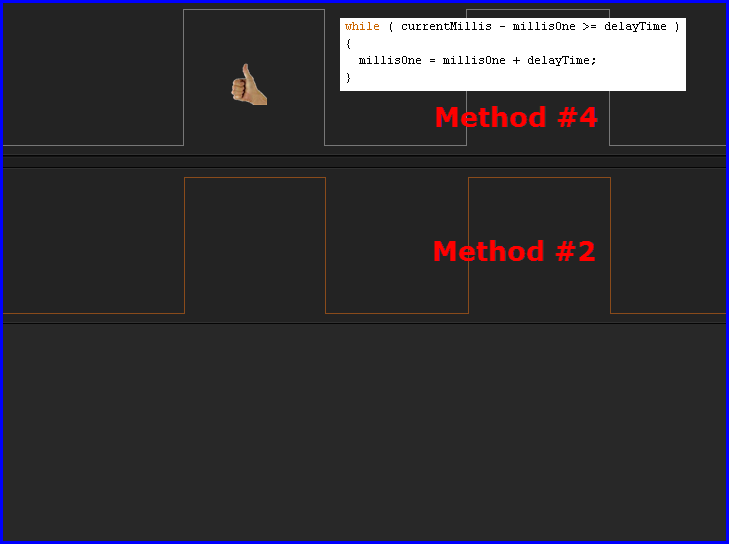
As seen in the following image, IMO, method #4 would be the correct choice.
Using CBs method #4 is the way to go to prevent all problems.
Well, the getting older situation would still be a problem
LarryD:
Using CBs method #4 is the way to go to prevent all problems.
In @Koepel's example (basic timekeeping) method #4 would lose seconds if an overrun occurs; the "seconds" variable would not have been incremented by the correct amount.
The bottom line is that each method has a place. They each solve a set of problems but they each also have side-effects.
Well, the getting older situation would still be a problem
CrossRoads:
I have experienced what LarryD described when I had a timer that was allowed to be paused - when unpaused, there would be a wild series of update while the time caught up. The solution I used was to reset "previousMillis" to the new "currentMillis" when time was unpaused, thus eliminating the burst of updates.
So it's not a bug, it's just something for the application to deal with.
Koepel:
The first one catches up when there was a big delay. But sometimes that is wanted when it has to stay tuned to the time. I say: "it is not a bug, it is a feature". The second one is the interval plus the delay by code.
Interesting that this observation is exactly how the Time Library works!
time_t now() {
	// calculate number of seconds passed since last call to now()
  while (millis() - prevMillis >= 1000 + msInterval) {
		// millis() and prevMillis are both unsigned ints thus the subtraction will always be the absolute value of the difference - msInterval can be negative, slowing appropriately
    sysTime++;
    prevMillis = prevMillis + 1000 + msInterval;
    msInterval = 0;
#ifdef TIME_DRIFT_INFO
    sysUnsyncedTime++; // this can be compared to the synced time to measure long term drift
#endif
  }
  if (nextSyncTime <= sysTime) {
    if (getTimePtr != 0) {
      time_t t = getTimePtr();
      if (t != 0) {
        setTime(t);
      } else {
        nextSyncTime = sysTime + syncInterval;
        Status = (Status == timeNotSet) ?  timeNotSet : timeNeedsSync;
      }
    }
  }
  return (time_t)sysTime;
}
each call to now() catches up the seconds to real time.
When I tried out the BlinkWithoutDelay example, I also stumbled over the code which uses the second method (assigning the current time to the last-called time variable).
Today, I intentionally had programmed it with the first method, so that in average the interval is 1s, independently of any further "tasks" which are performed "simultanously". I must confess that in my early programming years I had also used the second version. Only later I noticed that this version was often not my intended way how the scheduling should work. Often (but not always) the difference of both implementations does not matter, especially if the CPU load is low.
After reading the arguments here, I must ascertain that there is no general correct or wrong method.
It always depends on your application. There may be applications, where you want to have a minimum delay time between the actions. There may be other applications where you want to have a correct average interval between certain actions. In the latter case, you may want or may want not to prevent against repetive calls if the scheduler needs to catch up. (This occurs only if you have heavy CPU loads or calls of functions which prevent the loop to be called periodically.) A reasonable way is, to try to catch up until a certain amount of the interval (for example up to 200%). If the delay is higher, do not try to catch up, but warn the programmer/user that the "step" is lost.