gchliu
November 4, 2024, 7:43am
1
So far I am not having much luck in getting my ILI9488 TFT to work with Nano ESP32.
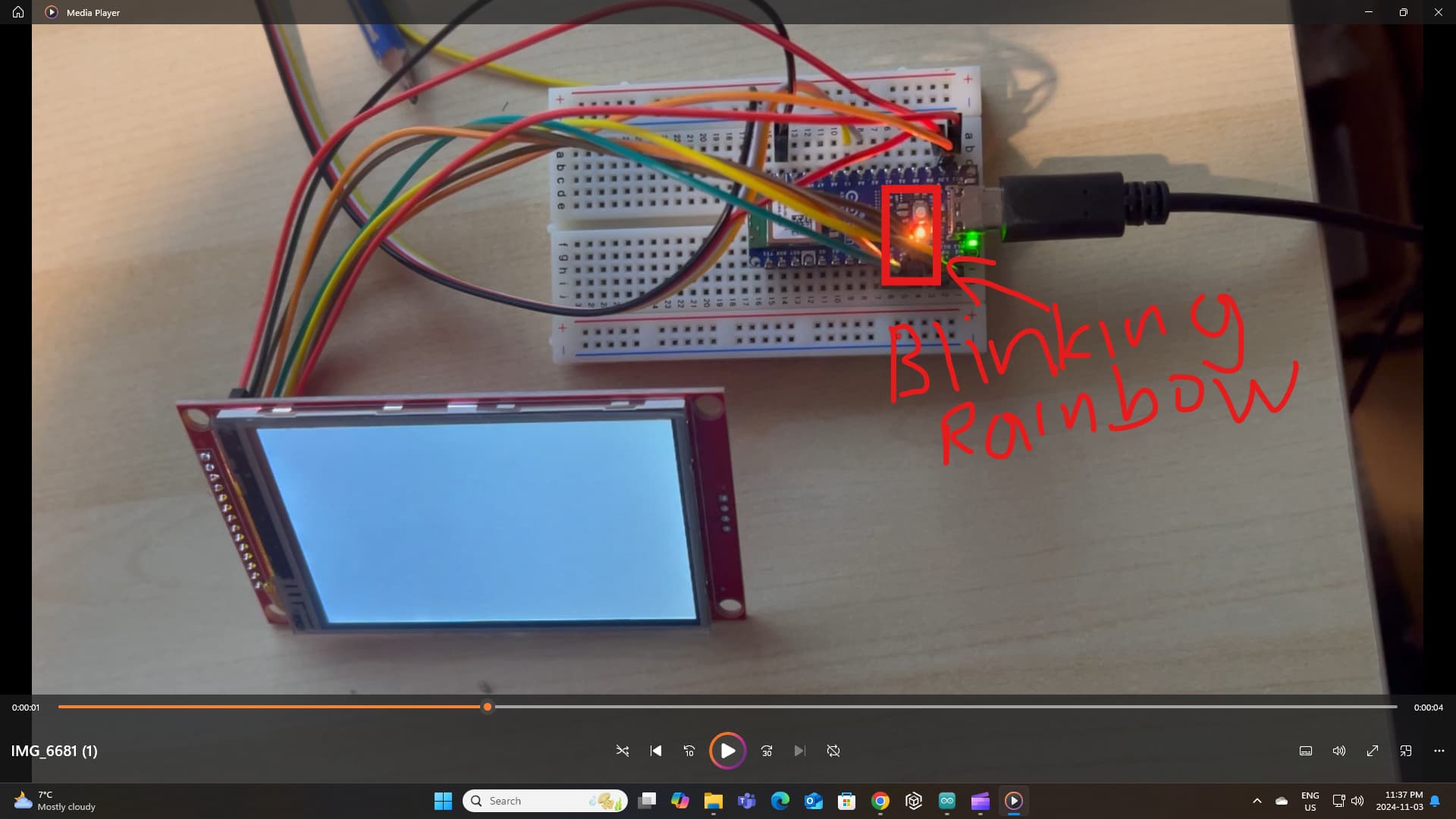
Each time I compile and upload example display programs, Nano would go into a strange state, where the LED blinks slowly from Blue->Red->Green and the Comm Port (USB) becomes unresponsive and remains so even after power cycle by disconnecting the USB cable.
I have tried TFT_eSPI library, compiled and uploaded "Read_User_Setup.ino" example program. I also tried Adafruit_GFX library, ILI9488 Arduino Library, and "GraphicsTest.ino" sample program . Both combinations complied successful but go into the same unknown state after uploading. I am certain that the wirings are correctly assigned, both on software and hardware.
The only way way to get out of this state is by pressing the reset button quickly a few times, then the LED changes to slow blinking blue light. This seems to be one of the ways to unfreeze the Comm port. The other way is to short circuit the GND and B1 pins.
Question -
If ILI9488 won't work, my second option is to switch to L2C LCD display. Hopefully, I wouldn't have to that far.
Thank you for reading this.
The ILI9488 display libraries can be memory-intensive, particularly with large graphics libraries and complex screen updates. The ESP32 might be crashing if it's running out of memory or hitting a stack overflow.
jim-p
November 4, 2024, 9:58am
4
Does the standard arduino Blink sketch upload and work?
Hi, @gchliu
Are the libraries compatible with ESP32 controller?
Have you Googled;
ILI9488 TFT Nano ESP32
Thanks.. Tom..
Hello @aliarifat794 , I think I have some suggestions for you - please try them and let me know if the situation improves:
Make sure you are using the Arduino ESP32 Boards package, not the "esp32" package, and update to the latest version.
Update the bootloader on the board by following this guide .
Make sure the Pin mapping is set to By GPIO Number by following this guide .
As a last resort, if you have a 3V3 USB-to-TTL serial cable you can attach it to the board's TX/RX pins and check the output there for some clues...
gchliu
November 4, 2024, 5:35pm
8
Thank you for the suggestion. I have already tried the example blinking program that came with the Arduino IDE. It worked fine as it should be without freezing the comm port and does not light up rainbow LED. The problem seems to be the TFT libraries that Nano ESP32 do not like. I have already tried 3 library packages - TFT_eSPI, TB_TFT_sSPI, and Adafruit. All compiled nicely but soon after uploading, they all froze the Comm port and turned on the rainbow led light.
gchliu
November 4, 2024, 6:25pm
9
Iburelli,
Thank for the suggestions. Unfortunately, it did not work. The COMM port becomes unresponsive and LED lights up with rainbow colours. Yes, I have assigned the wires correctly as per Nano's definitions, i.e. CIPO(MISO), COPI(MOSI) and SCK GPIO numbers (47, 38 and 48 respectively).
To eliminate the possible ILI9488 hardware conflict, I have completely disconnected it from the Nano ESP32 board and switched back on forth between the default(PIN) and legacy (GPIO) modes in IDE. All caused the COMM port unresponsive and turns on rainbow LED light, after uploading.
Not sure what to do next. I can change my game plan of either getting a knockoff ESP32 board or change the display.
The TFT_eSPI library by Bodmer appears to be the most common library for TFT integration. I am puzzled that I have so much trouble with this Nano ESP32 board.
George
gchliu
November 5, 2024, 2:32am
10
Hi Tom,
George
I have assigned the wires correctly as per Nano's definitions, i.e. CIPO(MISO), COPI(MOSI) and SCK GPIO numbers (47, 38 and 48 respectively).
Please read the guides I linked to carefully.
ALWAYS use pin labels in your sketch (write D12, not 47!) with the Nano ESP32.
Also, ALWAYS set By GPIO Number since you use libraries.
Do not try other combinations as they will just result in more confusing situations.
Can you please post:
the sketch
the board package you are currently using and its version
the IDE log of a bootloader upgrade procedure
Thanks!
gchliu
November 6, 2024, 6:05am
12
Iburelli,
If you like to experiment with TFT_eSPI library. It comes with an example sketch "TFT_eSPI\examples\Test and diagnostics\Read_User_Setup.ino" I am assuming you have access to a Nano ESP32 board. I would be interested to know if you were able to successfuly upload. You don't need an ILI9488 screen for this experiment.
FYI - as an experiment of my own, I was able to compile and upload the same example sketch to my UNO Wifi R2 board. There's definitely something that Nano ESP32 do not like with various TFT libraries.
Yes, it is confusing working with ESP32 GPIO and Arduino pin naming systems. Further confusing the situation, Nano ESP32 renamed MOSI and MISO to COPI and CIPO, respectively.
Thanks again for your time.
I am in the exact same situation.
Any sketch upload related with the TFT_eSPI, makes the Nano ESP32 go into the rgb led color circling mode, and the board dissapears from the board selector.
Nobody has had success with an ili9488 with an Arduino Nano ESP32?
Anybody knows where the problem can be? I suspect is something related about the VSPI and HSPI declarations.
Hi @dreamgame .
I believe all these reports are related:
If so, this is probably caused by a bug in either the "TFT_eSPI " library or version >2.0.14 of the "Arduino ESP32 Boards " / "esp32 " boards platform:
opened 11:38AM - 17 Apr 24 UTC
Hi,
I use arduino ide 2.3.0, tft_espi 2.5.43 library, and esp32 by espressif 2… .0.15 package , and the esp32c3 super mini module.
The following code lights the led 1 time.
But when I uncomment // tft.init() the led keeps blinking, so the module keeps restarting.
It does not happen when I use esp32 package 2.0.14
Any idea what the problem is ?
Regards
Sjors
code :
/*
*/
#include <TFT_eSPI.h>
TFT_eSPI tft = TFT_eSPI();
const byte led8 = 8;
byte UseFont;
char str[80];
void setup(){
// Serial.begin(115200);
// delay(2000);
pinMode(8, OUTPUT);
digitalWrite(8, HIGH);
delay(1000);
digitalWrite(8, LOW);
delay(1000);
digitalWrite(8, HIGH);
// tft.init(); // tft.begin(); zijn hetzelfde
}
void loop(){
}
opened 11:56PM - 18 Apr 24 UTC
I'm having issues with my ESP32-S3 module crashing and rebooting on `tft.begin(… )` (or on `tft.init()`). The following output repeats over and over in the monitor:
```
ESP-ROM:esp32s3-20210327
Build:Mar 27 2021
rst:0x1 (POWERON),boot:0x2b (SPI_FAST_FLASH_BOOT)
SPIWP:0xee
mode:DIO, clock div:1
load:0x3fce3808,len:0x4bc
load:0x403c9700,len:0xbd8
load:0x403cc700,len:0x2a0c
entry 0x403c98d0
E (99) esp_core_dump_flash: Core dump data check failed:
Calculated checksum='db82bb1c'
Image checksum='ffffffff'
Guru Meditation Error: Core 1 panic'ed (StoreProhibited). Exception was unhandled.
Core 1 register dump:
PC : 0x4200289b PS : 0x00060a30 A0 : 0x82002928 A1 : 0x3fcebd80
A2 : 0x00000010 A3 : 0x00000000 A4 : 0x60004000 A5 : 0x00000015
A6 : 0x000000ff A7 : 0x00000001 A8 : 0x08000000 A9 : 0x3fcebd50
A10 : 0x3fc952b0 A11 : 0x00000001 A12 : 0xffffffff A13 : 0x00000010
A14 : 0x00000000 A15 : 0x3fc91d98 SAR : 0x00000010 EXCCAUSE: 0x0000001d
EXCVADDR: 0x00000010 LBEG : 0x42004dec LEND : 0x42004e4f LCOUNT : 0x00000003
Backtrace: 0x42002898:0x3fcebd80 0x42002925:0x3fcebdb0 0x42002930:0x3fcebdd0 0x4200184d:0x3fcebdf0 0x420058da:0x3fcebe20
```
Using the [EspExceptionDecoder](https://github.com/me-no-dev/EspExceptionDecoder) to decode the dump (only works in Arduino 1.8.19) with the [ELF file](https://github.com/Bodmer/TFT_eSPI/files/15031350/minimal_tft.ino.elf.zip) from the build gives this:
```
PC: 0x4200289b: TFT_eSPI::writecommand(unsigned char) at C:\Users\stompp\Documents\Arduino\libraries\TFT_eSPI\TFT_eSPI.cpp line 81
EXCVADDR: 0x00000010
Decoding stack results
0x42002898: TFT_eSPI::writecommand(unsigned char) at C:\Users\stompp\Documents\Arduino\libraries\TFT_eSPI\TFT_eSPI.cpp line 81
0x42002925: TFT_eSPI::init(unsigned char) at C:\Users\stompp\Documents\Arduino\libraries\TFT_eSPI\TFT_eSPI.cpp line 692
0x42002930: TFT_eSPI::begin(unsigned char) at C:\Users\stompp\Documents\Arduino\libraries\TFT_eSPI\TFT_eSPI.cpp line 603
0x4200184d: setup() at C:\DEV\ESP32\minimal_tft/minimal_tft.ino line 7
0x420058da: loopTask(void*) at C:\Users\stompp\AppData\Local\Arduino15\packages\esp32\hardware\esp32\2.0.15\cores\esp32\main.cpp line 42
```
I've minimized the code to the following:
```C
#include <SPI.h>
#include <TFT_eSPI.h>
TFT_eSPI tft = TFT_eSPI();
void setup() {
Serial.begin(115200);
tft.begin();
}
void loop() {
}
```
My setup is the following:
IDE: Arduino 1.8.19 & 2.3.2
TFT_eSPI version: 2.5.43
Board package version: [2.0.15](https://github.com/espressif/arduino-esp32/releases/download/2.0.15/esp32-2.0.15.zip)
Processor: [ESP32-S3](https://github.com/Freenove/Freenove_ESP32_S3_WROOM_Board)
TFT driver: [GC9A01](https://www.waveshare.com/wiki/1.28inch_LCD_Module?amazon)
Interface: SPI
The [setup file](https://github.com/Bodmer/TFT_eSPI/files/15031361/Setup406_GC9A01_ESP32.zip) is a copy of 46 with a different MOSI pin. It's added to the `User_Setup_Select.h` file and the `User_Setup.h` is set to use the GC9A01 driver.
opened 02:30AM - 29 Apr 24 UTC
in board manger v 2.0.15 we have this:
```
Rebooting...
⸮ESP-ROM:esp32s3-20… 210327
Build:Mar 27 2021
rst:0xc (RTC_SW_CPU_RST),boot:0x2b (SPI_FAST_FLASH_BOOT)
Saved PC:0x4037736c
SPIWP:0xee
mode:DIO, clock div:1
load:0x3fce3808,len:0x4bc
load:0x403c9700,len:0xbd8
load:0x403cc700,len:0x2a0c
entry 0x403c98d0
Guru Meditation Error: Core 0 panic'ed (StoreProhibited). Exception was unhandled.
Core 0 register dump:
PC : 0x420037ee PS : 0x00060a30 A0 : 0x820038c8 A1 : 0x3fcebbd0
A2 : 0x00000010 A3 : 0x00000000 A4 : 0x60004000 A5 : 0x0000000b
A6 : 0x000000ff A7 : 0x00000000 A8 : 0x08000000 A9 : 0x3fcebba0
A10 : 0x3fc95938 A11 : 0x00000001 A12 : 0xffffffff A13 : 0x00000000
A14 : 0x00004000 A15 : 0x3fc91e3c SAR : 0x00000010 EXCCAUSE: 0x0000001d
EXCVADDR: 0x00000010 LBEG : 0x42005d1c LEND : 0x42005d7f LCOUNT : 0x00000000
Backtrace: 0x420037eb:0x3fcebbd0 0x420038c5:0x3fcebc00 0x420025a9:0x3fcebc20 0x42006926:0x3fcebc50
```
esp32s3
Demo_3D_cube.ino
ST7796
with or without touch
any frequency!
but in board manger v 2.0.14 it works.
opened 01:52PM - 16 May 24 UTC
Device crashes at boot.
Open issue in Arduino repo https://github.com/espressif… /arduino-esp32/issues/9618#issuecomment-2113344119
and
https://github.com/Xinyuan-LilyGO/T-Dongle-S3/issues/26
opened 02:45AM - 21 May 24 UTC
The issue that I am encountering is that a "Guru Meditation Error: Core 1 panic… 'ed (StoreProhibited). Exception was unhandled." just prior to executing the tft.init() function. This issue appears to be only graphics bases since I can execute this sketch with only Serial.println("..."); calls. I can use the Adafruit_GFX.h with the Adafruit_ST7789.h driver to do a test on a GFX application.
During an update something changed and I am at a loss to determine the root cause. Wiring is correct ( I have checked it many times).
1. IDE - Arduino version 2.3.2 CLI version 0.35.3
2. TFT_eSPI - version 2.5.43
3. Board Version - esp32 version 3.0.0.rc3 (I have regressed it back to ESP version 2.0.16 with no change in functionality, still reboots).
4. PROCESSOR - ESP32-S3
5. TFT Driver - ST7789 (TFT_eSPI sourced)
6. TFT Interface - SPI
See the following attached files for additional information you require:
[User_Setup.zip](https://github.com/Bodmer/TFT_eSPI/files/15383585/User_Setup.zip)
Sketch:
[WIFI_Channel_List.zip](https://github.com/Bodmer/TFT_eSPI/files/15383589/WIFI_Channel_List.zip)
TFT ; ST7789 IC 1.9 Inch ips Full View TFT Display LCD Color Module SPI Serial Port HD 170x320 MSP430 and C51 Programs
I have only one of these displays....

DEBUG Output:
[Debug Output.zip](https://github.com/Bodmer/TFT_eSPI/files/15383726/Debug.Output.zip)
Plus further information as appropriate to the problem:
1. TFT to processor connections used
2. A zip file containing your setup file (just drag and drop in message window - do not paste in long files!)
3. A zip file containing a simple and complete example sketch that demonstrates the problem but needs no special hardware sensors or libraries.
4. Screen shot pictures showing the setup

Thanks, John Taylor
I can be reached at taylorjw.nc@att.net
opened 09:24AM - 04 Aug 24 UTC
1. I get a Guru Meditation Error: Core 1 panic'ed, after loading an LVGL file t… hat is running well on ESP32-3248S035, using ESP32wroom , but due to insufficient memory to include BLE, I needed to go to ESP32-S3, with a separate TFT display , ILI9486. For this, I wrote a user_setup file, as I could not find any existing one to match this combination. I attached the user set up file.
[ILI9486.txt](https://github.com/user-attachments/files/16486968/ILI9486.txt)
2.Arduino IDE 2.3.2
3. TFT_eSPI library version 2.5.43
4. Board package version 3.0.4 esp32 by espressif systems
5. ESP32 S3 DevkitC-1
6. TFT driver ILI9486
7. Interface type SPI
Plus further information as appropriate to the problem:
1. TFT connections : ILI9486.txt , attached file, in fact user_setup.h file.
2. A zip file containing your setup file (just drag and drop in message window - do not paste in long files!)
3. ESP Exception Decoder
Sketch: ui FQBN: esp32:esp32:esp32s3
PC : 0x420267fa PS : 0x00060430 A0 : 0x820269d8 A1 : 0x3fcebd20
A2 : 0x3fc969a8 A3 : 0x00000000 A4 : 0x60004000 A5 : 0x00000010
A6 : 0x000000ff A7 : 0xff000000 A8 : 0x08000000 A9 : 0x3fcebcf0
A10 : 0x3fcaa72c A11 : 0x00000001 A12 : 0x02625a00 A13 : 0xffffffff
A14 : 0x00000031 A15 : 0x00000000 SAR : 0x00000006 EXCCAUSE: 0x0000001d
EXCVADDR: 0x00000010 LBEG : 0x4202ae24 LEND : 0x4202ae6b LCOUNT : 0x00000003
Backtrace: 0x420267f7:0x3fcebd20 0x420269d5:0x3fce
PC: 0x420267fa: is in TFT_eSPI::writecommand(unsigned char) (i:\arduino\hardware\espressif\esp32\sketches\S035\SjotterS035\libraries\TFT_eSPI\TFT_eSPI.cpp:81).
EXCVADDR: 0x00000010
Decoding stack results
0x420267f7: is in TFT_eSPI::writecommand(unsigned char) (i:\arduino\hardware\espressif\esp32\sketches\S035\SjotterS035\libraries\TFT_eSPI\TFT_eSPI.cpp:81).
0x420269d5: is in TFT_eSPI::init(unsigned char) (i:\arduino\hardware\espressif\esp32\sketches\S035\SjotterS035\libraries\TFT_eSPI\TFT_eSPI.cpp:692).
Any suggestions are welcome.
thanks in advance
best regards
Ludo
opened 12:00PM - 27 Aug 24 UTC
Guru Meditation Error: Core 0 panic'ed (Store access fault). Exception was unha… ndled.
Core 0 register dump:
MEPC : 0x4205061a RA : 0x42050612 SP : 0x3fca6c80 GP : 0x3fc8c600
TP : 0x3fc89c68 T0 : 0x00000003 T1 : 0xffc3ffff T2 : 0x00000020
S0/FP : 0x3fca2b50 S1 : 0x00000000 A0 : 0x00000001 A1 : 0xffffffff
A2 : 0x00000000 A3 : 0xfdffffff A4 : 0x08000000 A5 : 0x00000010
A6 : 0xffffffff A7 : 0x04c4b400 S2 : 0x00000002 S3 : 0x00000001
S4 : 0x000000a0 S5 : 0x3fc8dd6c S6 : 0x00000a00 S7 : 0x00000000
S8 : 0x00000000 S9 : 0x00000000 S10 : 0x00000000 S11 : 0x00000000
T3 : 0x0196e6aa T4 : 0x0000000f T5 : 0x003c0000 T6 : 0x00000003
MSTATUS : 0x00001881 MTVEC : 0x40380001 MCAUSE : 0x00000007 MTVAL : 0x00000010
MHARTID : 0x00000000
opened 11:25PM - 12 May 24 UTC
closed 10:04AM - 03 Jun 24 UTC
Type: Bug
Area: ESP-IDF related
Chip: ESP32-C3
Chip: ESP32-S3
Status: Needs investigation
### Board
lilygo-t-dongle-s3
### Device Description
ESP32-s3 dev module…
### Hardware Configuration
Dongle has a winbond - W25Q32 chip + small st3775 lcd screen built in:
https://github.com/Xinyuan-LilyGO/T-Dongle-S3
### Version
latest master (checkout manually)
### IDE Name
Arduino IDE 1.8.19
### Operating System
Windows 10
### Flash frequency
QUI 80 mhz
### PSRAM enabled
no
### Upload speed
921600
### Description
Sketch works fine, compiles and runs fine using esp32 board definitions version 2.0.14.
When the board is updated via Arduino board manager to a greater version 2.0.15+2.0.16 the sketch compiles fine and uploads but the dongle doesn't run the code anymore. I traced the fault to this file:
C:\Users\someuser\AppData\Local\Arduino15\packages\esp32\hardware\esp32\2.0.16\tools\sdk\esp32s3\include\soc\esp32s3\include\soc\soc.h
A new entry was added to line 122:
#define REG_SPI_BASE(i) (((i)>=2) ? (DR_REG_SPI2_BASE + (i-2) * 0x1000) : (0)) // GPSPI2 and GPSPI3
This line when commented out lets my code run fine on my dongle again using the 2.0.15+2.0.16, somehow though that line of code breaks the lilygo-t-dongle from being able to run the compiled and uploaded code.
### Sketch
```cpp
No issue with the sketch using the modded 2.0.16\tools\sdk\esp32s3\include\soc\esp32s3\include\soc\soc.h file with the line commented out as above.
```
### Debug Message
```plain
No debug message is displayed.
```
### Other Steps to Reproduce
_No response_
### I have checked existing issues, online documentation and the Troubleshooting Guide
- [X] I confirm I have checked existing issues, online documentation and Troubleshooting guide.


 or even better a minimal version that still crashes