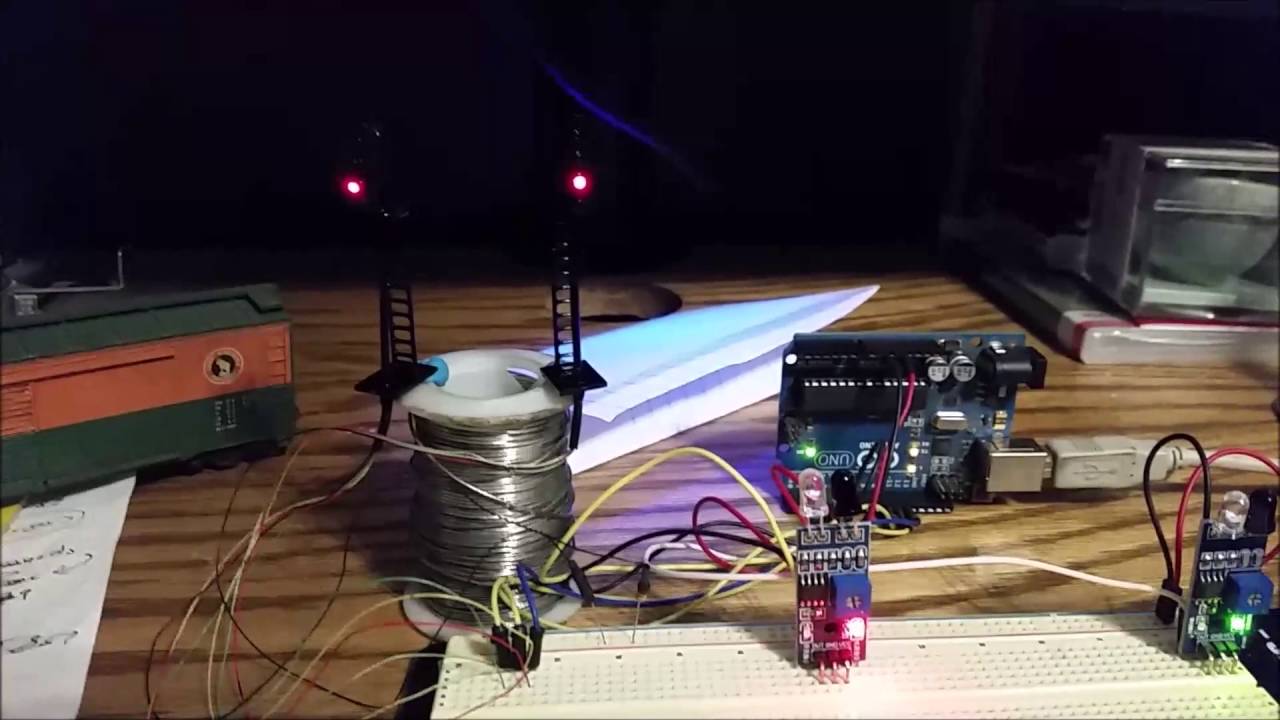
It's been a year since I first posted for help with this program. I want to thank "sterretje" for his help last time. I switched from using analog pins to using digital pins and modified the code to work after a lot of studying what he had wrote.
Well I left it for some time and when I came back to use the code again I could not find it so I have been trying to program it again but I have a problem.....
when a sensor is blocked that signal goes low and the program goes to the "block1Red state" and then immediately goes to YELLOWFLASH.
I know why it does this but can't figure out make it wait for the other sensor to be triggered. I had it before and it was something simple. HERE IS THE PROOF
Here is the code I have now. Any help would be greatly appreciated. I have been racking my brain for weeks now. I hope this posts OK??
// initilize the sense pins going to the IR reciever.
int sensePinA0 = 2;
int sensePinA1 = 4;

//Initilize the OUTPUT pins for the RED,GREEN and YELLOW lights.
int ledPinGRN = 10;
int ledPinYEL = 11;
int ledPinRED = 12;

void setup() {
  analogReference(DEFAULT); //isn't necessary
  //Serial.begin(9600);
  pinMode(ledPinGRN, OUTPUT);//Set pin MODES for lights
  pinMode(ledPinYEL, OUTPUT);//Set pin MODES for lights
  pinMode(ledPinRED, OUTPUT);//Set pin MODES for lights


}

enum LIGHTSTATES
{
  ST_GREEN,       // light green
  ST_YELLOWFLASH, // light yellow flash
  ST_YELLOW,      // yellow on for given time
  ST_RED,         // light red
};

// state of statemachine for block 1; initial value green
LIGHTSTATES block1State = ST_GREEN;

// current time
static unsigned long currentTime;

void loop()
{
  // get current time
  currentTime = millis();

  // read sensors

  int valA0 = digitalRead(sensePinA0);
  int valA1 = digitalRead(sensePinA1);


    switch (block1State)
  {
    // show green light
    // we will switch to red if sensors are triggered
    case ST_GREEN:
      block1Green(valA0, valA1);
      break;
    case ST_YELLOWFLASH:
      block1YellowFlash(valA0, valA1);
      break;
    case ST_YELLOW:
      block1Yellow(valA0, valA1);
      break;
    case ST_RED:
      block1Red(valA0, valA1);
      break;
  }
}

/*
  switch green light on for block 1
  'wait' for sensors to trigger and switches to red
  input: values of sensors A0 and A1
*/
void block1Green(int valA0, int valA1)
{
  digitalWrite(ledPinGRN, LOW);
  digitalWrite(ledPinYEL, HIGH);
  digitalWrite(ledPinRED, HIGH);

  if (valA0 == LOW || valA1 == LOW)
  {
    // change state to red
    block1State = ST_RED;
  }
}

/*
  switch red light on for block1
  'wait' for sensors to trigger and switches to yellow flash
  input: values of sensors A0 and A1
*/
void block1Red(int valA0, int valA1)
{
  digitalWrite(ledPinGRN, HIGH);
  digitalWrite(ledPinYEL, HIGH);
  digitalWrite(ledPinRED, LOW);
  if (valA0 == LOW || valA1 == LOW)
  {
    // change state to yellow flash
      block1State = ST_YELLOWFLASH;
  }
}


/*
  flash yellow led 10 times for block 1
  after that, switch to steady yellow
  input: values of sensors A0 and A1; both are not used but added for consistency in the calls to the light functions
*/
void block1YellowFlash(int valA1, int valA2)
{
  // on and off duration
  const unsigned long duration = 500;
  // number of flashes
  const byte numFlashes = 10;

  // remember last time that we changed from 'yellow on' to 'yellow off' or vice versa
  static unsigned long startTime = 0;
  // keep a counter for the number of flashes
  static byte counter = 0;

  // if called after coming from red
  if (startTime == 0)
  {
    // switch yellow on
    digitalWrite(ledPinGRN, HIGH);
    digitalWrite(ledPinYEL, LOW);
    digitalWrite(ledPinRED, HIGH);

    // start timing
    startTime = currentTime;

    // nothing else to do
    return;
  }

  // if it's time to toggle the yellow led
  // based on blink without delay
  if (currentTime - startTime >= duration)
  {
    // set start time
    startTime += duration;

    // toggle the yellow led
    digitalWrite(ledPinYEL, !digitalRead(ledPinYEL));

    // increment the counter
    counter++;
  }

  if (counter > numFlashes * 2)
  {
    // reset variables
    // as a result, the next time this function is called, the sequence is started from scratch
    startTime = 0;
    counter = 0;

    // change state to steady yellow
    block1State = ST_YELLOW;
  }
}

/*
  switch yellow light on for N seconds for block 1
  after that, switch to green
  input: values of sensors A0 and A1; both are not used but added for consistency in the calls to the light functions
*/
void block1Yellow(int valA0, int valA1)
{
  // duration for yellow on
  const unsigned long duration = 2000;
  // start time of delay
  static unsigned long startTime = 0;

  if (startTime == 0)
  {
    // switch yellow on
    digitalWrite(ledPinGRN, HIGH);
    digitalWrite(ledPinYEL, LOW);
    digitalWrite(ledPinRED, HIGH);

    // set start time of delay
    startTime = currentTime;

    // nothing else to do
    return;
  }

  // if N milliseconds passed
  if (currentTime - startTime >= duration)
  {
    // reset variables so next call to this sequence will start sequence from scratch
    startTime = 0;
    // change state to green
    block1State = ST_GREEN;
  }
}
I had it working before but lost the working code. It was something simple but can't remember what I did. With this code it goes straight to yellow flash. Because the state change is quick to pick up the LOW of the sensor . Hmmmm. Racking my Brain to remember what I did??????
You have a few functions that are almost copies of each other. That usually means that they could be handled with one function, or that the common code could be in a function so that the whole thing is much shorter and that usually makes the logic more obvious. In almost every situation where I have had code problems the solution involved less code.
What do the two sensors detect and why are their values passed into the functions?
sensePinA0 and valA0 are meaningless names. If you give variables meaningful names it will also help with visualising the logic of the program. I am just guessing but names like blockSectionADetectorPin and blockSectionAOccupied are the sort of thing I have in mind.
I did it. I remembered what I did. I added another RED STATE so when one sensor was triggered the sketch looks for the other sensor to trigger. That it. Now I have it save in several locations. Now to expand on what I have. Thanks All
// initilize the Digital input pins
int sensePin1 = 7;
int sensePin2 = 4;
//Initilize the OUTPUT pins for the RED,GREEN and YELLOW lights.
int ledPinGRN = 10;
int ledPinYEL = 11;
int ledPinRED = 12;
void setup() {
analogReference(DEFAULT); //isn't necessary
Serial.begin(9600);
pinMode(ledPinGRN, OUTPUT);//Set pin MODES for lights
pinMode(ledPinYEL, OUTPUT);//Set pin MODES for lights
pinMode(ledPinRED, OUTPUT);//Set pin MODES for lights
}
enum LIGHTSTATES
{
ST_GREEN, // light green
ST_YELLOWFLASH, // light yellow flash
ST_YELLOW, // yellow on for given time
ST_RED, // light red
ST_RED1, // light red
};
// state of statemachine for block 1; initial value green
LIGHTSTATES block1State = ST_GREEN;
// current time
static unsigned long currentTime;
void loop()
{
// get current time
currentTime = millis();
// read sensors
int valA1 = digitalRead(sensePin1);
int valA2 = digitalRead(sensePin2);
//Serial.print('valA1');
//Serial.println("");
//Serial.print('valA2');
//Serial.println("");
//Serial.println("");
//delay(1500);
switch (block1State)
{
// show green light
// we will switch to red if sensors are triggered
case ST_GREEN:
block1Green(valA1, valA2);
break;
case ST_YELLOWFLASH:
block1YellowFlash(valA1, valA2);
break;
case ST_YELLOW:
block1Yellow(valA1, valA2);
break;
case ST_RED:
block1Red(valA1, valA2);
break;
case ST_RED1:
block1Red1(valA1, valA2);
break;
}
}
/*
switch green light on for block 1
'wait' for sensors to trigger and switches to red
input: values of sensors A1 and A2
*/
void block1Green(int valA1, int valA2)
{
digitalWrite(ledPinGRN, LOW);
digitalWrite(ledPinYEL, HIGH);
digitalWrite(ledPinRED, HIGH);
if (valA1 == LOW && valA2 == HIGH)
{
    // change state to red
block1State = ST_RED;}
else if (valA1 == HIGH && valA2 == LOW)
{
// change state to red
block1State = ST_RED1;
}
}
/*
flash yellow led 10 times for block 1
after that, switch to steady yellow
input: values of sensors A1 and A2; both are not used but added for consistency in the calls to the light functions
*/
void block1YellowFlash(int valA1, int valA2)
{
// on and off duration
const unsigned long duration = 500;
// number of flashes
const byte numFlashes = 10;
// remember last time that we changed from 'yellow on' to 'yellow off' or vice versa
static unsigned long startTime = 0;
// keep a counter for the number of flashes
static byte counter = 0;
// if called after coming from red
if (startTime == 0)
{
// switch yellow on
digitalWrite(ledPinGRN, HIGH);
digitalWrite(ledPinYEL, LOW);
digitalWrite(ledPinRED, HIGH);
// start timing
startTime = currentTime;
// nothing else to do
return;
}
// if it's time to toggle the yellow led
// based on blink without delay
if (currentTime - startTime >= duration)
{
// set start time
startTime += duration;
// toggle the yellow led
digitalWrite(ledPinYEL, !digitalRead(ledPinYEL));
// increment the counter
counter++;
}
if (counter > numFlashes * 2)
{
// reset variables
// as a result, the next time this function is called, the sequence is started from scratch
startTime = 0;
counter = 0;
// change state to steady yellow
block1State = ST_YELLOW;
}
}
/*
switch yellow light on for N seconds for block 1
after that, switch to green
input: values of sensors A1 and A2; both are not used but added for consistency in the calls to the light functions
*/
void block1Yellow(int valA1, int valA2)
{
// duration for yellow on
const unsigned long duration = 2000;
// start time of delay
static unsigned long startTime = 0;
if (startTime == 0)
{
// switch yellow on
digitalWrite(ledPinGRN, HIGH);
digitalWrite(ledPinYEL, LOW);
digitalWrite(ledPinRED, HIGH);
// set start time of delay
startTime = currentTime;
// nothing else to do
return;
}
// if N milliseconds passed
if (currentTime - startTime >= duration)
{
// reset variables so next call to this sequence will start sequence from scratch
startTime = 0;
// change state to green
block1State = ST_GREEN;
}
}
/*
switch red light on for block1
'wait' for sensors to trigger and switches to yellow flash
input: values of sensors A1 and A2
*/
void block1Red(int valA1, int valA2)
{
digitalWrite(ledPinGRN, HIGH);
digitalWrite(ledPinYEL, HIGH);
digitalWrite(ledPinRED, LOW);
if (valA1 == HIGH && valA2 == LOW)
{
// change state to yellow flash
block1State = ST_YELLOWFLASH;
}
}
void block1Red1(int valA1, int valA2)
{
digitalWrite(ledPinGRN, HIGH);
digitalWrite(ledPinYEL, HIGH);
digitalWrite(ledPinRED, LOW);
if (valA1 == LOW && valA2 == HIGH)
{
// change state to yellow flash
block1State = ST_YELLOWFLASH;
}
}
Robin2:
What do the two sensors detect and why are their values passed into the functions?
sensePinA0 and valA0 are meaningless names. If you give variables meaningful names it will also help with visualising the logic of the program. I am just guessing but names like blockSectionADetectorPin and blockSectionAOccupied are the sort of thing I have in mind.
...R
I'm still new at programing. I would like to know how to decrease the amount of code I used, but for now I'm Happy it works. The sensors detect a model train passing above in the track. One on each end of the section of track I'm Looking at. It's just for visual animation more than anything else and it's helping me learn code.