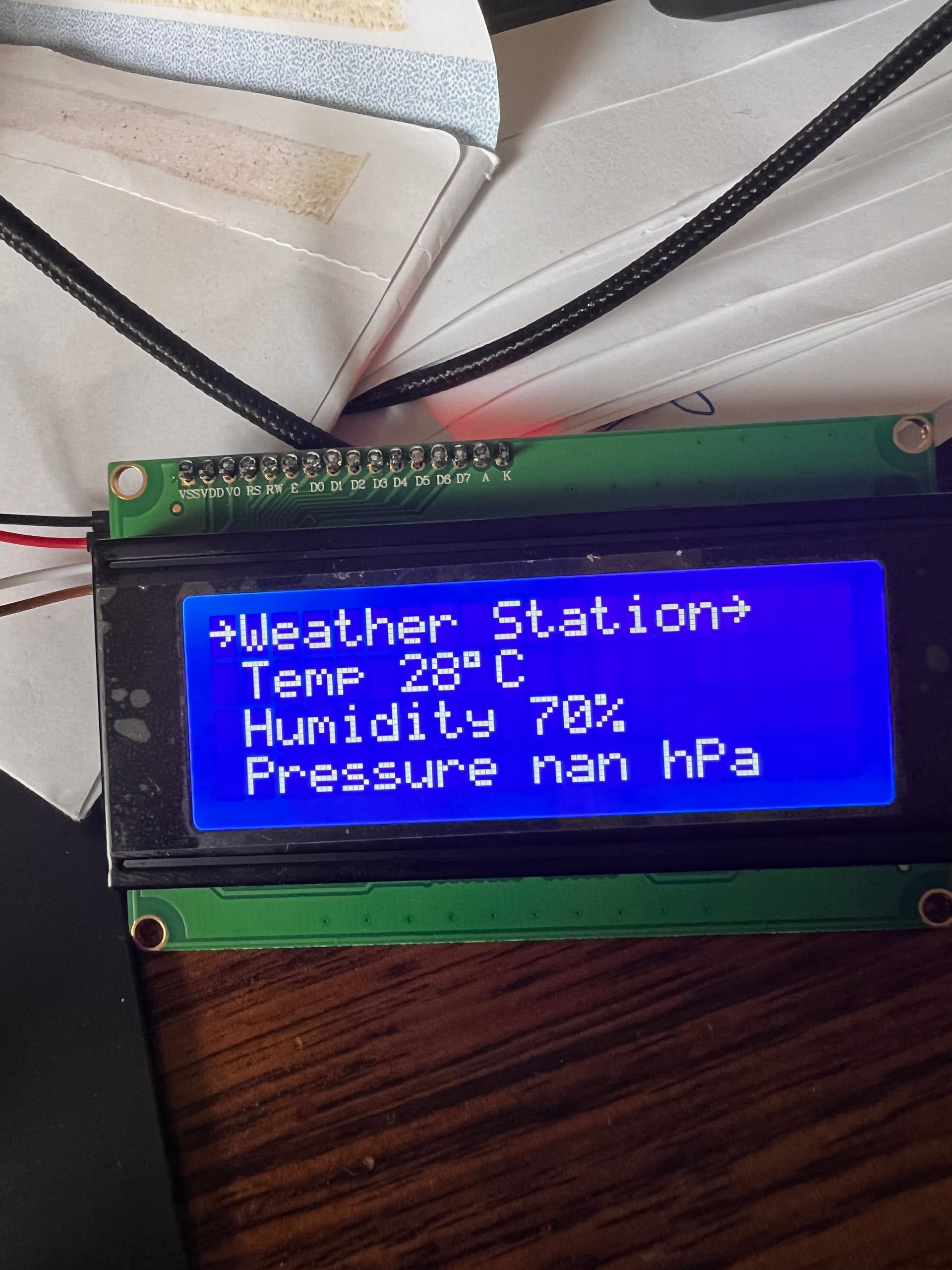
HI all , me again! I have spent the day tweaking some code in the DHT11 sketch and this works fine. I have written the BMP180 sketch separately, though using this and a number of other sketches found online I still had issues getting the serial or LCD output right.
No matter what I try I get nan C or nan hPa on the output (nan = not a number?). I have Googled this for hours and tried different approaches. I finally have the sketch at the point where I no longer get errors returned compiling or uploading so the code "sounds" solid. FYI the hardware is an Uno, with a DHT11 and BMP180 with an LCD 20x4 display. Temp and Humidity off the DHT11 report accurately, but the data from the BMP180 reports as "Pressure nan hPa" on the LCD.
Here is the code:
#include <dht.h> //DHT library
#include <LiquidCrystal_I2C.h>
#include <SFE_BMP180.h>

dht DHT; //Declaring dht named DHT
LiquidCrystal_I2C lcd (0x27,20,4); //Declaring I2C named lcd
SFE_BMP180 bmp180; //Declaring SFE_BMP180 named bmp180

#define DHT11_PIN 11 //DHT data pin

void setup()
{

  Serial.begin(9600);
  delay(1000);
  int chk = DHT.read11 (DHT11_PIN); //Read the data temperature from DHT11 pin
  lcd.init();
  lcd.backlight();
  lcd.begin(20,4);

}

void loop() {
  char status;
  double T, P;
  lcd.setCursor(0, 0);
  lcd.print ("~Weather Station~");
  delay(1000);
  lcd.setCursor(1,1);
  lcd.print("Temp ");
  lcd.print(DHT.temperature, 0); //Showing temperature value
  lcd.print(char(223)); // print ° character
  lcd.print("C");
  delay(1000);
  lcd.setCursor(1,2);
  lcd.print("Humidity ");
  lcd.print(DHT.humidity, 0); //Showing humidity percentage
  lcd.print("%");
  delay(1000);
  lcd.setCursor(1,3);
   status=bmp180.startTemperature();
 status=bmp180.getTemperature(T);
 status=bmp180.startPressure(3);
 status=bmp180.getPressure(P, T);
  lcd.print("Pressure ");
  lcd.print(P, 0);
  lcd.print(" hPa");
  delay(5000);
  lcd.clear();
}
I am still learning and this is only my 3rd sketch written from scratch (though using guides). Be gentle!
Please post schematics and a link to the LCD datasheet.
Please post the test code used to verify the display function.
Hi Railroader, the code I wrote to test the LCD function is:
//Four line LCD display code test
//Written by me

#include <LiquidCrystal_I2C.h>

LiquidCrystal_I2C lcd (0x27,20,4);

void setup() {
  // put your setup code here, to run once:
  lcd.init();
  lcd.backlight();


}

void loop() {
  // put your main code here, to run repeatedly:
  lcd.setCursor(0,0);
  lcd.print("Line 1 Test");
  lcd.setCursor(1,1);
  delay(1000);
  lcd.print("Line 2 Test");
  lcd.setCursor(2,2);
  delay(1000);
  lcd.print("Line 3 Test");
  lcd.setCursor(3,3);
  delay(1000);
  lcd.print("Line 4 Test");

}
It works perfectly on all four lines of the display as does the code I wrote just for the DHT11 in my temp and humidity sketch. I am using the I2C backpack for the LCD which was supplied with it and don't have a datasheet but got them from here 2004 20X4 LCD Display Screen IIC I2C SPI Interface Arduino Raspberry PI ESP32 | eBay.
Pinouts are:
BMP180 SDA to A4
BMP180 SCL to A5
BMP180 GND to Arduino GND
BMP180 VCC to Arduino 3.3v
DHT11 GND to Arduino GND
DHT11 VCC to Arduino 5v
DHT11 Data to Digital Pin 11
LCD GDN to Arduino GND
LCD VCC to Arduino 5v
LCD SDA to Arduino SDA
LCD SCL to Arduino SCL
Thanks!
Okey, a I2C LCD.
So the LCD and BMP both use I2C. That's what the bus is designed for. One idea is the pullups.
Can You check SDL and SCK using an oscilloscope and look for proper logic swing, that the low is below some 0.7 and high is above 1.4. (Verify those numbers reading the datasheets.
Either there can be too much, or too little of pullup on SDA and/or SCK.
Can You try and remove BMP SDA and SCL and see if the display wakes up?
This is what the LCD looks like. The temp and humidity are read from the DHT11. The Pressure is from the BMP180 and that’s what gives me an nan hPa reading
Okey. I didn't get Your question right the first time.
I'm limited to the phone for the moment...
Try this:
Use serial monitor and Serial.print in the code to find out if any transmission takes place from the BMP.
It does but only if I am using the SFE_BMP180 library. With the Adafruit ibrary it just keeps saying device not found. However, the output in serial monitor is just something like:
Temperature nan C Pressure nan hPa Altitude nan metres
Where there should be numbers there is only nan. And I have tried every single script I can find and none of them work.
It does but only if I am using the SFE_BMP180 library.
Why not use that library then?
With the Adafruit library it just keeps saying device not found.
Sounds like the wrong I2C address
However, the output in serial monitor is just something like:
Temperature nan C Pressure nan hPa Altitude nan metres
You did not understand my suggestion.
I suggested You make a special serial.print when any I2C data has been received telling a transfer occured.
Where there should be numbers there is only nan.
**I know. Try to debug whether any I2C transfer has occurred or not. **
And I have tried every single script I can find and none of them work.
There's no information I can use in that statement.
And, it works, correct?
nan means Not a Number and is returned by the library if it doesn't get data from the device.
I am as it is the only library that doesn't result in a device not found error.
No I still get the nan for all the outputs. I’m thinking it could be a faulty device?
I have bought a new one and still have the same nan output. Interestingly the BMP180 library recognises it using the SFE library, but printed on the bac k of the module is SPL06/BME. Should I be using different libraries?
I am using that library but I still get the nan output. The I2C address is recognised in the I2C scanner and has been changed in the respective library files. Would I not be getting data from the I2C in the serial monitor if it is giving me updates even if the reading itself is nan?
As I am new to this I don't know specifically how to run an I2C debug or the code I would need for that.
I2C communication has nothing to do with serial monitor. Add some special Serial.println when I2C function .available() yields a none zero value. Do only read from I2C when data is available.
You have 3 lines of code like status = bmp..... but You take no action if value status is false. The code only goes on...
Did you try:
void loop() {
  char status;
  double T, P;
  //lcd.setCursor(0, 0);
  //lcd.print ("~Weather Station~");
  delay(1000);
  //lcd.setCursor(1,1);
  //lcd.print("Temp ");
  //lcd.print(DHT.temperature, 0); //Showing temperature value
  //lcd.print(char(223)); // print ° character
  //lcd.print("C");
  //delay(1000);
  //lcd.setCursor(1,2);
  //lcd.print("Humidity ");
  //lcd.print(DHT.humidity, 0); //Showing humidity percentage
  //lcd.print("%");
  //delay(1000);
  //lcd.setCursor(1,3);
   //status=bmp180.startTemperature();
 //status=bmp180.getTemperature(T);
 status=bmp180.startPressure(3);


bmp180.getPressure(P, T);
  lcd.print("Pressure ");
  lcd.print( (float)P, 1);
  lcd.print(" hPa");
  delay(5000);
  lcd.clear();
}
Does it only print NaN's?
Why do you need 2 sensors?
Why not code to the library example?
I'd use the Adafruit library myself.
Post a few pics of the project.
It still gives me a nan output for the pressure. I’ve bought another sensor to make sure the original wasn’t a dud and still get the same output.
I still use a dht11 because that gives me humidity too which I can’t get off the bmp180 (plus I can’t get it to give me anything but nan!)
I don’t use adafruit because that library tells me the sensor can’t be found even after manually changing the module address in the library. Attached is a picture of the project.
The Adafruit library may be giving you the correct results.
When you ran the I2C scanner on the BME180 what address was reported?
0x76 was the hex address from the scanner. That matches the guide from the manufacturer also.