Having trouble getting a browser to connect to any of the Arduino Ethernet web server examples. have an Uno with W5100 shield. The Ethernet connect LEDs are illuminated. The five port switch on the bench seems to be functioning.
One example has Serial.println(Ethernet.localIP() ); this returns an IP I assume from my router therefor I also assume some degree of connectivity. Using this IP with several different browsers fails as dose using IPs defined in examples. I have tried disabling the firewall made no difference. I tried two different DEL computers. The OS is a current ver of XUbuntu the browsers can see the router using the local IP for it so things are working. Where is the glitch?
Can you ping the Arduino Ethernet shield from the browser PC command line?
If I open a Linux terminal and ping with the IP I do get a response. I do not know how to ping from within a browser.
That is what I meant.
You probably need to show the code in code tags and any Serial logs in code tags as well.
There are some faulty W5100 shields around. I've got one in the past, and I solved by adding a couple of resistors. To check it out, take a clear picture of the shield, where we can see in detail the black elements (i.e. resistors) next to the Ethernet connector.
But we also need the full sketch you're using to be able to tell you if it'd be either a software or hardware issue.
PS: read this for more information about bad W5100 shields.
Hi docdoc
Thanks for taking the time to check out this problem probably something simple cause I am not a network whiz kid.
Attached is the sketch and a photo of the shield. I did put the shield's MAC into the appropriate line of code.
I can ping the Uno / shield Via the Linux terminal
PING 192.168.0.111 (192.168.0.111) 56(84) bytes of data.
64 bytes from 192.168.0.111: icmp_seq=1 ttl=128 time=0.497 ms
64 bytes from 192.168.0.111: icmp_seq=2 ttl=128 time=0.319 ms
64 bytes from 192.168.0.111: icmp_seq=3 ttl=128 time=0.330 ms
I have tried the Ethernet example sketches these also fail to work. I have tried other browsers other than firefox and
I have the most liberal of browser security settings and have tried disabling the firewall none of these measures have
succeeded.
Gary
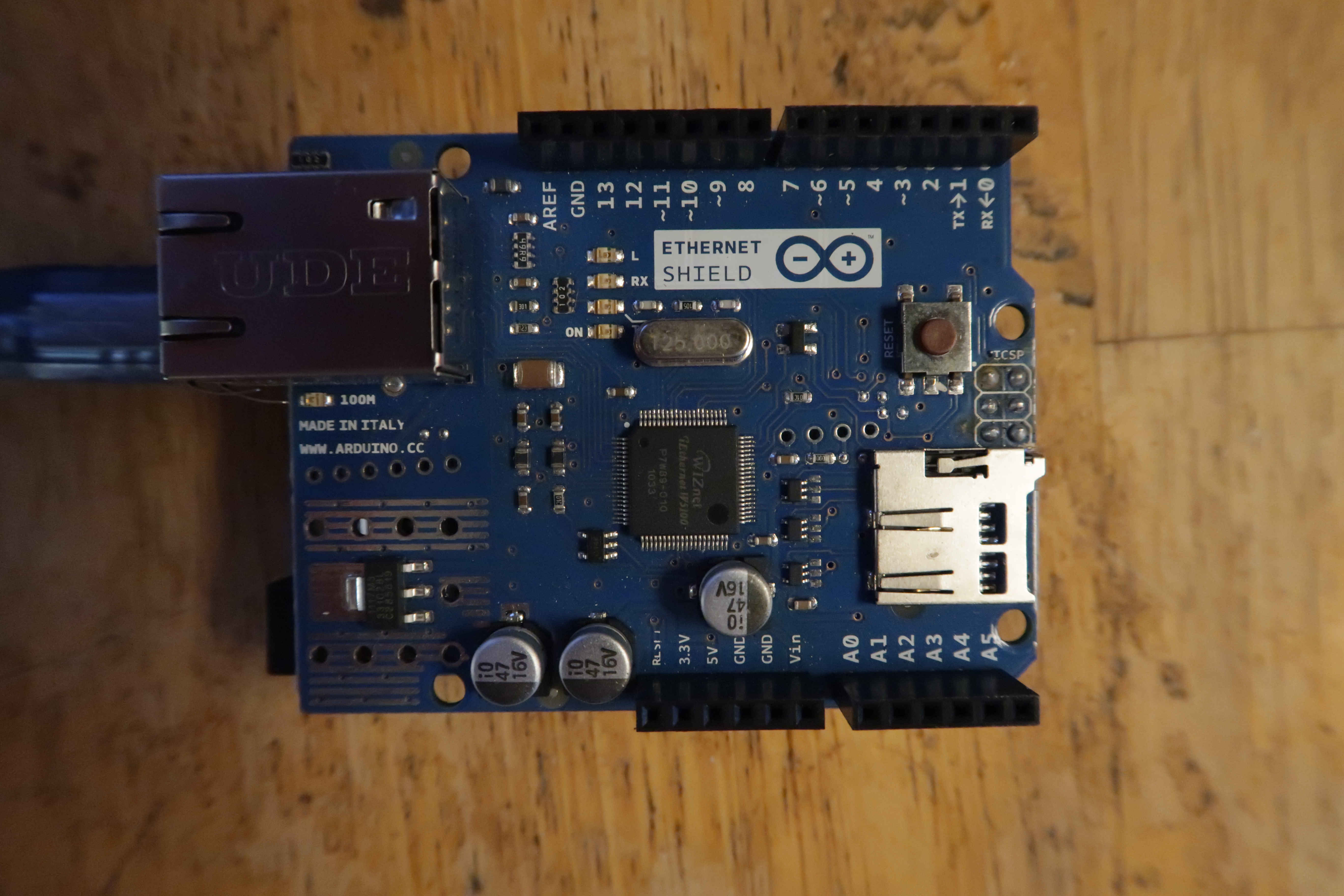
I see you haven't the issue I described because the resistors next to the Ethernet connector is 49.9 Ohm, and that's correct. The "faulty" shields have wrong 510 Ohm package (marked "511", so 51 * 10) instead of 49.9 or an acceptable 51 Ohm (it'd be marked "510" not "511").
Is that Arduino the only one you have active (i.e. running and connected) in your LAN? If you have another one, they'd have different MAC addresses, and most of the Arduino ethernet codes set it to the "standard" "DE AD BE EF FE ED".
Ping test is ok, but not enough because it's on a different protocol (ICMP) than http (TCP). So as http uses port TCP 80, try using telnet and see if the connection is established or refused. Example:
telnet 192.168.0.111 80
Another known issue I can recall is with some home routers, somehow fail to handle direct connections to an Arduino shield. Try connecting it to a switch, if you have one, and then see if that solves the issue.
Lastly, try assigning a static IP address to Arduino (but be aware routers sometimes don't like static IP addresses within the DHCP pool, e.g. if the router has a pool between 192.168.1.50 and 192.168.1.150 use an IP value external to that range).
If everything fails, I'm out of other options so try posting one of the sketches you are using to test it (I recomment you to keep a static IP for those tests) and results.
PS: You can simply paste the images inside the body of the message itself, there is no need to attach them...
OK did the telnet in terminal
no1@null:~$ telnet 192.168.0.111 80
Trying 192.168.0.111...
Connected to 192.168.0.111.
Escape character is '^]'.
Looks like it connected
I have all the devices connected through a old Netgear switch which then goes to the router.
Many of the example sketches I have tried do use a static IP but I will mess around with some
other IP address I need to learn more about ports is it possible the browser dose not have the
proper port enabled?
Gary
| docdoc Tesla
July 17 |
- | - |
garymcrobertpdx:
Attached is the sketch and a photo of the shield.
I see you haven't the issue I described because the resistors next to the Ethernet connector is 49.9 Ohm, and that's correct. The "faulty" shields have wrong 510 Ohm package (marked "511", so 51 * 10) instead of 49.9 or an acceptable 51 Ohm (it'd be marked "510" not "511").
Is that Arduino the only one you have active (i.e. running and connected) in your LAN? If you have another one, they'd have different MAC addresses, and most of the Arduino ethernet codes set it to the "standard" "DE AD BE EF FE ED".
Ping test is ok, but not enough because it's on a different protocol (ICMP) than http (TCP). So as http uses port TCP 80, try using telnet and see if the connection is established or refused. Example:
telnet 192.168.0.111 80
Another known issue I can recall is with some home routers, somehow fail to handle direct connections to an Arduino shield. Try connecting it to a switch, if you have one, and then see if that solves the issue.
Lastly, try assigning a static IP address to Arduino (but be aware routers sometimes don't like static IP addresses within the DHCP pool, e.g. if the router has a pool between 192.168.1.50 and 192.168.1.150 use an IP value external to that range).
If everything fails, I'm out of other options so try posting one of the sketches you are using to test it (I recomment you to keep a static IP for those tests) and results.
PS: You can simply paste the images inside the body of the message itself, there is no need to attach them...
Don’t forget if you are trying connect from outside of your network you need to setup port forwarding on your router .
Just jumping in here, to try to help - and because it's been a while since I last posted. Anyhoo...first, let me start off by saying I've never used one of these shields, and to make matters worse, my Arduino knowledge is a little rusty. That out of the way...your code looks very close to this complete example:
This repository is from a link that came up when I searched for "arduino W5100 library" - I don't know offhand if this is the official repo, some fork, etc; but it looks ok enough, so I'm rollin' with it!
As far as I can tell, your sketch and the example above are pretty much the same, as far as setup of the shield, connecting to the internet, etc; the example above seems to use a static IP, not a dynamically assigned one (DHCP); your sketch is configured to grab a dynamic IP - I believe that, based on your comments, etc - that all of that is correct and you are getting an IP.
You could even telnet to it; so all of that checks out.
But...browsing to it...well, all you are sending back to your browser is a header; there's no HTML document sent with the header...
Look at the example in the above link - and see if you can send a simple "hello world" message as HTML to your browser. There's enough code in the example, assuming you know HTML, to allow you to modify it (in the example, it's actually dumping the output of an analog pin; you don't need that, you just need to send back something much simpler).
Another check you can do would be to open up your browser's dev tools (you don't mention what kind of system you are using, or browser - if we knew that, other options - like using CURL or something - might be tried), open up whatever is used in it to show the network activity, then browse to the Arduino IP and see what the browser is getting; it should just be getting the header, and nothing else.
My uneducated and ignorant guess is that the sketch, and the server on the Arduino is functioning just fine, but the browser is "erroring out" because it isn't receiving any actual content, just a basic header (and what does that error message look like? What error are you getting, how is it being displayed, screenshots, etc)...
Here is a re-done form of your sketch, with the lines added for a simple "Hello World" content/page of HTML to be returned:
#include <SPI.h>
#include <Ethernet.h>

/* byte mac[] = { 0xA8, 0x61, 0x0A, 0xAE, 0x3A, 0xC4 };  */
byte mac[] = { 0x90, 0xA2, 0xDA, 0x00, 0x81, 0x2E };
EthernetServer server(80);
char c;

void setup()
{
  Ethernet.begin(mac);
  server.begin();
  Serial.begin(9600);

  Serial.println(Ethernet.localIP());
}

void loop()
{
  EthernetClient client = server.available();
  if (client) {
    boolean currentLineIsBlank = true;
    while (client.connected()) {
      if (client.available()) {
        char c = client.read();
        if (c == '\n' && currentLineIsBlank) {
          client.println("HTTP/1.1 200 OK");
          client.println("Content-Type: text/html");
          client.println("Connection: close");
          client.println();
          client.println("<!DOCTYPE HTML>");
          client.println("<html>");
          client.println("HELLO WORLD");
          client.println("</html>");
        }
        break;

      }
      if (c == '\n') {
        currentLineIsBlank = true;
      }
      else if (c != '\r') {
        currentLineIsBlank = false;
      }
    }
  }
  delay(1);
  client.stop();
}
I mentioned CURL - I don't know what would be needed for Windows, but if what you are on is a Mac or Linux, you can do something like this at the command line:
$ curl -v http://<ip-address>/
...and see what is coming back (be sure to check the man page for curl, too - lotsa great things to play with, and it can be useful as an "el-cheapo" way to send data from a script to a server)...
Another thing...if you look at that earlier example again:
Notice the number and such of the various Serial output; you might throw some of that in as some debugging info to help you out, to see what is happening (that is, what the Arduino is doing as it serves a page)...
Hi
Thank you for the helping hand. I will implement your suggestions. I have tried four various Example sketches obtained
from different sources Arduino lib and youtube. I will keep trying it sort of works so probably just one detail that is not right.
Gary
Yes, this seems to exclude any network-related issue.
The next step could be trying a GET command. After the telnet connection, type or copy/paste exactly the following lines (you probably won't see your typed characters, but don't worry) and press Enter twice:
GET / HTTP/1.1
Host: TEST
If the server replies with something like "HTTP/1.1 200 OK" followed by some other lines, everything is OK and the culprit is your borwser (which one?). If the response is different, copy/paste it here.
If it's the browser, are you sure you haven't any proxy server set? Try using another browser like firefox or Opera and see what happens.
Anyway, you always better post one of the sketches you are using to test it and its results/output, to let us do the same locally and check what's going on...
Hello
I took the redone sketch and added two diagnostic Serial.println to the code here is a snip-it of that code.
while (client.connected()) {
if (client.available()) {
Serial.println("At line 29"); /* My probe */
char c = client.read();
if (c == '\n' && currentLineIsBlank) {
Serial.println("At line 33"); /* My probe */
client.println("HTTP/1.1 200 OK");
client.println("Content-Type: text/html");
client.println("Connection: close");
client.println();
client.println("");
client.println("");
client.println("HELLO WORLD");
client.println("");
}
break;
The serial monitor output looks like this. Apparently (c == '\n' && currentLineIsBlank) never becomes True.

And the Firefox browser (with all extensions disabled) looks like this.

And the Linux terminal curl execution looks like this.
no1@null:~$ curl -v http://192.168.0.110/
- Trying 192.168.0.110:80...
- Connected to 192.168.0.110 (192.168.0.110) port 80
GET / HTTP/1.1
Host: 192.168.0.110
User-Agent: curl/8.5.0
Accept: /
- Empty reply from server
- Closing connection
curl: (52) Empty reply from server
no1@null:~$
Hopefully there is a clue that will unmask this problem.
Thank you for taking the time to help with this I am learning more but much still eludes me.
Gary
Hello
I stumbled into a Arduino web server Sketch that appears to work! I have no idea why it dose so but I though
you may find it interesting and maybe this may expose the nature of the problem I am or was having.
I will be examining the difference between this code and the other examples that fail. Hopefully I will perceive
the issue.
[
Arduino Web Server |

Please post code using the <CODE/> button in the formatting toolbar. Aside from syntax highlighting with colors, it also preserves indenting. I hope you're indenting your own code. It makes it easier to see mistakes, like the one here. Big hint: the difference between
      if (client.available()) {
        char c = client.read();
        if (c == '\n' && currentLineIsBlank) {
          client.println("HTTP/1.1 204 No Content");
          client.println("Connection: close");
          client.println();
        }
        break;
      }
and (as was suggested earlier)
      if (client.available()) {
        char c = client.read();
        if (c == '\n' && currentLineIsBlank) {
          client.println("HTTP/1.1 204 No Content");
          client.println("Connection: close");
          client.println();
          break;
        }
      }
@garymcrobertpdx @kenb4 I really screwed up the placement of that "break;" - shoot. Rusty skillz, Rusty Skillz (maybe I should change my handle to it?) 
I'm pretty sure that break needs to go on the "inside" of the brace:
if (c == '\n' && currentLineIsBlank) {
  // other code here
  break;
}
...and not the "outside" like I had it...
IOW, I think it needs to look like this:
#include <SPI.h>
#include <Ethernet.h>

/* byte mac[] = { 0xA8, 0x61, 0x0A, 0xAE, 0x3A, 0xC4 };  */
byte mac[] = { 0x90, 0xA2, 0xDA, 0x00, 0x81, 0x2E };
EthernetServer server(80);
char c;

void setup()
{
  Ethernet.begin(mac);
  server.begin();
  Serial.begin(9600);

  Serial.println(Ethernet.localIP());
}

void loop()
{
  EthernetClient client = server.available();
  if (client) {
    boolean currentLineIsBlank = true;
    while (client.connected()) {
      if (client.available()) {
        char c = client.read();
        if (c == '\n' && currentLineIsBlank) {
          client.println("HTTP/1.1 200 OK");
          client.println("Content-Type: text/html");
          client.println("Connection: close");
          client.println();
          client.println("<!DOCTYPE HTML>");
          client.println("<html>");
          client.println("HELLO WORLD");
          client.println("</html>");
          break;
        }
      }
      if (c == '\n') {
        currentLineIsBlank = true;
      }
      else if (c != '\r') {
        currentLineIsBlank = false;
      }
    }
  }
  delay(1);
  client.stop();
}
Otherwise, it keeps breaking before it has a chance to set the "currentLineIsBlank"...I think...
/on second thought, maybe you should just ignore everything I say, and I should just go back to lurking (this is what happens when you jump back into a forum after who-knows-how-long-I've-been-away)...