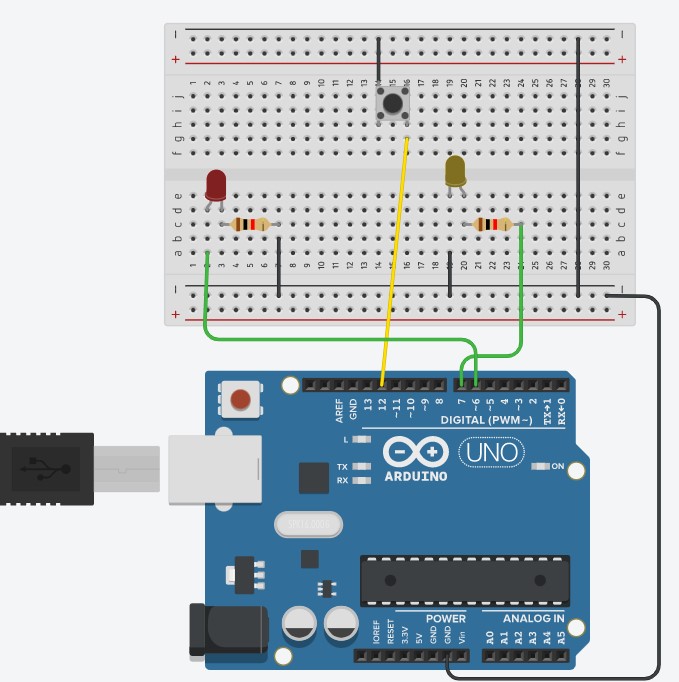
Can millis be used after a button?

I have searched this forum and Google high and low, but have yet to find a straightforward answer to this:
Can millis be used after a button?
I have reviewed the newbie posts here and tried as many examples as I could find that are relevant but I just can't seem to figure this one out.

My goal is to be able to have a few buttons (starting with 2 for now) and be able to execute a function using millis after it is pressed. The idea being that it would not be blocked and I could somehow add another button down the line to stop the function and go back.

I have been using TinkerCAD with a UNO R3. I have included a picture of the set up (sorry it's not the prettiest. I've been trying many things).

I have created 2 functions (I think that's the right name):
LED1_flash (which uses the delay function)
and
LED2_flash (which uses the millis function).

The goal right now is just to get them to flash appropriately when the correct button is pushed. I have bigger plans, but 1 step at a time.

Right now the following is happening:

  1. both LEDs are starting without need for the button to be pressed
  2. LED 2 turns itself on, but then does not blink

I have tried:

  • putting the plain code after each button
  • putting the function code after each button
  • removing the flashing altogether and just turn on with the buttons (I think I got this to work but I can't find the code for it now)

I have been sick now for over 5 weeks so my brain isn't working right. Sorry if this is an obvious solution that I have missed!

const int BUTTON1 = 2; //right button
const int BUTTON2 = 4; //left button
const int LED1 = 8; //green
const int LED2 = 12; //yellow
int BUTTONstate1 = 0;
int BUTTONstate2 = 0;
int mode = 0;

const long eventTime_1_LED1 = 5000;
const long eventTime_2_LED2 = 1000;

unsigned long previousTime_1 = 0;
unsigned long previousTime_2 = 0;

unsigned long currentTime = millis();
unsigned long currentTime2 = millis();

boolean BUTTONoldState1 = HIGH;
boolean BUTTONoldState2 = HIGH;

void setup()
{
  pinMode(BUTTON1, INPUT);
  pinMode(BUTTON2, INPUT);
  pinMode(LED1, OUTPUT);
  pinMode(LED2, OUTPUT);
  Serial.begin(9600);
}

void loop()
{
  //Get current button state
  BUTTONstate1 = digitalRead(BUTTON1);
  // check if state changed from high to low (button press)

  if ((BUTTONstate1 == LOW) && (BUTTONoldState1 == HIGH)) {
    Serial.print("ButtonState1");
    Serial.print (BUTTONstate1);
    // short delay to debouce button
    delay(20);
    //check if button is still low after debounce
    BUTTONstate1 = digitalRead(BUTTON1);
    if (BUTTONstate1 == LOW) { //Yes, still low
       LED1_flash();
      
      Serial.print("LED1 Flash");
    }
    delay(1000);
  }
  // Set the last-read state to the old state
  BUTTONoldState1 = BUTTONstate1;


  //Get current button state
  BUTTONstate2 = digitalRead(BUTTON2);
  // check if state changed from high to low (button press)

  if ((BUTTONstate2 == LOW) && (BUTTONoldState2 == HIGH)) {
    // short delay to debouce button
    delay(20);
    //check if button is still low after debounce
    BUTTONstate2 = digitalRead(BUTTON2);
    if (BUTTONstate2 == LOW) { //Yes, still low
     LED2_flash();
      Serial.print("LED2 Flash");
          
    }
  }
  // Set the last-read state to the old state
  BUTTONoldState2 = BUTTONstate2;
}
void LED1_flash() {
  digitalWrite(LED1,HIGH);
  delay(1000);
  digitalWrite(LED1, LOW);
  delay(1000);
  }


void LED2_flash() {
  currentTime2 = millis();{
    if ((currentTime2 - previousTime_2) >= eventTime_2_LED2){
      digitalWrite(LED2, !digitalRead(LED2));
      previousTime_2 = currentTime2;
    }
  }
}
 

Thank you for your assistance. I want to continue to develop my Arduino skills but sometimes self-teaching from tutorials only gets me so far :slight_smile: :face_with_monocle:

EQL

Millis does it’s thing all the time. Use it when you like

Millis, like everything else, does not work well with delay. Any delay in loop prevents it looping as quickly as it should and hence its responsiveness to any input is compromised

1 Like

It is a surprisingly clear diagram!

The problem may be with your circuit. It looks like you have pin2 and pin4 connected to the buttons. But both buttons are connected to ground.
If you read the BUTTON1 pin when it is not depressed, you will get an indeterminate reading. If read when pressed, BUTTON1 reads low.

Quick fix, add the internal pull up resistor:

void setup()
{
  pinMode(BUTTON1, INPUT_PULLUP);
  pinMode(BUTTON2, INPUT_PULLUP);

Now, if the button is not pressed, you will get a HIGH reading, and when pressed, LOW.

And perhaps add this line:

void loop()
{
  //Get current button state
  BUTTONstate1 = digitalRead(BUTTON1);

Serial.println(BUTTONstate1);
1 Like

You are nesting if statements that should not be nested. You are making functions which is good. Think about your button polling as another function. Each time through loop your buttonPoll function should check the state of the buttons. If the state has changed then it should adjust a variable which you can make global so that it can be seen by other functions in a simple way. You can do this for as many buttons as you like. Some people use switch case to make it more obvious. A simple if state equals x/y or z. Do x, y or z function. It will contine to do that function until the state is changed.

1 Like

The problem with your logic is that to use millis() instead of delay() you need to be calling it in a loop. You are only calling it at the point the button is first pressed.

Move this code outside of the if statement that you currently have it inside...

1 Like

This is sarcasm, right?

A hand drawn circuit in jpg or png is far preferable over a pretty Fritzing picture. A schematic is way simpler and easy to understand than a physical layout and it is unambiguous. . A pretty Fritzing picture just shows how to connect the parts. Using Fritzing will reduce the pool of folks prepared to even look at your problem.

No, not this time :slightly_smiling_face:
It is very simple, and when you click on the image, it is clear enough to figure out which pin goes where.
This is not the case most of the time, though.

1 Like

That's the wrong question for you right now. You need to ask yourself a simpler question:

"Can I use a button?"

What you have posted already tells us the answer right now is "no".

When you can't find the answer to a problem, look for a simpler problem and solve that first.

1 Like

Thank you! This made a huge difference.
Now I am getting both LEDs to react to the button presses, however they yellow LED that is using the millis function (I plan to switch the green one to millis as thats what I want to use in the end. I was just using delay to see if it worked differently) is turning off only when the eventTime period has passed and the button is pushed. I think I need to loop this somehow so it continues to do it on its own, do you know of any way to do that?

thank you,
EQL

Here is my new code:

const int BUTTON1 = 2; //right button
const int BUTTON2 = 4; //left button
const int LED1 = 8; //green
const int LED2 = 12; //yellow
int BUTTONstate1 = 0;
int BUTTONstate2 = 0;
int mode = 0;

const long eventTime_1_LED1 = 5000;
const long eventTime_2_LED2 = 1000;

unsigned long previousTime_1 = 0;
unsigned long previousTime_2 = 0;

unsigned long currentTime = millis();
unsigned long currentTime2 = millis();

boolean BUTTONoldState1 = HIGH;
boolean BUTTONoldState2 = HIGH;

void setup()
{
  pinMode(BUTTON1, INPUT_PULLUP);
  pinMode(BUTTON2, INPUT_PULLUP);
  pinMode(LED1, OUTPUT);
  pinMode(LED2, OUTPUT);
  Serial.begin(9600);
}

void loop()
{
  CheckButtons();
}

void CheckButtons() {
  //Get current button state
  BUTTONstate1 = digitalRead(BUTTON1);
  Serial.println(BUTTONstate1);
  // check if state changed from high to low (button press)

  if ((BUTTONstate1 == LOW) && (BUTTONoldState1 == HIGH)) {
    Serial.print("ButtonState1");
    Serial.print (BUTTONstate1);
    // short delay to debouce button
    delay(20);
    //check if button is still low after debounce
    BUTTONstate1 = digitalRead(BUTTON1);
    if (BUTTONstate1 == LOW) { //Yes, still low
       LED1_flash();
      
      Serial.print("LED1 Flash");
    }
    delay(1000);
  }
  // Set the last-read state to the old state
  BUTTONoldState1 = BUTTONstate1;


  //Get current button state
  BUTTONstate2 = digitalRead(BUTTON2);
  // check if state changed from high to low (button press)

  if ((BUTTONstate2 == LOW) && (BUTTONoldState2 == HIGH)) {
    // short delay to debouce button
    delay(20);
    //check if button is still low after debounce
    BUTTONstate2 = digitalRead(BUTTON2);
    if (BUTTONstate2 == LOW) { //Yes, still low
     LED2_flash();
      Serial.print("LED2 Flash");
          
    }
  }
  // Set the last-read state to the old state
  BUTTONoldState2 = BUTTONstate2;
}


void LED1_flash() {
  digitalWrite(LED1,HIGH);
  delay(1000);
  digitalWrite(LED1, LOW);
  delay(1000);
  }


void LED2_flash() {
  currentTime2 = millis();{
    if ((currentTime2 - previousTime_2) >= eventTime_2_LED2){
      digitalWrite(LED2, !digitalRead(LED2));
      previousTime_2 = currentTime2;
    }
  }
}
 

Thank you :slight_smile: This was very helpful!

Both your functions, LED1_flash() and LED2_flash(), only ever get called 20ms after the instant when their respective button pins change from HIGH to LOW, if the button pin is still LOW at that moment. They don't get called at any other instant in time. So they either perform some action at that instant, or they can't do anything. They don't get called again until their button is released and pressed again.

Please explain what it is you are trying to achieve. I think it is this: you want to have 2 or more buttons, each has a corresponding led. When each button is pressed, the corresponding led should light. Any led that is lit should go out 1 second after lighting. Buttons can be pressed at any time without being missed because delay() or other blocking code is not used.

Correct?

1 Like

Thank you for that info, that totally makes sense!

My goal is to have 2 buttons, each controlling an LED. When the button is pushed, the LED will flash a different pattern (yet to be written). I am trying not to use delay because it is blocking (it's in the code currently simply because I wanted to see if it would work). Not just the LED flashes on an off once.

Eventually (and I know this is a lot to learn before I get there), I would like to be able to have the buttons control various things (motors, sensors, neopixels, LCDs, etc).

I hope that clarifies it more?

Thank you for your assistance clarifying the buttons. That makes a ton of sense and I'll have to go back and look at the code and figure out how I can address that.

BTW, you are using different data types:
const long eventTime_2_LED2 = 1000;
unsigned long previousTime_1 = 0;
It may lead to problems.

Ok, I get it.

In order to do complex series of timed actions, like you describe, understanding how to use millis() instead of delay() is not enough. You need to learn how to make the Arduino follow multiple series of complex actions at the same time (or apparently at the same time).

One of the most common techniques to achieve that is what's called a "state machine". Sounds slightly scary, but once you get it, it seems like such an obvious and logical way to do it. It allows you to write a sequence of timed or event-driven sequences of actions, without simply writing those actions as a sequential list of code lines, because that always results in blocking code, when done on an Arduino.

On larger computers like PC or even raspberry pi, you have an operating system running all the time. One thing the OS does is manage multiple processes to run, apparently at the same time, even though there may be only one processor. The OS manages the processes so they all get a share of the processor's time, a little at a time, on a regular basis.

Arduino do not have an operating system, so that technique can't be used.

State machines are a way for your sketch to share processing time between different "processes". Each "process" is a state machine and maintains a "state" to remember what step in a sequence it got up to last time it completed an action.

1 Like

Hey Lisa, when we first learn to code it's like a start to end or that inside of loop but the straight progression start to end is how we arrange things. It's very Info Techish (IT).

Automation is very Electrical Engineer (EE) arranged and while it is code, it is made to deal with the real world in real time and IT is just not.

Real Time code does not take breaks. It HAS to keep checking inputs and be ready to output on cue. So inside of loop() you want a function for every type of input and for the sake of fast responses, only check 1 button in 1 run through void loop()...
since a non-blocked void loop() might average 50 passes per millisecond.

Debouncing buttons in software --- the pin will change many times per button press or release. What you care about is when the pin reads the same for a few ms after --- while everything else is running, you can have multiple functions running together.

Shiss, gotta go (RL happens), be back. You can code this, just need overview.

1 Like

Thank you for that. I will do some research and learn more about these state machines :slight_smile:

Thanks! I'll do some research into this. I have not heard of this concept before so it might take me a few days to follow up.
:slight_smile:

@PaulRB
ok, so I've spent more than a few hours (read: my whole day) doing research on these State Machines and they sound awesome! (This is a video that I found really helpful for anyone in the future βœ” Multitask Arduino with State Machines (& Switch Debouncing) - YouTube). I have included some new code below, based on the additional coding linked to this video. I am trying to modify it so that the button, when pressed, will trigger the LED state machine. Does this make sense?

Sorry the code is a bit messy. There were parts that I wanted to try not including but didn't want to fully delete them, so I just put a "//" in front so they wouldn't run.

I'm sure I'm missing something obvious. In the video he talks about case 5 (Trigger) not actually doing anything. I thought this was to enter what I wanted the button press to accomplish, but maybe I am mistaken? I have been trying to trigger one of the other 2 state machines when the button gets to case 5, but perhaps that's not what I should be doing?

[note that the code below called for a buzzer and an LED but I changed the actual mock up to 2 LEDs. This is why one StateMachine talks about buzzer]


//Top level variables:
int DEBUG = 1; //set to 1 to enable serial monitor debugging info

//Switch variables:
int state_s1 = 0;
int state_prev_s1 = 0;
int pin_s1 = 12; //button 1
int val_s1 = 0;
unsigned long t_s1 = 0;
unsigned long t_0_s1 = 0;
unsigned long bounce_delay_s1 = 10;
unsigned long hold_delay_s1 = 1000;

//RED LED 2 variables
int state_bz1 = 0;  //actual state of the state machine
int state_prev_bz1 = 0;  //remember the prev state
int pin_bz1 = 6;  //buzzer pin
int val_bz1 = 0; //buzzer value (on or off)
unsigned long t_bz1 = 0;  //current time of the buzzer state machine
unsigned long t_0_bz1 = 0; //The time that we last passed through a state of interest
unsigned long on_delay_bz1  = 500;  //on time for the buzzer as it beeps
unsigned long off_delay_bz1 = 500;  //off time for the buzzer as it beeps
int beep_count_bz1 = 0;  //number of times we've beeped on this journey
int beep_number_bz1 = 4;  //number of times we should beep before resetting


//YELLOW LED variables
int state_led1 = 0;  //actual state of the state machine
int state_prev_led1 = 0;  //remember the prev state
int pin_led1 = 7;  //LED pin
int val_led1 = 0; //LED value (on or off)
unsigned long t_led1 = 0;  //current time of the LED state machine
unsigned long t_0_led1 = 0; //The time that we last passed through a state of interest
unsigned long on_delay_led1  = 500;  //on time for the LED as it beeps
unsigned long off_delay_led1 = 500;  //off time for the LED as it beeps
int beep_count_led1 = 0;  //number of times we've light up on this journey
int beep_number_led1 = 4;  //number of times we should light before resetting


void setup()
{
  pinMode(2, INPUT_PULLUP);
 pinMode(pin_bz1, OUTPUT);
 pinMode(pin_led1, OUTPUT);
  //if DEBUG is turned on, initialize serial connection
  if(DEBUG) {Serial.begin(115200);Serial.println("Debugging is ON");}
  
}

void loop()
{
  //Instruct all the state machines to proceed one step (sometimes called a "cycle)
  StateMachine_s1();
  
  //StateMachine_bz1();
  //StateMachine_led1();

  //Provide events that can force the state machines to change state
  //I like to program interactions between state machines here in the top level loop
  if (state_s1 == 5) {state_led1 = 2;} //short press
  if (state_s1 == 5) {state_bz1 = 2;}  //long press

  if(DEBUG) {
    //Make a note whenever a state machine changes state
    //("Is the current state different from the previous? Yes? OK well let's tell the world the new state")
    if((state_prev_s1 != state_s1) | (state_prev_led1 != state_led1) | (state_prev_led1 != state_bz1)) {
      Serial.print("Switch State: "); Serial.print(state_s1);
      Serial.print(" | LED State: "); Serial.print(state_led1);
      Serial.print(" | Buzzer State: "); Serial.println(state_bz1);
    }
  }
}

  void StateMachine_s1(){
    //almost every state needs these lines, so I'll put it outside the State Machine
    val_s1 = digitalRead(pin_s1);
    state_prev_s1 = state_s1;
    
    //State Machine Section
    switch (state_s1) {
      case 0: //RESET
      // catch all 'home base' for the state machine
      state_s1 = 1;
      break;
      
      case 1: //WAIT
      //wait for the switch to go low
      if (val_s1 == LOW) {state_s1 = 2;}
      break;
      
      case 2: //ARMING!
      //Record the time and proceed to ARMED
      t_0_s1 = millis();
      state_s1 = 3;
      break;
      
      case 3: //ARMED
      //Check to see if the proper delay has passed. If a bounce occurs then RESET
      t_s1 = millis();
      if (t_s1 - t_0_s1 > bounce_delay_s1) {state_s1 = 4;}
      if (val_s1 == HIGH) {state_s1 = 0;}
      break;
      
      case 4: //DRAWN
      //if switch goes HIGH then trigger. Also check timer for a "long press"
      t_s1 = millis();
      if (val_s1 == HIGH) {state_s1 = 5;}
      if (t_s1 - t_0_s1 > hold_delay_s1) {state_s1 = 6;}
      break;
      
      case 5: //TRIGGERED!
      //reset the state machine, start the LED state machine
      
      state_s1 = 0;
      break;
      
      case 6: //HOLD
      //proceed to LOW WAIT
      state_s1 = 7;
      break;
      
      case 7: //LOW WAIT
      //wait for switch to go back to HIGH, then reset
      if (val_s1 == HIGH) {state_s1 = 0;}
      break;
    }
  
  } 
  
void StateMachine_bz1() {
  state_prev_bz1 = state_bz1;
  
  switch(state_bz1) {
    
    case 0: //RESET
    beep_count_bz1 = 0;
    state_bz1 = 1;
    break;
    
    case 1: //WAIT
    // do nothing, the main loop can progress this machine from state 1 to state 2
    break;
    
    case 2: //TURN ON
    //start buzzer, record time then preceed to ON,
    digitalWrite(pin_bz1,HIGH);
    t_0_bz1 = millis();
    state_bz1 = 3;
    break;
    
    case 3: //ON
    //wait for time to elapse, then proceed to turn OFF
    t_bz1 = millis();
    if(t_bz1 - t_0_bz1 > on_delay_bz1) {state_bz1 = 4;}
    break;
    
    case 4: //TURN OFF
    //Increment the beep counter, turn off buzzer, proceed to off
    beep_count_bz1++;
    t_0_bz1 = millis();
    digitalWrite(pin_bz1,LOW);
    state_bz1 = 5;
    break;
    
    case 5: //OFF
    t_bz1 = millis();
    if (t_bz1 - t_0_bz1) {state_bz1 = 2;}
    if (beep_count_bz1 >= beep_number_bz1) {state_bz1 = 0;}
    break;
    
  }
  
}
 void StateMachine_led1() {
  //Almost every state needs these lines so I'll put it outside the State Machine
  state_prev_led1 = state_led1;
  //State Machine Section
  switch(state_led1) {
    case 0: //RESET
      //Set Beep Count to 0 then proceed to WAIT
      beep_count_led1 = 0;
      state_led1 = 1;
    break;
    case 1: //WAIT
      //Do nothing.  Only the top level loop can force us out of this state into state 2 "TURN ON"
    break;
    
    case 2: //TURN ON
      //Start buzzer, record time then proceed to ON, 
      digitalWrite(pin_led1,HIGH);
      t_0_led1 = millis();
      state_led1 = 3;
    break;
    case 3: //ON
      //Wait for time to elapse, then proceed to TURN OFF
      t_led1 = millis();
      if (t_led1 - t_0_led1 > on_delay_led1) {state_led1 = 4;}
    break;
    case 4: //TURN OFF
      //Increment the beep counter, turn off buzzer, proceed to OFF
      beep_count_led1++;
      t_0_led1 = millis();
      digitalWrite(pin_led1,LOW);
      state_led1 = 5;
    break;
    case 5: //OFF
      t_led1 = millis();
      if (t_led1 - t_0_led1 > off_delay_led1) {state_led1 = 2;}
      if (beep_count_led1 >= beep_number_led1) {state_led1 = 0;}
    break;
  }
  
}


//void LED1_flash() {
  //digitalWrite(LED1,HIGH);
  //delay(1000);
  //digitalWrite(LED1, LOW);
  //delay(1000);
  //}


//void LED2_flash() {
  //currentTime2 = millis();{
    //if ((currentTime2 - previousTime_2) >= eventTime_2_LED2){
      //digitalWrite(LED2, !digitalRead(LED2));
      //previousTime_2 = currentTime2;
    //}


Thank you for your help. I've been trying to learn as much on my own so as not to bother you guys. Unfortunately I'm now kind of stuck!

EQL

Sorry, I'm not sure of the etiquette for correcting my own post. I found some of my errors and made a bit more progress.

1 error was forgetting to add a line to advance to case 1 in both buzzer and LED state machines

another was using the second LED and going back to using the buzzer on the mock up

and last one (which was really dumb of me) was having the wrong pin assigned for the button (2 vs 12)

Anyway, where I'm at now (see code below) is that the yellow LED will advance cases every time i press the button, but the buzzer still does nothing. The eventual goal is for the LED/motor/Neopixel/whatever to be able to run it's own little sequence without the need for the button input, but still be able to be interrupted and basically reset.

any ideas how to fix these?
thanks!

//const int BUTTON1 = 2; //right button

//Top level variables:
int DEBUG = 1; //set to 1 to enable serial monitor debugging info

//Switch variables:
int state_s1 = 0;
int state_prev_s1 = 0;
int pin_s1 = 12; //button 1
int val_s1 = 0;
unsigned long t_s1 = 0;
unsigned long t_0_s1 = 0;
unsigned long bounce_delay_s1 = 10;
unsigned long hold_delay_s1 = 1000;

//Buzzer variables
int state_bz1 = 0;  //actual state of the state machine
int state_prev_bz1 = 0;  //remember the prev state
int pin_bz1 = 6;  //buzzer pin
int val_bz1 = 0; //buzzer value (on or off)
unsigned long t_bz1 = 0;  //current time of the buzzer state machine
unsigned long t_0_bz1 = 0; //The time that we last passed through a state of interest
unsigned long on_delay_bz1  = 500;  //on time for the buzzer as it beeps
unsigned long off_delay_bz1 = 500;  //off time for the buzzer as it beeps
int beep_count_bz1 = 0;  //number of times we've beeped on this journey
int beep_number_bz1 = 4;  //number of times we should beep before resetting


//YELLOW LED variables
int state_led1 = 0;  //actual state of the state machine
int state_prev_led1 = 0;  //remember the prev state
int pin_led1 = 7;  //LED pin
int val_led1 = 0; //LED value (on or off)
unsigned long t_led1 = 0;  //current time of the LED state machine
unsigned long t_0_led1 = 0; //The time that we last passed through a state of interest
unsigned long on_delay_led1  = 500;  //on time for the LED as it beeps
unsigned long off_delay_led1 = 500;  //off time for the LED as it beeps
int beep_count_led1 = 0;  //number of times we've light up on this journey
int beep_number_led1 = 4;  //number of times we should light before resetting


void setup()
{
  pinMode(12, INPUT_PULLUP);
 pinMode(pin_bz1, OUTPUT);
 pinMode(pin_led1, OUTPUT);
  //if DEBUG is turned on, initialize serial connection
  if(DEBUG) {Serial.begin(115200);Serial.println("Debugging is ON");}
  
}

void loop()
{
  //Instruct all the state machines to proceed one step (sometimes called a "cycle)
  StateMachine_s1();
  
  //StateMachine_bz1();
  //StateMachine_led1();

  //Provide events that can force the state machines to change state
  //I like to program interactions between state machines here in the top level loop
  //if (state_s1 == 5) {state_led1 = 2;} //short press
  if (state_s1 == 5) {state_bz1 = 0;}  //long press

  if(DEBUG) {
    //Make a note whenever a state machine changes state
    //("Is the current state different from the previous? Yes? OK well let's tell the world the new state")
    if((state_prev_s1 != state_s1) | (state_prev_led1 != state_led1) | (state_prev_led1 != state_bz1)) {
      Serial.print("Switch State: "); Serial.print(state_s1);
      Serial.print(" | LED State: "); Serial.print(state_led1);
      Serial.print(" | Buzzer State: "); Serial.println(state_bz1);
    }
  }
}

  void StateMachine_s1(){
    //almost every state needs these lines, so I'll put it outside the State Machine
    val_s1 = digitalRead(pin_s1);
    state_prev_s1 = state_s1;
    
    //State Machine Section
    switch (state_s1) {
      case 0: //RESET
      // catch all 'home base' for the state machine
      state_s1 = 1;
      break;
      
      case 1: //WAIT
      //wait for the switch to go low
      if (val_s1 == LOW) {state_s1 = 2;}
      break;
      
      case 2: //ARMING!
      //Record the time and proceed to ARMED
      t_0_s1 = millis();
      state_s1 = 3;
      break;
      
      case 3: //ARMED
      //Check to see if the proper delay has passed. If a bounce occurs then RESET
      t_s1 = millis();
      if (t_s1 - t_0_s1 > bounce_delay_s1) {state_s1 = 4;}
      if (val_s1 == HIGH) {state_s1 = 0;}
      break;
      
      case 4: //DRAWN
      //if switch goes HIGH then trigger. Also check timer for a "long press"
      t_s1 = millis();
      if (val_s1 == HIGH) {state_s1 = 5;}
      if (t_s1 - t_0_s1 > hold_delay_s1) {state_s1 = 6;}
      break;
      
      case 5: //TRIGGERED!
      //reset the state machine, start the LED state machine
      if (DEBUG) {Serial.println("TRIGGERED!!");}
      StateMachine_bz1();
      StateMachine_led1();
      state_s1 = 0;
      break;
      
      case 6: //HOLD
      //proceed to LOW WAIT
      state_s1 = 7;
      break;
      
      case 7: //LOW WAIT
      //wait for switch to go back to HIGH, then reset
      if (val_s1 == HIGH) {state_s1 = 0;}
      break;
    }
    
  } 
  
void StateMachine_bz1() {
  state_prev_bz1 = state_bz1;
  
  switch(state_bz1) {
    
    case 0: //RESET
    beep_count_bz1 = 0;
    state_bz1 = 1;
    break;
    
    case 1: //WAIT
    // do nothing, the main loop can progress this machine from state 1 to state 2
    state_bz1 = 2;
    break;
    
    case 2: //TURN ON
    //start buzzer, record time then preceed to ON,
    digitalWrite(pin_bz1,HIGH);
    t_0_bz1 = millis();
    state_bz1 = 3;
    break;
    
    case 3: //ON
    //wait for time to elapse, then proceed to turn OFF
    t_bz1 = millis();
    if(t_bz1 - t_0_bz1 > on_delay_bz1) {state_bz1 = 4;}
    break;
    
    case 4: //TURN OFF
    //Increment the beep counter, turn off buzzer, proceed to off
    beep_count_bz1++;
    t_0_bz1 = millis();
    digitalWrite(pin_bz1,LOW);
    state_bz1 = 5;
    break;
    
    case 5: //OFF
    t_bz1 = millis();
    if (t_bz1 - t_0_bz1) {state_bz1 = 2;}
    if (beep_count_bz1 >= beep_number_bz1) {state_bz1 = 0;}
    break;
    
  }
  
}
 void StateMachine_led1() {
  //Almost every state needs these lines so I'll put it outside the State Machine
  state_prev_led1 = state_led1;
  //State Machine Section
  switch(state_led1) {
    case 0: //RESET
      //Set Beep Count to 0 then proceed to WAIT
      beep_count_led1 = 0;
      state_led1 = 1;
    break;
    case 1: //WAIT
      //Do nothing.  Only the top level loop can force us out of this state into state 2 "TURN ON"
   state_led1 = 2;
    break;
    
    case 2: //TURN ON
      //Start buzzer, record time then proceed to ON, 
      digitalWrite(pin_led1,HIGH);
      t_0_led1 = millis();
      state_led1 = 3;
    break;
    case 3: //ON
      //Wait for time to elapse, then proceed to TURN OFF
      t_led1 = millis();
      if (t_led1 - t_0_led1 > on_delay_led1) {state_led1 = 4;}
    break;
    case 4: //TURN OFF
      //Increment the beep counter, turn off buzzer, proceed to OFF
      beep_count_led1++;
      t_0_led1 = millis();
      digitalWrite(pin_led1,LOW);
      state_led1 = 5;
    break;
    case 5: //OFF
      t_led1 = millis();
      if (t_led1 - t_0_led1 > off_delay_led1) {state_led1 = 2;}
      if (beep_count_led1 >= beep_number_led1) {state_led1 = 0;}
    break;
  }
  
}


//void LED1_flash() {
  //digitalWrite(LED1,HIGH);
  //delay(1000);
  //digitalWrite(LED1, LOW);
  //delay(1000);
  //}


//void LED2_flash() {
  //currentTime2 = millis();{
    //if ((currentTime2 - previousTime_2) >= eventTime_2_LED2){
      //digitalWrite(LED2, !digitalRead(LED2));
      //previousTime_2 = currentTime2;
    //}


Now that you got rid of the delays you can run a loop counter to see how fast your code runs. It should open your eyes.

You need the #define, the function and the call in void loop().

Serial baud rate is at 115200 so that text in the print buffer (64 chars) gets sent out faster to avoid filling the buffer.

// LoopCounter 2018 by GoForSmoke @ Arduino.cc Forum
// Free for use, Apr 29/2018 by GFS. Compiled on Arduino IDE 1.6.9.
// This sketch counts times that loop has run each second and prints it.
// It uses the void LoopCounter() function that does not block other code.

#define microsInOneSecond 1000000UL

void setup()
{
  Serial.begin( 115200 );
  Serial.println( F( "\n\n\n  Loop Counter, free by GoForSmoke\n" ));
  Serial.println( F( "This sketch counts times that loop has run each second and prints it." ));
}

void LoopCounter() // tells the average response speed of void loop()
{ // inside a function, static variables keep their value from run to run
  static unsigned long count, countStartMicros; // only this function sees these

  count++; // adds 1 to count after any use in an expression, here it just adds 1.
  if ( micros() - countStartMicros >= microsInOneSecond ) // 1 second
  {
    countStartMicros += microsInOneSecond; // for a regular second
    Serial.println( count ); // 32-bit binary into decimal text = many micros
    count = 0; // don't forget to reset the counter 
  }
}

void loop()  // runs over and over, see how often with LoopCounter()
{
  LoopCounter(); // the function runs as a task, the optimizer will inline the code.
}

1 Like