I have read that a char data type have 1byte memory so that we can initialize a char with a single character. Unlike a string is a char array data type with a null character in the end of data, with this way we can initialize a string with several characters. When I declarate a char data type such as, ( char example;) and I try to read some datas from serial with the example opetate for instance example = Serial.read()
and then I try to print this data, why can I print more than one digit. I understand that the result of this is my operate behave such as a string, but I don't understand why
and then I try to print this data, why can I print more than one digit
If I get you right, you are asking why do you see a sting although the char can hold only 1 piece of the string ?
-->because you likely print them sequentially in the loop as they come one by one. So on the Serial monitor it looks like you got a string.
void setup() {Serial.begin(115200);}

void loop() {
  if (Serial.available()) {
    char example = Serial.read();
    Serial.print(example); // <<-- print only 1 char but the loop loops, so if you send more data, it prints more
  }
}
and if I want to work with string I have to write a code like:
char c, str[10];
int i;
if(Serial.available() > 0)
{
c = Serial.print();
if(c != '\n')
str[i++] = c
}
else
{
str = '\0'; With this way I fill tha array, one by one position for a digit, and if I want to print the array I have to write Serial.print(str); right?
const uint8_t maxMessageLength = 10;
char message[maxMessageLength + 1]; // + 1 for the trailing null char.
uint8_t index;

void setup() {
  Serial.begin(115200);
  // this is not necessary as global variables are initialized to 0 but for sake of clarity
  index = 0;
  message[0] = '\0'; // this way we know we always have a well formed cString
}

void loop() {
  if (Serial.available()) {
    char c = Serial.read();
    switch (c) {
      case '\r': break; // ignored, not memorized

      case '\n':
        Serial.print(F("Your message was "));
        Serial.println(message);
        index = 0;
        message[0] = '\0'; // this way we know we always have a well formed cString
        break;

      default:
        if (index < maxMessageLength) { // store only if there is space left
          message[index++] = c;
          message[index] = '\0';  // this way we know we always have a well formed cString
        }
    }
  }
}
I would suggest to study Serial Input Basics if you want to explore more on how to deal with Serial input.
harisv:
When I declarate a char data type such as, ( char example;) and I try to read some datas from serial with the example opetate for instance example = Serial.read()
and then I try to print this data, why can I print more than one digit.
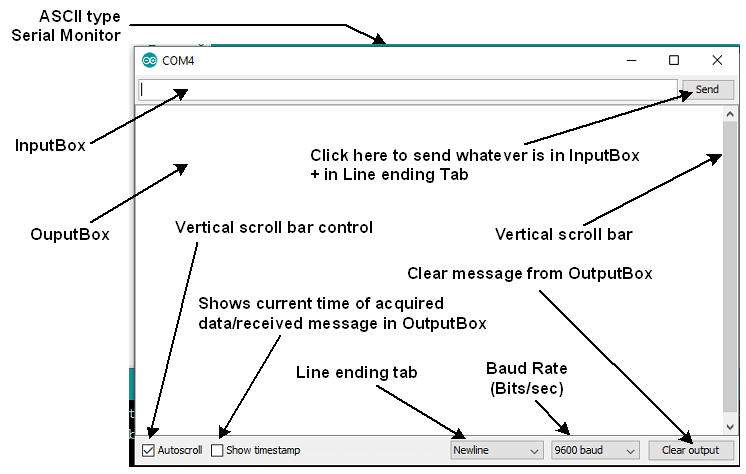
You entered A (for example) in the InputBox of the Serial Monitor (Fig-1) and then click on the Send button. After that you have observed 41 to appear in the OutputBox of the Serial Monitor. Is it correct? Now, your query is why your are seeing two digits/characters (41) on the Serial Monitor instead of one character (A). This situation can be reproduced by uploading the following sketch (select 'No line ending' option in the 'Line ending tab' of Serial Monitor):
ok, I want to thank you all, I don't write any specific code but I make some experiments about c programming in arduino and I was a little bit confused, I understand my mistakes because of you, your information are useful for me. Any suggestion or advice is good for me