So here is a code-version that makes use of ESP-DASH that can be used with an ESP8266 or an ESP32. The code has conditional compiler-directives to use ESP8266-files or ESP32 files according to the board-adjustment of the Arduino-IDE
It is pretty advanced but not in a state to be ready to demonstrate everything. This code-version is advanced enough to show the principles.
For testing purposes I added software-switches that simulate your flow-sensors and pressure-sensors
This is the code that must be flashed to the ESP32 who will act as the gateway to WiFi.
The data-exchange between Arduino Mega and ESP8266 (or ESP32 as well) is done through
a second serial interface. On Arduino Mega-side it uses Serial2
on ESP-side it uses software-serial
The advantage of this solution is you can use any Wifi-cabalbe device with any kind of browser to connect.
The second advantage is everything is done by simply coding C++. zero HTML-coding
You should use a voltage-level-converter between the 5V Arduino Mega and the 3.3V ESP32
For the serial connection
so here is the code
ESP32 / ESP8266
// MACRO-START * MACRO-START * MACRO-START * MACRO-START * MACRO-START * MACRO-START *
// Take it for granted at the moment scroll down to void setup
// start of macros dbg and dbgi
#define dbg(myFixedText, variableName) \
  Serial.print( F(#myFixedText " "  #variableName"=") ); \
  Serial.println(variableName);
// usage: dbg("1:my fixed text",myVariable);
// myVariable can be any variable or expression that is defined in scope

#define dbgi(myFixedText, variableName,timeInterval) \
  do { \
    static unsigned long intervalStartTime; \
    if ( millis() - intervalStartTime >= timeInterval ){ \
      intervalStartTime = millis(); \
      Serial.print( F(#myFixedText " "  #variableName"=") ); \
      Serial.println(variableName); \
    } \
  } while (false);
// usage: dbgi("2:my fixed text",myVariable,1000);
// myVariable can be any variable or expression that is defined in scope
// third parameter is the time in milliseconds that must pass by until the next time a
// Serial.print is executed
// end of macros dbg and dbgi
// MACRO-END * MACRO-END * MACRO-END * MACRO-END * MACRO-END * MACRO-END * MACRO-END *

#define CodeVersion "Code-Version 006"

//#include <Arduino.h>
#if defined(ESP8266)
/* ESP8266 Dependencies */
#include <ESP8266WiFi.h>
#include <ESPAsyncTCP.h>
#include <ESPAsyncWebServer.h>
#elif defined(ESP32)
/* ESP32 Dependencies */
#include <WiFi.h>
#include <AsyncTCP.h>
#include <ESPAsyncWebServer.h>
#endif
#include <ESPDash.h>

#include <SoftwareSerial.h>
const byte SoftSerTx_Pin = 15;
const byte SoftSerRx_Pin = 13;
const boolean invertLogic = false;
const byte buffersize = 256;
SoftwareSerial SoftSerial(SoftSerRx_Pin, SoftSerTx_Pin, invertLogic);
const int SoftBaudRate = 9600;

#include <SafeString.h>
createSafeString(WaterFlow1_SS,  32);
createSafeString(WaterFlow2_SS,  32);
createSafeString(WaterFlow3_SS,  32);
createSafeString(WaterFlow4_SS,  32);

createSafeString(WaterPressure1_SS,  32);
createSafeString(WaterPressure2_SS,  32);
createSafeString(WaterPressure3_SS,  32);


#define MAX_CHARS 256
char receivedChars[MAX_CHARS];
createSafeString(SerialReceived_SS,  MAX_CHARS);
createSafeString(MultiPurp_SS,  MAX_CHARS);

createSafeString(TokenSubStr, 16);
char delimiters[] = ","; // just comma for delimiter, could also use ",;" if comma or semi-colon seperated fields
createSafeString(Data_SS,  16);

size_t BeginOfSubStr;
size_t EndOfSubStr;

boolean newDataComplete = false;

/* Your SoftAP WiFi Credentials */
const char* ssid = "ESP-Dash-Demo"; // SSID
// ATTENTION password MUST have at least 8 characters
// otherwise you CAN'T connect !!!!
const char* password = "12345678"; // Password

boolean ByPassOpened = false;

int myDemoCounter;

/* Start Webserver */
AsyncWebServer myAsyncServer(80);

/* Attach ESP-DASH to AsyncWebServer */
ESPDash MyDashBoard(&myAsyncServer);

/* define Dashboard Cards
  Format - (Dashboard Instance, Card Type, Card Name, Card Symbol(optional) )
*/
//  Button Card Format - (Dashboard Instance, Card Type, descriptive Text)
Card MyByPassButton(&MyDashBoard, BUTTON_CARD, "open/close Bypass");

Card MyValve1Button(&MyDashBoard, BUTTON_CARD, "open/close valve 1");
Card MyValve2Button(&MyDashBoard, BUTTON_CARD, "open/close valve 2");
Card MyValve3Button(&MyDashBoard, BUTTON_CARD, "open/close valve 3");
Card MyValve4Button(&MyDashBoard, BUTTON_CARD, "open/close valve 4");

Card WaterFlowCard1(&MyDashBoard, GENERIC_CARD, "Waterflow 1", "L/h");
Card WaterFlowCard2(&MyDashBoard, GENERIC_CARD, "Waterflow 2", "L/h");
Card WaterFlowCard3(&MyDashBoard, GENERIC_CARD, "Waterflow 3", "L/h");
Card WaterFlowCard4(&MyDashBoard, GENERIC_CARD, "Waterflow 4", "L/h");

Card WaterPressureCard1(&MyDashBoard, GENERIC_CARD, "Waterpressure 1", "PSI");
Card WaterPressureCard2(&MyDashBoard, GENERIC_CARD, "Waterpressure 2", "PSI");
Card WaterPressureCard3(&MyDashBoard, GENERIC_CARD, "Waterpressure 3", "PSI");


void PrintFileNameDateTime() {
  Serial.println( F("Code running comes from file ") );
  Serial.println( F(__FILE__) );
  Serial.print( F("  compiled ") );
  Serial.print( F(__DATE__) );
  Serial.print( F(" ") );
  Serial.println( F(__TIME__) );
  Serial.println( F(CodeVersion) );
}


void ESP_DashSetup() {

  // Attach Button Callback this function gets executed every time the Button is clicked
  MyByPassButton.attachCallback([&](bool MyByPassButtonState) {
    ByPassOpened = MyByPassButtonState;
    Serial.println("MyByPassButton Triggered: " + String((MyByPassButtonState) ? "true" : "false"));
    MyByPassButton.update(MyByPassButtonState); //Make sure we update our button's value and send update to dashboard */
    MyDashBoard.sendUpdates();
  });

  Serial.println( F("ESP_DashSetup() done") );
}


// easy to use helper-function for non-blocking timing
boolean TimePeriodIsOver (unsigned long &startOfPeriod, unsigned long TimePeriod) {
  unsigned long currentMillis  = millis();
  if ( currentMillis - startOfPeriod >= TimePeriod ) {
    // more time than TimePeriod has elapsed since last time if-condition was true
    startOfPeriod = currentMillis; // a new period starts right here so set new starttime
    return true;
  }
  else return false;            // actual TimePeriod is NOT yet over
}

unsigned long MyTestTimer = 0;                   // Timer-variables MUST be of type unsigned long
const byte    OnBoard_LED = 2;


void BlinkHeartBeatLED(int IO_Pin, int BlinkPeriod) {
  static unsigned long MyBlinkTimer;
  pinMode(IO_Pin, OUTPUT);

  if ( TimePeriodIsOver(MyBlinkTimer, BlinkPeriod) ) {
    digitalWrite(IO_Pin, !digitalRead(IO_Pin) );
  }
}


void Start_AP_AsyncWebServer() {
  /* Start Access Point */
  WiFi.mode(WIFI_AP);
  WiFi.softAPConfig(IPAddress(192, 168, 4, 1), IPAddress(192, 168, 4, 1), IPAddress(255, 255, 255, 0));
  WiFi.softAP(ssid, password);
  Serial.print( F("IP Address: ") );
  Serial.println(WiFi.softAPIP());

  /* Start AsyncWebServer */
  myAsyncServer.begin();
  Serial.println( F("myAsyncServer.begin() done") );
  Serial.print( F("WiFi with name ") );
  Serial.print(ssid);
  Serial.print( F(" created WiFi-Accesspoint") );
  Serial.print( F("Connect to this WiFi Password is ") );
  Serial.println(password);
  Serial.println( F("then type into your browser") );
  Serial.print( F("http://") );
  Serial.println(WiFi.softAPIP());
}

void UpDateData() {
  if (ByPassOpened) {
    myDemoCounter++;
    WaterFlow1_SS  = "actual flow:";
    WaterFlow1_SS += myDemoCounter;
    WaterFlowCard1.update(WaterFlow1_SS.c_str());
    /* Send Updates to our Dashboard (realtime) */
    MyDashBoard.sendUpdates();
  }
}


void ExtractData() {
  if (newDataComplete) { // new data received
    newDataComplete = false; // clear flag
    // and proces data
    //WaterFlow2_SS = SerialReceived_SS;
    MultiPurp_SS = SerialReceived_SS;

    MultiPurp_SS.nextToken(TokenSubStr, delimiters, true);
    BeginOfSubStr = TokenSubStr.indexOf("W1=") + 3;
    EndOfSubStr   = TokenSubStr.indexOf(",")  - 1;
    Serial.print("TokenSubStr#");
    Serial.print(TokenSubStr);
    Serial.println("#");
    Serial.println();

    TokenSubStr.substring(Data_SS, BeginOfSubStr, EndOfSubStr);
    Serial.print("Data_SS#");
    Serial.print(Data_SS);
    Serial.println("#");
    Serial.println();

    MultiPurp_SS.nextToken(TokenSubStr, delimiters, true);
    BeginOfSubStr = TokenSubStr.indexOf("W2=") + 3;
    EndOfSubStr   = TokenSubStr.indexOf(",")  - 1;
    Serial.print("TokenSubStr#");
    Serial.print(TokenSubStr);
    Serial.println("#");
    Serial.println();

    TokenSubStr.substring(Data_SS, BeginOfSubStr, EndOfSubStr);
    Serial.print("Data_SS#");
    Serial.print(Data_SS);
    Serial.println("#");
    Serial.println();

    WaterFlowCard2.update(Data_SS.c_str());
    MyDashBoard.sendUpdates();
  }
}


void SoftRecvWithStartEndMarkers() {
  static boolean recvInProgress = false;
  static byte ndx = 0;
  char startMarker = '<';
  char endMarker = '>';
  char rc;

  while (SoftSerial.available() > 0 && newDataComplete == false) {
    // if there are characters in the Rx-buffer (= SoftSerial.available())
    // and no endmarker is yet received (=newDataComplete == false
    rc = SoftSerial.read(); // read character  from Rx-buffer

    if (recvInProgress == true) {
      if (rc != endMarker) { // if it is NOT the endmarker
        SerialReceived_SS += rc; // add character to variable
        ndx++;                       // increase index by 1
        if (ndx >= MAX_CHARS) {      // if too many characters
          ndx = MAX_CHARS - 1;       // drop them
        }
      }
      else {
        SerialReceived_SS += rc; // add character
        ndx++;

        //receivedChars[ndx] = '\0'; // terminate the string
        recvInProgress = false;
        ndx = 0;
        newDataComplete = true;
      }
    }

    else if (rc == startMarker) {
      // startMarker found start collecting characters
      SerialReceived_SS  = ""; // delete last characters
      SerialReceived_SS += rc; // add new character
      //receivedChars[ndx] = rc;
      ndx++;
      recvInProgress = true;
    }
  }
} // end of void SoftRecvWithStartEndMarkers()


void setup() {
  Serial.begin(115200);
  Serial.println( F("Setup-Start") );
  SoftSerial.begin(SoftBaudRate);
  Serial.println( F("SoftSerial.begin(") );
  Serial.print(SoftBaudRate);
  Serial.println( F("); done") );
  SoftSerial.println("SoftSerial-Start");
  PrintFileNameDateTime();
  ESP_DashSetup();
  Start_AP_AsyncWebServer();

  myDemoCounter = 0;
  newDataComplete = false;
}


void loop() {

  BlinkHeartBeatLED(OnBoard_LED, 250);
  SoftRecvWithStartEndMarkers();

  if ( TimePeriodIsOver(MyTestTimer, 1000) ) {
    if (newDataComplete) {
      //newDataComplete = false;
      Serial.print( F("SoftSerial received chars #") );
      Serial.print(SerialReceived_SS);
      Serial.println( F("#") );
      ExtractData();
    }
    UpDateData();

    SoftSerial.print( F("Hi I'm Softserial at ") );
    SoftSerial.print(SoftBaudRate);
    SoftSerial.println( F(" baud") );
  }

}
Your Arduino-Mega-Code modified to communicate over Serial2
#include <SafeString.h>
createSafeString(DataToSend_SS,  256);

createSafeString(WaterFlow1_SS,  16);
createSafeString(WaterFlow2_SS,  16);
createSafeString(WaterFlow3_SS,  16);
createSafeString(WaterFlow4_SS,  16);

createSafeString(WaterPressure1_SS,  16);
createSafeString(WaterPressure2_SS,  16);
createSafeString(WaterPressure3_SS,  16);

const byte sensors = 4;
const byte sensorPins[sensors] = {2, 3, 18, 19};
volatile unsigned long flow_frequency[sensors] = {0, 0, 0, 0}; // Measures flow sensor pulsesunsigned

const unsigned long baudrate = 9600;

const boolean simulateFlow     = true;
const boolean simulatePressure = true;

// easy to use helper-function for non-blocking timing
boolean TimePeriodIsOver (unsigned long &startOfPeriod, unsigned long TimePeriod) {
  unsigned long currentMillis  = millis();
  if ( currentMillis - startOfPeriod >= TimePeriod ) {
    // more time than TimePeriod has elapsed since last time if-condition was true
    startOfPeriod = currentMillis; // a new period starts right here so set new starttime
    return true;
  }
  else return false;            // actual TimePeriod is NOT yet over
}

unsigned long MyTestTimer =  0;                   // Timer-variables MUST be of type unsigned long
const byte    OnBoard_LED = 13;

unsigned long SendTimer =  0;                   // Timer-variables MUST be of type unsigned long


void BlinkHeartBeatLED(int IO_Pin, int BlinkPeriod) {
  static unsigned long MyBlinkTimer;
  pinMode(IO_Pin, OUTPUT);

  if ( TimePeriodIsOver(MyBlinkTimer, BlinkPeriod) ) {
    digitalWrite(IO_Pin, !digitalRead(IO_Pin) );
  }
}


void setup() {
  Serial.begin(baudrate);        // open serial port to computer
  Serial.println( F("Setup-Start") );

  // Pin 16=Tx Pin 17=Rx
  Serial2.begin(baudrate);       // open serial port to ESP8266 nodeMCU
  Serial.print( F("Serial2.begin(") );
  Serial.print(baudrate);
  Serial.println( F(") done") );

  for (byte s = 0; s < sensors; s++) {
    pinMode(sensorPins[s], INPUT_PULLUP);
  }
  attachInterrupt (digitalPinToInterrupt(sensorPins[0]), flow1, RISING);
  attachInterrupt (digitalPinToInterrupt(sensorPins[1]), flow2, RISING);
  attachInterrupt (digitalPinToInterrupt(sensorPins[2]), flow3, RISING);
  attachInterrupt (digitalPinToInterrupt(sensorPins[3]), flow4, RISING);
}


void loop() {
  BlinkHeartBeatLED(OnBoard_LED, 250);

  static unsigned long cloopTime = millis();

  if ( TimePeriodIsOver(SendTimer,1000) ) {

    water_Flow(0);
    DataToSend_SS  = "<";
    DataToSend_SS += WaterFlow1_SS;
    DataToSend_SS += ", ";
    //Serial.print(",");

    water_Flow(1);
    DataToSend_SS += WaterFlow2_SS;
    DataToSend_SS += ", ";
    //Serial.print(",");

    water_Flow(2);
    DataToSend_SS += WaterFlow3_SS;
    DataToSend_SS += ", ";
    //Serial.print(",");

    water_Flow(3);
    DataToSend_SS += WaterFlow4_SS;
    DataToSend_SS += ", ";
    //Serial.print(",");

    PressureSensor(A0, 0.47);
    DataToSend_SS += WaterPressure1_SS;
    DataToSend_SS += ", ";
    //Serial.print(",");

    PressureSensor(A1, 0.47);
    DataToSend_SS += WaterPressure2_SS;
    DataToSend_SS += ", ";
    //Serial.print(",");

    PressureSensor(A2, 0.07);
    DataToSend_SS += WaterPressure3_SS;
    DataToSend_SS += ">";
    Serial.println(DataToSend_SS);
    Serial2.println(DataToSend_SS);
  }
}


void valve_On( int m_pin) {
  pinMode(m_pin, OUTPUT); //set m_pin to output to control the valve
  digitalWrite(m_pin, HIGH); // set the output to HIGH to turn ON the valve
}

void valve_Off( int m_pin) {
  pinMode(m_pin, OUTPUT);
  digitalWrite(m_pin, LOW); // set the output to LOW to turn OFF the valve
}

float  OffSet; // declared as float since it will contain decimals
float V, P;

void PressureSensor (int analogpin, float off) {
  OffSet = off;
  V =  analogRead(analogpin) * 5.00 / 1024;     //Sensor output voltage
  P = (V - OffSet) ;             //Calculate water pressure

  if (simulatePressure) {
    P = random (10,50) / 10.0;
  }

  switch (analogpin) {
    case A0:
      WaterPressure1_SS  = "P1=";
      WaterPressure1_SS += P;
      WaterPressure1_SS += ", ";
      break;

    case A1:
      WaterPressure2_SS  = "P2=";
      WaterPressure2_SS += P;
      WaterPressure2_SS += ", ";
      break;

    case A2:
      WaterPressure3_SS  = "P3=";
      WaterPressure3_SS += P;
      WaterPressure3_SS += ", ";
      break;
  }
}


void flow1() { // interrupt function
  flow_frequency[0]++; // this will increment the  array flow_frequency[s]
}

void flow2() {
  flow_frequency[1]++;
}

void flow3() {
  flow_frequency[2]++;
}

void flow4() {
  flow_frequency[3]++;
}


float water_Flow (byte p_section) {
  static unsigned long l_hour = 0;
  static unsigned long flow_freq = 0;

  noInterrupts();
  flow_freq = flow_frequency[p_section];
  flow_frequency[p_section] = 0; // this is used so that the reading of the water flow returns to 0 whenver it stops spinning and not stacking the reading
  interrupts();
  // Pulse frequency (Hz) = 7.5Q, Q is flow rate in L/min.
  l_hour = (flow_freq * 60 / 7.5); // (Pulse frequency x 60 min) / 7.5Q = flowrate in L/hour

  if (simulateFlow) {
    l_hour = random(500,1000);
  }
  switch (p_section) {
    case 0:
      WaterFlow1_SS  = "W1=";
      WaterFlow1_SS += l_hour;
      break;

    case 1:
      WaterFlow2_SS  = "W2=";
      WaterFlow2_SS += l_hour;
      break;

    case 2:
      WaterFlow3_SS  = "W3=";
      WaterFlow3_SS += l_hour;
      break;

    case 3:
      WaterFlow4_SS  = "W4=";
      WaterFlow4_SS += l_hour;
      break;
  }

  if (p_section != 0) {

    if (l_hour < 550) {
      //delay(5000);
      valve_On(7);
      valve_On(6);
      valve_On(8);
      valve_On(9);
    }
    else {
      valve_Off(7);
      valve_Off(6);
      valve_Off(8);
      valve_Off(9);
    }
  }
}
best regards Stefan


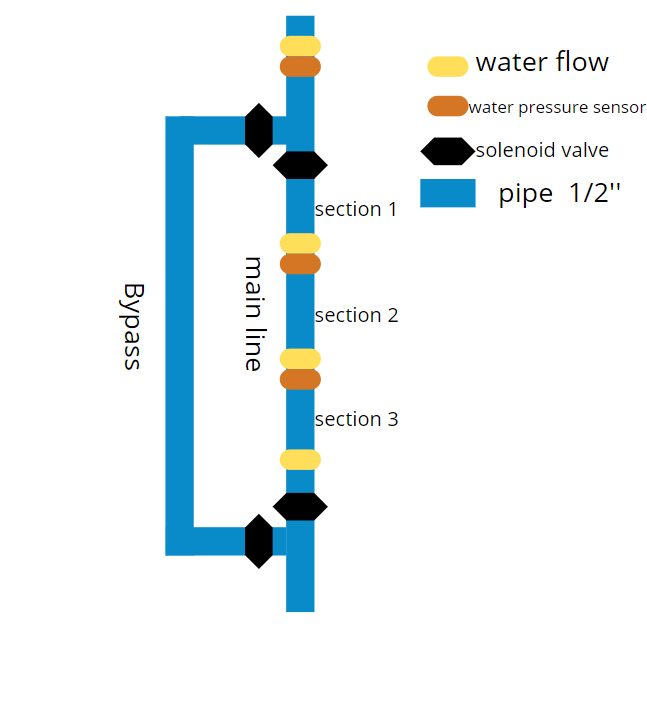


 I just used this website since I only drag and drop the components I need to use and it adds everything it needs to make it work
