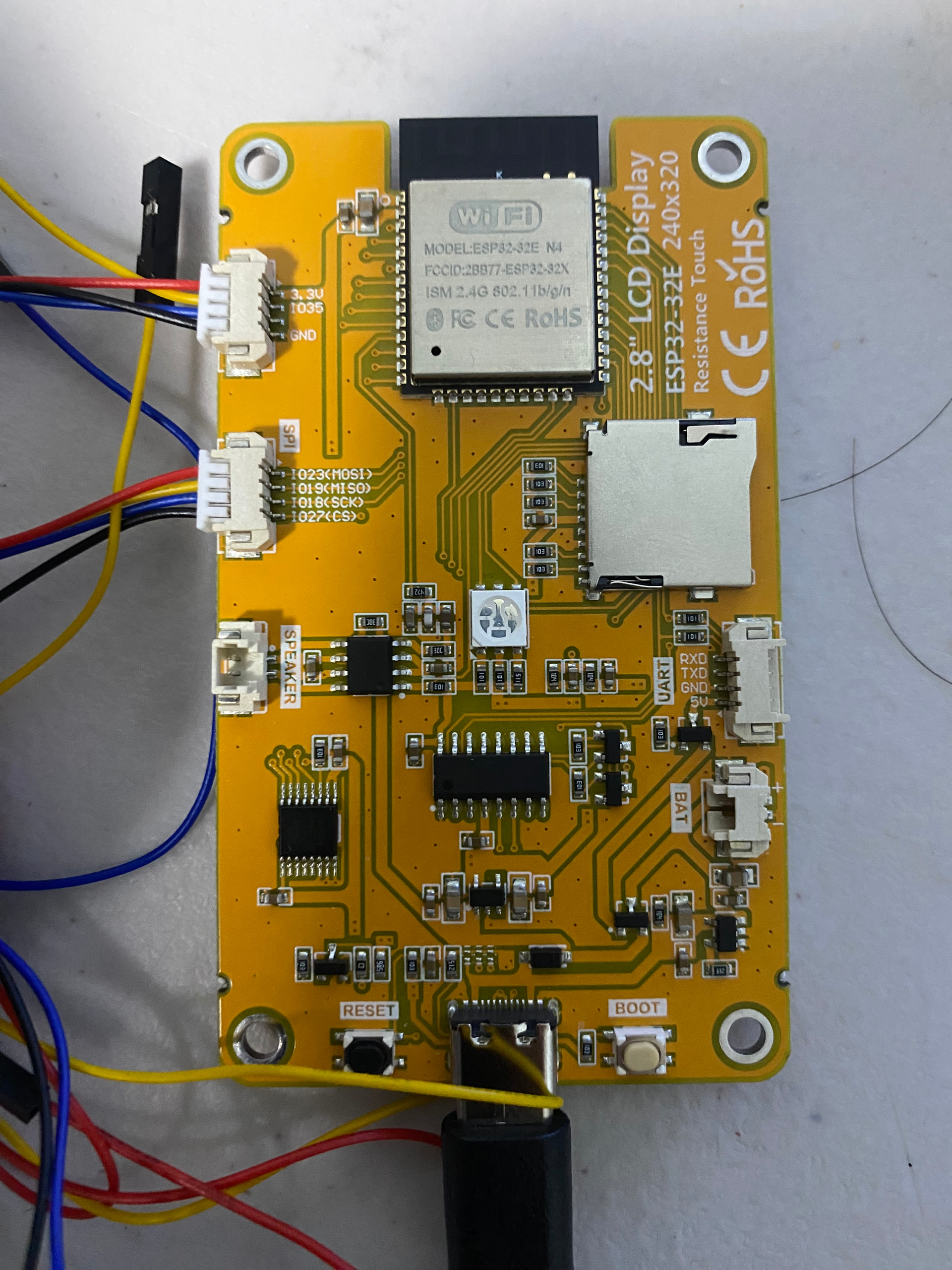
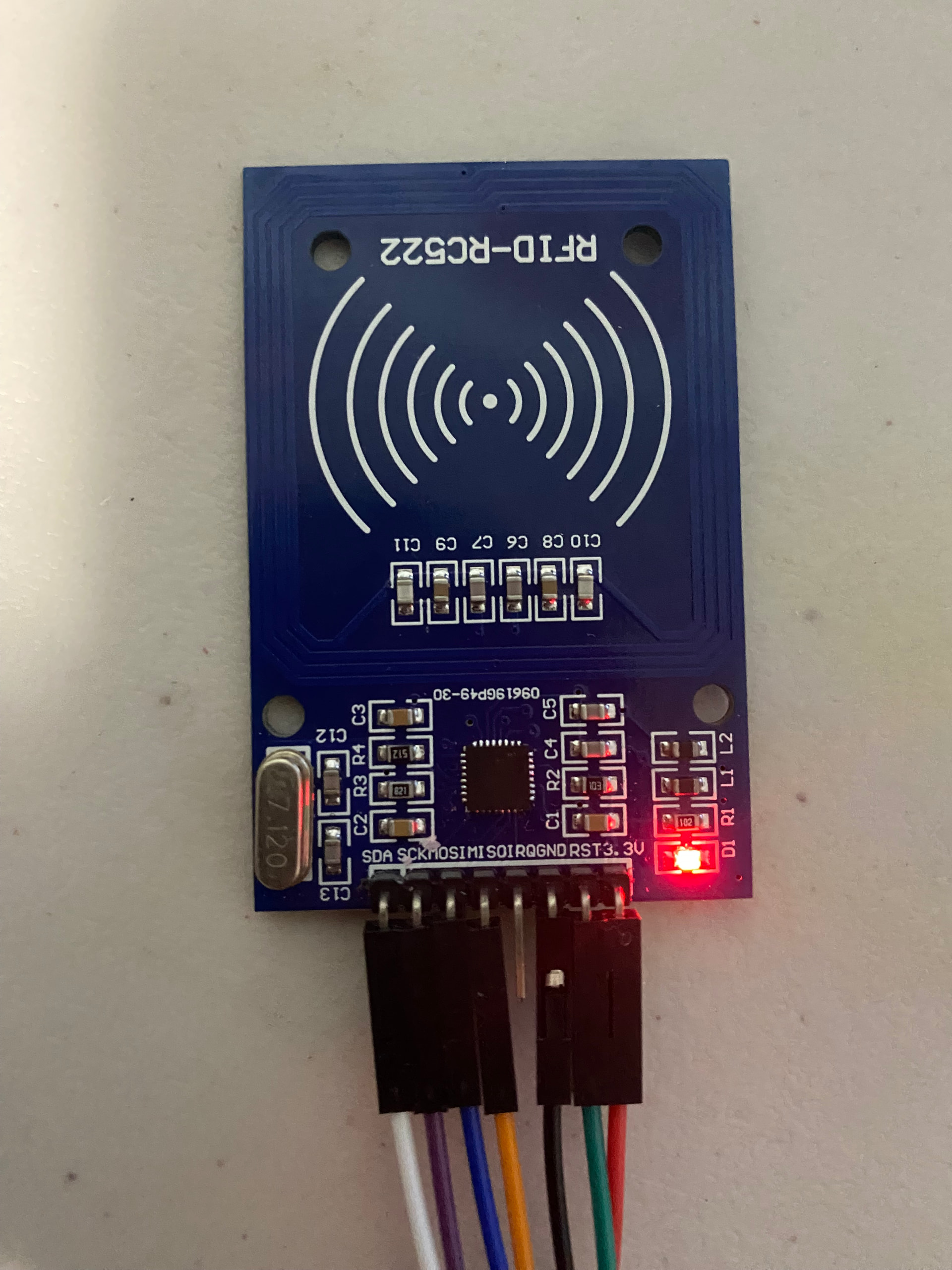
I am trying to connect my rfid rc522 reader to the esp32 display, but I don't know how to connect and code in. I am doing a inventory system where if I scan a tag, it deduct the item's quantity by one.
My goal is to make the touchscreen + rfid work but I have been struggling with that. The touchscreen is working, but the rfid doesn't work. Any help is appreciated!
My code:
#include <EEPROM.h>
#include <TFT_eSPI.h>
#include <XPT2046_Touchscreen.h>

// -------------------- Pins for cheap yellow ESP32 display --------------------
#define XPT2046_IRQ 36
#define XPT2046_MOSI 32
#define XPT2046_MISO 39
#define XPT2046_CLK 25
#define XPT2046_CS 33

SPIClass mySpi = SPIClass(VSPI);
XPT2046_Touchscreen ts(XPT2046_CS, XPT2046_IRQ);
TFT_eSPI tft = TFT_eSPI();

// -------------------- EEPROM --------------------
#define EEPROM_SIZE 64
const int DEFAULT_QUANTITY = 10;

// -------------------- Screen States --------------------
enum ScreenMode {
  SCREEN_MENU,
  SCREEN_DRAWER
};

ScreenMode screenMode = SCREEN_MENU;
int currentDrawer = -1;

// -------------------- Inventory --------------------
struct InventoryItem {
  const char* uids[5];
  int uidCount;
  const char* name;
  int quantity;
  int eepromAddress;
};

InventoryItem inventory[] = {
  { {"5182D0E4", "1149D0E4"}, 2, "Chicken", 0, 0 },
  { {"431AEC11"}, 1, "Energy Bar", 0, 4 },
  { {"0339AC0D"}, 1, "Vegetables", 0, 8 }
};

const int INVENTORY_SIZE = sizeof(inventory) / sizeof(inventory[0]);

// -------------------- Buttons --------------------
struct Button { int x, y, w, h; };
Button drawers[3];
Button backBtn = {100, 180, 120, 45};

// -------------------- UI helpers --------------------
bool inside(int x, int y, Button b){
  return (x >= b.x && x <= b.x + b.w && y >= b.y && y <= b.y + b.h);
}

void drawButton(Button b, String label, uint32_t color, int labelFont=2){
  tft.fillRoundRect(b.x, b.y, b.w, b.h, 6, color);
  tft.setTextColor(TFT_WHITE, color);

  int splitIndex = label.indexOf('\n');
  if (splitIndex == -1) {
    tft.drawCentreString(label, b.x + b.w/2, b.y + b.h/2 - 8, labelFont);
  } else {
    String line1 = label.substring(0, splitIndex);
    String line2 = label.substring(splitIndex + 1);
    tft.drawCentreString(line1, b.x + b.w/2, b.y + b.h/2 - 14, labelFont);
    tft.drawCentreString(line2, b.x + b.w/2, b.y + b.h/2 + 2, labelFont);
  }
}

void drawRightString(String text, int x, int y, int font=2){
  int w = tft.textWidth(text, font);
  tft.drawString(text, x - w, y, font);
}

// -------------------- Screens --------------------
void drawMenu(){
  screenMode = SCREEN_MENU;
  currentDrawer = -1;

  drawers[0] = {20, 35, 130, 70};
  drawers[1] = {170, 35, 130, 70};
  drawers[2] = {95, 120, 130, 70};   // ← Drawer 3 centered at bottom

  tft.fillScreen(TFT_BLACK);
  tft.setTextColor(TFT_WHITE, TFT_BLACK);
  tft.drawCentreString("SELECT A DRAWER", tft.width()/2, 6, 2);

  uint32_t colors[3] = {TFT_BLUE, TFT_GREEN, TFT_ORANGE};

  for (int i = 0; i < 3; i++) {
    String label = "Drawer " + String(i + 1) + "\nQty: " + String(inventory[i].quantity);
    drawButton(drawers[i], label, colors[i], 2);
  }
}

void drawDrawer(int drawerIndex){
  screenMode = SCREEN_DRAWER;
  currentDrawer = drawerIndex;

  tft.fillScreen(TFT_BLACK);
  tft.setTextColor(TFT_WHITE, TFT_BLACK);
  tft.drawCentreString("Drawer " + String(drawerIndex + 1), tft.width()/2, 6, 2);

  InventoryItem* item = &inventory[drawerIndex];
  tft.drawString("Item:", 10, 40, 2);
  tft.drawString(item->name, 80, 40, 2);

  tft.drawString("Quantity:", 10, 75, 2);
  drawRightString(String(item->quantity), tft.width()-20, 75, 2);

  drawButton(backBtn, "Back", TFT_MAGENTA, 2);
}

// -------------------- RFID & EEPROM --------------------
void resetAllStock(){
  for (int i = 0; i < INVENTORY_SIZE; i++){
    inventory[i].quantity = DEFAULT_QUANTITY;
    EEPROM.put(inventory[i].eepromAddress, DEFAULT_QUANTITY);
  }
  EEPROM.commit();
}

int findItemIndex(String uid){
  uid.toUpperCase();
  for (int i = 0; i < INVENTORY_SIZE; i++){
    for (int u = 0; u < inventory[i].uidCount; u++){
      String known = inventory[i].uids[u];
      known.toUpperCase();
      if (uid == known) return i;
    }
  }
  return -1;
}

void deductAndSave(int itemIndex){
  if (inventory[itemIndex].quantity > 0){
    inventory[itemIndex].quantity--;
    EEPROM.put(inventory[itemIndex].eepromAddress, inventory[itemIndex].quantity);
    EEPROM.commit();
  }
}

// -------------------- Serial2 Command --------------------
void sendDrawerCommand(int drawerIndex){
  char cmd = '1' + drawerIndex;

  Serial.print("SEND TO MEGA: ");
  Serial.println(cmd);

  Serial2.write(cmd);
}

// -------------------- Setup --------------------
void setup() {
  Serial.begin(115200);
  Serial2.begin(115200, SERIAL_8N1, 16, 17);

  EEPROM.begin(EEPROM_SIZE);
  resetAllStock();

  tft.init();
  tft.setRotation(1);

  mySpi.begin(XPT2046_CLK, XPT2046_MISO, XPT2046_MOSI, XPT2046_CS);
  ts.begin(mySpi);
  ts.setRotation(1);

  drawMenu();
}

// -------------------- Loop --------------------
void loop() {
  if (ts.tirqTouched() && ts.touched()) {
    TS_Point p = ts.getPoint();
    int x = map(p.x, 0, 4095, 0, tft.width() - 1);
    int y = map(p.y, 0, 4095, 0, tft.height() - 1);

    if (screenMode == SCREEN_MENU) {
      for (int i = 0; i < 3; i++) {
        if (inside(x, y, drawers[i])) {
          drawDrawer(i);
          sendDrawerCommand(i);

          break;
        }
      }
    }
    else if (screenMode == SCREEN_DRAWER) {
      if (inside(x, y, backBtn)) {
        drawMenu();
      }
    }
    delay(200);
  }
}