Convert start stop timer to attiny85

Hello, I'm trying to shrink this project down from an arduino nano to attiny85. It's an oled with 2 buttons. A button will start a timer and the other will stop the timer. What do I need to change in order to convert to attiny85? Here is the code.


#include <Adafruit_SSD1306.h> 


#define OLED_RESET 4 

Adafruit_SSD1306 display(OLED_RESET); 


unsigned long startMillis; 

unsigned long currentMillis; 

unsigned long elapsedMillis; 

boolean running = false; 


const int startButtonPin = 2; 

const int pauseButtonPin = 3; 

const int resetButtonPin = 4; 


void setup() { 

  pinMode(startButtonPin, INPUT_PULLUP); 

  pinMode(pauseButtonPin, INPUT_PULLUP); 

  pinMode(resetButtonPin, INPUT_PULLUP); 


display.begin(SSD1306_SWITCHCAPVCC, 0x3C); 

display.clearDisplay(); 

display.setTextColor(WHITE); 

display.setTextSize(1); 

display.setCursor(0,0); 

display.print("Press button to start"); 

display.display(); 

} 


void loop() { 

  if (!running){ 

    if (digitalRead(startButtonPin) == LOW) { 

      startTimer(); 

    } 

  } else { 

    if (digitalRead(pauseButtonPin) == LOW) { 

      pauseTimer(); 

    } else { 

      currentMillis = millis(); 

      elapsedMillis = currentMillis - startMillis; 


      display.clearDisplay(); 

      display.setCursor(8,4); //0,16 this changes size

      display.setTextSize(4); 

      display.setTextColor(WHITE); 


      if (elapsedMillis < 60000) { 

        display.print(elapsedMillis / 1000); 

        display.print("."); 

        if ((elapsedMillis % 1000) < 10){ 

          display.print("0"); 

        } 

        display.print(elapsedMillis % 1000 / 10); 

        display.print(" s"); 

      } else { 

        unsigned int minutes = (elapsedMillis / 1000) / 60; 

        unsigned int seconds = (elapsedMillis / 1000) % 60; 

        unsigned int splitSeconds = (elapsedMillis % 1000) / 10; 


        if (minutes < 10) { 

          display.print("0"); 

        } 

        display.print(minutes); 

        display.print(":"); 

        if (seconds < 10) { 

          display.print("0"); 

        } 

        display.print(seconds); 

        display.print("."); 

        if (splitSeconds < 10) { 

          display.print("0"); 

        } 

        display.print(splitSeconds); 


      } 

    } 

    if (digitalRead(resetButtonPin) == LOW) { 

      resetProgram(); 

    } 

  } 


  display.display(); 


} 


void startTimer() { 

  startMillis = millis() - elapsedMillis; 

  running = true; 

  display.clearDisplay(); 

} 


void pauseTimer() { 

  running = false; 

} 


void resetProgram() { 

  running = false; 

  elapsedMillis = 0; 

  display.clearDisplay(); 

  display.setCursor(0,10); 

  display.print("Timer reset"); 

  delay(1000); 

  display.clearDisplay(); 

  display.setCursor(0,10); 

  display.print("Push start"); 


} 

I tried deleting this part

#include <Adafruit_SSD1306.h> 


#define OLED_RESET 4 

Adafruit_SSD1306 display(OLED_RESET); 

I tried these 2 libraries but to no avail.
#include <TinyWireM.h>
#include <Tiny4kOLED.h>

1 Like

So I figured out that the <Tiny4koled.h> library can display an oled. Anything that says
display must be change to oled such as:

display.print();
MUST be changed to
oled.print();

OR
display.clearDisplay();
MUST be changed to
oled.clear();

and

display.setCursor(8,4);
MUST be changed to
oled.setFont(FONT6X8);

I can get the oled to display ("Press button to start"), however when a button is pressed it will not show the count down timer. I know that there is a line of code that I am missing telling the attiny to display the timer on the oled. That is the part I need help with in the code. I went ahead and left all the forward slashes to let the arduino code know to ignore those lines. I left them there to show the changes needed to go from an arduino to attiny85.

Here is the code and how I modified it as well as all the different libraries that I used.

//#include <ssd1306xled.h>
#include <Tiny4kOLED.h>
//#define DHT21_PIN PB1
//#include <EEPROM.h>
//#include "font6x8AJ2.h"
//dht DHT;
//#include <Adafruit_SSD1306.h> 


//#define OLED_RESET 4 

//Adafruit_SSD1306 display(OLED_RESET); 
//display(OLED_RESET); 


unsigned long startMillis; 

unsigned long currentMillis; 

unsigned long elapsedMillis; 

boolean running = false; 


const int startButtonPin = 3; 

const int pauseButtonPin = 4; 

const int resetButtonPin = 1; 


void setup() {
 // pinMode(DHT21_PIN, INPUT);
 // oled.begin(128, 64, sizeof(tiny4koled_init_128x64br), tiny4koled_init_128x64br);
 oled.begin();
  
  oled.clear();
  oled.on();
  oled.switchRenderFrame();
  //delay(3000);


  pinMode(startButtonPin, INPUT_PULLUP); 

  pinMode(pauseButtonPin, INPUT_PULLUP); 

  pinMode(resetButtonPin, INPUT_PULLUP); 

 oled.clear();

  // The characters in the 8x16 font are 8 pixels wide and 16 pixels tall
  // 2 lines of 16 characters exactly fills 128x32
  oled.setFont(FONT8X16);

  // Position the cusror
  // usage: oled.setCursor(X IN PIXELS, Y IN ROWS OF 8 PIXELS STARTING WITH 0);
  oled.setCursor(32, 0);

  // Write the text to oled RAM (which is not currently being displayed)
  // Wrap strings in F() to save RAM!
  oled.print(F("Press button to start"));

  // The characters in the 6x8 font are 6 pixels wide and 8 pixels tall
  // 4 lines of 21 characters only fills 126x32
 // oled.setFont(FONT6X8);

  // Position the cusror
  // Two rows down because the 8x16 font used for the last text takes two rows of 8 pixels
 // oled.setCursor(13, 2);

  
  // Position the cusror
  // Cursor X is in pixels, and does not need to be a multiple of the font width
  //oled.setCursor(16, 3);


  // Swap which half of RAM is being written to, and which half is being displayed
  oled.switchFrame();


/*display.begin(SSD1306_SWITCHCAPVCC, 0x3C); 

display.clearDisplay(); 

display.setTextColor(WHITE); 

display.setTextSize(1); 

display.setCursor(0,0); 

display.print("Press button to start"); 

display.display(); 
*/
 
} 

 
//}
 
void loop() {


  static long startTime = 0;
  long currentTime;
 
//  DHT.read22(DHT21_PIN);
//oled.clear();

 if (!running){ 

    if (digitalRead(startButtonPin) == LOW) { 

      startTimer(); 

    } 

  } else { 

    if (digitalRead(pauseButtonPin) == LOW) { 

      pauseTimer(); 

    } else { 

      currentMillis = millis(); 

      elapsedMillis = currentMillis - startMillis; 


//      display.clearDisplay(); 
oled.clear();
     // display.setCursor(8,4); //0,16 this changes size
oled.setFont(FONT6X8);
 //     display.setTextSize(4); 
oled.setCursor(13, 2);
//      display.setTextColor(WHITE); 


      if (elapsedMillis < 60000) { 

       // display.print(elapsedMillis / 1000); 
oled.print(elapsedMillis / 1000); 
       // display.print("."); 
oled.print(".");
        if ((elapsedMillis % 1000) < 10){ 

          //display.print("0"); 
oled.print("0"); 
        } 

       // display.print(elapsedMillis % 1000 / 10); 
 oled.print(elapsedMillis % 1000 / 10);
       // display.print(" s"); 
oled.print(" s");
      } else { 

        unsigned int minutes = (elapsedMillis / 1000) / 60; 

        unsigned int seconds = (elapsedMillis / 1000) % 60; 

        unsigned int splitSeconds = (elapsedMillis % 1000) / 10; 


        if (minutes < 10) { 

         // display.print("0"); 
oled.print("0"); 
        } 
oled.setFont(FONT6X8);
    //    display.print(minutes); 

//        display.print(":"); 
oled.print(":");
        if (seconds < 10) { 

         // display.print("0"); 
oled.print("0");
        } 

     //   display.print(seconds); 
 oled.print(seconds); 
     //   display.print("."); 
oled.print(":");
        if (splitSeconds < 10) { 

         // display.print("0"); 
oled.print("0");
        } 

       // display.print(splitSeconds); 

        oled.print(splitSeconds);   

      } 

    } 

    if (digitalRead(resetButtonPin) == LOW) { 

     resetProgram(); 

    } 

  } 


  //display.display(); 
oled.setFont(FONT6X8);
 

} 


void startTimer() { 

  startMillis = millis() - elapsedMillis; 

  running = true; 

//  display.clearDisplay(); 
oled.clear();
} 


void pauseTimer() { 

  running = false; 

} 


void resetProgram() { 

  running = false; 

  elapsedMillis = 0; 

 // display.clearDisplay(); 
oled.clear();
 // display.setCursor(0,10); 
oled.setCursor(0,10);
 // display.print("Timer reset"); 
oled.print("Timer reset");
  delay(1000); 

 // display.clearDisplay(); 
oled.clear();
  //display.setCursor(0,10); 
oled.setCursor(0,10);
  //display.print("Push start"); 
oled.print("Push start");
}

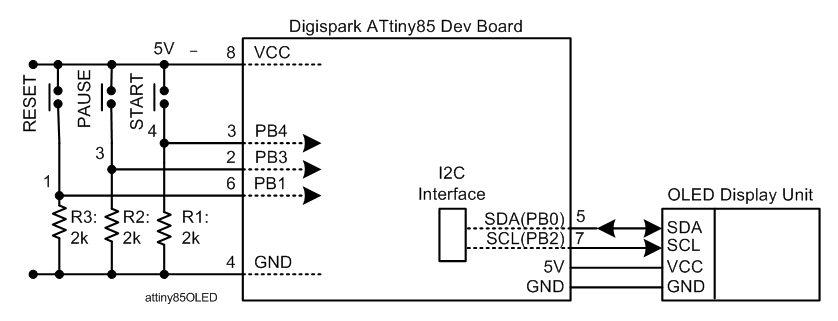
You can use Digispark ATtiny85 Dev Board (Fig-1) and nicely play around to migrate the codes from NANO to ATtiny85.

image
Figure-1:

Q1. Are you sure that your sketch of post #1 runs in your NANO. I could not run it in my UNO.

Q2: Are you running a Stop Watch on the OLED?

Q3: What is the Time Format -- HRS:MIN:SEC?

Does this double buffer need to be in your sketch? You are reading three buttons and displaying time.

@spiderman288888
This is the sketch for Arduino UNO for the Stop Watch; where, the Start Button has been implemented. The Time Format is:

Hrs   :  Min   : Sec
xx    :  xx    : xx

image

#include <Wire.h>
#include <Adafruit_GFX.h>
#include <Adafruit_SSD1306.h>

#define SCREEN_WIDTH 128 // OLED display width, in pixels
#define SCREEN_HEIGHT 32 // OLED display height, in pixels

#define OLED_RESET     -1 // Reset pin # (or -1 if sharing Arduino reset pin)
#define SCREEN_ADDRESS 0x3C ///< See datasheet for Address; 0x3D for 128x64, 0x3C for 128x32
Adafruit_SSD1306 display(SCREEN_WIDTH, SCREEN_HEIGHT, &Wire, OLED_RESET);

const int startButtonPin = 2;
const int pauseButtonPin = 3;
const int resetButtonPin = 4;

unsigned long currentMillis = millis();

byte hrs = 00;
byte min = 00;
byte sec = 00 ;

void setup()
{
  Serial.begin(9600);
  pinMode(startButtonPin, INPUT_PULLUP);
  pinMode(pauseButtonPin, INPUT_PULLUP);
  pinMode(resetButtonPin, INPUT_PULLUP);

  // SSD1306_SWITCHCAPVCC = generate display voltage from 3.3V internally
  if (!display.begin(SSD1306_SWITCHCAPVCC, SCREEN_ADDRESS))
  {
    Serial.println(F("SSD1306 allocation failed"));
    for (;;); // Don't proceed, loop forever
  }
  display.setCursor(0, 0);
  display.clearDisplay();
  display.setTextSize(1);             // Normal 1:1 pixel scale
  display.setTextColor(SSD1306_WHITE);        // Draw white text

  display.print("Press button to start");
  display.display();

  while (digitalRead(startButtonPin) != LOW)
  {
    ;
  }
  display.clearDisplay();
  display.setCursor(0, 0);
  display.setTextSize(1);
  display.println("Hrs : Min : Sec");
  //-----------------------
  display.setCursor(0, 10);
  display.setTextSize(2);             // Normal 1:1 pixel scale
  showTime();
  currentMillis = millis();
}

void loop()
{
  if (millis() - currentMillis >= 1000)
  {
    currentMillis = millis();
    sec = sec + 1;
    if (sec == 60)
    {
      sec = 0;
      min = min + 1;
      if (min == 60)
      {
        min = 0;
        hrs = hrs + 1;
        if (hrs == 24)
        {
          sec = 0;
          min = 0;
          hrs = 0;
        }
      }
    }
    display.clearDisplay();
    display.setCursor(0, 0);
    display.setTextSize(1);
    display.println("Hrs : Min : Sec");
    //-----------------------
    display.setCursor(0, 10);
    display.setTextSize(2);             // Normal 1:1 pixel scale
    showTime();
  }
}

void showTime()
{
  byte temp = hrs;
  if (temp < 10)
  {
    display.print('0');
  }
  display.print(hrs, DEC);
  display.print(':');
  //------------------------
  temp = min;
  if (min < 10)
  {
    display.print('0');
  }
  display.print(min, DEC);
  display.print(':');
  //------------------------
  temp = sec;
  if (temp < 10)
  {
    display.print('0');
  }
  display.print(sec, DEC);
  display.println();

  display.display();
}

Q1. The code is running on my UNO
Q2. The goal is to run a Stop Watch on my OLED
Q3. The Time Format is MIN:SEC:MILLISECONDS

I tried commenting out the

oled.switchFrame()

and "Press button to start" would not display.

What do I need to add to the code in order for it to display the Stop Watch timer once I press a button?

Try commenting-out oled.switchRenderFrame()... and oled.switchFrame()... at the same time.

The video (and code) from post #2 uses graphics with no call to frame switching... (he does use "frame" but in the context of displaying graphics in 8 pixel grids)...

1. Connect your START Button across PB4-pin of ATtiny85 and VCC-pin (5V) (Fig-1).


Figure-1:

2. Terminate PB4-pin of ATtiny85 to GND via R1 (2k) pull-down resistor.
3. Connect OLED with the I2C Bus of Attiny85.
4. Upload the following sketch in ATtiny85. (Memory requirements: Flash: 5368 bytes, RAM : 135 bytes.)

#include <Tiny4kOLED.h>

unsigned long currentMillis = millis();

byte hrs = 00;
byte min = 00;
byte sec = 00 ;

#define startButtonPin 4

void setup()
{
  oled.begin();
  delay(1000);
  pinMode(startButtonPin, INPUT);
  oled.setFont(FONT6X8);
  oled.clear();
  oled.switchRenderFrame();
  oled.clear();
  oled.switchRenderFrame();
  oled.setCursor(0, 0);
  oled.print("Press button to start");
  oled.on();

  while (digitalRead(startButtonPin) != HIGH)
  {
    ;
  }
  oled.clear();
  showTime();
  currentMillis = millis();
}

void loop()
{
  if (millis() - currentMillis >= 1000)
  {
    currentMillis = millis();
    sec = sec + 1;
    if (sec == 60)
    {
      sec = 0;
      min = min + 1;
      if (min == 60)
      {
        min = 0;
        hrs = hrs + 1;
        if (hrs == 24)
        {
          sec = 0;
          min = 0;
          hrs = 0;
        }
      }
    }
    oled.setCursor(0, 0);
    oled.setFont(FONT6X8);
    oled.println(F("Hrs:Min:Sec"));
    //-----------------------
    oled.setCursor(0, 10);
    oled.setFont(FONT8X16);
    showTime();
  }
}

void showTime()
{
  byte temp = hrs;
  if (temp < 10)
  {
    oled.print('0');
  }
  oled.print(hrs, DEC);
  oled.print(':');
  //------------------------
  temp = min;
  if (min < 10)
  {
    oled.print('0');
  }
  oled.print(min, DEC);
  oled.print(':');
  //------------------------
  temp = sec;
  if (temp < 10)
  {
    oled.print('0');
  }
  oled.print(sec, DEC);
  oled.println();
  oled.on();
}

5. Check that the following message has appeared on OLED:
"Press button to start"

6. Press the START Button.
7. Check that the Stop Watch is running in the following Time Format:

Hrs: Min: Sec
xx : xx : xx

8. Modify the sketch of this post to run the Stop Watch in the following Time Format:

MIN : SEC : MILLS
xx  : XX  : xxx

9. Implement Pause and Reset Functions:

GolamMostafa, that code works great! Once downloaded the stop watch automatically runs.

I thought I should go easy. Since the timer automatically runs once the power is on, I wanted to add just one push button that will pause the timer then, start it again. I tried doing this to the code but this error message comes out
" a function definition is not allowed here before '{' token".

#include <Tiny4kOLED.h>

unsigned long currentMillis = millis();
 
#define pauseButtonPin 4
 boolean running = false;
 
byte hrs = 00;
byte min = 00;
byte sec = 00 ;


void setup()
{
  oled.begin();
  delay(1000);
  pinMode(pauseButtonPin, INPUT_PULLUP);
  oled.setFont(FONT6X8);
  oled.clear();
  oled.switchRenderFrame();
  oled.clear();
  oled.switchRenderFrame();
  oled.setCursor(0, 0);
  oled.print("Press button to start");
  oled.on();


 /*while (digitalRead(pauseButtonPin) != HIGH)
  {
    ;
  }
  oled.clear();
  showTime();
  currentMillis = millis();
}
*/
void loop(){
  if (!running){
     
(digitalRead(pauseButtonPin) != HIGH)
  {
      showTime(); 

    } 
  } else { 
   if (digitalRead(pauseButtonPin) == LOW) { 

      pauseTimer(); 
    }   
    else {(millis() - currentMillis >= 1000);


    currentMillis = millis();
    sec = sec + 1;
    
    if (sec == 60)
    {
      sec = 0;
      min = min + 1;
      if (min == 60)
      {
        min = 0;
        hrs = hrs + 1;
        if (hrs == 24)
        {
          sec = 0;
          min = 0;
          hrs = 0;
        }
      }
    }
    oled.setCursor(0, 0);
    oled.setFont(FONT6X8);
    oled.println(F("Hrs:Min:Sec"));
    //-----------------------
    oled.setCursor(0, 10);
    oled.setFont(FONT8X16);
    showTime();
  }

}
void showTime(){
  byte temp = hrs;
  if (temp < 10)
  {
    oled.print('0');
  }
  oled.print(hrs, DEC);
  oled.print(':');
  //------------------------
  temp = min;
  if (min < 10)
  {
    oled.print('0');
  }
  oled.print(min, DEC);
  oled.print(':');
  //------------------------
  temp = sec;
  if (temp < 10)
  {
    oled.print('0');
  }
  oled.print(sec, DEC);
  oled.println();
  oled.on();

}


void pauseTimer() { 

  running = false; 

} 


This topic was automatically closed 180 days after the last reply. New replies are no longer allowed.