Creating a state machine to make ice

Hi, @florindopvh


Can you please post a copy of your circuit, a picture of a hand drawn circuit in jpg, png?
Hand drawn and photographed is perfectly acceptable.
Please include ALL hardware, power supplies, component names and pin labels.

How are your limit switches wired up?
Do you have INPUT_PULLUP for those switches in your setup() statement?

Thanks... Tom... :smiley: :+1: :coffee: :australia:

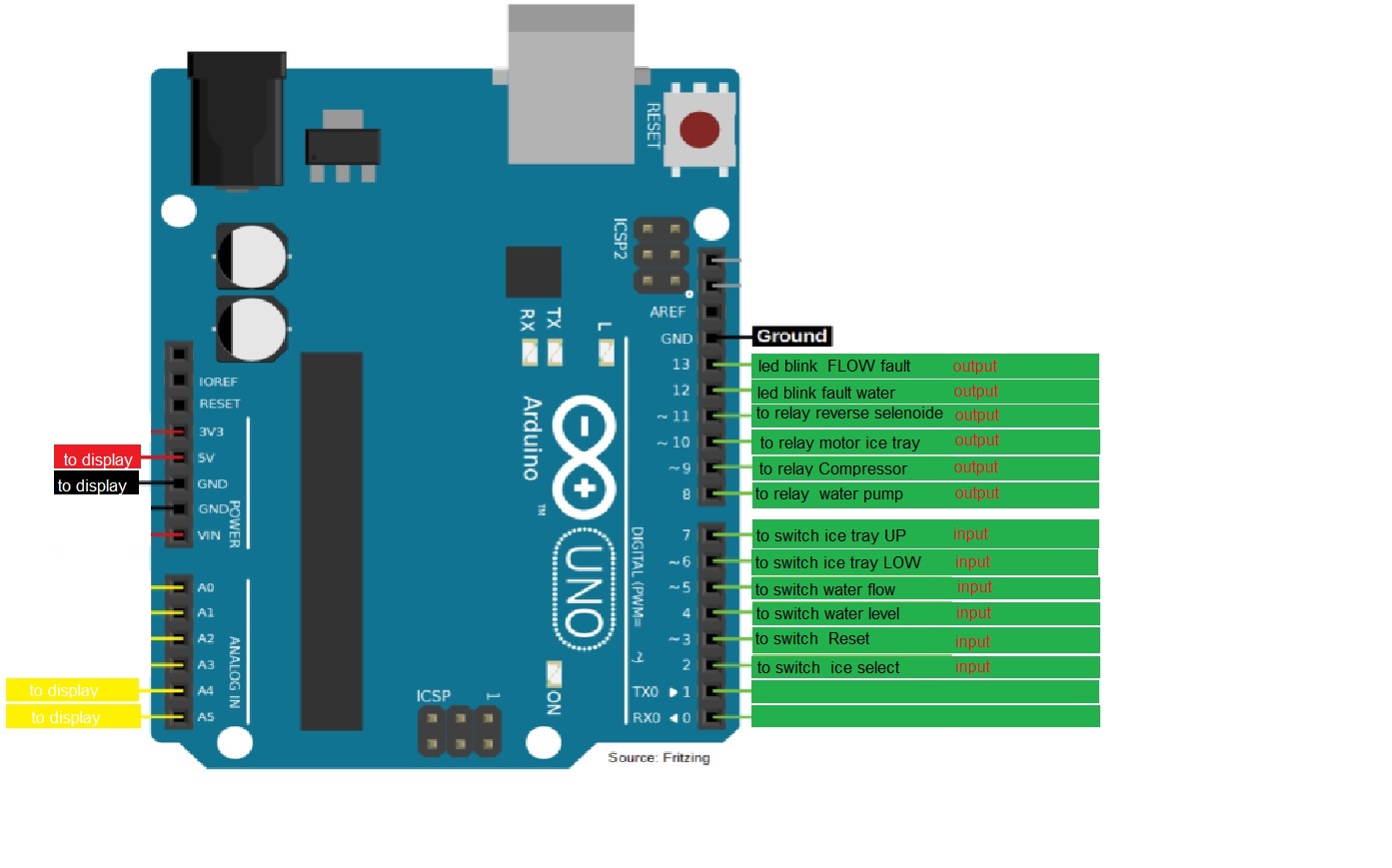
I'm terrible at drawing by hand... but below I'll put an image I made that you'll certainly understand because it's all clear, plus I'll put the link to tinkercad where the circuit is already assembled and wired with the code applied to it. simulation .... unfortunately there is no relay in the tinkercad libraries so they were replaced by leds (think of it this way when the COMPRESSOR led is on it means that the relay that will close the circuit for energy to flow to the compressor has been activated... and so on. the other exits

The red switches are fixed high and low

the pulsating ones are as they will be in real

and the sliders simulate micro switches

link to simulation last code but dont work corretly

in the simulation I left the tray sensors both open, as if the tray was in the middle of the path

When turning on the simulation you must press the selection button
1 you so that everything goes faster

The next thing that should happen is starting the tray motor, but in this case it is turning on the compressor

#include <LiquidCrystal_I2C.h>
LiquidCrystal_I2C lcd(0x27, 16, 2); // LCD address and dimensions (16x2)

// Pin definitions
enum Pins {
  pinButton = 2, 
  pinReset = 3,
  pinWaterLevel = 4,
  pinTrayHigh = 7,
  pinTrayLow = 6,
  pinWaterFlow = 5,
  pinWaterPump = 8,
  pinIceSolenoid = 11,
  pinCompressor = 9,
  pinTrayMotor = 10,
  pinWaterShortageLED = 12,
  pinNoFlowLED = 13
};

#define stopTrayMotor digitalWrite(pinTrayMotor,LOW)

// Tray motor direction constants
const int CW = 1; // Clockwise direction
const int CCW = 2; // Counterclockwise direction
const char getIceSizeName[3][7] = { "Small ", "Medium", "Large "};
const byte Time[3] = {3, 6, 9};

// Maximum motor direction change timeout (half a second)
const unsigned long motorDirectionChangeTimeout = 500;

enum State {
  SETUP,
  CHECK_WATER_LEVEL,
  INITIAL_TRAY_POSITION,
  SELECT_TIME,
  FILLING,
  COMPRESSOR_ON,
  MAKING_ICE,
  LOWER_TRAY,
  RELEASE_ICE,
  ERROR_WATER,
  ERROR_FLOW,
  ERROR_TRAY
};

unsigned long stateStartTime;
unsigned long iceMakingTime = 0; // Default time of 10 seconds
bool motorDirectionChanged = true;
unsigned long lastMotorDirectionChangeTime = 0;
State currentState;
int buttonPressCount = 0; // Variável de seleção
bool CountedDown = false; // Variável de contagem inicializada fora do switch

void setup() {
  // Pin input/output configuration
  for (int i = pinButton; i != pinNoFlowLED; i++) pinMode(i, 1 + (i < pinWaterPump));

  // LCD initialization
  lcd.init();
  lcd.backlight();

  // Start state machine at SELECT_TIME
  currentState = SELECT_TIME;
}

void loop() {
  switch (currentState) {
    case SELECT_TIME:
      lcd.clear();
      lcd.print("Cube Size:");
      stateStartTime = millis();
      while (millis() - stateStartTime < 15000) {
        if (digitalRead(pinButton) == LOW) {
          buttonPressCount++;
          if (buttonPressCount > 3) buttonPressCount = 1; // Closed cycle
          lcd.setCursor(0, 1);
          lcd.print(getIceSizeName[buttonPressCount - 1]);
        }
        delay(50); // Debounce delay
      }
      iceMakingTime = Time[buttonPressCount - 1];
      lcd.clear();
      lcd.print("Ice size: ");
      lcd.print(getIceSizeName[buttonPressCount - 1]);
      lcd.setCursor(0, 1);
      lcd.print(iceMakingTime);
      lcd.print(" seconds");
      delay(2000);
      iceMakingTime *= 1000;
      currentState = CHECK_WATER_LEVEL;
      break;

    case CHECK_WATER_LEVEL:
      if (digitalRead(pinWaterLevel) == HIGH) {
        lcd.clear();
        lcd.print("Water Shortage");
        digitalWrite(pinWaterShortageLED, HIGH);
        digitalWrite(pinWaterPump, LOW);
        digitalWrite(pinIceSolenoid, LOW);
        digitalWrite(pinCompressor, LOW);
        stopTrayMotor;
        while (digitalRead(pinReset));
        digitalWrite(pinWaterShortageLED, LOW);
      } else currentState = INITIAL_TRAY_POSITION;

      lcd.clear();
      lcd.print("COMPRESSOR ON");
      digitalWrite(pinCompressor, HIGH);
      delay(2000);
      break;

    case INITIAL_TRAY_POSITION:
      lcd.clear();
      lcd.print("RAISING");
      runTrayMotor(CW); // Raise tray (clockwise direction)
      stateStartTime = millis();
      CountedDown = false;
      while (!CountedDown) {
        if (millis() - stateStartTime >= motorDirectionChangeTimeout) CountedDown = true;
        if (digitalRead(pinTrayHigh)) break;
      }
      if (CountedDown) {
        stopTrayMotor;
        delay(100);
        runTrayMotor(CW);
      }
      while (!digitalRead(pinTrayLow)) {
        if (millis() - stateStartTime > 6000) {
          currentState = ERROR_TRAY;
          return;
        }
        delay(100);
        displayCountdown(stateStartTime, 6000);
      }
      stopTrayMotor;
      currentState = FILLING;
      break;

    case FILLING:
      lcd.clear();
      lcd.print("FILLING");
      stateStartTime = millis();
      digitalWrite(pinWaterPump, HIGH);
      while (millis() - stateStartTime < 2000) {
        displayCountdown(stateStartTime, 2000);
      }
      digitalWrite(pinWaterPump, LOW);
      currentState = MAKING_ICE;
      break;

    case MAKING_ICE:
      stateStartTime = millis();
      lcd.clear();
      lcd.print("FREEZING");
      while (millis() - stateStartTime < iceMakingTime) {
        displayCountdown(stateStartTime, iceMakingTime);
      }
      currentState = LOWER_TRAY;
      break;

    case LOWER_TRAY:
      lcd.clear();
      lcd.print("LOWERING");
      runTrayMotor(CCW); // Lower tray (counterclockwise direction)
      stateStartTime = millis();
      CountedDown = false;
      while (!CountedDown) {
        if (millis() - stateStartTime >= motorDirectionChangeTimeout) CountedDown = true;
        if (digitalRead(pinTrayLow)) break;
      }
      if (CountedDown) {
        stopTrayMotor;
        delay(100);
        runTrayMotor(CCW);
      }
      while (!digitalRead(pinTrayHigh)) {
        if (millis() - stateStartTime > 6000) {
          currentState = ERROR_TRAY;
          return;
        }
        delay(100);
        displayCountdown(stateStartTime, 6000);
      }
      stopTrayMotor;
      currentState = RELEASE_ICE;
      break;

    case RELEASE_ICE:
      stateStartTime = millis();
      lcd.clear();
      lcd.print("RELEASING ICE");
      digitalWrite(pinIceSolenoid, HIGH);
      while (millis() - stateStartTime < 2000) {
        displayCountdown(stateStartTime, 2000);
      }
      digitalWrite(pinIceSolenoid, LOW);
      currentState = CHECK_WATER_LEVEL; // Voltando para CHECK_WATER_LEVEL ao invés de INITIAL_TRAY_POSITION
      break;

    case ERROR_WATER:
      lcd.clear();
      lcd.print("Water Error");
      digitalWrite(pinWaterPump, LOW);
      digitalWrite(pinIceSolenoid, LOW);
      digitalWrite(pinCompressor, LOW);
      stopTrayMotor;
      while (digitalRead(pinReset));
      currentState = CHECK_WATER_LEVEL;
      break;

    case ERROR_FLOW:
      lcd.clear();
      lcd.print("No Water Flow");
      digitalWrite(pinNoFlowLED, HIGH);
      digitalWrite(pinWaterPump, LOW);
      digitalWrite(pinIceSolenoid, LOW);
      digitalWrite(pinCompressor, LOW);
      stopTrayMotor;
      while (digitalRead(pinReset));
      digitalWrite(pinNoFlowLED, LOW);
      currentState = CHECK_WATER_LEVEL;
      break;

    case ERROR_TRAY:
      lcd.clear();
      lcd.print("Tray Error");
      digitalWrite(pinWaterPump, LOW);
      digitalWrite(pinIceSolenoid, LOW);
      digitalWrite(pinCompressor, LOW);
      stopTrayMotor;
      while (digitalRead(pinReset));
      currentState = CHECK_WATER_LEVEL;
      break;

    default:
      currentState = CHECK_WATER_LEVEL;
      break;
  }
}

void displayCountdown(unsigned long startTime, unsigned long duration) {
  unsigned long remainingTime = (duration - (millis() - startTime)) / 1000;
  lcd.setCursor(0, 1);
  lcd.print("Time left: ");
  lcd.print(remainingTime);
  lcd.print(" sec");
}

void runTrayMotor(int direction) {
  if (direction == CW) {
    digitalWrite(pinTrayMotor, HIGH);
    motorDirectionChanged = false;
  } else if (direction == CCW) {
    digitalWrite(pinTrayMotor, HIGH);
    motorDirectionChanged = true;
  }
}

code received from friend Kolaha and some CHATGPT adjustments later, in the simulator it seems to be doing everything as it should be....

but I think he (the code) still doesn't understand the issue of limit switches and motor.

the tray is stopped...

When starting the engine, he needs to see that the closed micro switch opens >>>

and then wait for what was distant to close >>>, this should always be like this

here we go with the rotation inversion.>>
Started engine, didn't open, need to pulse >>>pulsed and opened, continue the dance until the other one closes (movement completed...

We'll still have a small chapter... but we've already gone much further...

Thank you very much in advance Kolaha

#include <LiquidCrystal_I2C.h>
LiquidCrystal_I2C lcd(0x27, 16, 2); // LCD address and dimensions (16x2)

// Pin definitions
enum Pins {
  pinButton = 2, 
  pinReset = 3,
  pinWaterLevel = 4,
  pinTrayHigh = 7,
  pinTrayLow = 6,
  pinWaterFlow = 5,
  pinWaterPump = 8,
  pinIceSolenoid = 11,
  pinCompressor = 9,
  pinTrayMotor = 10,
  pinWaterShortageLED = 12,
  pinNoFlowLED = 13
};

#define stopTrayMotor digitalWrite(pinTrayMotor,LOW)

// Tray motor direction constants
const int CW = 1; // Clockwise direction
const int CCW = 2; // Counterclockwise direction
const char getIceSizeName[3][7] = { "Small ", "Medium", "Large "};
const byte Time[3] = {3, 6, 9};

// Maximum motor direction change timeout (half a second)
const unsigned long motorDirectionChangeTimeout = 500;

enum State {
  SETUP,
  CHECK_WATER_LEVEL,
  INITIAL_TRAY_POSITION,
  SELECT_TIME,
  FILLING,
  COMPRESSOR_ON,
  MAKING_ICE,
  LOWER_TRAY,
  RELEASE_ICE,
  ERROR_WATER,
  ERROR_FLOW,
  ERROR_TRAY
};

unsigned long stateStartTime;
unsigned long iceMakingTime = 0; // Default time of 10 seconds
bool motorDirectionChanged = true;
unsigned long lastMotorDirectionChangeTime = 0;
State currentState;
int buttonPressCount = 0; // Variável de seleção
bool CountedDown = false; // Variável de contagem inicializada fora do switch

void setup() {
  // Pin input/output configuration
  for (int i = pinButton; i != pinNoFlowLED; i++) pinMode(i, 1 + (i < pinWaterPump));

  // LCD initialization
  lcd.init();
  lcd.backlight();

  // Start state machine at SELECT_TIME
  currentState = SELECT_TIME;
}

void loop() {
  switch (currentState) {
    case SELECT_TIME:
      lcd.clear();
      lcd.print("Cube Size:");
      stateStartTime = millis();
      while (millis() - stateStartTime < 15000) {
        if (digitalRead(pinButton) == LOW) {
          buttonPressCount++;
          if (buttonPressCount > 3) buttonPressCount = 1; // Closed cycle
          lcd.setCursor(0, 1);
          lcd.print(getIceSizeName[buttonPressCount - 1]);
        }
        delay(50); // Debounce delay
      }
      iceMakingTime = Time[buttonPressCount - 1];
      lcd.clear();
      lcd.print("Ice size: ");
      lcd.print(getIceSizeName[buttonPressCount - 1]);
      lcd.setCursor(0, 1);
      lcd.print(iceMakingTime);
      lcd.print(" seconds");
      delay(2000);
      iceMakingTime *= 1000;
      currentState = CHECK_WATER_LEVEL;
      break;

    case CHECK_WATER_LEVEL:
      if (digitalRead(pinWaterLevel) == HIGH) {
        lcd.clear();
        lcd.print("Water Shortage");
        digitalWrite(pinWaterShortageLED, HIGH);
        digitalWrite(pinWaterPump, LOW);
        digitalWrite(pinIceSolenoid, LOW);
        digitalWrite(pinCompressor, LOW);
        stopTrayMotor;
        while (digitalRead(pinReset));
        digitalWrite(pinWaterShortageLED, LOW);
      } else currentState = INITIAL_TRAY_POSITION;

      lcd.clear();
      lcd.print("COMPRESSOR ON");
      digitalWrite(pinCompressor, HIGH);
      delay(2000);
      break;

  case INITIAL_TRAY_POSITION:
  lcd.clear();
  lcd.print("RAISING");
  runTrayMotor(CW); // Raise tray (clockwise direction)
  stateStartTime = millis();
  CountedDown = false;

  // Wait for pinTrayLow to go HIGH (indicating tray is starting to rise)
  while (!digitalRead(pinTrayLow)) {
    if (millis() - stateStartTime > 6000) {
      currentState = ERROR_TRAY;
      return;
    }
    delay(100);
    displayCountdown(stateStartTime, 6000);

    // Check if pinTrayHigh is LOW before proceeding to FILLING
    if (!digitalRead(pinTrayHigh)) {
      stopTrayMotor;
      currentState = FILLING;
      return;
    }
  }

  // If pinTrayLow is HIGH but pinTrayHigh is not LOW yet, continue waiting
  while (digitalRead(pinTrayHigh)) {
    if (millis() - stateStartTime >= motorDirectionChangeTimeout) {
      currentState = ERROR_TRAY;
      return;
    }
    delay(100);
    displayCountdown(stateStartTime, motorDirectionChangeTimeout);
  }

  stopTrayMotor;
  currentState = FILLING;
  break;


    case FILLING:
      lcd.clear();
      lcd.print("FILLING");
      stateStartTime = millis();
      digitalWrite(pinWaterPump, HIGH);
      while (millis() - stateStartTime < 2000) {
        displayCountdown(stateStartTime, 2000);
      }
      digitalWrite(pinWaterPump, LOW);
      currentState = MAKING_ICE;
      break;

    case MAKING_ICE:
      stateStartTime = millis();
      lcd.clear();
      lcd.print("FREEZING");
      while (millis() - stateStartTime < iceMakingTime) {
        displayCountdown(stateStartTime, iceMakingTime);
      }
      currentState = LOWER_TRAY;
      break;

    case LOWER_TRAY:
  lcd.clear();
  lcd.print("LOWERING");
  runTrayMotor(CCW); // Lower tray (counterclockwise direction)
  stateStartTime = millis();
  CountedDown = false;

  // Wait for pinTrayHigh to go HIGH (indicating tray is starting to lower)
  while (!digitalRead(pinTrayHigh)) {
    if (millis() - stateStartTime > 6000) {
      currentState = ERROR_TRAY;
      return;
    }
    delay(100);
    displayCountdown(stateStartTime, 6000);
  }

  // Wait for pinTrayLow to go LOW (indicating tray is fully lowered)
  while (digitalRead(pinTrayLow)) {
    if (millis() - stateStartTime > 6000) {
      currentState = ERROR_TRAY;
      return;
    }
    delay(100);
    displayCountdown(stateStartTime, 6000);
  }

  stopTrayMotor;
  currentState = RELEASE_ICE;
  break;


    case RELEASE_ICE:
      stateStartTime = millis();
      lcd.clear();
      lcd.print("RELEASING ICE");
      digitalWrite(pinIceSolenoid, HIGH);
      while (millis() - stateStartTime < 2000) {
        displayCountdown(stateStartTime, 2000);
      }
      digitalWrite(pinIceSolenoid, LOW);
      currentState = CHECK_WATER_LEVEL; // Voltando para CHECK_WATER_LEVEL ao invés de INITIAL_TRAY_POSITION
      break;

    case ERROR_WATER:
      lcd.clear();
      lcd.print("Water Error");
      digitalWrite(pinWaterPump, LOW);
      digitalWrite(pinIceSolenoid, LOW);
      digitalWrite(pinCompressor, LOW);
      stopTrayMotor;
      while (digitalRead(pinReset));
      currentState = CHECK_WATER_LEVEL;
      break;

    case ERROR_FLOW:
      lcd.clear();
      lcd.print("No Water Flow");
      digitalWrite(pinNoFlowLED, HIGH);
      digitalWrite(pinWaterPump, LOW);
      digitalWrite(pinIceSolenoid, LOW);
      digitalWrite(pinCompressor, LOW);
      stopTrayMotor;
      while (digitalRead(pinReset));
      digitalWrite(pinNoFlowLED, LOW);
      currentState = CHECK_WATER_LEVEL;
      break;

    case ERROR_TRAY:
      lcd.clear();
      lcd.print("Tray Error");
      digitalWrite(pinWaterPump, LOW);
      digitalWrite(pinIceSolenoid, LOW);
      digitalWrite(pinCompressor, LOW);
      stopTrayMotor;
      while (digitalRead(pinReset));
      currentState = CHECK_WATER_LEVEL;
      break;

    default:
      currentState = CHECK_WATER_LEVEL;
      break;
  }
}

void displayCountdown(unsigned long startTime, unsigned long duration) {
  unsigned long remainingTime = (duration - (millis() - startTime)) / 1000;
  lcd.setCursor(0, 1);
  lcd.print("Time left: ");
  lcd.print(remainingTime);
  lcd.print(" sec");
}

void runTrayMotor(int direction) {
  if (direction == CW) {
    digitalWrite(pinTrayMotor, HIGH);
    motorDirectionChanged = false;
  } else if (direction == CCW) {
    digitalWrite(pinTrayMotor, HIGH);
    motorDirectionChanged = true;
  }
}

my words in my language:
CODIGO FINAL TESTADO NO SIMULADOR,

Apenas falta testar no real com o motor para ver se a reversao de rotacao funciona por pulso ( na da pra ver um led pulsar kkkkkkkk)

que esse codigo ajude os outros que nao finalizaram suas ideias, e que ajudem muitos mais, eu estou muito feliz

now in English:
FINAL CODE TESTED IN THE SIMULATOR,

All that remains is to test it in real life with the motor to see if the rotation reversal works by pulse (you can't see a pulsating LED hahaha).

May this code help others who haven't finalized their ideas, and may it help many more, I'm very happy

you take this strange code back. ok. see you.

Sorry what do you mean, your Fritzy image shows that they are connected each from a GND to an INPUT PIN, do you have INPUT_PULLUP specified in your setup part of the code for these switched?

If you don't have pullups the inputs will not go high when the switch is open.

Sorry, but a proper schematic would be so much better, rather than you relying on odd symbols to get by.

Tom... :smiley: :+1: :coffee: :australia:

It must be the translation... but what you said about strange symbols seemed offensive to me...

Physically the machine has a micro switch, would you expect me to put anything in the simulator other than a BUTTON???

In the simulator I'm using, Tinkercad only has a little push button, this button looks like a light switch, and the slider...

I used all 3 types

push where I need to press for selection

the light type for positions that I will use much less

and the sliders for those that alternate with the "led" which actually simulates a motor moving the tray from one point to another.

If you enter the simulator you will understand that by pressing the SELECT button on the display the size of the ice cube appears...

as soon as the tray appears moving on the display, you move the slider to inform you that the motor has moved and activated the slider.... then VUALA the machine has changed state and is making ice... the LED that simulates the water pump goes off... and the time counter advances to go to the next phase....

I don't understand, do you mean I should delete this??? Or where did I get this from??

remember, I don't know how to write code... either it was you or it was the AI... hahaha, but it's working... compared to what I had the machine physically doing on the original board..

The only question I don't know is why in the simulator you can't see this happen and the pulse to reverse the rotation... but tomorrow I'm going to remove the motor and put it in the Arduino... if physically I see that the motor stops try to run it wrong and it runs correctly by not opening the switch, then the code will receive the 1% it needs to reach 100% tested.

eached 100% I'm going to build the PCB, I'm not going to use an Arduino, but just the atmega 328p, its crystal and the relay and source circuit components

till in development but I believe that's basically it

4 relays protected by Bc457 and diode

Atmega328 and its crystal with 2 capacitors.

power supply
the pins for the display

the input pins

a zero Homs resistor to serve as a cros line hahaha

Where are the base resistors on those? Your board won't work like this since the base of the transistor will try to draw infinite current. Add something like 470Ohm or 1k between the GPIO and the base.

Where are the decoupling capacitors on your microcontroller?

How are you going to program the controller?

How will you troubleshoot the board if it turns out not to work right away?

Your power supply traces are horribly thin. Especially the ones on the switched side of the relays. Do they carry 230V? If so, your board design is an actual fire hazard. Also, spacing between those HV lines and your logic-level traces around some of the relay pins is woefully inadequate. The thought that this is supposed to work in an environment that likely encounters conditions involving humidity is downright scary.

Please read up on PCB layout practices for mains applications.

Hi, @florindopvh

Your Fritzy image shows the buttons are connected each from a GND to an INPUT PIN, do you have INPUT_PULLUP specified in your setup part of the code for these switched?

Sorry, but a proper schematic would be so much better, rather than you relying on non standard to get by.

Thanks.. Tom.. :smiley: :+1: :coffee: :australia:

Thank you for remembering the base resistors.... and the capacitors

As for the trails, they are just a sketch

when it is done, the load tracks will be adequate...

There is a lot of space on the board, just to change it, I want it to be as small as possible.

new image already with the forgetfulness.

regarding programming... this will be done outside of it, that's why the socket

BE HAPPY, and who knows, maybe you can help

Don't use electrolytics as decoupling caps; they're not very suitable for this purpose. Just use something like 0603 SMD 100nF; this will also enable you to move the crystal closer to the controller pins.

I thought so, yes. You'll figure out soon enough how inefficient and cumbersome this is, especially once you've bent some pins on the controller while taking it out, realizing they will break at some point.

Better feed out UART TX and RX to the outside world through a pin header, along with GND and 5V for the controller. Connect this to a USB-UART interface ("FTDI cable") and you can program your controller as it's plugged into the system; you never have to take it out and you can debug your code through the Serial monitor.

Don't forget that you have to program your virgin ATMega controller with a bootloader. You can use a breadboard and something like an Arduino UNO/Nano for this. I prefer to use an USBASP because I find it more convenient.

Maybe easier to read like this
image

1 Like

then it depends on the person, I read the REPRESENTATIVE one easier.... the one I see the Arduino I see the display the buttons... and I can hold the wire where it goes....

In this schematic we have a 4-pin plug (for the LCD, not representative as the friend above likes to say fritzy. I physically know where each component arrives or leaves...

but those of you in the PROFESSIONAL environment

They even bother with the background color.....

with the exception of Kolaha who helped a lot with the code... and Rsmls who identified missing components... the rest was just criticism without support....

no one thought this guy is doing something he doesn't know how to do, by force, with the resources he has, AND IT'S ALMOST READY... and there are still people asking for diagrams and questioning if PULLUP... is there? in the code.... the one who should want everything chewed up is the big donkey HERE...

That may well be.

This still makes no sense

void runTrayMotor(int direction) {
  if (direction == CW) {
    digitalWrite(pinTrayMotor, HIGH);
    motorDirectionChanged = false;
  } else if (direction == CCW) {
    digitalWrite(pinTrayMotor, HIGH);
    motorDirectionChanged = true;
  }
}

Taking into account the rest of your code, this function is exactly

void runTrayMotor(int direction) {
    digitalWrite(pinTrayMotor, HIGH);
}

a7

I cannot see in this part of your code where you use the INPUT_PULLUP resistors on the input buttons / switches.
You will need to either edit your code, OR, add 10K pullup resistors to each of your switches.

Your schematic is very readable because it lacks resolution.
Try EXPORTing an image from your CAD.

Did you breadboard your project in the real world before designing your PCB?

Thanks Tom.. :smiley: :+1: :coffee: :coffee: :coffee: :australia:

It’s nice to see your appreciation for the people who tried to help you.

You may understand how everything is wired but that is because you are intimately familiar with your project. We on the other hand only know what you tell us. If we ask questions it is only to gain a better understanding of your project and to help you with the parts that are not working correctly.

The diagram modified and posted by @UKHeliBob is, to me, much more readable than how you posted it. But instead of showing your appreciation for his efforts you complain about it almost as if you are personally insulted that he would dare to help us all help you.

There are many people on these fora that are professionals of one or more disciplines but we all share one thing in common. We all enjoy working with microcontrollers and finding ways to help others when we can. And this is done on our own time free of charge. You have received the benefit of centuries of experience and knowledge. And you throw it back at us in this manner.

I don’t know what your future goals are in this area. Is this just one project you are working on to save the cost of buying a new ice maker or are you actually interested in learning about microcontrollers and coding.

It is very evident that you are quite inexperienced in this field. Otherwise you would not be complaining about our requests for more information, if you ever pursue this hobby/occupation further, you will come to understand just how ungrateful you are right now and how petty you have acted.

As it is I feel that I have wasted more time on you than you are worth. But maybe it will help you and after all, that is why we are here.

so the code part for me is the most difficult part, that's why I'm here, this code was created by gpt chat, after I came here KOHALA CHANGED IT IN SOME POINTS
Then I tested it in the simulator and there were some errors and I adjusted it using what I have GPT... at this moment in the simulator everything works... (maybe not the inversion of the motor's direction) this is unknown because I don't understand the code and how an LED lights up, I don't know if it did what I know it needs to do... I posted a video here, where when turned on it turns to one side and when turned off and on again it can turn to the other... if that's what the code I don't know what to do yet...

What I know is that in practice the machine's original board turns on the motor if it starts up wrong (the switch doesn't open) then it turns off and on again (the switch opens and it stays connected to close the opposite)

In other words, the machine is very stupid but it understands that if it turns on and it doesn't open, it needs to be turned off and on again... and in the opposite direction the same thing...

Is that what the code does??? I have no idea, maybe only KOHALA can tell you...