I have code that sends a degree sign as serial output but it show up as ?? under any windows program I use instead of the ° sign.
Serial.print("°F, ");
Gives me ??F,
I have code that sends a degree sign as serial output but it show up as ?? under any windows program I use instead of the ° sign.
Serial.print("°F, ");
Gives me ??F,
do those support UTF8 ? it's sent as 0xc2b0
void setup() {
  Serial.begin(115200);
  char degree[] = "°";
  for (char* ptr = degree; *ptr != '\0'; ptr++) {
    Serial.print(*ptr, HEX); Serial.write(' ');
  }
}

void loop() {}
Serial Monitor (@ 115200 bauds) will show C2 B0
I checked the ° in the top post and it is indeed the UTF-8 character for degrees and it is indeed 0xC2B0.
Every program should support UTF-8, but perhaps something got lost halfway.
On my Windows computer at this time I have 3 different serial terminal applications:
Serial Monitor of Arduino IDE
Termite
TeraTerm
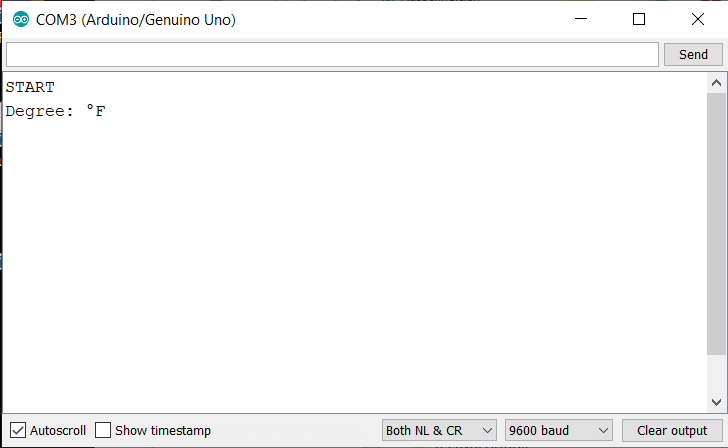
When I run this program on an Arduino UNO:
void setup() {
  Serial.begin(9600);
  Serial.println("START");
  Serial.println("Degree: °F");
}

void loop() {

}
I get the following results when I use...
Serial Monitor of Arduino IDE:
Termite:

TeraTerm:

So 2 out of these 3 serial terminal applications can display the degree sign as desired. (By the way: the degree sign is not within the standard ASCII range).
As already mentioned the application needs to support UTF8.
With Termite (my non UTF-8 application) the degree sign will be displayed with code like this:
void setup() {
  Serial.begin(9600);
  Serial.println("START");
  Serial.print("Degree: ");
  Serial.write(176);    // the degree sign (for non UTF-8 apps)
  Serial.print("F");
  Serial.println();
}

void loop() {

}
Screenshot:

Must be missing something.
I did the Serial.write(176); and get at ? from the serial port.
Can't find how to make sure UTF-8 is enabled in my program.
What’s your program ?
I decided to put a ~ instead of the ° sign and change it in the program on my PC that reads the data. This works fine and is the only program I plan to use to get the data anyway.
What are you coding with on the PC side? It’s weird it does not support UTF8 or Unicode
I am using Visual Studio 10.
Maybe it as something with the data coming in from the serial port.
I use this with the degree sign and it works fine.
Tdata = ComData.Replace("~", "°")
Switch to Kelvin
Kelvin still has a degree symbol.
No it doesn't.