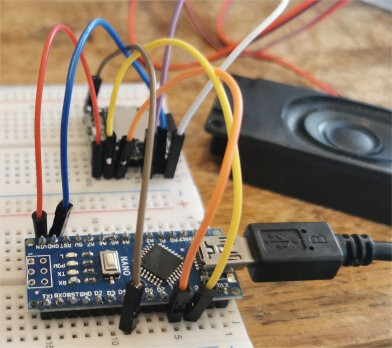
I currently own a MP3-TF-16P module, and from my extensive research on the internet i find it works like a dfplayer mini. however, whenever i upload my code onto my R4 minima, wifi, my arduino nano and my R3, it does not post. in a few occasions i am able to get it to connect (i have no idea what i did nor what i changed) but it doesn't play anything.
main issue: it prints out " Unable to begin, 1.Please recheck the connection! 2.Please insert the SD card!" in the serial monitor.
my code:
#include "Arduino.h"
#include "SoftwareSerial.h"
#include "DFRobotDFPlayerMini.h"

SoftwareSerial mySoftwareSerial(3, 2); // RX, TX
DFRobotDFPlayerMini myDFPlayer;
void printDetail(uint8_t type, int value);

void setup()
{
  mySoftwareSerial.begin(9600);
  Serial.begin(115200);

  Serial.println();
  Serial.println(F("DFRobot DFPlayer Mini Demo"));
  Serial.println(F("Initializing DFPlayer ... (May take 3~5 seconds)"));

  if (!myDFPlayer.begin(mySoftwareSerial)) {  //Use softwareSerial to communicate with mp3.
    Serial.println(F("Unable to begin:"));
    Serial.println(F("1.Please recheck the connection!"));
    Serial.println(F("2.Please insert the SD card!"));
    while(true);
  }
  Serial.println(F("DFPlayer Mini online."));

  myDFPlayer.play(1);  //Play the first mp3
}

void loop()
{
  static unsigned long timer = millis();

  if (millis() - timer > 3000) {
    timer = millis();
    //myDFPlayer.next();  //Play next mp3 every 3 second.
  }

  if (myDFPlayer.available()) {
    printDetail(myDFPlayer.readType(), myDFPlayer.read()); //Print the detail message from DFPlayer to handle different errors and states.
  }
}

void printDetail(uint8_t type, int value){
  switch (type) {
    case TimeOut:
      Serial.println(F("Time Out!"));
      break;
    case WrongStack:
      Serial.println(F("Stack Wrong!"));
      break;
    case DFPlayerCardInserted:
      Serial.println(F("Card Inserted!"));
      break;
    case DFPlayerCardRemoved:
      Serial.println(F("Card Removed!"));
      break;
    case DFPlayerCardOnline:
      Serial.println(F("Card Online!"));
      break;
    case DFPlayerPlayFinished:
      Serial.print(F("Number:"));
      Serial.print(value);
      Serial.println(F(" Play Finished!"));
      break;
    case DFPlayerError:
      Serial.print(F("DFPlayerError:"));
      switch (value) {
        case Busy:
          Serial.println(F("Card not found"));
          break;
        case Sleeping:
          Serial.println(F("Sleeping"));
          break;
        case SerialWrongStack:
          Serial.println(F("Get Wrong Stack"));
          break;
        case CheckSumNotMatch:
          Serial.println(F("Check Sum Not Match"));
          break;
        case FileIndexOut:
          Serial.println(F("File Index Out of Bound"));
          break;
        case FileMismatch:
          Serial.println(F("Cannot Find File"));
          break;
        case Advertise:
          Serial.println(F("In Advertise"));
          break;
        default:
          break;
      }
      break;
    default:
      break;
  }

}
pardon my (perhaps) short temper and inadequate information, i'm just very frustrated at this whole thing not working.
THINGS THAT I HAVE TRIED ALREADY:
changing TX and RX to many other combinations.
finding many other code examples.
used another sd card
changed all the filenames on my sd card and used a different method (e.g. playMp3Folder, playFolder, loop, play...)
reuploading everything on my sd card
tried using different mp3 files to see whether it's a reading problem
Have you tried momentarily grounding either the IO_1 or IO_2 pin to take the Arduino out of the equation?
Edit: also, in your picture, you have Uno's pin 3 running through a 1K resistor to the module's pin 2. Pin 2 on the module is Rx. In your code, you are defining the SoftwareSerial's Rx pin as pin 3. Oops. You need to hook up the Uno's SoftwareSerial Tx pin (which you have defined as pin 2) through the 1K resistor to the module's pin 2. And then the Uno's SoftwareSerial Rx pin (which you have defined as pin 3) directly to the module's pin 3.
oh my god i didn't see "momentarily grounding IO1 and IO2" sorry but yeah i haven't tried that
it's formatted with the windows default file explorer and idk whether it works
edit: by grounding IO1 and IO2 i managed to get the file to play but i have no idea how to actually pair this with my arduino such that it can be controlled software-side
I start with a shorting jumper in my hand and tap the IO_x pin to skip to next file. Then I hold the jumper a little longer until it effects volume. Using that "time" I wire the IO_x pin to a digital pin and use some code to "tap" or "long press" the IO_x pin.
the following worked on a Nono using AltSoftSerial but code using same pins should work on a UNO
// Arduino Nano Classic  DFRobotDFPlayer player

// **** Once the card is formatted, MP3 files can be copied to it.
// **** They are played in the order in which they were copied to the card
// names make no difference

#include "Arduino.h"
#include <AltSoftSerial.h>
#include "DFRobotDFPlayerMini.h"

// Nano connections
// Nano VIN (5V) to DFPlayer VCC
// Nano GND to DFPlayer GND
// Nano pin 8 serial RX to DFPlayer TX
// Nano pin 9 serial TX to DFPlayer RX
// Nano pin 4 to DFPlayer BUSY

AltSoftSerial mySoftwareSerial(8, 9); // nano RX, TX
#define BUSY 4

DFRobotDFPlayerMini myDFPlayer;
void printDetail(uint8_t type, int value);

void setup() {
  pinMode(4, INPUT_PULLUP);       // GPIO 4 is Busy signal
  mySoftwareSerial.begin(9600);   // DFPlayer serial
  Serial.begin(115200);
  delay(3000);
  Serial.println();
  Serial.println(F("\nNano DFRobot DFPlayer Mini Demo"));
  Serial.println(F("Initializing DFPlayer ... (May take 3~5 seconds)"));

  if (!myDFPlayer.begin(mySoftwareSerial)) {  //Use softwareSerial to communicate with mp3.
    Serial.println(F("Unable to begin:"));
    Serial.println(F("1.Please recheck the connection!"));
    Serial.println(F("2.Please insert the SD card!"));
    while (true)
      ;
  }
  Serial.println(F("DFPlayer Mini online."));
  myDFPlayer.volume(25);  //Set volume value. From 0 to 30
  //myDFPlayer.play(1);     //Play the first mp3
  delay(10);
  Serial.println("enter track to play (1, 2, 3, etc)");
}

void loop() {
  static unsigned long timer = millis();
  static int busy = -1;
  // check if player Busy status has changed
  if (digitalRead(BUSY) != busy) {
    if ((busy = digitalRead(BUSY)))
      Serial.println("busy " + String(busy) + " NOT playing");
    else
      Serial.println("busy " + String(busy) + " playing");
    ;
  }

  if (millis() - timer > 3000) {
    timer = millis();
    //myDFPlayer.next();  //Play next mp3 every 3 second.
  }
  // if new track (integer) entered play it
  if (Serial.available()) {
    int x = Serial.parseInt();                // read track number
    Serial.println("playing " + String(x));
    myDFPlayer.play(x);                       // play track
    while (Serial.available()) Serial.read(); // clear EOL etc
    delay(10);
  }

  // if player status changed display
  if (myDFPlayer.available()) {
    printDetail(myDFPlayer.readType(), myDFPlayer.read());  //Print the detail message from DFPlayer to handle different errors and states.
  }
}

void printDetail(uint8_t type, int value) {
  switch (type) {
    case TimeOut:
      Serial.println(F("Time Out!"));
      break;
    case WrongStack:
      Serial.println(F("Stack Wrong!"));
      break;
    case DFPlayerCardInserted:
      Serial.println(F("Card Inserted!"));
      break;
    case DFPlayerCardRemoved:
      Serial.println(F("Card Removed!"));
      break;
    case DFPlayerCardOnline:
      Serial.println(F("Card Online!"));
      break;
    case DFPlayerPlayFinished:
      Serial.print(F("Number:"));
      Serial.print(value);
      Serial.println(F(" Play Finished!"));
      break;
    case DFPlayerError:
      Serial.print(F("DFPlayerError:"));
      switch (value) {
        case Busy:
          Serial.println(F("Card not found"));
          break;
        case Sleeping:
          Serial.println(F("Sleeping"));
          break;
        case SerialWrongStack:
          Serial.println(F("Get Wrong Stack"));
          break;
        case CheckSumNotMatch:
          Serial.println(F("Check Sum Not Match"));
          break;
        case FileIndexOut:
          Serial.println(F("File Index Out of Bound"));
          break;
        case FileMismatch:
          Serial.println(F("Cannot Find File"));
          break;
        case Advertise:
          Serial.println(F("In Advertise"));
          break;
        default:
          break;
      }
      break;
    default:
      break;
  }
}
serial monitor output
Nano DFRobot DFPlayer Mini Demo
Initializing DFPlayer ... (May take 3~5 seconds)
DFPlayer Mini online.
enter track to play (1, 2, 3, etc)
busy 1 NOT playing
playing 1
busy 0 playing
playing 2
busy 1 NOT playing
busy 0 playing
playing 3
busy 1 NOT playing
busy 0 playing