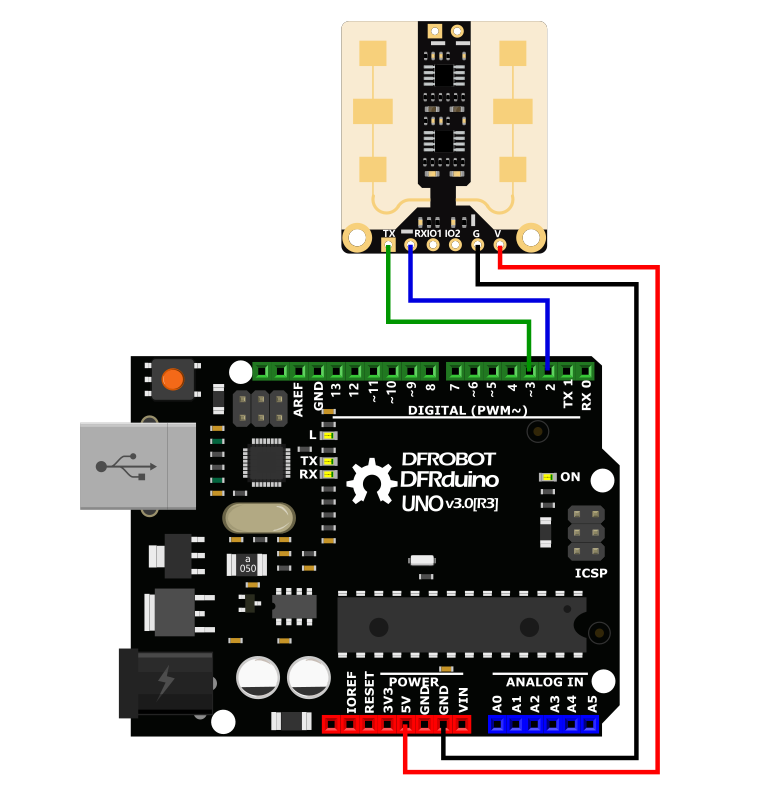
So i'm making a human presence detection using the DFRobot SEN0395 sensor with the Arduino Pro Micro. I'm using the included Example program on the "DFRobot_mmwave_Radar.h"
#include <SoftwareSerial.h>

#include "DFRobot_mmWave_Radar.h"

SoftwareSerial mySerial(3, 2);  //RX,TX
DFRobot_mmWave_Radar sensor(&mySerial);

int ledPin = 13;

void setup()
{
  Serial.begin(9600);
  mySerial.begin(115200);
  pinMode(ledPin, OUTPUT);

  sensor.factoryReset();    //Restore to the factory settings
  sensor.DetRangeCfg(0, 9);    //The detection range is as far as 9m
  sensor.OutputLatency(0, 0);
}

void loop()
{
  int val = sensor.readPresenceDetection();
  digitalWrite(ledPin, val);
  Serial.println(val);


}
When i tried it on an UNO there're outputs but they were Janky and kinda broken cause i faced the sensor to the other side the data keep reading it was high even though there is no one.
i dont think it's the baud rate problem. According to the Wiki the default baud rate is 115200 and when i change it, it won't work. I'm trying another Library with much simpler way to use.
#include <DFR_Radar.h>

// Serial1 is the hardware UART pins
DFR_Radar sensor( &Serial1 );

void setup()
{
  Serial.begin( 9600 );

  // The DFRobot device is factory-set for 115200 baud
  Serial1.begin( 115200 );

  // Restore to the factory settings -- it's not necessary to do this unless needed
  sensor.factoryReset();

  // Set a detection range of 0 to 1 meter (9.45m is the maximum)
  sensor.setDetectionRange( 0, 1 );

  // Lower the sensitivity so that it's easier to test
  sensor.setSensitivity( 2 );

  // This will cause the LED to turn on 1 second after presence is detected and
  // it will stay on for 5 seconds after the sensor no longer detects presence.
  // Set both of these to 0 for instant on/off, although you may get short-cycling.
  sensor.setOutputLatency( 1, 5 );

  // Setup the built-in LED
  pinMode( LED_BUILTIN, OUTPUT );
}

void loop()
{
  /**
   * NOTE: if you use any `delay()` here, the
   * more of them plus the longer they are,
   * the more likely the presence events will
   * be missed.
   */

  // Query the presence detection status
  bool presence = sensor.checkPresence();

  // If presence == true, turn on the built-in LED.
  digitalWrite( LED_BUILTIN, presence );

  // Your serial monitor will show constant 1's or 0's depending
  Serial.println( presence );
}
The Terminal said that the Serial1 was not declared. I've tried to change it but the error message still same.
Serial1 is only available of hardware that has more than 1 hardware serial port. An Uno only has 1 - Serial. If you get a Mega 2560, it has 4, Serial, Serial1, Serial2, and Serial3.
which brings up back to the original help - use a different board.