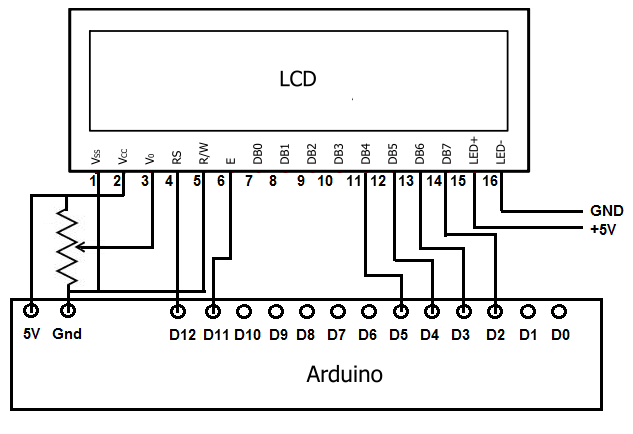
Hello, I am relatively new to Arduino and for a project I need to get an LCD to display the pressed buttons of a keypad. So far, it is not working but the code doesn't come up with any errors. This is my code:
#include <LiquidCrystal.h>
#include <Keypad.h>

// Define the pins for the LCD screen
LiquidCrystal lcd(7, 8, 9, 10, 11, 12);

// Define the pins for the keypad
const byte ROWS = 4;
const byte COLS = 4;
char keys[ROWS][COLS] = {
  {'1', '2', '3', 'A'},
  {'4', '5', '6', 'B'},
  {'7', '8', '9', 'C'},
  {'*', '0', '#', 'D'}
};
byte rowPins[ROWS] = {2, 3, 4, 5};
byte colPins[COLS] = {14, 15, 16, 17};

// Define the keypad
Keypad keypad = Keypad(makeKeymap(keys), rowPins, colPins, ROWS, COLS);

void setup() {
  // Initialize the LCD screen
  lcd.begin(16, 2);
  lcd.setCursor(0, 0);
  lcd.print("Press a key:");

  // Initialize the serial monitor
  Serial.begin(9600);
}

void loop() {
  // Read the keypad
  char key = keypad.getKey();
  if (key != NO_KEY) {
    // Display the pressed key on the LCD screen
    lcd.setCursor(0, 1);
    lcd.print(key);

    // Print the pressed key to the serial monitor
    Serial.println(key);

    delay(200); // Debounce the keypad
  }
}
The keypad itself works, but when I press a button on it the number doesn't display on the LCD. I was picking up the code from a partner who had added in debounce delay.
Can you write "Hello World" on the LCD display ?
Your problem seems to be how the LCD display is connected. Most of us had trouble with all those wires, so we prefer a I2C LCD with only four wires.
Your sketch with a working display and the correct wiring is working.
This is your sketch in Wokwi simulation: