And then I switched to the more intuitive alternative by @econjack in the same thread. (By which I mean I think I could have ended up writing that code myself. But why re-invent wheels?)
Nonsense. The code example for that library does the padding (actually leading zero insertion) in the application code, just like the example from Post #4. It as nothing to do with the library and everything to do with how you (the application code writer) choose to print the values.
Excellent, thanks David. Very easy to set up. And prints its time output padded without help from me! Its sketch examples are thoroughly commented too. I may switch my allegiance to it from DS3231, before I start integrating with my project.
If you have used it for LCD output (e.g. the 1602), was it straightforward?
Both libraries supply hour, minutes, seconds, etc as integer types (i.e. function minute() or now.minute()). It's the application code that chooses to add leading zeros or not when it prints. YOU write the application code, therefore you are responsible for adding leading zeros if want them.
The example code you like adds the leading zeros with the function printDigits(). That function is in the application code not the library. You could write your own similar function for the Adafruit library. But again, it won't be part of the library, it's application code for the library.
I understand the distinction youre trying to make. But my point is that library authors write their Examples. Presumably to help users to implement their libraries. So the only 'nonsense' here is your suggestion that "It has nothing to do with the library"!
well, the library is fine. It's the usage of the library (the example) that fell short of your expectation but the code in the example does what it's supposed to do (even if I agree it's not the usual representation)
the other example I linked in post 28 has formatting
No help from you, perhaps, but with help from the printDigits() function
void printDigits(int digits)
{
    // utility function for digital clock display: prints preceding colon and leading 0
    Serial.print(':');
    if(digits < 10)
        Serial.print('0');
    Serial.print(digits);
}
which is not part of the library, rather it is part of the application code
If a clock library did return a 2 digit zero padded value, which it could, then it would have to be an array of 3 chars, aka a C style string (NOT a String), which would introduce complications for the application code if a comparison was required. Instead of the simple
if (hour > 7 && hour < 11) //turn off the lamp between 7am and 11am
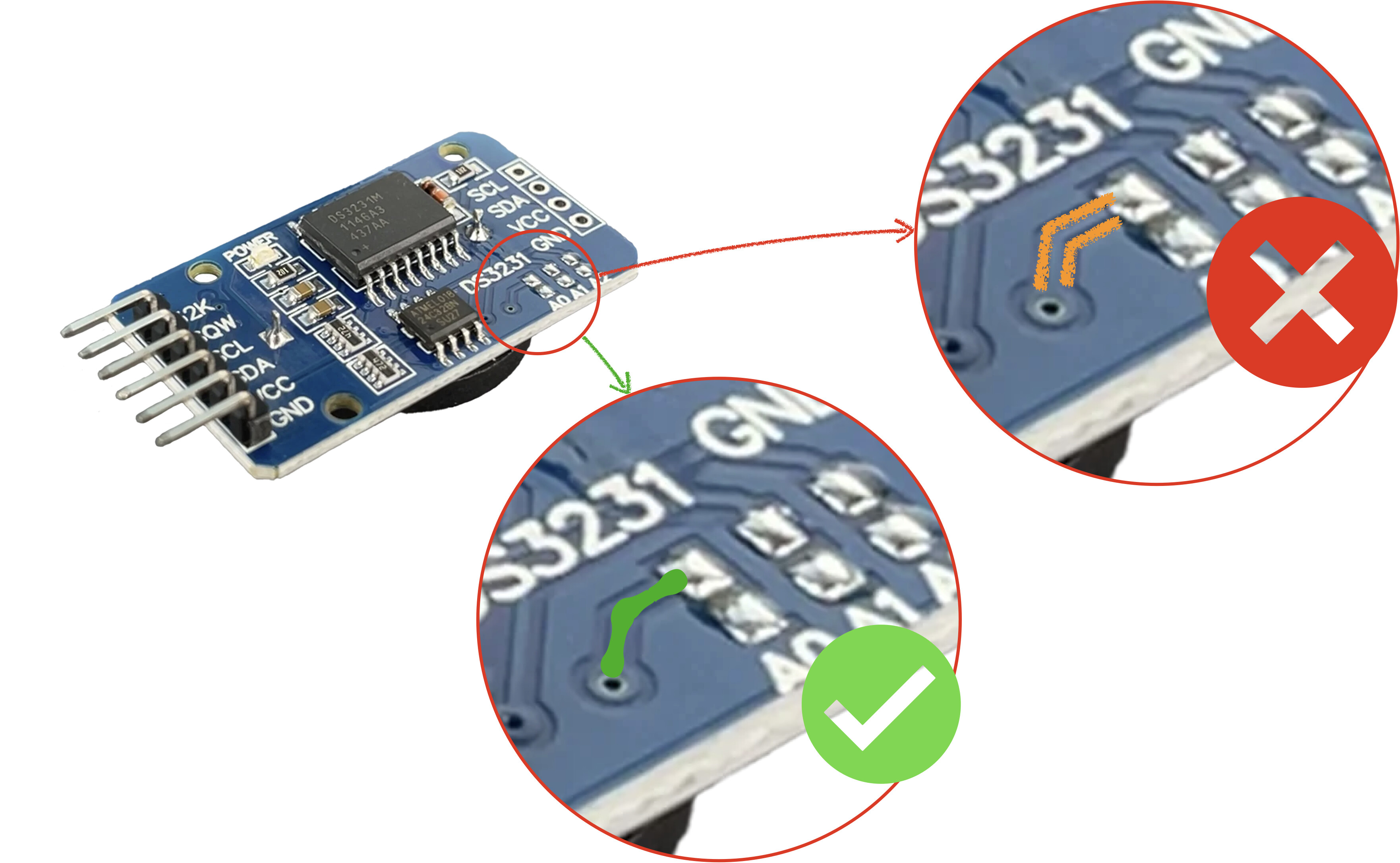
If it's a CR2032, it is indeed a lithium battery, but it is not rechargeable, and you would need to do the modification. However, I believe instead of desoldering things you can just cut one trace to accomplish the same thing:
OK, thanks, got it. Hadn't understood there could be significant downsides to using 'formatted code' for inbuilt library variables.
I think library authors could anticipate that not all users are hardened programmers though! A well placed comment or two ("This is basic code; write your own formatting") would have had the penny dropped a lot sooner.
But IMO it is waaay easier to melt a few SM components off the board than to cut your finger again for the Nth time because X-Acto knives.
Especially if you aren't intending to reuse the removed components.
Even just a few seconds with a pliers to crush them. Destroying things is easy fun.
It is surprising that these made it out into the world. Some units are known defective, so les than perfect time keeping, or more usually some excitement around the EEPROM part include on the module.
Looks like I don’t need to cut the trace or remove the diode or resistor - as the latter isn’t present. Nothing between its pair of solder blobs. Confirmed by DMM.
If either the diode or the resistor is not populated on the module, then you're in like Flynn. Just make sure the empty pads aren't soldered together into a blob.