Due GUI (Graphical user interface) - [now community project]

Hi Graham,
IT WORKS!
I only have model CTE32 (320240 with and without fonts), ITDB32WD (240400). It looks that can not work well with other models so as you realize only first screen looks good but I do not care (I am going to order some 7 inch models ). At least I have something working, first to study and play with some simple buttons (now I use UTFT_Buttons with my own functions for data entry fields with popup numeric keyboard in an HMI of bigger project using hardware quadrature DUE encoder to test damaged bottles in a high speed production line).

Now my Idea is to build a user interface written in Python. So you can easily graphically position and paint all your objects as you like on any screen size and the the program will produce DUEGUI functions and screens ready to insert to your code compile and run it.

Some with commercial visualization products and industrial HMI like Siemens panels and Wintek among others.

Think when Arduino TRE comes! you do not need a separate computer. the entire python HMI can be built on tre running lynx!
So my contribution to this project is some little help on C coding, help on the presentation and an HMI running python and creating DUEGUI code and..

But we need @cowasaki , @ediaz and any other that can help. We need a central point to uplod the code and a project leader for the project to be alive and finished.

Thanks again Graham
Happy New year to all
Vasilis

Hi Vasilis,

You are welcome and I am pleased I could help on this occasion! :smiley: As you say, only the first screen works, I am aware of that and I only got that far before I realised there were problems with 'invisibility'. The Screen you see at startup looks like this (or it should do) :-

Ok, so the problem I am having is this, at startup you should see the screen shown above, touch the 'R' button, this is re-draw all objects, and you will see the whole screen visibly shimmer as it redraws....... do this several times until you know what I am talking about......... then touch the -1&2 button, which will make the '1' , '2' and '-1&2' buttons disappear........... now touch the 'R' button........ several times.............. the 'R' button turns red to indicate it realises it is active............... but the corresponding redraw does not happen.............. And actually this is also the case if the screen is originally drawn with any invisible objects present...... I have not managed to track down why yet, and that is the main reason I have not continued to format the fan, clock and cal screens yet, ediaz has already done significant work on the input screen, and I understand it fits a 400240 screen correctly, but as you will be aware not quite perfect on 320240. My priority is/has been to try to resolve this invisible problem, and so far I have drawn a blank and become a little de-motivated to be honest, but I will keep chipping away at it, unless someone figures it out before I do.

The next idea I think would be good, would be to take advantage and use CTE fonts if they are available, or normal UTFT fonts if not. The current ediaz version is now only UTFT fonts. My problem with this idea is that as yet I don't have a CTE TFT with fonts and although I am planning to get the 5" 800*480 with fonts, it is not going to be for another month or 2, which kind of restricts my abilities to experiment in that area... =(

I very much like your idea of the PYTHON display design project and drop into DUEGUI to compile, that does sound great, and I must admit, while you might not believe it, it did actually take me quite a long time to produce that first screen with nice formatting and layout, which you may or may not be aware, does not contain everything of the original DEMO_02.

I had intended to carry on and redesign the remaining screens all to nicely fit 320*240, but I then decided was perhaps more important to try to resolve identified problems as/when they are discovered, I fixed the 2 digit date problem along the way but that was easy.... Since others are now showing interest and asking about the current state of this project, I figured the more the merrier and released what I have so far, Ed, I hope you don't mind as I do appreciate you did the bulk of the work and I don't wish to tread on your toes!!

This invisibility problem has taken a huge amount of my time already, as while I was playing/designing that first screen I had almost completed it when I decided to introduce invisible buttons, and then touch stopped working, but I didn't connect no touch with invisible objects immediately, so actually that first screen is the stage I was at basically early November!! =( :0

Lastly, but perhaps most importantly? Would be to deal with the touch calibration screen, dynamically adjusted to cope with ANY display size at the library level, currently ediaz has it hardwired for 400240, I modified that and hardwired it for 320240, but this is not an ideal long term solution for what hopefully is going to be a universal library.

Regarding your weak C abilities, don't worry about it, Google knows everything!! :grin: XD experimenting and playing is a good way to learn, start with DUEGUI its already broke, you can only make it better!!

To those of you requesting SVN, git etc, until somebody else wants to take control and move it somewhere else, this is my first stab at a repo..... Do what you like with it....

GitHub - ghlawrence2000/DUEGUI: A place for DUEGUI library 0.13 by 'cowasaki' to live This is no longer functional, I have no more interest in this project.

Happy new year,

Regards,

Graham
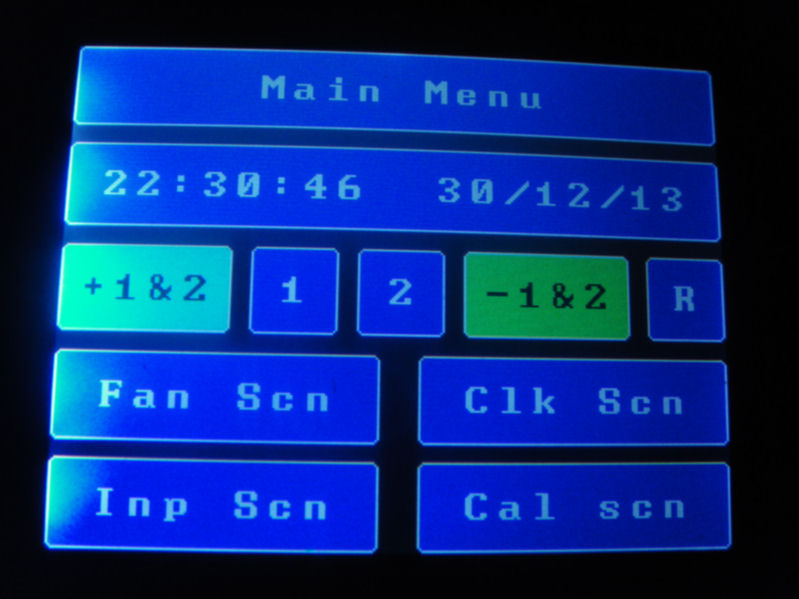
Hi Graham,

Yes first screen only works but it is OK. I only wanted to have a first look.
It is Ok to have the project a "home" even no permanent.
To my opinion @ediaz or @cowasaki or both must cooperate to lead the project. The have the knowledge to do so.

I have a contact with Gary as well and promised me to send me some of his work on a little different direction but it is working well .

So unless some with good knoledge of C. C++ lead this project it will end up with everybody with cut and past makes his version only for himself.

I wonder why the original creator Henning Karlsen did not think of doing something like that. If nobody else interesting in leading it may be Henning Karlsen inspired and give us a wonderful GUI written in C..

Anyway that is the beauty of open source . You never know. The good thing is that people like us find living not boring but interesting way of spending wisely the precious gift that God gave us... LIFE and FREEDOM .

So at this point I only want to increase my knowledge in C by standing the library (not trying to resolve problems, as I have limited time to spend on this).
I have to finish my project witch has dead a line and I will start designing (at least in the analysis stage) The python HMI based on industrial standards.
Happy New Year to everybody

Vasilis

vorrias:
So unless some with good knoledge of C. C++ lead this project it will end up with everybody with cut and past makes his version only for himself.

No! That is absolutely not what I envisage, whoever or wherever this library is hosted is not important, who wishes to be lead contributor, and or lead coordinator is not important, 'Kernighan Ritchie' levels of understanding of C, kind of seems to imply less knowledgeable mortals have nothing to offer, which I absolutely disagree with, and finally the whole point of a community project is that ALL suggestions from ANY angle are to be accepted, appreciated, discussed and dealt with appropriately, with the result being uploaded to git? Is that not what an ideal community collaboration is all about?

@cowasaki has already handed over the reigns due to limited time, Henning I think you will find has enough on his plate with his existing projects and maintenance of his various libraries and resources. Git gives us the ability to fork, branch, and monitor any/all changes/variations/additions/deletions and produce useful documentation collaboratively! The repository is public as such is available as a 'free for all' with no control from me, I just hosted it because nobody else had......... I don't see that this has empowered me or nominated me in any way? You may have noticed that @ediaz and myself have been in dialogue a little while now, and I think it would be more appropriate to have a staging area / brain storming arena away from this forum where trivialities and any/all comments can be made without swamping the forum with tooing and froing of questions/suggestions/test reports etc?

One of the most urgently required imminent updates to this needs to be the dynamic calibration screen, while I accept maybe I am no K&R prodige, I do consider it to be within the realms of my abilities to do this, the major limitation I have, is that I only have 1 display. I am hoping and will need, other people with different flavours of shield and or display to verify the modifications when I have made them, which actually brings this full circle, @ediaz gave me his code to test on my display. He and I already agree something needs to be done about this, and here we are, this is the point you have joined in. Come the time I have dealt with the invisible object problem, and the touch calibration screen, I will be looking for as many as possible different people to test this, not only myself and @ediaz, thus ensuring the ultimate flexibility of the DUEGUI library.

What individuals then chose to do with that library of course will very much be on a 'each to themselves' arrangement. My demo was made by me, for me, on my own display, as a start point to then get down to doing some remedial work on the library itself. The sketch I gave was a work in progress, and in hindsight, maybe I should not have given it you if you are not intending to bring anything back? :0 :frowning:

Regards and a VERY Happy New Year everyone!! :smiley:

Graham

Hi Gary

Ok I agree in what you say.
I am not using anything what you did so far. When I have time I will try to understand your concept in DUE GUI but my time is limited in that moment and I want to increase my knowledge in C. I have the intention If I understand what you are doing to help in any way I can and contribute.
But my mind is still troubling with a high level HMI .

I am 60 years old I am not learning as fast as before and despite the fact that I am in the computer business since 1979 I "learn" C just one year ago and not exercising frequently

Finally I will try to help and stay with all you.
So happy New Year again
Vasili

Vasilis

vorrias:
Hi Gary

Ok I agree in what you say.
I am not using anything what you did so far. When I have time I will try to understand your concept in DUE GUI but my time is limited in that moment and I want to increase my knowledge in C. I have the intention If I understand what you are doing to help in any way I can and contribute.
But my mind is still troubling with a high level HMI .

I am 60 years old I am not learning as fast as before and despite the fact that I am in the computer business since 1979 I "learn" C just one year ago and not exercising frequently

Finally I will try to help and stay with all you.
So happy New Year again
Vasili

Vasilis

Hi Vasili,

That is great!! :smiley: You have a huge amount of knowledge no doubt, and that is valuable in its own right. Let me give you a snapshot of who I am...... I was 13 back in 1981 when I was introduced to a computer for the first time, it was an Acorn BBC Micro Model 'B', I taught myself BBC Basic, and 6502 Assembly language. I studied electrical and electronic engineering after school, and became an electronics service engineer for the English N.H.S. for around 17 years. My hobby and passion was always electronics, but a close 2nd was computers, and more recently Arduino, I tinkered and played with C back at college, but that was early 1990's, and now I am playing with C++ for fun with the Arduino! I do take your point about not learning at the same pace as when you were younger!!! :roll_eyes: :fearful: XD

I for one will never criticise you for what you don't know, but I hope you would be prepared to fault find, test, or simply take part in any way you feel able to do so? I have commented previously it is a little disappointing there are not more people showing an interest in this project, because I feel once it is working as Darren originally intended on any hardware UTFT supports, that it will have great potential in various applications??

Regards,

(I am not wishing anyone Happy New Year again, I did plenty of that earlier!! BAH HUMBUG LOL)

Graham

Graham,

It is coming better and better.
Ok when you were 13 I was just starting a computer business in Greece (after having my H.N.D in Electronics in Greece and spending 2 years in England In North London poly in digital electronics) shelling Sinclair computers, OSBORNE, NCR, AMSTRAD, and all IBM compatibles until 10 years ago that stopped the computer business and starting again my real profession Electronics.
Meanwhile I was involved heavily in Z80 assembly programing and made many controllers . Then left the custom made Z80 controllers and for the last 10 years in industrial automation with PLC which I do now for living.
15 years ago in a Munich exhibition I saw intel CPUs with CAN bus! We got 2 boards for 2000 marks back then!. But I had to learn C which I did not, because I was too much occupied with my computer business and abandon that grate opportunity to learn C and jump to the beautiful word of CAN bus (now CANopen)
So about 2 years ago I suddenly wanted badly to start again embedded computing and thanks God I choose Atmel.

That meant C again! . Believe me starting C in my 59 and having a heavy program in the factory I am working it was a huge step for me. But I did it and I inspired and a younger technician who is working with me to start programming Atmel with C in Eclipse.
Then after a year (not every day) programming and building many "libraries" I discover Arduino. I saw that I could improve my knowledge and use a huge amount of other peoples work. Always trying to give something in return.

Finally now I will try to learn some C++ and have this DUEGUI project as a teaching helper for my jurnay in C programming.

So give me some time to understand the project and I will be able to be very helpful. At the end even improving my knowledge of C and helping the community will be very satisfying for me.

And Graham one last thing that made me very happy and I want to share it , but a little embarrassed because I stopped.
In Aug 20, 2011 I started a thread in the Raspberry forum with the title "Turn Raspberry Pi into a P.L.C". Then for some reason after some months because of too much work I abandon my involvement.
Bus some days ago just for curiosity I return to see what is happening! I could not believed it. These people went too far ! I also descover this on the last post of my tread!


by ranpitime » Fri Dec 20, 2013 4:25 pm
Hi,
using Raspberry PI as PLC with CODESYS V3 is now possible and available:

Steps to use it.........

What is possible?
EthercatMaster
ModbusTCP / Master & Slave
Ethernet / IP Scanner
Using PIFace
Using PICam (Trigger Images by plc...)
Webvisu which is executable on Android's and IPhone/Ipad
SoftMotion


Oh! CODESYS (is a PLC programing tool made by German guys ) is the PLC operating system I use in my job. Imagine! They went too far!

OK I was a bit out of the topic here but What I want to finally say is:
WE HAVE TO DO MANY THINGS with Arduino and the newcomer Arduino TRE.
I will always feel DUEGUI home and always have my knowledge available to anybody that asks for them!

Take care

Vasilis

@Vasilis, WOW!! I read quite a bit of your Raspberry PI PLC thread, very well done! :slight_smile: I have not got a Raspberry Pi although I am aware of what they are of course...... I often wondered why I would want one when my computer does everything better/faster than the computer aspect of the PI, and my Arduino DUE does everything better/faster than the microcontroller aspect of the raspberry pi? Feel free to enlighten me if you wish :wink: I appreciate you are busy as you have previously said, but I wonder if sometime when you can spare a little time if you could possibly help me out with this [SOLVED] CTE TFT with font ic, what size are the fonts please? - Displays - Arduino Forum please, as nobody else has yet. I don't presently own a CTE display, but I wanted to see what I could do to assimilate assorted UTFT fonts as approximations of CTE fonts? The idea being to give us a hardware independent DUEGUI library that is not reliant on the font ic but can use it if available.

@all, Ok, so back on topic, I have been playing with the optInvisible side of things, and I cannot find any rational explanation why it behaves as it does, it may be a cop-out, but I am not going to try to figure it out any further as I am quite enthusiastic to crack on with the touch calibration screen!

@ediaz Happy new year! You are quiet :slight_smile:

Graham

Hi Graham and every body

I was writing a long text to explain the beauty of Raspberry but because of a crash I lost everything.
So I can only write back a few words..
Raspberry-pi wrote history as the first FULL computer that you can plug it on a TV with an HDMI interface.
Run Linux out of the box on SD and can control the GPIO (General Purpose Input Output) pins from the OS.
Embarrassed from the education community and gain momentum. Look (www.themagpi.com).

Arduino did not have an OS. Instead you wrote everything from scratch. But this litle thing was wrote history too.
Among many others reprap machines (www.reprap.org) could never existed without Arduino .

So both Arduino and Raspberry had inspired designers to catch this "spark" and build something genius that nobody thought before.

Arduino TRE is coming. Better than Raspberry-pi. But that does not mean Raspberry is obsolete. In contrary all the work done in Raspberry can move to Arduino tre and visa verse . Beremiz and CODESYS will port to Arduino TRE. That because Raspberry was in "town" before. So the journey just started and it is magic.
As Socrates (the grate Greek philosopher) said "one thing I know for sure, that I Know nothing". Every day in our lives we will realize that. And that makes us better persons.

Now pity I do not have 5" and 7" displays with fonts to answer you question but for me now this is not the problem. I thing we have to make DUEGUI to work nice with different models with the soft fonts. Lets debug it first. I will come back when I finish my "education" in the code and have some C++ lessons.
Now I have a project to finished so I made some functions of my own to make things look nicer to the display. like make a rectangular with text or number printed inside, input field with keyboard popup etc. I can sent the to anybody like them but I believe inside DUEGUI are more advanced features. I just do not have time now to use it. I am learning it.

I am going to order one 7"display probably CTE.
But have in mind that I do not use shield (but I have one). I connected the display straight to board using a small wired adapter.
this is the wiring attached if you do not have the shield.

take care

Vasilis

DUE-40 pin LCD connection.pdf (104 KB)

Getting back to DUE. I started gathering my DUE, Taijuino and CTE stuff back as Daniel and a few other students lost interest in the GUI development for the DUE. Seems I have a total of five of these SSD1963 LCDs, shields And DUE/Taijuinos in my possession.

I picked out a sligthly different one...

As far as I have read through the don't see any support for SPI displays.
This also has the RAiO RA8875 Chip ( http://www.raio.com.tw/e%20version/e_product.8875.htm ) which does support SPI, I2C, Serial and has a on-board uSD card slot and options are either a 4 wire or capacitive touch like this one.

I'm planing on using the Due and this display as the micro-controller over I2C to change certain values in the DSP/DAC as well as the digital input board.
Even the GUI is a great start for me as i could port part of it to suit my needs but at this point my programming skills are a bit very rusty LOL ( last time i was writing programs was in basic and this is going back 18 or 20 years :confused: )

BDinWa:
You've been busy.

Just an FYI, I fixed the issues with ethernet by changing these 2 defines in UTFT.cpp
#define USE_ARDUINO_SPI_LIBRARY 1
#define USE_NATIVE_SAM3X_SPI 0
It was direct DMA access causing the problem. Not sure why yet.

I can not find these defines in UTFT.cpp
Do I have to add these lines in UTFT.cpp?

Hello everybody,

at first I would like to say that this is a great project and thanks to the guy(s) who worked on it.
I downloaded it yesterday and tried to install the demo application on my Due, but there is a small problem.

Hardware : Due, CTE Shield, 7" Touch SSD1963
IDE 1.5.7

I tried to compile the demo file, but the IDE said :

Arduino: 1.5.7 (Windows 8), Board: "Arduino Due (Programming Port)"

DueGUI_demo_02.ino: In function 'void setup()':
DueGUI_demo_02.ino:375:206: error: converting to 'String' from initializer list would use explicit constructor 'String::String(int, unsigned char)'
In file included from DueGUI_demo_02.ino:23:0:
C:\Users\Pamapama\Documents\Arduino\libraries\DUEGUI/DUEGUI.h:404:11: error: initializing argument 2 of 'void DUEGUI::db_St(int, String)'
void db_St(int level,String out);
^
So I changed the typecast from (int) to (String) and it compiled without problems.
After uploading this is all I see (attached image).

Anyone a hint for me where to start searching.
Unfortunately I don't have the debugging plugin for VS. I'm very familiar with C# and startet Arduino-work around some weeks ago with a Nano. Things worked really good so I bought the Sainsmart Due/Shield/TFT from ebay.

Thanks

Hi Pamapama,

If you have read this full thread you will see I came late on in development and lost interest fairly soon afterwards. However, I will try to help if I can.

Have you successfully compiled and ran any of the other UTFT Demos? What I am getting at is, have you changed

\Arduino\libraries\UTFT\hardware\arm\HW_ARM_defines.h

// CTE TFT LCD/SD Shield for Arduino Due
// -------------------------------------
// Uncomment the following line if you are using this shield
#define CTE_DUE_SHIELD 1 <=========== IMPORTANT
//
// For this shield: RS=25, WR=26, CS=27, RST=28

Let me just mention, I have not played with IDE 1.5.7 before, but just trying to give further meaningful assistance today, I have tried to compile and run 'several' sketches of my own that previously worked fine under 1.5.4 but now appear to have developed issues. Sorry.

Try this first, and in the mean time, I will try to sort out my IDE problems.

Regards,

Graham

PS, It just occurred to me, are using DUEGUI 0.13? from page 1 of this thread? Potentially, it would be easier if you used ediaz' version which has been extracted from the incorporated UTFT, UTouch etc.

Hello,

thank you for the fast reply. Yes I run some UTFT demos and I changed the line for the ARM. The UTFT things are working, but the UTouch isn't really - touch is dead. I will take care about the touch things later, but at first I want to get the DUEGUI running.

You are right, I downloaded the 0.13 from the first page. I checked all posts of "ediaz" but where did he offer a version of the project ?

I really should get t he debug-plugin. Things would be easier :frowning:

GitHub - ghlawrence2000/DUEGUI: A place for DUEGUI library 0.13 by 'cowasaki' to live This is no longer functional, I have no more interest in this project.

I may have been slightly untruthful about functionality, try it, you never know!! XD

Graham

UTFT library is very slow even in Due. Some days ago I found a well optimized UTFT library but it is for AVR Arduinos. Can anybody do the same optimization for Arduino Due?

http://gizmogarage.net/c-vs-assembler-performance-on-avr/

@melodic,

I too saw the example of hand modified UTFT library that you reference, but if you were to compare your hand modified AVR version with the standard DUE version, I believe you will find the DUE to outperform even the modified AVR version? Can you give us an example of what you are trying to achieve and the performance figures for that task on modified AVR and standard DUE?

I have played extensively with Hennings UTFT library, modifying some elements of UTFT_TinyFAT to better serve my requirements for drawing bitmaps. I now have the ability to draw a portion of a LARGE bitmap on screen and scaled if required, on my DUE and CTE shield, and SD1689 display, this takes about 0.3seconds for 240*240 image.... Oh, just to mention, the same thing on a MEGA2560 took approx 1.2Seconds....

It really is quite meaningless to just say even on a DUE it is slow. WHAT is slow?

Regards,

G

I have a 320240 16 bit display with a GEEE28 driver. I need to print about 6 strings of text and some graphics 10050 pixels with 10 fps. It is a full refresh of the screen.
I’m planning to use 18 Hz GPS and I need 18 fps. (1 frame to draw and 1 frame to erase = 36 fps.)

I did some performance test. 6 string of 9 digits without any graphics. I`ve got ~12 fps and some blinking.

#include <UTFT.h>

extern uint8_t BigFont[];

UTFT myGLCD(GEEE28,38,39,40,41);

void setup()
{
  myGLCD.InitLCD();
  myGLCD.clrScr();
  myGLCD.setFont(BigFont);
}

void loop()
{
  for (int i=0; i<255; i++)
  {
  myGLCD.clrScr();
  myGLCD.setColor(255, 255, 255);
  myGLCD.printNumI(i+100000000, CENTER, 0);
  myGLCD.printNumI(i+100000000, CENTER, 20);
  myGLCD.printNumI(i+100000000, CENTER, 40);
  myGLCD.printNumI(i+100000000, CENTER, 60);
  myGLCD.printNumI(i+100000000, CENTER, 80);
  myGLCD.printNumI(i+100000000, CENTER, 100);
  }
myGLCD.printNumI(millis(), CENTER, 225);
delay(2000);
}

Hi melodic,

Ok, so that adds some more detail to your requirements. I started something similar a couple of years ago with GPS, although not 18Hz.

My initial thoughts would be, why do you NEED 18Hz screen refresh? To be honest unless you are travelling at Mach 3 you probably don't actually need 18Hz GPS either, but as with all things there are countless ways to achieve a similar end result.

The way I tackled the screen was to have a flag, which called to refresh the screen if 'something' on screen changed, whether that was the time, latitude, longitude, altitude, speed, distance from/to target or way-point or whatever else you might dream up from your flashy new 18Hz GPS!! :wink: However you do need to be sensible and realistic, you are not in control of an i7 with SLI nVidia display hardware :P. You will NEVER achieve what you are asking with the hardware you are using, so you need to compromise, and it is up to you to decide which compromises will be acceptable.

Let's say you have a MANDATORY requirement for the 18Hz GPS, thats ok, the DUE can handle that in its idle time..... so do your clever calculations and stuff on the data coming from the GPS and update only the required parameters on screen which I can promise will not need 36fps!!

The 100*50 pixels graphics...... what is that? Pointers, arrows, direction indicators, or map fragment? Will it ALWAYS be in the same location? If so, there is no need for full screen erase/update, just overwrite and only update the necessary fields.

I would also say that DUEGUI is not your best platform to do what you are wanting, as such, there is a whole heap more wisdom and knowledge on the Arduino forums if you were to start a new thread in the DUE section, or Display section.

I understand your code snippet is just an example of what you are trying to show, but a couple of pointers, bad practice to include things that will not change inside the loop, also the repeated clear screen is what causes your flicker. Try this :-

#include <UTFT.h>

extern uint8_t BigFont[];

UTFT myGLCD(GEEE28, 38, 39, 40, 41);

void setup()
{
  myGLCD.InitLCD();
  myGLCD.clrScr();
  myGLCD.setFont(BigFont);
  myGLCD.setColor(255, 255, 255);
}

void loop()
{
  long int mytime = millis();
  myGLCD.clrScr();
  for (int i = 0; i < 255; i++)
  {
    myGLCD.printNumI(i + 100000000, CENTER, 0);
    myGLCD.printNumI(i + 100000000, CENTER, 20);
    myGLCD.printNumI(i + 100000000, CENTER, 40);
    myGLCD.printNumI(i + 100000000, CENTER, 60);
    myGLCD.printNumI(i + 100000000, CENTER, 80);
    myGLCD.printNumI(i + 100000000, CENTER, 100);
  }
  myGLCD.printNumI(mytime - millis(), CENTER, 225);
  delay(2000);
}

Regards,

Graham