Encountering issues with Serial.read when the input is lengthy

I am trying to read serial and print the serial input on my Arduino Uno. I am encountering issues when the input is lengthy, causing the Arduino to not print the entire command.

this is my code:


bool newSerialData = false;
String command;

void setup() {
  Serial.begin(115200);
}

void loop() {
  command = readCommandFromSerial();
    if (newSerialData) {
      newSerialData = false;
      Serial.print("command: ");
      Serial.println(command);
}
}
String readCommandFromSerial() {
  String cmd = "";
  char receivedChar = ' ';

  while (!newSerialData) {
    while (Serial.available() > 0) {
      receivedChar = Serial.read();
      if (receivedChar == '\n') {
        newSerialData = true;
        return cmd; // Exit the loop when a newline character is received.
      }
      cmd += receivedChar;
    }
  }
}

When I use serial monitor and send a lengthy command the arduino can't print the entire command.

problem in code you attempt to initialise a char with a string, e.g.

char receivedChar = ' ';   //  not "";

if I then run the program on a ESP32 it works OK, e.g. serial output

command: this is a test
command: 1111111111111111111111111111111111111111111111111111111111111111111111111111111111111111111111111111111111111111111111111abc
command: xxxxxxxxxxxxxxxxxxxxxxxxxxxxxxxxxxxxxxxxxxxxxxxxxxxxxxxxxxxxxxxxxxxxxxxxxxxxxxxxxxxxxxxxxxxxxxxxxxxxxxxxxxxxxxxxxxxxxxxxxxxxxxxxxxxxxxxxxxxxxxxxxxxxxxxxxxxxxxxxxxxxxx123

what arduino are you using?
why not use readBytesUntil()?

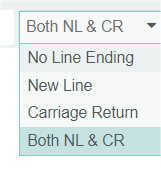
Edit: what have you got the serial monitor line ending set too?
image

How long is lengthy?

Maybe try reserve()?

What board are you testing on, e.g. how much static and dynamic memory (not sure where, probably dynamic)?

corrected the char initialization. serial monitor line ending: both NL & CR

and I am using an Arduino Uno

command: this is a test

command: 1111111111111111111111111111111111111111111111111111111111111111111111111111111111111111111111111111111111111111111111111abc

command: xxxxxxxxxxxxxxxxxxxxxxxxxxxxxxxxxxxxxxxxxxxxxxxxxxxxxxxxxxxxxxxxxxxxxxxxxxxxxxxxxxxxxxxxxxxxxxxxxxxxxxxxxxxxxxxxxxxxxxxxxxxxxxxxxxxxxxxxxxxxxxxxxxxxxxxxxxxxxxxxxxxxxx123

command: xxxxxxxxxxxxxxxxxxxxxxxxxxxxxxxxxxxxxxxxxxxxxxxxxxxxxxxxxxxxxxxxxxxxxxxxxxxx


the 4th and 5th command was the same as 3rd one but as you can see it can't receive the entire cpmmand

I am using an Arduino Uno.

Sketch uses 23258 bytes (72%) of program storage space. Maximum is 32256 bytes.
Global variables use 1348 bytes (65%) of dynamic memory, leaving 700 bytes for local variables. Maximum is 2048 bytes.

on an esp32 works OK

command: xxxxxxxxxxxxxxxxxxxxxxxxxxxxxxxxxxxxxxxxxxxxxxxxxxxxxxxxxxxxxxxxxxxxxxxxxxxxxxxxxxxxxxxxxxxxxxxxxxxxxxxxxxxxxxxxxxxxxxxxxxxxxxxxxxxxxxxxxxxxxxxxxxxxxxxxxxxxxxxxxxxxxxxxxxxxxxxx123

the use of the String class is not recommended on low memory devices such as the UNO
the memory can become fragmented and give intermittent results (as your program) or even crash the program
recommend you use a char array

I need to use Arduino Uno. esp32 has 520KB RAM, Uno has 2KB

use a char array to hold your command text not a String class object
not using String will also reduce the amount of flash program storage used - String is a complex class suitable for more powerful processors

Hi @siavashgol

welcome to the arduino-forum.

you should really specify how many bytes is the most

command.

At what frequency where the commands repeated?
Where do you want to display the received commands?

If all you want to do is print the received commands on a computer
use a virtual-comport adapter standalone. With such a virtual comport-adapter you can receive commands 100.000 bytes long at speeds up to 1.000.000 Baud
https://de.aliexpress.com/item/1005005992579746.html

Inside the file HardwareSerial.h the receive-buffersize is defined
As the file belongs to the arduino-core changing this number influences each and every sketch

#if !defined(SERIAL_TX_BUFFER_SIZE)
#if ((RAMEND - RAMSTART) < 1023)
#define SERIAL_TX_BUFFER_SIZE 16
#else
#define SERIAL_TX_BUFFER_SIZE 64 // <<<< change this number
#endif

Increasing this number reduces the available RAM for the rest of your code.

You should write an overview of what you want to do.
What is the final purpose of receiving these commands?

best regards Stefan

I second that.
You can read the explanation here

You assign new values to the String very very often. Each time when your while-loop iterates

One solution is to use the SafeString-library in conjunction with the SafeStringReader
All the hassling about having received all bytes is handled inside the SafeStringReader
So a demo-code looks short like this

#include <SafeString.h>
#include "SafeStringReader.h"

// create an sfReader instance of SafeStringReader class
// delimited by space, comma or CarrageReturn or NewLine
// the createSafeStringReader( ) macro creates both the SafeStringReader (sfReader) and the necessary SafeString that holds input chars until a delimiter is found
// args are (ReaderInstanceName, expectedMaxCmdLength, delimiters)
createSafeStringReader(sfReader, 256, " ,\r\n");

cSF(myReceivedCommand,256);

byte bytesReceived;

void setup() {
  Serial.begin(115200);
  Serial.println("Setup-Start ready to receive ");

  SafeString::setOutput(Serial); // enable error messages and SafeString.debug() output to be sent to Serial
  sfReader.connect(Serial); // where SafeStringReader will read from
  // sfReader.echoOn(); // echo back all input, by default echo is off
}


void loop() {
  bytesReceived = sfReader.read();

  if (bytesReceived) {
    myReceivedCommand = sfReader;
    Serial.print("Received=");
    Serial.println(myReceivedCommand);
  }
}

I tested with your inputstring

xxxxxxxxxxxxxxxxxxxxxxxxxxxxxxxxxxxxxxxxxxxxxxxxxxxxxxxxxxxxxxxxxxxxxxxxxxxxxxxxxxxxxxxxxxxxxxxxxxxxxxxxxxxxxxxxxxxxxxxxxxxxxxxxxxxxxxxxxxxxxxxxxxxxxxxxxxxxxxxxxxxxxx123

and sended it multiple times
and each time the complete string is received

Received=xxxxxxxxxxxxxxxxxxxxxxxxxxxxxxxxxxxxxxxxxxxxxxxxxxxxxxxxxxxxxxxxxxxxxxxxxxxxxxxxxxxxxxxxxxxxxxxxxxxxxxxxxxxxxxxxxxxxxxxxxxxxxxxxxxxxxxxxxxxxxxxxxxxxxxxxxxxxxxxxxxxxxx123

best regards Stefan

thanks.
I want to encrypt received data (max data size: 5KB). how can I use Arduino Uno to get 5KB of data via Serial. I have a windows form app where I intend to send data to arduino and the arduino must encrypt data and send back the result.

if you receive the 5KB of data over a period of time where you can receive packets of data, process it and send encrypted data back it is possible
if you need to receive the whole 5KB at a time it is not possible on UNO which has only 2KB of SRAM
maybe possible on a mega which has 8KB of SRAM

@siavashgol
You may divide the 5x1024 Bytes data into 160 frames; where, each frame contains 32 bytes data. After that receive frame by frame, process them, and save them.

I'll try that.

Mind that the 32-byte wide frame could be sent by the sender in ASCII format with startmark (say: 0x02) and endmark (say: '\n'). You may add checksum if you like to validate the integrity of the received frame.

When you post code, please post all your code. Setup() is essential. In this case, what baud rate are you using in Serial.begin()? It matters immensely.

No one has mentioned transmit and receive buffers yet. Serial has inbound and outbound buffers of a certain length. It's small in the case of an Uno, large in the case of an ESP32, which is one factor that contributes to the differences people are reporting. If you're using a slow baud rate, no problem, your code can keep up; at higher rates, it becomes important to extract data from the serial buffer before it fills. That's probably what you're seeing in your OP, but we can't tell for sure because, well, setup().

have you considered using Serial.readByteUntil()?

readByteUntil() returns when either the terminator char is detected or the size of the buffer is full. very long lines will return cause it to return multiple times

i made buf just 20, but make it 200 if you need it to be that long
char buf [20];

// -----------------------------------------------------------------------------
void loop ()
{
    if (Serial.available ()) {
        int n = Serial.readBytesUntil ('\n', buf, sizeof(buf)-1);
        buf [n] = '\0';

        Serial.print (buf);
    }
}

void setup ()
{
    Serial.begin (9600);
}