I encountered an issue after successfully uninstalling Microsoft OneDrive, which had been installed without my consent following a software update. After restarting the computer, I discovered that the Arduino IDE configuration is still trying to search for libraries in the folder under /users/xxx/OneDrive/documents/arduno/library.
After completely uninstalling Arduino IDE 2.0 and reinstalling it, the library issue was resolved, but now it is unable to start compiling code for the ESP32 platform. The problem is related to the uninstallation of Microsoft OneDrive. Performing a clean install using the Local Administrator account worked fine. I'm installing arduino-ide_2.3.6_Windows_64bit.msi
Error is:
thread 'main' panicked at 'assertion failed: (left != right)
left: 0,
right: 0: Failed to get path name. Error code: 3', main.rs:65:9
note: run with RUST_BACKTRACE=1 environment variable to display a backtrace
exit status 101
You forgot to post all the source code in code tags, all the verbose output in code tags, and at least a photo of a hand drawn labelled wiring diagram if applicable.
It's an "early" error, independent of the code being compiled. It simply occurs with empty Main and Loop functions. It's a configuration issue after uninstalling OneDrive. This is driving me crazy.
Everything was working fine until I (successfully) uninstalled OneDrive. I had issues with the library path, so I completely uninstalled Arduino IDE 2.xxx and reinstalled the latest version downloaded from arduino.cc. From that moment on, it stopped compiling for ESP32 environments.
I think I know the answer, and it was already reported to you but your insistence in not following directions is impeding your success. The solution is a single click. Good luck.
I don't understand you. This is the first time I've posted on this forum. Before doing so, I spent an hour searching for anyone else who'd had the same problem so as not to open an unnecessary thread.
Searching is an art to be sure. I will take a guess since you have not given me anything I can work with.
But first, do you have an esp32 entry in the additional URL's? If you do remove it, restart the IDE. Now do the following
Select the DOIT esp32 board
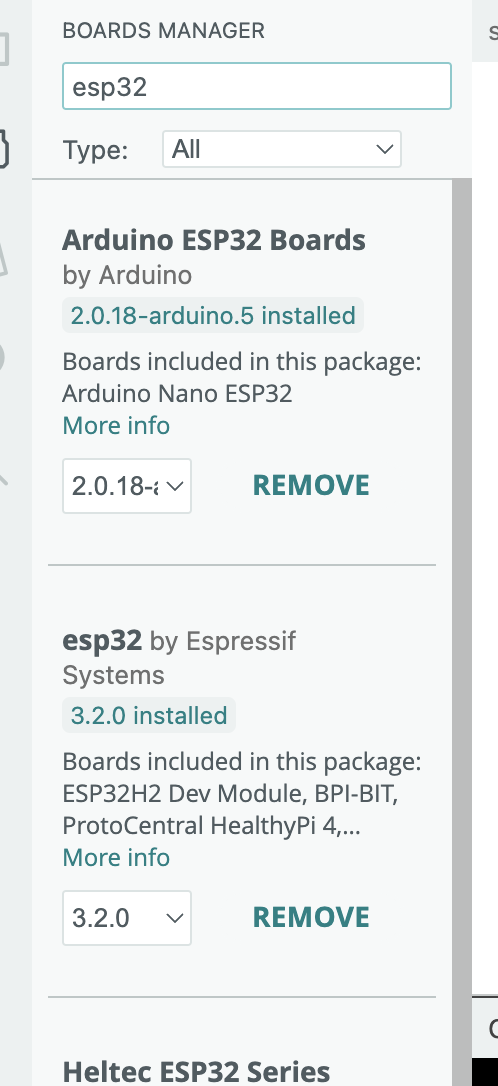
In the Boards manager search for esp32
select the ESPRESSIF not arduino entry and downgrade it to 2.0.17
Now try your test.
Here are a couple screen grabs if that is not clear
I was finally able to resolve the problem. It only affected the Arduino IDE, but the problem was due to a user folder with an accent in the name "Álvaro", the uninstallation of Microsoft OneDrive, self installed after the latest Windows 10 update... and the way the ESP32 packages were in the absolute path:
I was finally able to figure it out by reading the logs. With non-ESP32 boards, the Arduino IDE worked fine. Remember, it only happens when the Arduino IDE is installed with the MSI installer and Microsoft OneDrive in use, and OneDrive is subsequently uninstalled.