
In this sketch where I am trying to debug a connection (USB) issue to my device. I have added in some debugging steps that don't seem to like to show up in the monitor window. So I added in 2 more lines before the if structures. This code shows 0 for avail, so it is no wonder why the ifs don't work. But the 'Monitoring serial' message does show up. Does anyone have any idea where to start on this problem?
Show us a good schematic of your circuit. Show us a good image of your ‘actual’ wiring.
In the Arduino IDE, use Ctrl T or CMD T to format your code then copy the complete sketch.
Use the </> icon from the ‘reply menu’ to attach the copied sketch.
I thought that I could download a png file and that would be OK, but that doesn't seem to comply with what the forum wants. Will make another topic and start again.
syd
Please don't do that. Just use this topic.
#include <SerialDebug.h>
#include <SoftwareSerial.h>

SoftwareSerial mySerial(10, 11); // RX, TX

void setup() {
  // Open serial communications and wait for port to open:
  Serial.begin(9600);

  // wait for serial port to connect. Needed for native USB port only
  while (!Serial) {
    ;
  }
  Serial.println("Monitoring serial!");

  // set the data rate for the SoftwareSerial port
  mySerial.begin(9600);
}

void loop() { // run over and over
  //int avail = mySerial.available();
  //Serial.println(avail, DEC);

  if (mySerial.available()) {
    step(1);
    Serial.write(mySerial.read());
    step(2);
  }

  if (Serial.available()) {
    step(3);
    mySerial.write(Serial.read());
    step(4);
  }
}

void step(int place)
{
  // dump vars here
  Serial.print ("debug: "); Serial.println (place, DEC);
  // dump relevant vars
  while (Serial.available() == 0);
  Serial.read();
}
OK here's the sketch, finally!
I originally but in 2 lines to check available() return values and got a lot!! of zeros. Then I realized that was OK until I entered something in the monitor. Commenting out these 2 lines I now step 3 and step 4 in the monitor when I do make an entry, so it looks like the first 'if' isn't working! mySerial.available() must always be returning 0, but why?
syd
Not sure why you are i) waiting for input in step and ii) then reading one char from Serial
If you block in step you will/can lose data from mySerial due to RX buffer overflow
Check out my tutorials on
Arduino Software Solutions for various ways to read from Serial with their pros and cons and
Arduino Serial I/O for the Real World for details how to cope with RX / TX buffer overflow
I note you have an include for SerialDebug I have not used that but from the code it appears to just write to Serial SO.. if you start writing a lot of debug you will miss reading mySerial input.
Start by increasing Serial.begin(9600) to Serial.begin(115200)
but check the Arduino Serial I/O for the Real World for other solutions if that does not work for you.
I think I know where the problem is. Steps 3 & 4 show up, which means Serial.available <> 0. Serial.read reads from the monitor and mySerial.write sends it to the device's port. There is no way to see if mySerial.write actually does anything (debug utility would be needed) so I am assuming it's trying and then just skipping over the function whether it succeeds or not. The other if is never done because mySerial.available() = 0. which means it can't connect to the device I'm wired to. The problem must be in my wiring!!
syd
I definitely will check out your 3 links! What exactly does Serial.begin(xxxx) do? ie what is the parameter xxxx used for? As far as the SerialDebug header is concerned, I have found documentation on what is included in this library and it does look very complicated to use. There is an API that implements this library and does look interesting and it uses this library, but unfortunately it seems to be a memory hog and is not all that useful for for this board.
I changed the 9600 to 115200 in the Serial.begin, no luck. I also tried it in mySerial.begin, still no luck.
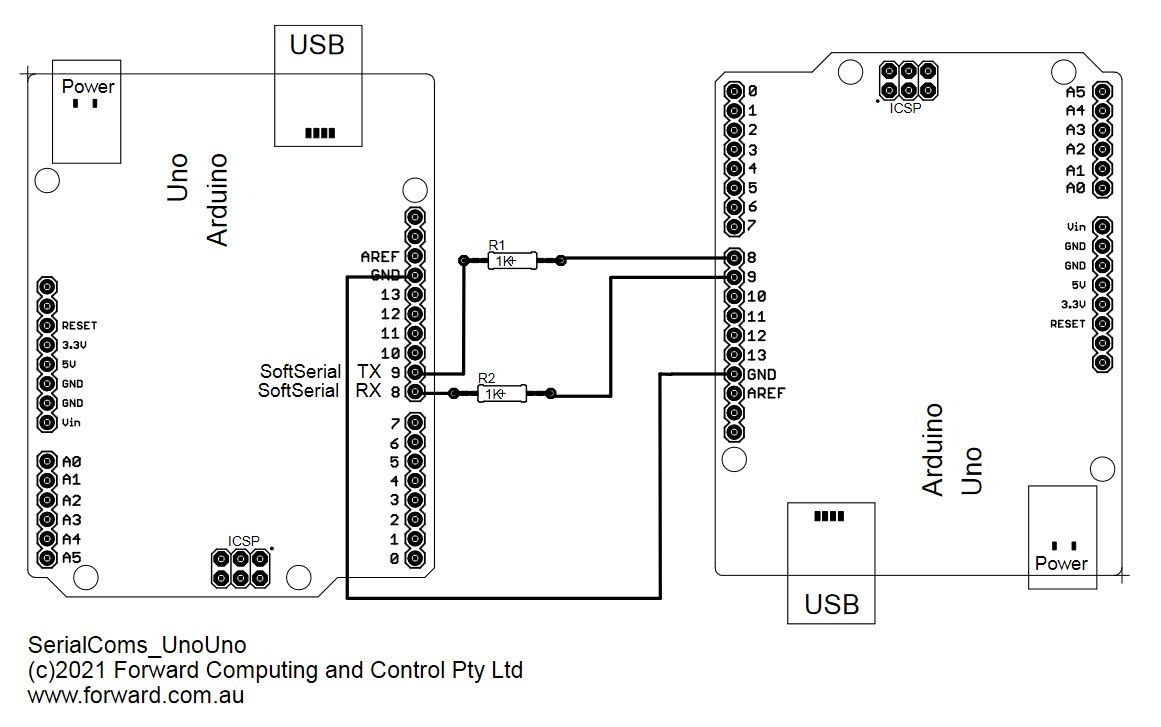
I did check the wiring again and the Rx from one unit goes to the Tx on the other unit. and the Tx from the original unit goes to the Rx pin on the other unit.
syd
Here is a simple sketch (very similar to yours) that connects two Arduinos via serial. See if you can get that working
// https://forum.arduino.cc/t/i-need-help-with-this-serial-communiction-with-2-arduinos-and-to-put-3-more-sensors-ultrassom/875806
// uno/mega to uno/mega

// if using SoftwareSerial on Uno/Mega
#ifdef SOFTWARE_SERIAL
#include <SoftwareSerial.h>
#define SERIAL_RX 10
#define SERIAL_TX 9
SoftwareSerial softSerial(SERIAL_RX, SERIAL_TX);
#define comSerial softSerial

#else
// else for hardware Serial3
#define comSerial Serial3
#endif

void setup() {
  Serial.begin(115200);  // fast for debug
  for (int i = 10; i > 0; i--) {
    Serial.print(i); Serial.print(' ');
    delay(500);
  }
  Serial.println();
  comSerial.begin(4800);

}

void loop() {
  if (Serial.available()) {
    comSerial.write(Serial.read());
  }
  if (comSerial.available()) {
    Serial.write(comSerial.read());
  }
}
Try that between to Arduinos. Open two IDE (one for each boards) and load the sketch on two boards and then what you type in one monitor should appear in the other.
As noted above be sure to connect Tx<->Rx and Rx<->TX
The 1K resistors protect against miss-wiring
The xxxx sets how fast the data bits are send/received. The receive happens in the background (via interrupts/hardware UART) and fills an RX buffer with received chars. If your loop is too slow the RX buffer will fill up and later chars will not be added (lost).
On the Serial.print() the chars are first sent to the Tx buffer and then slowly sent out at the baud rate set. If the Tx buffer fills up the loop just stops and waits for some chars to be sent so it can add more to the Tx buffer. So you want a high (fast) send to you Serial (debug) output to minimize loop blocking and a low (slow) receive from your Software serial to give the loop time to handle the input before the Rx buffer fills up.
See Arduino Serial I/O for the Real World for more details on how to handle these issues.
This topic was automatically closed 120 days after the last reply. New replies are no longer allowed.