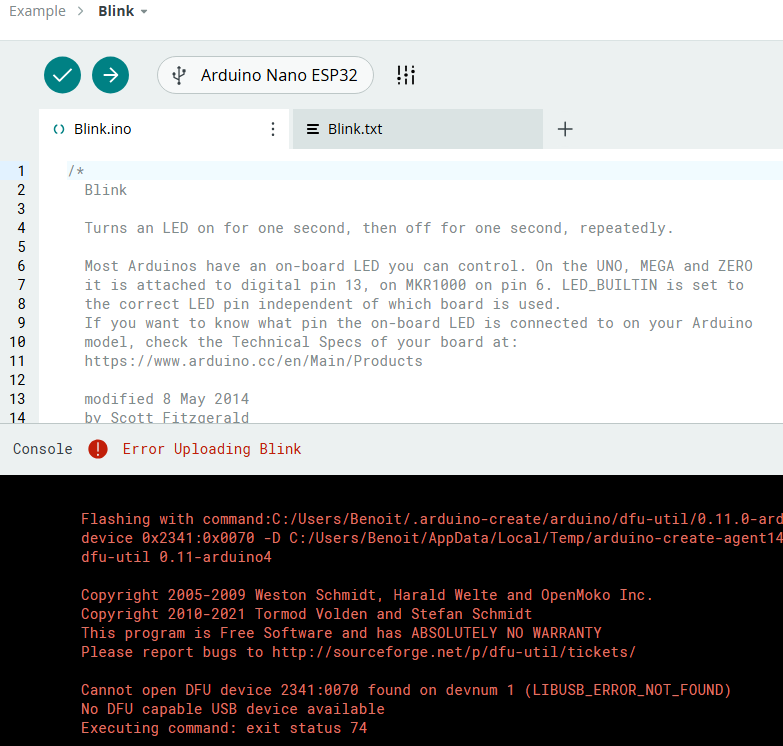
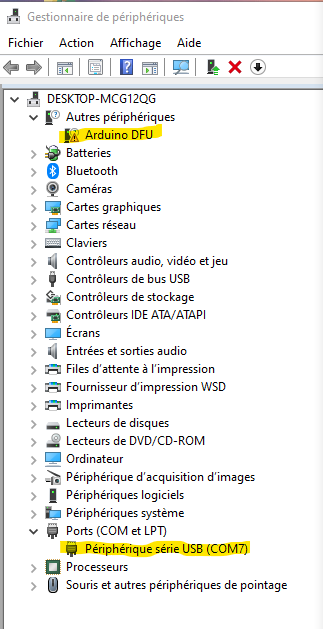
Hello , I just got a nano ESP32, I use the arduino Cloud editor. I have win v10. When I connect the board, Arduino Cloud identifize it on COM 7. The device manager detect USB COM 7 and a problem on Arduino DFU peripheral.
/home/builder/.arduino15/packages/esp32/tools/xtensa-esp32s3-elf-gcc/esp-2021r2-patch5-8.4.0/bin/xtensa-esp32s3-elf-size -A /tmp/arduino-build-DF1F747AE32B8AD4BD2C27126751EE3F/Blink.ino.elf
Sketch uses 285829 bytes (9%) of program storage space. Maximum is 3145728 bytes.
Global variables use 30732 bytes (9%) of dynamic memory, leaving 296948 bytes for local variables. Maximum is 327680 bytes.
Used platform Version Path
arduino:esp32 2.0.13 /home/builder/.arduino15/packages/arduino/hardware/esp32/2.0.13
Flashing with command:C:/Users/Benoit/.arduino-create/arduino/dfu-util/0.11.0-arduino5/dfu-util.exe --device 0x2341:0x0070 -D C:/Users/Benoit/AppData/Local/Temp/arduino-create-agent1431182711/Blink.bin -Q
dfu-util 0.11-arduino4
Copyright 2005-2009 Weston Schmidt, Harald Welte and OpenMoko Inc.
Copyright 2010-2021 Tormod Volden and Stefan Schmidt
This program is Free Software and has ABSOLUTELY NO WARRANTY
Please report bugs to http://sourceforge.net/p/dfu-util/tickets/
**Cannot open DFU device 2341:0070 found on devnum 1 (LIBUSB_ERROR_NOT_FOUND)
No DFU capable USB device available
Executing command: exit status 74
This "LIBUSB_ERROR_NOT_FOUND" error indicates you have not installed the drivers for the Nano ESP32 board.
When using Arduino IDE, the drivers are installed automatically when you install the "Arduino ESP32 Boards" platform that configures the IDE for use with the Nano ESP32 board, but unfortunately this doesn't happen when you use Arduino Cloud.
The most simple solution will be to install Arduino IDE and the "Arduino ESP32 Boards" platform, making sure to approve the driver installation offer. I'll provide instructions for doing that:
Select Tools > Board > Boards Manager... from the Arduino IDE menus to open the "Boards Manager" view in the left side panel.
Scroll down through the list of boards platforms until you see the "Arduino ESP32 Boards" entry.
Click the "INSTALL" button at the bottom of the "Arduino ESP32 Boards" entry.
You should now see a "User Account Control" dialog about dpinst-amd64.exe asking whether you "want to allow this app from an unknown publisher to make changes to your device". Click the "Yes" button in the dialog:
Wait for the installation process to finish, as indicated by a notification at the bottom right corner of the Arduino IDE window:
Successfully installed platform ...
Select File > Quit (or Arduino > Quit Arduino for macOS users) from the Arduino IDE menus.
All Arduino IDE windows will close.
After you have done that, try using Arduino Cloud Editor to upload the sketch to your Nano ESP32 board again, just as you did before. Hopefully it will be successful this time.
Please let me know if you have any questions or problems while following those instructions.