I did update some days ago all libraries that I have installed. Quite a lot libs.
I started the IDE 2.1 and the IDE reports updates for libs available so I clicked on update
and got this error-messages
Failed to install library: ESP Telnet:2.1.1.
Error: 3 INVALID_ARGUMENT: The library ESP Telnet has multiple installations:
- F:\myData\Arduino\libraries\ESPTelnet
- F:\myData\Arduino\libraries\ESP_Telnet
Automatic library install can't be performed in this case, please manually remove all duplicates and retry.
Failed to install library: ESP-DASH:4.0.1.
Error: 3 INVALID_ARGUMENT: The library ESP-DASH has multiple installations:
- F:\myData\Arduino\libraries\ESP-DASH
- F:\myData\Arduino\libraries\ESPDash
Automatic library install can't be performed in this case, please manually remove all duplicates and retry.
Failed to install library: LovyanGFX:1.1.6.
Error: 3 INVALID_ARGUMENT: The library LovyanGFX has multiple installations:
- F:\myData\Arduino\libraries\LovyanGFX
- F:\myData\Arduino\libraries\arduino_45797
Automatic library install can't be performed in this case, please manually remove all duplicates and retry.
as the notifications are not provided as text I post a screenshot of them
Why does the IDE 2.1 create errors after using the automatic update-functionality of the IDE 2.1
without changing anything ?
I have just used IDE 2.1 for some time
Hi @StefanL38. With previous versions of Arduino IDE, having multiple installations of a library of a given name could cause the IDE to get into a state where it always showed the library as updatable in the Library Manager. There is a detailed description here:
Because the library name (as defined by the name field of the library.properties metadata file for the "1.5" format libraries, or the folder name for "legacy" format libraries) is the sole unique identifier of a library, there is no way for Arduino IDE to correctly handle updates of a library when there are multiple installations with that name.
For this reason, such operations now fail and the user must manually resolve the conflict.
So you should evaluate the multiple installations of these libraries to understand how to proceed. If one of the installations is superfluous, then simply delete that folder. If both installations are actually needed then you should change the name of the one that is not managed by Library Manager to some unique identifier (making certain it is not already used by any of the libraries in Library Manager).
The only folder that is relevant for Library Manager operations is the libraries subfolder of the sketchbook folder. This means you already have control over which folder is used by the "Skethbook location" in the "Preferences" dialog.
If you move a library out of that libraries subfolder of the sketchbook folder, it will no longer have any effect on Library Manager, so moving the library is an effective alternative to deleting one of these redundant installations.
If I change the sketchbook-folderpath inside IDE 2.1.0
to something different like
F:\myData\Arduino-IDE-2_1_0
which them means IDE 1.8.19 uses "F:\myData\Arduino\libraries" as the libraries-folder
updating with IDE 1.8.19 does not interfere with IDE 2.1.0?
and vice versa
if IDE 2.1.0 uses "F:\myData\Arduino-IDE-2_1_0\libraries" as the libraries-folder
updating with IDE 2.1.0 does not interfere with IDE 1.8.19?
I'm not sure if I understand this right
especcially
there is no way for Arduino IDE to correctly handle updates of a library when there are multiple installations with that name
"that name" implies there are two or even more installations of the a library in the same folder
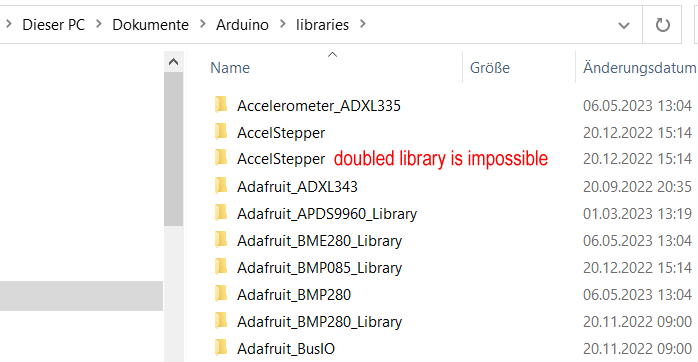
how can there be two folders with the exact same name in a folder?
at the moment my library folder looks like this
Do you mean it might be that there is inside the library folder
"F:\myData\Arduino\libraries" a sub-folder with folder-name
"AccelStepper-unique_ID5678" and inside this sub-folder there is a file library.properties
and inside this file there is
name=AccelStepper
and then if the libraries-folder "F:\myData\Arduino\libraries" has a sub-folder named
"AccelStepper"
in short
F:\myData\Arduino\libraries\AccelStepper-unique_ID5678\library.properties with name=AccelStepper
F:\myData\Arduino\libraries\AccelStepper
You should note this only applies to Library Manager. The boards platforms you update via Boards Manager are installed to a different location that is not configurable via the "Preferences" dialog. I mention this because people sometimes refer to the boards platforms as "libraries". By default, both Arduino IDE 2.x and 1.x use the same folder for the Boards Manager updates. However, since you have Arduino IDE 1.x in "portable" mode, it uses a dedicated location so you already have the two IDEs isolated from each other in that respect.
There can't be. So it is impossible to have two installations of a "legacy" format library with the same ID. But note what I said here:
This means you can have multiple "1.5" format libraries installed with the same ID, or "1.5" format libraries with the same ID as one "legacy" format library.
So what exactly is the 1.5-lib-format ID ?
is the 1.5-lib-format-ID this
name=AccelStepper
which means it would be possible to have
where each library.properties-file
has the same entry which will be
name=AccelStepper
and this works???
If this is not correct I would appreciate it very much if you would give an example with
example-folders
example-file-names
example library.properties-files
one combination of what works
and
one combination of what does not update automatically
No, it doesn't work. There is no way for Arduino IDE to correctly handle these conditions.
This is why the IDE now instructs you to resolve the conflict when you have conditions like this. Previous versions of the IDE only behaved incorrectly without communicating the cause of the problem to the user.