@noiasca,
(And anyone else with knowledge of using time libraries on the ESP8266)
Hello Werner,
I am using s slightly modified version of the code on your website here:
https://werner.rothschopf.net/202011_arduino_esp8266_ntp_en.htm
The modification is just to print when the seconds increments instead of after a delay of 1000ms, and I am sending the data to the serial port instead of the USB port.
The ESP8266 board I am using is:
I have an oscilloscope connected to D8, which is the serial Tx pin after doing Serial.swap().
On the other channel of the oscilloscope I have a 1 second pulse from a GPS receiver for reference. My assumption and understanding being that a 1 second pulse from a GPS receiver will be accurate to a few nano seconds, certainly a lot more accurate than required for this test.
What I find is that the time the data is sent, which is driven by when the seconds increment happens, drifts slowly, suggesting the clock is running slightly slow. While I realise the oscillator on the ESP8266 might not have an accurately defined frequency, I would hope that updates from an NTP server would correct for this. I have not yet run a test for long enough to see whether and how the drift is corrected. I would guess that it must be corrected by some means at some point otherwise the RTC will be wrong.
My question is to ask if there is a fix for this, to stop or reduce the drift, also when and how is it corrected? Any other comment or feedback is welcome.
Code:
// NTP using the built in NTP functionality
// https://werner.rothschopf.net/202011_arduino_esp8266_ntp_en.htm
// https://forum.arduino.cc/u/noiasca
// https://forum.arduino.cc/t/ntp-time-on-esp8266-showing-rubbish/936241/3


/*
  NTP TZ DST - bare minimum
  NetWork Time Protocol - Time Zone - Daylight Saving Time

  Our target for this MINI sketch is:
  - get the SNTP request running
  - set the timezone
  - (implicit) respect daylight saving time
  - how to "read" time to be printed to Serial.Monitor

  This example is a stripped down version of the NTP-TZ-DST (v2)
  And works for ESP8266 core 2.7.4 and 3.0.2

  by noiasca
  2020-09-22
*/

// https://forum.arduino.cc/t/problem-connecting-wifi-with-esp8266-to-send-data-to-google-sheets/944317/3
// ESP8266 status codes

#ifndef STASSID
#define STASSID "xxx"                            // set your SSID
#define STAPSK  "xxx"                        // set your wifi password
#endif

/* Configuration of NTP */
#define MY_NTP_SERVER "at.pool.ntp.org"
//#define MY_TZ "GMT0BST,M3.5.0/1,M10.5.0"
//#define MY_TZ "CET-1CEST,M3.5.0/02,M10.5.0/03"

#define MY_TZ "AST4"
#define MY_TZGMT "GMT0"

/* Necessary Includes */
#include <ESP8266WiFi.h>            // we need wifi to get internet access
#include <time.h>                   // time() ctime()
//#include <TimeLib.h>

/* Globals */
time_t now;                         // this is the epoch
tm tm;                              // the structure tm holds time information in a more convient way

void showTime() {
    static time_t lastTime;
    time(&now);                       // read the current time
    if (now != lastTime) {
        lastTime = now;
        localtime_r(&now, &tm);           // update the structure tm with the current time
        Serial.print("year:");
        Serial.print(tm.tm_year + 1900);  // years since 1900
        Serial.print("\tmonth:");
        Serial.print(tm.tm_mon + 1);      // January = 0 (!)
        Serial.print("\tday:");
        Serial.print(tm.tm_mday);         // day of month
        Serial.print("\thour:");
        Serial.print(tm.tm_hour);         // hours since midnight  0-23
        Serial.print("\tmin:");
        Serial.print(tm.tm_min);          // minutes after the hour  0-59
        Serial.print("\tsec:");
        Serial.print(tm.tm_sec);          // seconds after the minute  0-61*
        Serial.print("\twday:");
        Serial.print(tm.tm_wday);         // days since Sunday 0-6
        if (tm.tm_isdst == 1)             // Daylight Saving Time flag
        Serial.print("\tDST");
        else
        Serial.print("\tstandard");
        Serial.println();
    }
}

void setup() {
    Serial.begin(115200);

    Serial.println("\nNTP TZ DST - bare minimum");

    configTime(MY_TZGMT, MY_NTP_SERVER);
    configTime(MY_TZ, MY_NTP_SERVER); // --> Here is the IMPORTANT ONE LINER needed in your sketch!


    // start network
    WiFi.persistent(false);
    WiFi.mode(WIFI_STA);
    WiFi.begin(STASSID, STAPSK);
    while (WiFi.status() != WL_CONNECTED) {
        delay(200);
        Serial.print ( "." );
    }
    Serial.println("\nWiFi connected");
    // by default, the NTP will be started after 60 secs
    Serial.swap();

}

void loop() {
    showTime();
    //Serial.print(now);
    //delay(1000); // dirty delay
}
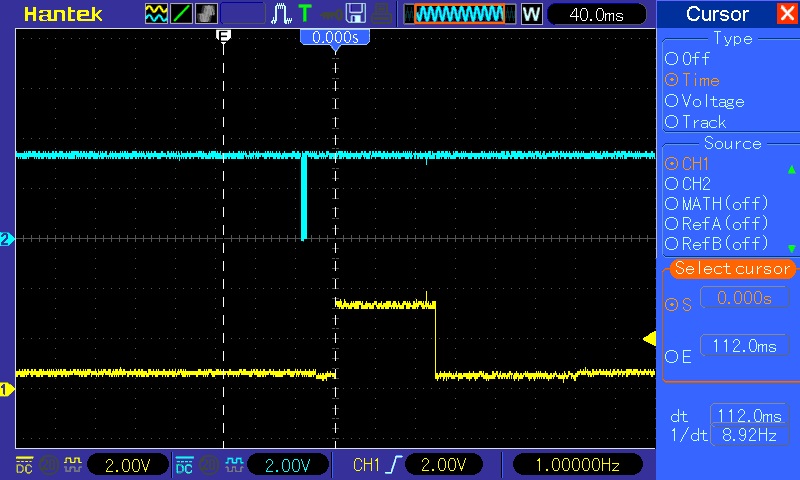
Oscilloscope traces just after ESP8266 restarted
Yellow trace 1 second reference, blue trace data from serial port on ESP8266

Oscilloscope traces 30 minutes after ESP8266 started
Background to this question
I use several ESP8266s to collect data from weather sensors and send the data along with the date and time to a PIC based controller that displays the weather data and also runs my heating. The weather data is saved to give a 7 day rolling history of the weather. The saved data would have errors in it every day or 2 at random intervals. I traced this to the data occasionally not being saved due to the clock running on the PIC sometimes skipping seconds. I traced that problem to the time data from the ESP8266 jittering by about half a second every 5 minutes or so. I fixed the jittering by adding yield() between every function call in loop() on the ESP8266. The jitter was hiding the drift. Now I see the drift and want to remove or minimise it if possible.


