thanks Appreciate it.
I'm about to post an update where i ran 20 Simultaneous Tasks without crashing for over 1,000 ticks
I am at the same side with you in learning the working principles of the FreeRTOS operating system under ESP32 Dev Board. It is not my intention at all to study the Hardware Architecture of ESP32 in this thread. I have already a thread named Learning Architecture and Multi-tasking Programming of 32-bit Dual-core Microcontroller using ESP32 Dev Module, Arduino IDE, ESP-IDF, and FreeRTOS for this purpose, which I update time to time taking materials being a poster of various ESP32 related threads.
However, as Computer/Computing is interwined with Hardware and Software, it is natural to respond/interact when issue comes on hardware aspect of the system. The Moderator may warn/notify when off-topic discussion goes far.
OK .. UPDATE...
The Original idea was to get past a basic 2 Task Sketch
And not have it crash
WELL HERE IT IS
Now i did get to 20 as that's what i wanted to do, and it does work.
However, so as to avoid clutter i'm going to post the 5 Task Version.
Feel free to add as many more as you like.
// Change the "0" to whatever value you want the counter to start at
int COUNTER_1 = 0;
int COUNTER_2 = 0;
int COUNTER_3 = 0;
int COUNTER_4 = 0;
int COUNTER_5 = 0;

// Change "TASK1" to whatever is most meaningful to your project
void TASK1(void *pvParameters);
void TASK2(void *pvParameters);
void TASK3(void *pvParameters);
void TASK4(void *pvParameters);
void TASK5(void *pvParameters);

// Change the Task Handle "HANDLE_FOR_TASK_1 to whatever is most meaningful to you"
TaskHandle_t HANDLE_FOR_TASK_1;
TaskHandle_t HANDLE_FOR_TASK_2;
TaskHandle_t HANDLE_FOR_TASK_3;
TaskHandle_t HANDLE_FOR_TASK_4;
TaskHandle_t HANDLE_FOR_TASK_5;
//-------------------------------------------------------------
//                   VOID SETUP FUNCTION
//-------------------------------------------------------------
void setup()
{

  Serial.begin(9600);  // Begin Serial and Setup of Baud Rate

  // Here you add the Task and the Task Parameters , The numbers in the middle
  // Define the PRIORITY of the Task,  change them all to "0" See what happens.
  // Then try and change the order of them and see what happens.

  xTaskCreate(TASK1, "Task 1", 1000, NULL, 4, &HANDLE_FOR_TASK_1);
  xTaskCreate(TASK2, "Task 2", 1000, NULL, 3, &HANDLE_FOR_TASK_2);
  xTaskCreate(TASK3, "Task 3", 1000, NULL, 2, &HANDLE_FOR_TASK_3);
  xTaskCreate(TASK4, "Task 4", 1000, NULL, 1, &HANDLE_FOR_TASK_4);
  xTaskCreate(TASK5, "Task 5", 1000, NULL, 0, &HANDLE_FOR_TASK_5);
}
//-------------------------------------------------------------
//                   VOID LOOP FUNCTION
//-------------------------------------------------------------
void loop()
{
vTaskDelay(1); // Leave this here
}
//-------------------------------------------------------------
//                   TASK 1 FUNCTION
//-------------------------------------------------------------
void TASK1(void *pvParameters)
{
  for(;;)
  {
    Serial.print("TASK1 IS RUNNING ON CORE ");
    Serial.println(xPortGetCoreID());       // Identifies the Core that the Task is running On
    Serial.print("Current Count for TASK 1 : ");
    Serial.println(COUNTER_1++);            // Prints the Count Iteration
    Serial.println("");
    vTaskDelay(2000 / portTICK_PERIOD_MS);  // Delay 200ms , Feel free to remove this
//    vTaskDelete(HANDLE_FOR_TASK_1);  // Puts Task1 Into BLOCKED State.
  }
}
 //-------------------------------------------------------------
//                   TASK 2 FUNCTION
//-------------------------------------------------------------
void TASK2(void *pvParameters)
{
  for(;;)
  {
    Serial.print("TASK2 IS RUNNING ON CORE ");
    Serial.println(xPortGetCoreID());
    Serial.print("Current Count for TASK 2 : ");
    Serial.println(COUNTER_2++);
    Serial.println("");
    vTaskDelay(2000 / portTICK_PERIOD_MS);
//    vTaskDelete(HANDLE_FOR_TASK_2);
  }
}
//-------------------------------------------------------------
//                   TASK 3 FUNCTION
//-------------------------------------------------------------
void TASK3(void *pvParameters)
{
  for(;;)
  {
    Serial.print("TASK3 IS RUNNING ON CORE ");
    Serial.println(xPortGetCoreID());
    Serial.print("Current Count for TASK 3 : ");
    Serial.println(COUNTER_3++);
    Serial.println("");
    vTaskDelay(2000 / portTICK_PERIOD_MS);
//    vTaskDelete(HANDLE_FOR_TASK_3);
  }
}
//-------------------------------------------------------------
//                   TASK 4 FUNCTION
//-------------------------------------------------------------
void TASK4(void *pvParameters)
{
  for(;;)
  {
    Serial.print("TASK4 IS RUNNING ON CORE ");
    Serial.println(xPortGetCoreID());
    Serial.print("Current Count for TASK 4 : ");
    Serial.println(COUNTER_4++);
    Serial.println("");
    vTaskDelay(2000 / portTICK_PERIOD_MS);
//    vTaskDelete(HANDLE_FOR_TASK_4);
  }
}
//-------------------------------------------------------------
//                   TASK 5 FUNCTION
//-------------------------------------------------------------
void TASK5(void *pvParameters)
{
  for(;;)
  {
    Serial.print("TASK5 IS RUNNING ON CORE ");
    Serial.println(xPortGetCoreID());
    Serial.print("Current Count for TASK 5 : ");
    Serial.println(COUNTER_5++);
    Serial.println("");
    vTaskDelay(2000 / portTICK_PERIOD_MS);
//    vTaskDelete(HANDLE_FOR_TASK_5);
  }
}
//-------------------------------------------------------------
//                   END OF PROGRAM
//-------------------------------------------------------------
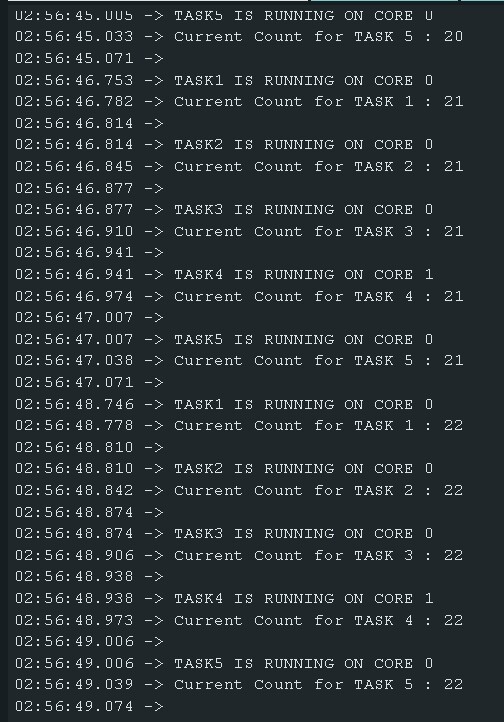
HERE IS THE SERIAL OUTPUT
Indeed. For some reason the Boards menu was unresponsive so that I could not locate the Boards Manager. After an IDE update it worked again and I installed the Espressif suite.
1. Excellent!
2. Would you mind if I wish to experiment he functionality of the following Task-State Diagram of your post #47 through the application of the sketch/Fig-1 of post #10?

Figure-1:
3. Few Quiz type questions referring to your sketch of post #104.
(1) How many process you have in this sketch?
(2) How many tasks are there in the sketch?
(3) Why have chosen different priority levels for your tasks?
(4) What is the priority level of the task that you have in the loop() function?
(5) Why are the codes of a task within infinite loop -- for(; ; ){}?
Two critiques, if you're interested.
-
You've written 5 (or 20) functions to run 5 (or 20) tasks. But, each of the tasks does essentially the same thing. So, having 5 (or 20) different functions is rather bloated. For a more elegant way to handle this situation, see the code I provided in Post 21.
-
It's really just more of the same. A bunch of independent tasks chugging along doing their own timing with delay and no interaction between them. It's time to move to the next level and explore inter-task synchronization and data sharing.
Why vTaskDelay(1) in your loop ?
We'll test the effect with task stats soon.
Now i'll give a bit of feedback on what transpired
-
GETTING TO 20 SIMULTANEOUS TASKS.
The Original idea was to get beyond 2 Simultaneous Tasks running on 1 Core and to get
To 20, THAT HAS BEEN ACHIEVED, I had half a mind to go to 50 , Maybe when i finish
a few things. -
My next port of call is learning how to pull system information , i want to have a play with getting
vGetStackSize()and other informational commands -
I also want to now mess around with suspend and delete and delay as well as
SuspendAll and Resume -
What i initially found was that getting 2 Tasks running was easy but then , when i added a 3rd the system would crash, This had something to do with use
vTaskDeleteandvTaskSuspend -
To see a demo of that, ...
You will notice in the code thatvTaskDelete(HANDLE_FOR_TASK_2);is withing
the parameters of TASK2.
Try changingvTaskDelete(HANDLE_FOR_TASK_2);tovTaskDelete(HANDLE_FOR_TASK_3);and compile
 //-------------------------------------------------------------
//                   TASK 2 FUNCTION
//-------------------------------------------------------------
void TASK2(void *pvParameters)
{
  for(;;)
  {
    Serial.print("TASK2 IS RUNNING ON CORE ");
    Serial.println(xPortGetCoreID());
    Serial.print("Current Count for TASK 2 : ");
    Serial.println(COUNTER_2++);
    Serial.println("");
    vTaskDelay(2000 / portTICK_PERIOD_MS);
//    vTaskDelete(HANDLE_FOR_TASK_2);
  }
}
//-------------------------------------------------------------
-
So i gained a first level of control by slowing the serial ouptut with the use of
..vTaskDelay(2000); -
Next after a bit of experimentation i saw that really wasn't a point to using
..xTaskCreatePinnedToCore();and instead i went withxTaskCreate();
You find that you don't need to worry about core assignment with this.
But you will use TASK PRIORITY. -
I also found that there is a big difference between running 2 Tasks, Running 5 Tasks and
Running 20 Tasks,
With the looping of the code over more tasks you start to learn that what worked with
2 Tasks does not work with 10.-
Example, If one Task has a priority of 0 (the Lowest) and another Task has a priority
of 1 (in a 2 Task Sketch) it will probably run fine and in order, or even if they both
have the same priority, Now you try that in 10 Tasks running at once and funny things
happen, Tasks want to jump ahead of other tasks and the ordering overlaps.Anyway, Long story short the priority of the Tasks in my sketch are
-
  xTaskCreate(TASK1, "Task 1", 1000, NULL, 4, &HANDLE_FOR_TASK_1);
  xTaskCreate(TASK2, "Task 2", 1000, NULL, 3, &HANDLE_FOR_TASK_2);
  xTaskCreate(TASK3, "Task 3", 1000, NULL, 2, &HANDLE_FOR_TASK_3);
  xTaskCreate(TASK4, "Task 4", 1000, NULL, 1, &HANDLE_FOR_TASK_4);
  xTaskCreate(TASK5, "Task 5", 1000, NULL, 0, &HANDLE_FOR_TASK_5);
Because i wanted Task 1 to Run First and Task 2 Second and so on
(This was 1 level of control that i wanted to achieve)
I also learned......
A Little while back i asked a forum member what is the order of Task Priority.
because we are told in the Docs that "0 is the lowest" but then it doesn't specify above that. The forum member told me he has never had to use higher than 3, so we have
0 , 1 , 2, 3
well, in this sketch we have 0,1,2,3,4 i can also confirm i have gone 0, - 19
I have a suspicion that the order of priority may be relatively infinite (as high as you want) so long as the value is higher than another value , that Task will take Priority.
- the next level of control was to add
vTaskDeleteto see if a task once put in BLOCKED STATE, does it return on the next cycle ?
ANSWER : No it doesn't , Granted that i haven't played around with arguments for this statement
so to refresh our minds back to the RTOS STATE FLOW CHART
https://www.freertos.org/RTOS-task-states.html
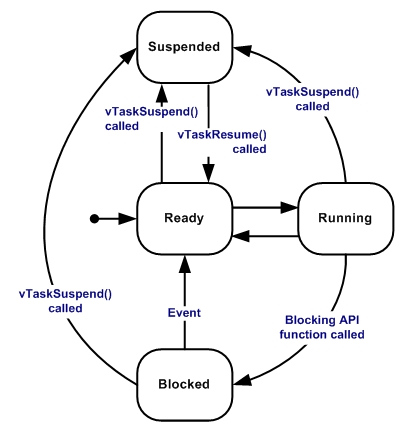
- Blocked
A task is said to be in the Blocked state if it is currently waiting for either a temporal or external event. For example, if a task callsvTaskDelay()it will block(be placed into the Blocked state)
until the delay period has expired - a temporal event.
Tasks can also block to wait for queue, semaphore, event group, notification or semaphore event. Tasks in the Blocked state normally have a 'timeout' period, after which the task will be timeout, and be unblocked, even if the event the task was waiting for has not occurred.Tasks in the Blocked state do not use any processing time and cannot be selected to enter the Running state.
So i suppose if i give this state an Event i can bring it back into the READY State for Re-Use.
this is something i will have a play with.
-
Next port of call is to experiment with
vTaskSuspend()as well asvTaskResume() -
Then i'm going to move onto
- Notifications
- Queues
- Event Groups
- Semaphores
- Mutexes
and that's where i'm up to at this stage.
Facts are better than suspicion. See FreeRTOSConfig.h:
/* This has impact on speed of search for highest priority */
#define configMAX_PRIORITIES                            ( 25 )
An oversimplified explanation for now, and the reason why i put //"leave this here"
and didn't explain was because it was a bit more technical for a beginner and i didn't want to go off track, but ok
SIMPLE EXPLANATION
in a BareMinimum Sketch
void setup()  // This Function  is Mandatory
{
}

void loop() This Function is Mandatory
{
}
if you try and run the sketch without it it will not compile
and leaving the loop or setup will compile but just won't do anything, Now in Arduino, that's fine
With ESP32 and given how the stack works and the back end house keeping choirs,
What "could"happen sometimes is that if you leave the void loop empty, what it does is.. it basically uses it as it see's fit.
Now the way the Scheduler works and one of the aspects of "Time Slicing"
Time Slicing and Task Scheduling
is that the Scheduler organizes tasks in MINIMUM UNITS OF 1 TICK and 1 Tick = 1ms
so i just gave the loop a minimum delay of 1ms (Something to do so it has something to do ) and as a result the background tasks won't interfere with your program
As stated already, we'll have a play with this later and get it to interfere and see what happens
Indeed we will
Of course, it's your journey. But, IMO this is just futzing around the periphery of what's really important to write useful code under FreeRTOS.
If you want sequential task invocation then write a scheduler or let one task resume the next one.
Sorry if I'll sound rude:
Your question is answered in the xTaskCreate() or any other task creator function with an uxPriority parameter. Does nobody read the fine documentation before using an API function?
Usually the task brings itself into blocked state by calling one of the blocking API functions you listed already.
Not at all , i was planning to test the diagram anyway.
OK
Trick Question Huh ?
Your'e trying to see if i'm paying attention
ANSWER : there is no sketch is #104, the Sketch is in #103
I know you would like me to accept this trophy for getting that correct.

Moving forward...
In that sketch i have 5 Tasks running concurrently ,
However i did test it off forum with 20 (Actually i went up to 25) but that sketch has 5
so we don't clutter the forum
let me know if you want the 20 Task Sketch.
Sorry, i thought that was the first question.
Define what you meant by "processes "
Oh, sorry, i forgot to say
When all the levels of priority (as the sketch is) are changed to "0" the output is in the order of
Task 1
Task 3
Task 4
Task 5
Task 2
and i wanted them to come out as
Task 1
Task 2
Task 3
Task 4
Task 5
Therefore Task 5 has the lowest priority "0" and Task 1 has the highest,
it's for the sake of Sequence Control
Which Loop Function ?
there are 6 loop Functions
Because this was the first way that i encountered them , I tried using the Function
without the for(;;) and it crashed,
i do understand that ;; Means infinite loop, but i am curious to know what happens if
you do this for(;)
The same thing if you try for(;;;) ... it won't compile. You don't get to make up you own language syntax.
Always Definitely interested, don't even ask in the future, Just go ahead with it.
Yes, it's just to prove a concept that being....
-
My project doesn't actually need 5 tasks or 20 or 50 for that matter I'm just trying to push it and see what happens. but the idea is, there are 5 Tasks
-
Now these tasks will not do the same thing , Because OBVIOUSLY , as you eluded that would be rather stupid and wasteful , if 3 tasks do the same thing i would put them in the same task.
-
In my project i have experienced that certain tasks conflict with other tasks.
So here i have 5 tasks running and i'm testing if i can control them how i want so they don't conflict when i do what i want to do . thats' why.
No problem , will do
Yep, You read my mind
First i'm gonna have a bit of a play with vTaskSuspend(); and for some reason i can't get
suspendAll to work and ResumeAll, Looking into it, i think it's a syntax thing and i'm missing arguments. in any case,
Next step, have a bit of a play with suspend
I've also noticed that when i have this vTaskDelete(HANDLE_FOR_TASK_2);
As long as it stays in Task2 everything works, if i change it to Task3 or whatever else while it resides in Task 2 it crashes, i'm going to try to Delete another function from outside of it's function by doing it via void loop
i also want to get the stacksize, i'm having issues getting that to work
and i want to pull some basic system information
then i'll move to inter task synchronisation and data sharing.
because this entire topic was basically leading up to that
any suggestions..
 //-------------------------------------------------------------
//                   TASK 2 FUNCTION
//-------------------------------------------------------------
void TASK2(void *pvParameters)
{
  for(;;)
  {
    Serial.print("TASK2 IS RUNNING ON CORE ");
    Serial.println(xPortGetCoreID());
    Serial.print("Current Count for TASK 2 : ");
    Serial.println(COUNTER_2++);
    Serial.println("");
    vTaskDelay(2000 / portTICK_PERIOD_MS);
//    vTaskDelete(HANDLE_FOR_TASK_2);
  }
}
//-------------------------------------------------------------
I could not find that tick==ms assumption in the entire linked document nor somewhere else. Please give a proof of your assumption or finally start accepting the xTicksToDelay description in the vTaskDelay() documentation.
Another replacement of the delay in loop() were taskYield() as also documented with vTaskDelay().
No, it's my Topic, IT'S OUR JOURNEY
Feel fee to suggest whatever, I would actually like some of the newbies to jump in as well with ideas, as @GolamMostafa previously suggested
what's "Futzing" do you mean "FireTrucking" Because Fire truck is not an offensive word
Sure, let's do it
I'm not completely new to ESP32, but am still somewhat new to it,
What gets me by is my long electronics background and I.T. Background , so i still have a few things i want to test, but mate, sure, let's move it along so we don't stay in the boring stuff for much longer as i can appreciate that it is,
LET'S DO SOME COOL STUFF.
that's why i started this
