Hello,
I have ESP32-S3 esp32-s3-devkitc-1-n16r8v .
When I run I2C scanner ESP finds RTC ds1307 module SDA on 8 and SCl on 9.
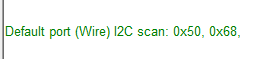
I useArduiuno libraries for communication but it doesnt works in PIO

Thank you for advance.
Hello,
I have ESP32-S3 esp32-s3-devkitc-1-n16r8v .
When I run I2C scanner ESP finds RTC ds1307 module SDA on 8 and SCl on 9.
I useArduiuno libraries for communication but it doesnt works in PIO
Thank you for advance.
Not quite sure that this relates to Interfacing w/ Software on the Computer. Topic moved to a more suitable location on the forum.
So you did something wrong in your code or your wiring. As you're hiding both from us we unable to help you to solve that.
I use example code and ds1307 rtc doesnt response but I2C scanner finds out rtc address
#include <Wire.h> // must be included here so that Arduino library object file references work
#include <RtcDS1307.h>
RtcDS1307<TwoWire> Rtc(Wire);
/* for normal hardware wire use above */

// handy routine to return true if there was an error
// but it will also print out an error message with the given topic
bool wasError(const char* errorTopic = "")
{
    uint8_t error = Rtc.LastError();
    if (error != 0)
    {
        // we have a communications error
        // see https://www.arduino.cc/reference/en/language/functions/communication/wire/endtransmission/
        // for what the number means
        Serial.print("[");
        Serial.print(errorTopic);
        Serial.print("] WIRE communications error (");
        Serial.print(error);
        Serial.print(") : ");

        switch (error)
        {
        case Rtc_Wire_Error_None:
            Serial.println("(none?!)");
            break;
        case Rtc_Wire_Error_TxBufferOverflow:
            Serial.println("transmit buffer overflow");
            break;
        case Rtc_Wire_Error_NoAddressableDevice:
            Serial.println("no device responded");
            break;
        case Rtc_Wire_Error_UnsupportedRequest:
            Serial.println("device doesn't support request");
            break;
        case Rtc_Wire_Error_Unspecific:
            Serial.println("unspecified error");
            break;
        case Rtc_Wire_Error_CommunicationTimeout:
            Serial.println("communications timed out");
            break;
        }
        return true;
    }
    return false;
}


void setup ()
{
    Serial.begin(115200);

    Serial.print("compiled: ");
    Serial.print(__DATE__);
    Serial.println(__TIME__);

    //--------RTC SETUP ------------
    // if you are using ESP-01 then uncomment the line below to reset the pins to
    // the available pins for SDA, SCL
    // Rtc.Begin(0, 2); // due to limited pins, use pin 0 and 2 for SDA, SCL

    Rtc.Begin();
#if defined(WIRE_HAS_TIMEOUT)
    Wire.setWireTimeout(3000 /* us */, true /* reset_on_timeout */);
#endif

    RtcDateTime compiled = RtcDateTime(__DATE__, __TIME__);
    printDateTime(compiled);
    Serial.println();

    if (!Rtc.IsDateTimeValid())
    {
        if (!wasError("setup IsDateTimeValid"))
        {
            // Common Causes:
            //    1) first time you ran and the device wasn't running yet
            //    2) the battery on the device is low or even missing

            Serial.println("RTC lost confidence in the DateTime!");
            // following line sets the RTC to the date & time this sketch was compiled
            // it will also reset the valid flag internally unless the Rtc device is
            // having an issue

            Rtc.SetDateTime(compiled);
        }
    }

    if (!Rtc.GetIsRunning())
    {
        if (!wasError("setup GetIsRunning"))
        {
            Serial.println("RTC was not actively running, starting now");
            Rtc.SetIsRunning(true);
        }
    }

    RtcDateTime now = Rtc.GetDateTime();
    if (!wasError("setup GetDateTime"))
    {
        if (now < compiled)
        {
            Serial.println("RTC is older than compile time, updating DateTime");
            Rtc.SetDateTime(compiled);
        }
        else if (now > compiled)
        {
            Serial.println("RTC is newer than compile time, this is expected");
        }
        else if (now == compiled)
        {
            Serial.println("RTC is the same as compile time, while not expected all is still fine");
        }
    }

    // never assume the Rtc was last configured by you, so
    // just clear them to your needed state
    Rtc.SetSquareWavePin(DS1307SquareWaveOut_Low);
    wasError("setup SetSquareWavePin");
}

void loop ()
{
    if (!Rtc.IsDateTimeValid())
    {
        if (!wasError("loop IsDateTimeValid"))
        {
            // Common Causes:
            //    1) the battery on the device is low or even missing and the power line was disconnected
            Serial.println("RTC lost confidence in the DateTime!");
        }
    }

    RtcDateTime now = Rtc.GetDateTime();
    if (!wasError("loop GetDateTime"))
    {
        printDateTime(now);
        Serial.println();
    }

    delay(10000); // ten seconds
}

#define countof(a) (sizeof(a) / sizeof(a[0]))

void printDateTime(const RtcDateTime& dt)
{
    char datestring[26];

    snprintf_P(datestring,
            countof(datestring),
            PSTR("%02u/%02u/%04u %02u:%02u:%02u"),
            dt.Month(),
            dt.Day(),
            dt.Year(),
            dt.Hour(),
            dt.Minute(),
            dt.Second() );
    Serial.print(datestring);
}
Post the complete serial output you get! No picture!
Do you use the "Rtc by Makuna" library ?
It works on a ESP32-S3 in Wokwi simulation with the "DS1307_Simple.ino" example that comes with the library:
Wokwi needs some time to compile the project. The simulation runs at a low speed. It takes a while before it starts printing the time. But it works.
Do you have the newest version of the Arduino IDE 2.1.1 with all the boards and all the libraries updated ?
Thank you for your answer . I use same example .
  Rtc.Begin(8,9); //SDA SCL
#if defined(WIRE_HAS_TIMEOUT)
    Wire.setWireTimeout(3000 /* us */, true /* reset_on_timeout */);
#endif
but result is same:
[setup IsDateTimeValid] WIRE communications error (5) : communications timed out
[setup GetIsRunning] WIRE communications error (5) : communications timed out
[setup GetDateTime] WIRE communications error (4) : unspecified error
[setup SetSquareWavePin] WIRE communications error (5) : communications timed out
[loop IsDateTimeValid] WIRE communications error (5) : communications timed out
[loop GetDateTime] WIRE communications error (4) : unspecified error
I don't know what else to do, sorry.
Do you have a ESP32 (without C3, S3, C6) ?
Does a other sketch work, that just connects to a online website ?
Maybe your router does not like the ESP32-S3.
[EDIT] I think I was answering two topics in this post 
@saruhan
If the battery is dead or missing you will get those errors
I have standart ESP32 and it works properly.
I use Adafuit RTC library too.
S3 doesnt work only . Normally I use esp32 but i need more flash memory so i wanted to upgrade S3
Why it works on the standard ESP32 and not the S3 is puzzling
I think you are right.
I need 16mb flash so S3 has. Wrover has too but doesnt have like module at same price S3
I need usb communication with a device so i bought and tried . I didnt make it too.
Measure the voltage of the battery using a multimeter. Do the same for the 5V you supply to the RTC board. If the voltage you supply to VCC is less than 1.25 times the battery voltage the DS1307 assumes a power outage and denies communication.
So if you power the RTC by a low USB voltage (p.e. 4.2V) and the battery is completely new and delivers 3.4V you see that behavior. But this calculation is much worse if you power incorrectly, p.e. by 3.3V. In that case even a nominal voltage (3V) of the battery will not allow communication.
I bought new one and it works fine.
May be soldering issue may be another problems . I am not sure.
This topic was automatically closed 180 days after the last reply. New replies are no longer allowed.


